Top M.2 SSDs for Speed and Capacity
The Samsung 990 Pro takes the top spot for its exceptional sustained write speeds and proven reliability, ideal for professionals and gamers who demand peak performance. Its main limitation is a higher price per gigabyte compared to some rivals.
M.2 SSDs have become the standard for modern PCs and laptops, offering blistering speeds in a compact stick form. With PCIe 4.0 and 5.0 drives flooding the market, choosing the right one can be daunting.
We compared the latest models from top brands to help you upgrade your system. Whether you are a gamer, video editor, or just need a snappy boot drive, this list covers the best M.2 SSDs available.
The shortlist, ranked

Samsung 990 Pro 2TB
The Samsung 990 Pro is a PCIe 4.0 powerhouse, delivering sequential read speeds up to 7,450 MB/s and write speeds up to 6,900 MB/s. It uses Samsung’s latest V-NAND and a new controller for improved power efficiency. Owners report consistent performance even during sustained writes, making it ideal for 4K video editing and large file transfers.
Pros
- Exceptional sustained write speeds
- Reliable Samsung quality
- Efficient power consumption
Cons
- Premium price
- No heatsink in base version

WD Black SN850X 2TB
The WD Black SN850X is designed with gamers in mind, featuring a Gaming Mode that boosts performance in game load times. It offers read speeds up to 7,300 MB/s and write up to 6,600 MB/s. Users appreciate its excellent random performance and optional heatsink versions for better thermal control.
Pros
- Game-specific optimization
- Great random read/write speeds
- Available with heatsink
Cons
- Needs software for full features
- High power draw under load

Crucial T500 2TB
The Crucial T500 offers a great balance of performance and price. With read speeds up to 7,400 MB/s and write up to 7,000 MB/s, it rivals more expensive drives. It features a low-profile design and is compatible with both PS5 and PC. Users report it runs cool even without a heatsink.
Pros
- Competitive price
- High write speeds
- Cool operation
Cons
- Lower endurance than some rivals
- No DRAM cache (uses HMB)

SK hynix Platinum P41 2TB
The SK hynix Platinum P41 is a top-tier PCIe 4.0 drive with read speeds up to 7,000 MB/s and write up to 6,500 MB/s. It is known for its low power consumption, making it an excellent choice for laptops. The drive uses SK hynix’s own controller and 128-layer TLC NAND, ensuring solid performance.
Pros
- Very power efficient
- Reliable controller
- Consistent performance
Cons
- Slightly lower peak speeds
- Limited availability
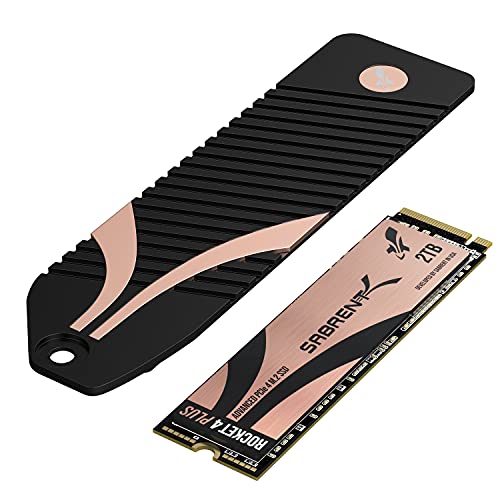
Sabrent Rocket 4 Plus 2TB
The Sabrent Rocket 4 Plus offers up to 8TB capacity in a PCIe 4.0 drive, making it ideal for professionals with massive storage needs. It delivers read speeds up to 7,100 MB/s and write up to 6,600 MB/s. Users appreciate its high endurance ratings and included Acronis cloning software.
Pros
- Available up to 8TB
- High endurance
- Cloning software included
Cons
- Heatsink not included
- Price per TB increases on larger models
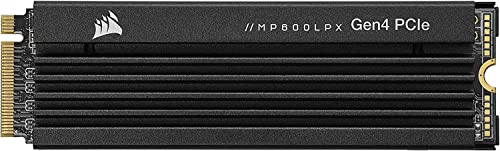
Corsair MP600 Pro LPX 2TB
The Corsair MP600 Pro LPX comes with a pre-installed low-profile heatsink that fits perfectly in the PS5. It offers read speeds up to 7,100 MB/s and write up to 6,800 MB/s. Owners report smooth performance in PS5 games with faster load times. It is also suitable for PCs with tight clearance.
Pros
- PS5 ready with heatsink
- Good endurance
- Easy installation
Cons
- Heatsink may not fit all laptops
- Slightly slower than top drives
Solidigm P44 Pro 2TB
The Solidigm P44 Pro is a solid PCIe 4.0 drive that often goes under the radar. It delivers read speeds up to 7,000 MB/s and write up to 6,500 MB/s. It uses Intel’s NAND and a proven controller. Users find it a reliable choice for everyday computing and gaming.
Pros
- Consistent performance
- Reasonable price
- Low power draw
Cons
- No heatsink option
- Less known brand
How they compare
| # | Model | Interface | Best for | Score | Price |
|---|---|---|---|---|---|
| 1 | Samsung 990 Pro 2TB | PCIe 4.0 x4 NVMe | Top overall performance | 9.6 | Check price |
| 2 | WD Black SN850X 2TB | PCIe 4.0 x4 NVMe | Gaming performance | 9.4 | Check price |
| 3 | Crucial T500 2TB | PCIe 4.0 x4 NVMe | Best value PCIe 4.0 | 9.2 | Check price |
| 4 | SK hynix Platinum P41 2TB | PCIe 4.0 x4 NVMe | Efficiency and low power | 9.0 | Check price |
| 5 | Sabrent Rocket 4 Plus 2TB | PCIe 4.0 x4 NVMe | Max capacity options | 8.8 | Check price |
| 6 | Corsair MP600 Pro LPX 2TB | PCIe 4.0 x4 NVMe | PS5 expansion | 8.7 | Check price |
| 7 | Solidigm P44 Pro 2TB | PCIe 4.0 x4 NVMe | Balanced performance | 8.5 | Check price |
Before you buy
Questions worth asking
What does M.2 mean?
M.2 is a form factor for expansion cards and drives. It replaced the older mSATA standard. M.2 drives are small, rectangular sticks that plug directly into the motherboard. They support both SATA and NVMe protocols, but NVMe offers much higher speeds.
Is M.2 faster than SATA?
Yes, M.2 NVMe drives are significantly faster than SATA drives. SATA III has a maximum speed of about 600 MB/s, while NVMe drives can exceed 7,000 MB/s. That is more than 10 times faster. Even M.2 SATA drives are similar in speed to 2.5-inch SATA SSDs.
How do I know if my motherboard supports M.2 NVMe?
Check your motherboard’s specifications. Look for M.2 slots that support PCIe, ideally PCIe 3.0 or 4.0. Most motherboards from the last few years have at least one M.2 slot. Consult the manual to see if it supports NVMe protocol and the correct key type.
Can I use an M.2 SSD in a PS5?
Yes, the PS5 supports M.2 SSDs that meet certain requirements. The drive must be PCIe 4.0, have read speeds above 5,500 MB/s, and be equipped with a heatsink. Drives like the Corsair MP600 Pro LPX are designed for PS5 expansion.
What is the difference between NVMe and SATA M.2?
NVMe uses the PCIe bus, offering much higher bandwidth and lower latency. SATA M.2 uses the older SATA protocol, limiting speeds to around 600 MB/s. For best performance, choose NVMe, but ensure your system supports it.
How long do M.2 SSDs last?
Most M.2 SSDs have a lifespan of 5 years or more with typical usage. The endurance is rated in TBW. For example, a 2TB drive with 1,200 TBW means you can write 1,200 TB of data before the drive may fail. In practice, most users never reach that limit.
Do I need a heatsink for my M.2 SSD?
It depends on your usage. If you do heavy sustained write operations, like video editing, a heatsink helps prevent thermal throttling. Many motherboards include heatsinks. For laptops, ensure the drive is low-profile. Otherwise, a heatsink may not be necessary for light use.
Can I clone my current hard drive to an M.2 SSD?
Yes, you can use cloning software to migrate your OS and files. Most SSD manufacturers offer free cloning software, like Samsung’s Data Migration or Sabrent’s Acronis. Ensure the new M.2 drive is installed and recognized, then follow the software instructions.
What is the best M.2 SSD for gaming?
The WD Black SN850X is a top choice for gaming due to its fast load times and gaming mode. Samsung 990 Pro is also excellent. For PS5, the Corsair MP600 Pro LPX is a solid option. Any PCIe 4.0 drive with high sequential read speeds will improve game load times.
Are PCIe 5.0 M.2 SSDs worth it?
PCIe 5.0 M.2 SSDs offer blazing speeds up to 10,000 MB/s, but they are expensive and require proper cooling. They are beneficial for professional workloads like large file transfers or 8K video editing. For most users, PCIe 4.0 is more than enough.
The bottom line
For most builders, the Samsung 990 Pro is the best all-around M.2 SSD, offering unmatched performance and reliability. If you are on a budget, the Crucial T500 delivers nearly the same speed for less. Gamers should consider the WD Black SN850X for its gaming-specific optimizations. We do not recommend PCIe 5.0 drives yet due to high cost and heat. Choose based on your workload and system compatibility, but any of these drives will be a massive upgrade over SATA SSDs.

