Top Memory Modules for Seamless Multitasking and Speed
For most builders, the Corsair Vengeance LPX 32GB DDR4 kit is the top pick because it offers reliable performance, broad compatibility, and a low-profile design that fits under large CPU coolers. Its main limitation is that it lacks RGB lighting, which some enthusiasts want for aesthetics.
Upgrading your RAM is one of the most cost-effective ways to boost system responsiveness. Whether you are gaming, editing video, or running virtual machines, the right memory kit can make a noticeable difference.
This roundup covers a range of modules from budget-friendly to high-performance RGB kits. We focus on real-world specifications and owner experiences to help you find the best match for your build.
What to look for
The top picks, ranked

Corsair Vengeance LPX 32GB (2x16GB) DDR4 3200MHz
The Corsair Vengeance LPX is a classic choice known for its stability and compatibility. It features a low-profile heat spreader that fits easily under large air coolers. With speeds up to 3200MHz and tight timings, it offers solid performance for gaming and productivity. Many motherboards list this kit in their QVL, ensuring hassle-free setup.
Pros
- Excellent compatibility with Intel and AMD platforms
- Low-profile design clears big CPU coolers
- Reliable overclocking headroom
Cons
- No RGB lighting
- Limited to DDR4 (not for new DDR5 systems)

G.Skill Trident Z5 RGB 32GB (2x16GB) DDR5 6000MHz
For users building a modern DDR5 system, the G.Skill Trident Z5 RGB delivers exceptional speed and style. It runs at 6000MHz with low latency, providing a significant boost in gaming and content creation. The aluminum heat spreader and RGB lighting add a premium look. Owners report stable XMP 3.0 profiles on both Intel and AMD platforms.
Pros
- High frequency for DDR5 performance
- Stunning RGB lighting with many effects
- Hand-tested for quality
Cons
- Requires a DDR5 motherboard and CPU
- Premium price compared to DDR4

Crucial Ballistix 16GB (2x8GB) DDR4 3600MHz
Crucial Ballistix is known for its excellent price-to-performance ratio. This 16GB kit runs at 3600MHz with CL16 timings, offering a sweet spot for Ryzen processors. It features a sleek aluminum heat spreader and is available in multiple colors. Gamers on a budget get fast memory without breaking the bank.
Pros
- Outstanding value for DDR4 performance
- Ideal for Ryzen builds with Infinity Fabric
- Clean design with multiple color options
Cons
- Limited to 16GB capacity
- No RGB version in this lineup
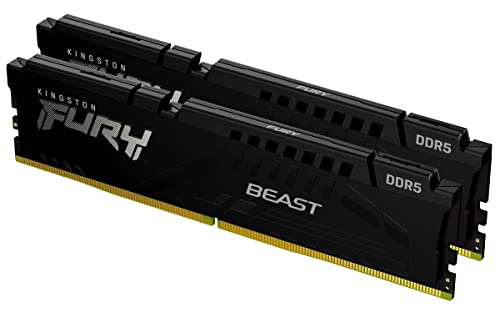
Kingston Fury Beast 32GB (2x16GB) DDR5 5200MHz
Kingston Fury Beast DDR5 offers a hassle-free upgrade path for new systems. It runs at 5200MHz with automatic overclocking via Intel XMP 3.0 and AMD EXPO. The heat spreader is aggressive and looks great. Users appreciate its stability and straightforward installation, making it a solid choice for first-time builders.
Pros
- Plug-and-play with automatic overclocking
- Supports both Intel and AMD platforms
- Efficient low voltage
Cons
- Slower than higher-end DDR5 kits
- Higher latency compared to some competitors

TeamGroup T-Force Delta RGB 32GB (2x16GB) DDR4 3600MHz
TeamGroup’s T-Force Delta RGB combines vivid lighting with reliable performance. This 3600MHz kit is compatible with major motherboard RGB software, allowing for customizable effects. The sleek design and full aluminum heat spreader keep temperatures in check. It is a favorite among gamers who want both style and substance.
Pros
- Vibrant RGB with wide software support
- Good performance for gaming and multitasking
- Affordable price for 32GB capacity
Cons
- Timings are slightly loose
- Tall heat spreader may interfere with some coolers

Silicon Power Value Gaming DDR4 16GB (2x8GB) 3200MHz
For the tightest budgets, Silicon Power Value Gaming offers essential DDR4 performance at a rock-bottom price. It runs at 3200MHz with CL16 timings, providing decent speeds for everyday computing and light gaming. The minimalist design has no heat spreader, but that is fine for standard builds. Users report it works reliably out of the box.
Pros
- Very affordable price
- Solid stable performance for daily tasks
- Lifetime warranty
Cons
- No heat spreader (may run slightly warmer)
- Not ideal for overclocking

Samsung 32GB (1x32GB) DDR5 4800MHz ECC SODIMM
Samsung’s DDR5 ECC SODIMM is designed for professional workstations and servers that require error correction. This single 32GB module operates at 4800MHz and includes ECC to detect and correct data corruption. It is ideal for applications where data integrity is paramount, such as scientific computing or database servers.
Pros
- ECC support for error detection
- High capacity in a single module
- Low power consumption
Cons
- SODIMM form factor (not for desktop DIMM slots)
- Not suited for gaming or consumer builds
How they stack up
| # | Model | Capacity | Best for | Score | Price |
|---|---|---|---|---|---|
| 1 | Corsair Vengeance LPX 32GB (2x16GB) DDR4 3200MHz | 32GB (2x16GB) | Best Overall for Most Builds | 9.4 | Check price |
| 2 | G.Skill Trident Z5 RGB 32GB (2x16GB) DDR5 6000MHz | 32GB (2x16GB) | Best for High-End Gaming and Overclocking | 9.2 | Check price |
| 3 | Crucial Ballistix 16GB (2x8GB) DDR4 3600MHz | 16GB (2x8GB) | Best Budget Performance | 9.0 | Check price |
| 4 | Kingston Fury Beast 32GB (2x16GB) DDR5 5200MHz | 32GB (2x16GB) | Best Plug-and-Play DDR5 | 8.8 | Check price |
| 5 | TeamGroup T-Force Delta RGB 32GB (2x16GB) DDR4 3600MHz | 32GB (2x16GB) | Best RGB Aesthetics for DDR4 | 8.7 | Check price |
| 6 | Silicon Power Value Gaming DDR4 16GB (2x8GB) 3200MHz | 16GB (2x8GB) | Best Entry-Level Budget | 8.5 | Check price |
| 7 | Samsung 32GB (1x32GB) DDR5 4800MHz ECC SODIMM | 32GB (1x32GB) | Best for Workstations and Servers | 8.0 | Check price |
Good to know
How much RAM do I need for gaming?
For modern games, 16GB is the minimum, but 32GB is becoming more common for AAA titles and future-proofing. If you stream or have many background apps, go with 32GB.
Is higher MHz RAM always better?
Not always. Higher speeds can improve performance, but the real-world gain is small beyond a certain point. Also, your CPU and motherboard must support the speed. If not, the RAM will run at a lower speed, so check compatibility.
Can I mix different brands or speeds of RAM?
Technically yes, but it can lead to stability issues. Mixing modules may force them to run at the lowest speed and loosest timings. For best performance, use a matched kit from the same manufacturer.
What is XMP or EXPO and why should I enable it?
XMP (Intel) and EXPO (AMD) are profiles that allow RAM to run at its rated speed. Without enabling them, RAM defaults to a slower JEDEC speed. You enable these profiles in the BIOS for optimal performance.
Do I need ECC RAM?
ECC (Error-Correcting Code) memory is designed for servers and workstations where data integrity is critical. For general consumer use, it is not necessary and may even be slower. Only choose ECC if your motherboard and CPU support it.
How do I install RAM properly?
Turn off your PC, unplug it, and open the case. Locate the RAM slots, push down the clips, align the notch on the RAM stick with the slot, and press firmly until it clicks. Make sure to use the recommended slots for dual-channel operation.
Why does my system not recognize the full RAM capacity?
This can happen if you are using a 32-bit operating system (which limits to 4GB) or if the RAM is not seated correctly. Also, some motherboards reserve memory for integrated graphics. Check your OS and BIOS settings.
What is the difference between single-rank and dual-rank memory?
Dual-rank memory has more memory chips, which can improve performance in some workloads, but it may be harder to overclock. For most users, the difference is minimal, and capacity and speed matter more.
The verdict
For most users, the Corsair Vengeance LPX 32GB DDR4 kit is the best choice due to its proven reliability and broad compatibility. If you are building a new high-end system, invest in the G.Skill Trident Z5 RGB DDR5 for future-proofing and speed. Budget builders will find the Crucial Ballistix 16GB kit an excellent value.