Stop Screen Peeking: Privacy Protectors Compared
Spigen’s GLAS.tR Slim Privacy leads for phones, pairing a narrow viewing angle with tempered glass protection. ZAGG’s InvisibleShield Glass Elite Privacy 360 blocks all four sides for public transport. On laptops, the 3M Privacy Filter remains the benchmark other brands measure against for cutoff sharpness and durability.
Spigen’s GLAS.tR Slim Privacy is the sensible default for phones. It narrows the viewing cone enough to defeat a nosy seatmate while doubling as ordinary tempered glass. ZAGG’s InvisibleShield Glass Elite Privacy 360 goes further, blocking views from above and below too. On laptops, the 3M Privacy Filter is still the model other brands get measured against.
Marketing tends to skip the real trade off here. The same microlouvre structure that blocks a side view also cuts brightness and can add a faint color cast head on. Two way filters leave you exposed from above on a train. Four way filters cost more brightness in exchange for full coverage. We compared cutoff angles, brightness loss, touch response, coating quality and cutout accuracy against owner reports on long term wear.
Our top picks
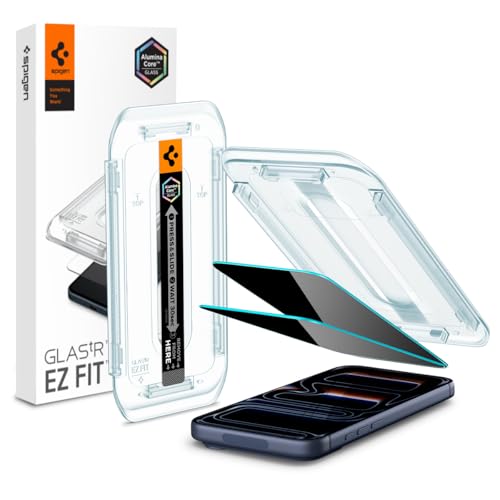
Spigen GLAS.tR Slim Privacy Screen Protector
Spigen builds the privacy layer into tempered glass rather than a plastic film. One product delivers drop protection and a screen that darkens from the side. An alignment tray makes fitting straightforward, which matters since misalignment shows clearly on privacy glass.
Pros
- Combines drop protection with side view privacy
- Alignment tray simplifies first time fitting
- Strong side angle blackout for public use
Cons
- Requires raising screen brightness to compensate
- No protection from viewing above or below

ZAGG InvisibleShield Glass Elite Privacy 360
Two way filters still let someone read your screen from above, exactly the risk on a crowded train. This ZAGG version blocks all four directions, narrowing the usable view to roughly straight on. Extra filtering costs more brightness and a higher price than two way options.
Pros
- Blocks viewing from above and below too
- Durable tempered glass construction
- Alignment frame included for accurate placement
Cons
- Highest brightness penalty among tested filters
- Priced well above basic privacy glass
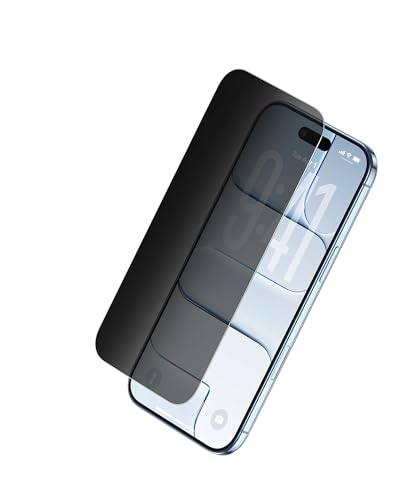
Belkin ScreenForce TemperedGlass Privacy Screen Protector
Belkin delivers a clearer straight on image than most privacy glass, avoiding the grayish sheen some filters show. An easy align tray positions it accurately on the first try. Side blocking works well, though slightly less aggressively than the Spigen.
Pros
- Clearer head on image than rival filters
- Accurate first time alignment tray
- Effective oleophobic coating resists fingerprints
Cons
- Wider viewing cone than top competitors
- Filters left and right only, not four way

3M Privacy Filter for Laptops
3M invented the microlouvre technology these filters use. Its laptop panels remain standard in offices where privacy policy requires them. The cutoff is sharp, switching from readable to black across a narrow range, and panels attach with adhesive strips or slide in tabs for easy removal.
Pros
- Sharp, reliable viewing angle cutoff
- Removable when privacy isn’t required
- Sized precisely for common laptop screens
Cons
- Adds visible thickness to the laptop lid
- Must match exact screen size and ratio

Kensington MagPro Magnetic Privacy Screen
Magnetic strips let this panel snap on before a meeting and off right after. Optical clarity head on stays good, and a reversible matte side cuts glare. Thin bezel strips stay attached to the laptop permanently, even with the panel removed.
Pros
- Attaches and detaches in seconds
- Reversible matte side reduces glare
- Included sleeve protects the panel in transit
Cons
- Bezel strips remain visible when panel is off
- Magnets can shift if the lid closes roughly

amFilm Privacy Screen Protector
amFilm sells privacy glass in multipacks with an installation frame included. A botched first attempt becomes survivable, and cost per protector drops considerably. Filtering and hardness compete well with pricier branded options.
Pros
- Spare protector included in every pack
- Effective side blocking for the price
- Guide frame simplifies alignment
Cons
- Edge finishing is less refined than premium brands
- Occasional fit issues with thick phone cases

Ailun Privacy Screen Protector
Ailun covers the basic requirement at low cost, blocking side views while adding tempered glass protection. Coverage stops short of the very edge on curved screens, so cases fit without lifting. Clarity trails premium filters, and the oleophobic coating wears sooner.
Pros
- Lowest cost per protector in this roundup
- Case friendly coverage near curved edges
- Adequate side blocking for casual privacy needs
Cons
- Coating wears faster than premium alternatives
- Noticeable sheen head on in bright light
What matters most
How do privacy screen filters actually work? Microscopic vertical louvres act like tiny blinds inside the film. Light passes through toward someone directly in front. It blocks at an angle, dimming around thirty degrees off center and going nearly black by sixty. This structure explains why every privacy protector costs brightness. It also causes the faint texture some people notice in bright sunlight.
Two way or four way filtering: which do you need? Two way filters block left and right, covering an airplane seat or a desk neighbor. They do nothing about someone standing behind and above you on a bus. Four way filters, like the ZAGG 360, handle that angle too. Expect more brightness loss and a higher price in exchange. Decide by where you actually use the device, not by which spec sounds stronger.
Does a privacy filter hurt battery life and outdoor visibility? Blocking light means raising screen brightness to compensate. On a phone, that shortens battery life measurably. The effect shows most outdoors in daylight, where a privacy screen can make an otherwise readable display hard to see. Four way filters lose more brightness than two way ones. Skip privacy glass entirely if you rarely handle sensitive information in public.
How do I install a privacy screen without bubbles? Clean the screen with the supplied alcohol wipe first. Lift dust with the sticky tab before applying the film. Working in a steamy bathroom right after a hot shower helps settle airborne dust. Use the alignment frame if one is included, since misalignment shows clearly on privacy glass. Small edge bubbles often disappear within a day, but trapped dust requires lifting a corner to remove.
The lineup, side by side
| # | Model | Type | Best for | Score | Price |
|---|---|---|---|---|---|
| 1 | Spigen GLAS.tR Slim Privacy Screen Protector | Tempered glass with privacy filter | Best overall for phones | 9.4 | Check price |
| 2 | ZAGG InvisibleShield Glass Elite Privacy 360 | Tempered glass with privacy filter | Best four way filtering | 9.2 | Check price |
| 3 | Belkin ScreenForce TemperedGlass Privacy Screen Protector | Tempered glass with privacy filter | Best clarity head on | 9.0 | Check price |
| 4 | 3M Privacy Filter for Laptops | Removable laptop privacy panel | Best for laptops | 8.8 | Check price |
| 5 | Kensington MagPro Magnetic Privacy Screen | Magnetic laptop privacy panel | Best removable laptop option | 8.6 | Check price |
| 6 | amFilm Privacy Screen Protector | Tempered glass with privacy filter | Best value | 8.3 | Check price |
| 7 | Ailun Privacy Screen Protector | Tempered glass with privacy filter | Best budget | 8.0 | Check price |
Common questions
Do privacy screen protectors make the screen darker?
Yes, unavoidably, since the filter blocks light at an angle and some light head on too. Most people raise brightness a step or two to compensate. The dimming is most noticeable outdoors. Four way filters dim more than two way versions.
Can someone still see my phone screen from behind me?
With a standard two way filter, yes, since it only blocks left and right. A four way filter, like the ZAGG InvisibleShield Glass Elite Privacy 360, blocks above and below too. That coverage matters most on public transport.
Does a privacy filter affect touch sensitivity or fingerprint sensors?
Good glass protectors work fine with in display fingerprint sensors, though some phones need a fingerprint re registration after fitting. Touch response is generally unaffected. Check that the listing specifically names your phone model before buying.
Are privacy screen protectors bad for eye strain?
No evidence links them to eye strain directly. The extra brightness people use to compensate can feel harsher in a dark room though. Matte finished filters, like the reversible Kensington panel, reduce glare and feel more comfortable during long sessions.
Is a stick on film or a magnetic panel better for a laptop?
Magnetic panels, like the Kensington MagPro, suit people who only need privacy sometimes, since they detach in seconds. Adhesive or slide in panels, like 3M’s, suit machines that always need coverage. Both require matching the exact screen size and aspect ratio.
Will a privacy screen protector fit under my phone case?
Usually, though curved edge phones carry real risk, since full coverage glass can catch on a case lip and lift. Protectors that stop slightly short of the edge, like the Ailun, avoid this at the cost of a small uncovered border.
How long does a privacy screen protector last?
Typically a year or two of daily use. The oleophobic coating wears first, making the surface feel grabby and show fingerprints more. Budget options wear sooner than premium ones. Replace any protector immediately once it cracks, since a chipped edge can cut skin.
Are privacy screen protectors required for work compliance?
Some employers mandate them for staff handling regulated data in public, which is why 3M panels are common in offices. Check whether your employer specifies a particular product or certification before buying your own.
What is the best privacy screen protector for a phone?
Spigen’s GLAS.tR Slim Privacy suits most phone users, combining tempered glass protection with a narrow viewing angle. Choose the ZAGG InvisibleShield Glass Elite Privacy 360 instead if people often stand behind you rather than beside you.
Our take
For a phone, the Spigen GLAS.tR Slim Privacy balances side blocking, everyday clarity and physical protection well. Choose the ZAGG InvisibleShield Glass Elite Privacy 360 instead when people regularly stand behind you, and accept extra dimming as the cost. On a laptop, the 3M Privacy Filter stays the reliable pick, with the Kensington MagPro for detachable convenience.