Modem Router Combos That End Monthly Rental Fees
The NETGEAR Nighthawk CAX80 leads for multi-gigabit cable plans thanks to DOCSIS 3.1 and WiFi 6 coverage across large homes. The ARRIS SURFboard G36 is the balanced value pick, and the Motorola MG7700 remains the sensible choice for plans under 600 Mbps.
If you want one box that replaces both a rented cable modem and an aging router, the NETGEAR Nighthawk CAX80 covers the widest range of speed tiers, while the ARRIS SURFboard G36 hits a friendlier balance for most gigabit plans and the Motorola MG7700 handles mid tier packages without fuss.
Combo units are tricky because the modem half and the router half age at different rates, and a DOCSIS 3.0 unit can quietly cap a plan you already pay for. We compared published DOCSIS versions, downstream channel counts, WiFi standards, antenna configurations and each manufacturer’s ISP approval list, then weighed what owners report about firmware updates and long term stability.
Our top picks

NETGEAR Nighthawk CAX80
NETGEAR pairs a DOCSIS 3.1 modem with an AX6000 class WiFi 6 router in a single tall chassis, which is why it handles the fastest cable tiers most providers sell. Owners report solid coverage across three floors and reliable performance with many simultaneous devices. The four gigabit LAN ports plus link aggregation give wired gear somewhere to land.
Pros
- DOCSIS 3.1 keeps it viable as plans get faster
- WiFi 6 coverage holds up in larger homes
- Port aggregation for a NAS or wired backbone
Cons
- Physically large and runs warm
- Overkill if your plan stays under 500 Mbps

ARRIS SURFboard G36
The SURFboard G36 combines a DOCSIS 3.1 modem with AX3000 WiFi 6, which suits the gigabit plans most households actually buy. ARRIS supplies a straightforward app for setup and firmware, and owners report an easy activation process on major cable providers. It is a smaller and quieter box than the flagship options.
Pros
- Multi-gig Ethernet ports at a sensible tier
- Compact compared with tower style gateways
- Simple app driven activation
Cons
- Only two LAN ports
- Coverage trails larger antenna arrays
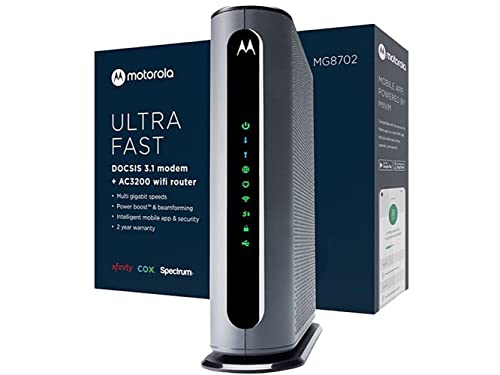
Motorola MG8702
Motorola built the MG8702 around a 32×8 DOCSIS 3.1 modem paired with AC3200 WiFi, a combination that still saturates a gigabit connection over Ethernet. Owners report stable uptime and a clear web interface for port forwarding and firewall rules. It is a practical choice if most of your heavy devices are wired.
Pros
- Strong wired throughput on gigabit tiers
- Detailed admin controls
- Long track record of firmware support
Cons
- WiFi 5 rather than WiFi 6
- Bulky vertical footprint

NETGEAR Nighthawk CAX30
The CAX30 trims the flagship down to an AX2700 WiFi 6 radio while keeping the DOCSIS 3.1 modem, which is the part that matters for future speed tiers. Based on specifications it comfortably serves plans in the several hundred megabit range with room to grow. The four LAN ports make it easy to drop into an existing wired setup.
Pros
- DOCSIS 3.1 without flagship bulk
- WiFi 6 support for newer phones and laptops
- Familiar Nighthawk app setup
Cons
- Coverage falls off in long ranch layouts
- No multi-gig Ethernet port

ARRIS SURFboard SBG8300
The SBG8300 is an older DOCSIS 3.1 gateway with AC2350 WiFi, and it earns a place because the modem side is still current. Owners report that it activates cleanly on most major cable networks and holds a stable connection for long stretches. Treat the WiFi as adequate rather than exciting.
Pros
- DOCSIS 3.1 modem in a modest package
- Broad ISP compatibility
- Straightforward setup process
Cons
- WiFi 5 radio is showing its age
- Limited advanced routing features

Motorola MG7700
This 24×8 DOCSIS 3.0 gateway with AC1900 WiFi is aimed squarely at plans in the few hundred megabit range, and it does that job without drama. Owners report that it pays for itself quickly against a rental charge on a modest cable package. It is not the unit to buy if you plan to upgrade to a gigabit tier.
Pros
- Easy replacement for a rented gateway
- Runs cool and quiet
- Simple interface for basic households
Cons
- DOCSIS 3.0 caps your upgrade path
- WiFi 5 only

NETGEAR Nighthawk C7000
The C7000 pairs a 24×8 DOCSIS 3.0 modem with AC1900 WiFi and remains a common first step away from a rented box. It suits households that stream on a few devices and do not need multi-gig headroom. Based on specifications, expect it to comfortably serve mid tier cable packages rather than premium ones.
Pros
- Widely supported by cable providers
- Familiar Nighthawk management tools
- Compact for a combo unit
Cons
- Not suitable for gigabit plans
- Older WiFi standard limits device speeds
Before you buy
Check your provider’s approved list first Cable companies publish device compatibility lists, and a gateway that is not on yours may refuse to provision no matter how capable it is. Before ordering, look up the exact model against your provider and your specific speed tier, because approval is often tier dependent. This one check prevents the most common return reason owners report.
DOCSIS 3.1 is the future proofing decision A DOCSIS 3.0 modem can serve a mid tier plan perfectly well today, but it becomes the bottleneck the moment you upgrade. DOCSIS 3.1 adds OFDM channels that handle gigabit and multi-gigabit tiers, so it is the safer purchase if you expect your plan to change within a few years. The WiFi half of a combo can always be supplemented later with a mesh node, while the modem half cannot.
Understand the tradeoff you are accepting Combining modem and router into one box means you replace both when either becomes obsolete, and it removes the option of running a separate router you prefer. In exchange you get one power adapter, one device to manage and no rental fee. If you already own a router you like, a standalone modem may serve you better than any combo here.
Match coverage to your floor plan, not your square footage Antenna count and placement matter more than the advertised speed class when signal has to cross plaster, brick or a stairwell. A gateway sitting in a basement corner will underperform regardless of its rating, so plan for a central, elevated position. For long or multi wing layouts, budget for a mesh extension rather than expecting one combo to reach everywhere.
Compared at a glance
| # | Model | Modem standard | Best for | Score | Price |
|---|---|---|---|---|---|
| 1 | NETGEAR Nighthawk CAX80 | DOCSIS 3.1 | Best overall | 9.4 | Check price |
| 2 | ARRIS SURFboard G36 | DOCSIS 3.1 | Best value | 9.2 | Check price |
| 3 | Motorola MG8702 | DOCSIS 3.1 32×8 | Best for gigabit plans | 9.0 | Check price |
| 4 | NETGEAR Nighthawk CAX30 | DOCSIS 3.1 | Best for mid size homes | 8.7 | Check price |
| 5 | ARRIS SURFboard SBG8300 | DOCSIS 3.1 | Best for wired reliability | 8.5 | Check price |
| 6 | Motorola MG7700 | DOCSIS 3.0 24×8 | Best budget | 8.2 | Check price |
| 7 | NETGEAR Nighthawk C7000 | DOCSIS 3.0 24×8 | Best for basic streaming households | 8.0 | Check price |
Common questions
Will buying a modem router combo actually save money?
Yes, in most cases, because cable providers bill a recurring equipment rental charge that disappears once you activate your own approved gateway. The savings depend on your provider’s rental rate and how long you keep the unit, which is why buying a DOCSIS 3.1 model that stays useful for years improves the arithmetic.
How do I activate a combo I bought myself?
Connect the coaxial cable, power it on and wait for the online indicator to settle, then call your provider or use their self activation page with the device MAC address and serial number printed on the label. Most providers complete this in a few minutes.
Is a combo unit slower than separate devices?
Not inherently, though separate devices let you upgrade the router independently and often offer stronger radios at the same tier. For gigabit and below, a current combo keeps up fine with a comparable standalone pair.
Do these work with fiber or DSL internet?
No. Every model here is a cable gateway using a coaxial connection, so it will not work on fiber, DSL or fixed wireless services. Fiber customers need an ONT supplied by the provider plus a standalone router.
What does 32×8 or 24×8 mean?
Those numbers describe downstream and upstream channel bonding on the DOCSIS 3.0 side. More downstream channels give the modem more capacity to pull data simultaneously, which matters most on busier nodes and higher speed tiers.
Can I turn off the built in WiFi and use my own router?
Most of these gateways offer a bridge mode that disables routing and WiFi, letting the unit act as a plain modem. Owners report this is a useful path if you later add a mesh system and want to avoid double NAT.
Do I need WiFi 6 if my devices are older?
Older devices will not go faster on a WiFi 6 gateway, but WiFi 6 handles crowded networks more efficiently and gives newer phones and laptops room to run. If you replace devices gradually, buying the newer standard now avoids a second upgrade.
How long should a modem router combo last?
Owners commonly report several years of service before either an ISP speed upgrade or a WiFi standard change makes replacement worthwhile. Choosing DOCSIS 3.1 and WiFi 6 stretches that window considerably compared with older DOCSIS 3.0 units.
Our take
For most cable subscribers the ARRIS SURFboard G36 is the sensible landing spot, pairing a DOCSIS 3.1 modem with WiFi 6 and multi-gig Ethernet in a compact box. Move up to the NETGEAR Nighthawk CAX80 if you have a large home or a multi-gigabit plan, and consider the Motorola MG7700 only if your speed tier is modest and you want to stop paying rent as cheaply as possible.


