Smart Monitor Stands for a Cleaner, More Productive Desk
For most people, the VIVO Dual Monitor Stand with USB Hub offers the best balance of smart features and value, providing a sturdy dual-arm setup with convenient ports and cable management. Its main limitation is the lack of wireless charging, which some pricier models include.
A smart monitor stand does more than raise your screen to eye level. It can declutter your desk with built-in USB ports, wireless charging pads, and even motorized height adjustments. These stands help you maintain better posture while keeping your workspace tidy and connected.
We compared popular models from top brands like VIVO, Wali, and Ergotron that offer smart features. Owners report that the best ones feel solid, offer smooth adjustments, and genuinely reduce cable clutter. But not every stand fits every desk or budget, so read on to find the right one for your setup.
The best picks, ranked
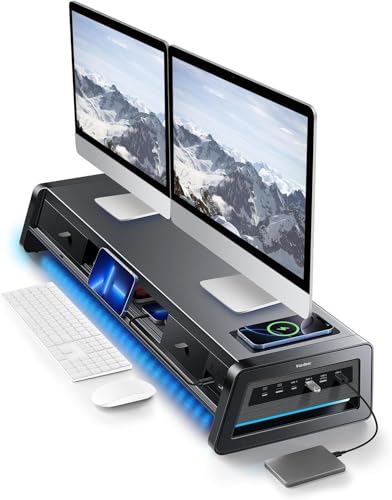
VIVO Dual Monitor Stand with USB Hub
This heavy-duty stand supports two monitors up to 27 inches each and includes a 4-port USB hub for easy connectivity. Its gas spring arms allow smooth height and tilt adjustments, and the integrated cable management keeps wires hidden. Owners appreciate the sturdy build and the convenience of having ports at arm’s reach.
Pros
- Sturdy C-clamp or grommet mount
- Smooth gas spring adjustments
- Integrated USB hub for easy access
Cons
- No wireless charging pad
- Arms may be bulky for small desks
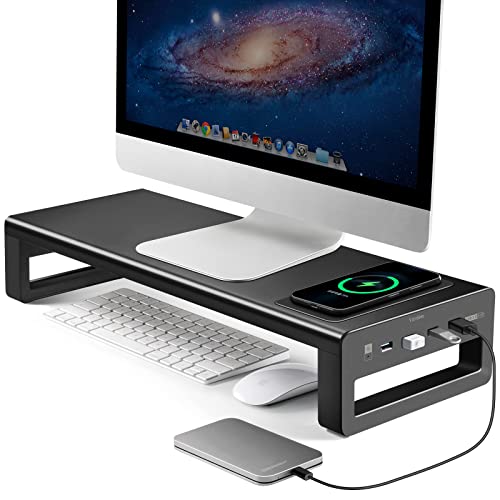
Wali Single Monitor Stand with Wireless Charger
This single-arm stand includes a 15W wireless charging pad at the base, letting you power up your phone while you work. The gas spring arm offers full motion, and the base has a weighted design for stability. Users like the convenience of the charger, though it may require careful phone placement.
Pros
- Integrated fast wireless charger
- Smooth full-motion arm
- Cable management clips included
Cons
- Only supports one monitor
- Charging pad may not fit large phones

Ergotron LX Dual Stacking Stand with USB Hub
Ergotron’s LX stand allows you to stack two monitors vertically, saving desk space, and includes a USB hub for connectivity. The build quality is excellent, with a patented constant force lift for easy adjustments. Users report it feels rock solid, but the price is higher than many alternatives.
Pros
- Exceptional build quality
- Vertical stacking saves desk space
- Smooth constant force lift
Cons
- Expensive
- Limited to smaller monitors when stacked

HUANUO Dual Monitor Stand with USB Ports
This affordable dual-arm stand provides a USB hub and solid ergonomic adjustments. It supports monitors up to 27 inches and offers height, tilt, and swivel changes. Owners say it’s surprisingly sturdy for the price, but the arms may not be as refined as pricier models.
Pros
- Great value
- Good cable management
- Easy to assemble
Cons
- USB hub only has 2 ports
- Plastic parts in the base

Amazon Basics Single Monitor Stand with USB Hub
Amazon Basics offers a straightforward single-arm stand with a built-in USB hub. It provides basic ergonomic adjustments and a clean look. Users appreciate its simplicity and reliability, but it lacks advanced features like wireless charging or motorized movement.
Pros
- Affordable and reliable
- Easy setup
- Compact design
Cons
- Manual height adjustment
- No wireless charging
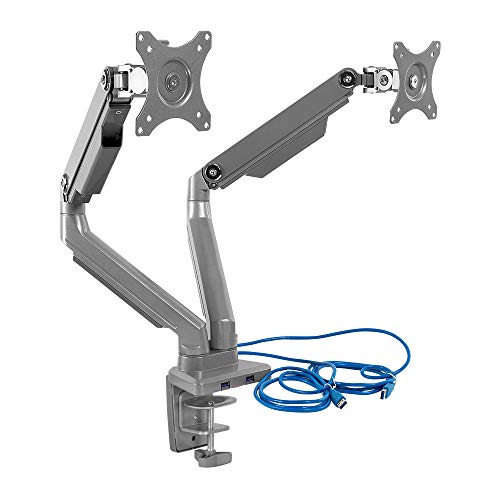
Mount-It! Dual Monitor Stand with USB Dock
This stand includes a USB dock with multiple ports, making it easy to connect peripherals and even a laptop. It supports two monitors up to 27 inches and offers smooth gas spring movement. Owners find the dock convenient for a clean setup, but the stand is heavier than some.
Pros
- Integrated USB dock
- Supports heavy monitors
- Good cable management
Cons
- Heavy base takes up space
- No wireless charging
ErGear Single Monitor Stand with Wireless Charging and RGB
This stand features a 10W wireless charger and customizable RGB lighting on the base, making it a popular choice for gamers. The gas spring arm supports up to 32 inches and provides smooth adjustments. Users love the aesthetic, but the RGB may not appeal to everyone.
Pros
- RGB lighting adds flair
- Wireless charging built-in
- Good range of motion
Cons
- RGB is not customizable
- Some users report wobble at full extension
How to pick the right one
The lineup, side by side
| # | Model | Max Screen Size | Best for | Score | Price |
|---|---|---|---|---|---|
| 1 | VIVO Dual Monitor Stand with USB Hub | 27 inches each | Best overall for dual monitors | 9.4 | Check price |
| 2 | Wali Single Monitor Stand with Wireless Charger | 32 inches | Best for built-in wireless charging | 9.1 | Check price |
| 3 | Ergotron LX Dual Stacking Stand with USB Hub | Up to 24 inches each (stacked) | Best premium for dual stacking | 9.0 | Check price |
| 4 | HUANUO Dual Monitor Stand with USB Ports | 27 inches each | Best budget with USB hub | 8.7 | Check price |
| 5 | Amazon Basics Single Monitor Stand with USB Hub | 32 inches | Best simple and reliable | 8.5 | Check price |
| 6 | Mount-It! Dual Monitor Stand with USB Dock | 27 inches each | Best for laptop integration | 8.8 | Check price |
| 7 | ErGear Single Monitor Stand with Wireless Charging and RGB | 32 inches | Best for gaming setups | 8.2 | Check price |
Common questions
What is a smart monitor stand?
A smart monitor stand typically includes extra features beyond basic elevation, such as USB hubs, wireless charging pads, or even motorized height adjustment. These features aim to reduce desk clutter and improve connectivity.
Are smart monitor stands compatible with all monitors?
Compatibility depends on the VESA pattern (usually 75×75 or 100×100 mm) and the weight of your monitor. Most stands list maximum screen size and weight capacity, so always check those specifications.
Can I use a smart monitor stand with a laptop?
Some stands include a laptop tray or a USB dock that can connect to your laptop. However, most stands are designed for monitors with VESA mounts. If you want to use a laptop, look for a stand that specifically supports a laptop platform.
How does wireless charging work on a monitor stand?
The stand has a built-in charging pad that uses Qi technology. You simply place your compatible phone or earbuds on the pad, and they will charge as long as the stand is plugged into power. Charging speeds vary, with some pads offering 10W or 15W fast charging.
Are these stands easy to install?
Most smart monitor stands require basic assembly and mounting to your desk. The process typically involves attaching a clamp or base, and then securing the arm and monitor. Most owners report that installation takes 15 to 30 minutes with basic tools.
Do smart monitor stands wobble?
Sturdiness depends on the build quality and how well the stand is mounted. Heavier bases and gas spring arms tend to be more stable. Some users report slight wobble on cheaper stands when fully extended. Reading reviews can help you avoid flimsy models.
Can I adjust the height of the stand?
Yes, most smart stands offer height adjustment, either via a gas spring or manual mechanism. Gas spring arms allow smooth vertical movement, while manual stands may require loosening a knob. Always check the height range to ensure it suits your desk and posture needs.
Will a smart monitor stand fit on my desk?
Most stands use a C-clamp that attaches to the edge of your desk, so they do not require a large footprint. However, the clamp may not fit desks with thick edges or unusual shapes. Check the clamp’s maximum opening width and your desk’s thickness before purchasing.
What is the weight capacity of these stands?
Weight capacities vary from about 10 to 25 pounds per monitor. Always verify that your monitor’s weight is within the specified limit. The VIVO Dual Monitor Stand, for example, supports up to 22 pounds per arm.
Do I need a power outlet for smart features?
Yes, USB hubs and wireless charging require power. Most stands include a power adapter or a cable that connects to your computer or a wall outlet. Some models draw power from your computer’s USB ports, but that may limit charging speed.
The bottom line
For a dual-monitor setup with practical smart features, the VIVO Dual Monitor Stand with USB Hub is the top recommendation. It offers a sturdy build, smooth adjustments, and a convenient USB hub at a reasonable price. If you need wireless charging, the Wali Single Monitor Stand is an excellent choice for a single monitor. If you want premium quality and don’t mind paying more, the Ergotron LX Dual Stacking Stand is built to last. Choose based on your monitor count and essential features, and you’ll find a stand that enhances both your comfort and productivity.


