Computer Monitors That Sharpen Every Kind of Work
The Dell S2722QC is our top pick for its 4K clarity and single-cable USB-C convenience. The Samsung Odyssey G5 delivers the best value with a fast QHD panel, and the Dell SE2422H is the reliable budget choice for everyday home and office use.
The Dell S2722QC leads this roundup for its crisp 4K resolution and tidy single-cable USB-C setup, with the fast Samsung Odyssey G5 close behind on value and the affordable Dell SE2422H covering shoppers who need a dependable everyday screen.
Monitors are tricky to compare because resolution, refresh rate, panel technology, and connectivity all pull in different directions depending on your work. We ranked these seven by studying manufacturer specifications and what owners report about image quality, color accuracy, and how well each display suits gaming, creating, or office tasks.
The top picks, ranked

Dell S2722QC 27-inch 4K USB-C Monitor
The S2722QC pairs a sharp 27-inch 4K IPS panel with USB-C that carries video and power over one cable, making it a clean fit for laptops. Owners praise the crisp text, built-in speakers, and adjustable stand, which together make it a versatile all-around display.
Pros
- Sharp 4K IPS image
- Single-cable USB-C for laptops
- Height-adjustable stand
Cons
- 60Hz limits fast gaming
- Speakers are basic

Samsung Odyssey G5 27-inch QHD Gaming Monitor
The Odyssey G5 brings a curved QHD panel with a high refresh rate and adaptive sync at a fair price. Owners like the immersive curve and smooth motion for both gaming and general use, making it a strong value for people who want more than a basic office screen.
Pros
- Fast 144Hz refresh
- Immersive curved panel
- Strong value for QHD
Cons
- No height adjustment on stand
- VA viewing angles narrower than IPS

Dell SE2422H 24-inch Full HD Monitor
The SE2422H covers the essentials with a 24-inch Full HD panel and slim bezels at a low price. Based on specifications and owner feedback, it is a dependable pick for browsing, email, and office work where sharp productivity beats gaming speed or 4K detail.
Pros
- Very affordable
- Clean slim-bezel design
- Good for office tasks
Cons
- Only 1080p resolution
- Basic tilt-only stand

ASUS ProArt PA278QV 27-inch QHD Monitor
The ProArt PA278QV targets photo and design work with a factory-calibrated QHD IPS panel and wide color coverage. Owners value the accurate colors, ergonomic stand, and extensive port selection, which make it a reliable choice for detailed creative projects.
Pros
- Factory calibrated color
- Fully adjustable stand
- Rich port selection
Cons
- 75Hz not ideal for gaming
- Design is utilitarian
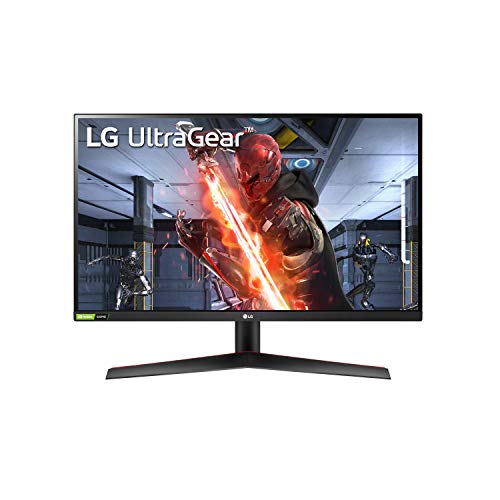
LG 27GN800-B UltraGear 27-inch QHD Monitor
The UltraGear 27GN800-B combines a fast QHD IPS panel with a 144Hz refresh rate and quick response times aimed at gamers. Owners report smooth motion and vivid colors, plus adaptive sync support that keeps fast-paced action tear-free on capable graphics cards.
Pros
- Fast IPS with 144Hz
- Vivid accurate colors
- Adaptive sync support
Cons
- Tilt-only base stand
- Speakers not included

Gigabyte M27Q 27-inch QHD Monitor
The Gigabyte M27Q blends a 170Hz QHD panel with a built-in KVM switch that lets you control two devices from one keyboard and mouse. Owners find it a flexible pick for people who both game and juggle multiple computers on a single desk.
Pros
- High 170Hz refresh
- Built-in KVM switch
- Strong all-round value
Cons
- Non-standard subpixel layout
- Stand adjustment limited

LG 27UL500-W 27-inch 4K UHD Monitor
The 27UL500-W offers 4K resolution on a 27-inch IPS panel with HDR10 support at a friendly price. Owners appreciate the sharp detail for media and detailed work, making it an affordable way to step up to 4K without paying a premium.
Pros
- Affordable 4K detail
- IPS color and angles
- HDR10 support
Cons
- 60Hz refresh only
- Tilt-only stand
What to look for
Pick resolution for your screen size Resolution sets how sharp everything looks. On a 24-inch display, 1080p is fine for everyday work, while 27 inches benefits from QHD or 4K for crisp text and detail. Higher resolution means more desktop space and clarity, but it also demands a more capable graphics card, especially for gaming.
Refresh rate matters for motion Refresh rate, measured in hertz, controls how smoothly motion appears. Office and creative work run fine at 60Hz to 75Hz, but gamers gain a real edge from 144Hz or higher for fluid, responsive action. Pair a high refresh monitor with a graphics card that can actually push those frame rates.
Understand panel technology IPS panels deliver the best color accuracy and viewing angles, making them ideal for creative work and shared screens. VA panels offer deeper contrast and often curve nicely for immersion, though angles are narrower. Match the panel to your priority, whether that is color precision, contrast, or fast gaming response.
Check connectivity and ergonomics Ports decide how easily a monitor fits your setup. USB-C can carry video and charge a laptop over one cable, while HDMI and DisplayPort cover most desktops. Also look at the stand, since height and tilt adjustment protect your posture, and features like a KVM switch help if you run more than one computer.
The lineup, side by side
| # | Model | Screen size | Best for | Score | Price |
|---|---|---|---|---|---|
| 1 | Dell S2722QC 27-inch 4K USB-C Monitor | 27 inches | Best overall | 9.4 | Check price |
| 2 | Samsung Odyssey G5 27-inch QHD Gaming Monitor | 27 inches | Best value | 9.1 | Check price |
| 3 | Dell SE2422H 24-inch Full HD Monitor | 24 inches | Best budget | 8.6 | Check price |
| 4 | ASUS ProArt PA278QV 27-inch QHD Monitor | 27 inches | Best for creators | 9.0 | Check price |
| 5 | LG 27GN800-B UltraGear 27-inch QHD Monitor | 27 inches | Best for gaming | 8.9 | Check price |
| 6 | Gigabyte M27Q 27-inch QHD Monitor | 27 inches | Best for productivity | 8.8 | Check price |
| 7 | LG 27UL500-W 27-inch 4K UHD Monitor | 27 inches | Best 4K value | 8.7 | Check price |
Good to know
What resolution should I choose for a 27-inch monitor?
For a 27-inch screen, QHD at 2560 by 1440 is the sweet spot for sharp text and detail, while 4K adds even more clarity for media and design. Full HD can look a little soft at this size.
Is a higher refresh rate worth it for everyday use?
For browsing, office work, and video, 60Hz to 75Hz is perfectly smooth. A high refresh rate of 144Hz or more mainly benefits gamers and anyone who wants noticeably fluid motion during fast action.
What is the difference between IPS and VA panels?
IPS panels offer better color accuracy and wider viewing angles, ideal for creative work and shared viewing. VA panels provide deeper contrast and darker blacks but narrower angles, and they often appear on curved gaming displays.
Do I need a USB-C monitor?
USB-C is convenient if you use a compatible laptop, since one cable can carry video and charge the device at the same time. For a desktop, HDMI or DisplayPort works just as well.
Can these monitors work for both gaming and work?
Yes, QHD models with higher refresh rates handle office tasks and gaming well, giving you sharp text and smooth motion. Creative users should prioritize color-accurate IPS panels over the very fastest refresh rates.
What graphics card do I need for a 4K monitor?
Everyday 4K desktop use runs on modest hardware, but gaming at 4K demands a strong, current graphics card to hit good frame rates. For 4K gaming, check that your card can drive the resolution smoothly before buying.
Does a curved monitor make a difference?
A curved panel can feel more immersive and reduce eye travel on larger and ultrawide screens, which some people prefer for gaming and media. On smaller flat-friendly tasks the benefit is more about personal preference.
Should I care about HDR on a monitor?
Entry-level HDR10 support adds some extra range to compatible content but is limited on budget panels. For a real HDR boost you need a display with high brightness and local dimming, which costs considerably more.
Final word
For most desks, the Dell S2722QC is the best all-around choice thanks to its sharp 4K image and single-cable USB-C convenience. Gamers and value seekers should look at the Samsung Odyssey G5 for its fast QHD panel, while the Dell SE2422H remains a dependable budget pick for everyday office and home use.


