Choosing a NAS for Home Backups and Media Streaming
The Synology DiskStation DS224+ is the most sensible first NAS for home backup and Plex, the Synology DS923+ suits households that need four bays and expansion room, and the TerraMaster F4-424 gives the most hardware for the outlay. Software maturity separates them more than specifications do.
For most households setting up their first network storage, the Synology DiskStation DS224+ is the right starting point thanks to mature software and enough processor for Plex and photo indexing. The DS923+ is the step up when four bays and future expansion matter, and the TerraMaster F4-424 delivers the strongest hardware specification if you are comfortable with less polished software.
NAS shopping goes wrong when people compare raw capacity and ignore everything else. The processor decides whether media streams smoothly to a phone, the memory ceiling decides how many containers and apps you can run, and the software ecosystem decides whether backups actually happen or quietly stop. We compared bay counts, CPU generation and transcoding support, maximum RAM, network interfaces and expansion paths, alongside what owners report about long term software support.
What to look for
How many bays do you actually need Two bays running mirrored drives is the practical minimum for anything you care about, because it means a single drive failure does not take the data with it. Four bays let you run a parity array where you get more usable capacity from the same redundancy, and give room to grow without rebuilding everything. The common regret is buying two bays and filling them within a year. If your storage is already growing steadily, four bays is usually the cheaper decision over the life of the unit.
Processor, transcoding and what your media library needs If you plan to run Plex or Jellyfin, look for an Intel processor with integrated graphics, since hardware transcoding is what lets a NAS convert a high bitrate file on the fly for a phone on mobile data. ARM processors and some AMD chips lack this, which means direct play only. Direct play is fine if all your devices support the formats in your library, and a serious limitation if they do not. Check what your clients actually need before paying for transcoding you will never use.
RAID is not a backup This is the point that catches people out. A mirrored or parity array protects against a drive failing, not against ransomware, accidental deletion, fire, theft or a failed controller writing corruption across the array. The widely used guidance is three copies of important data, on two different media, with one copy offsite. A NAS makes that easier by automating backups to an external drive and to cloud storage, but it only counts as one copy on its own.
Software matters more than specifications The hardware in this category is broadly similar, and the difference in daily use comes from the operating system. Synology DSM is the most refined and the easiest for a non-specialist to maintain, with a large app catalogue and long support history. QNAP QTS offers more control and more features with a steeper learning curve. Asustor, TerraMaster and UGREEN all offer capable software with smaller ecosystems, which mostly shows up when you are searching for help with an unusual problem. Weigh how much time you want to spend administering the thing.
The best picks, ranked

Synology DiskStation DS224+
The DS224+ pairs a two bay chassis with an Intel Celeron processor that handles hardware transcoding, photo indexing and a handful of containers without complaint. DSM remains the most approachable NAS operating system for people who do not want to become system administrators. Owners report setup takes an evening rather than a weekend.
Pros
- DSM software is mature and genuinely easy to use
- Intel processor handles media transcoding well
- Strong app ecosystem for backup and photos
Cons
- Only gigabit networking, no 2.5 gigabit
- Two bays limit future capacity growth

Synology DiskStation DS923+
Four bays, a large memory ceiling and an expansion unit option make the DS923+ the model to choose if you expect your library to keep growing. It also accepts NVMe cache drives and an optional 10 gigabit network card. Based on specifications it is the most future-proof Synology here, with the caveat that its AMD processor lacks hardware transcoding.
Pros
- Large memory ceiling for containers and virtual machines
- NVMe cache slots and 10 gigabit upgrade path
- Expansion unit support for more bays later
Cons
- No integrated graphics for hardware transcoding
- Drive compatibility list is restrictive

QNAP TS-464
The TS-464 combines an Intel Celeron N5105 with integrated graphics and 2.5 gigabit networking, which is a strong combination for a household streaming to several devices. QTS gives you more control than DSM at the cost of a steeper learning curve. Owners report the faster networking makes a noticeable difference on large file transfers.
Pros
- Hardware transcoding for media libraries
- 2.5 gigabit networking as standard
- PCIe slot for further expansion
Cons
- QTS interface is busier than DSM
- Fan noise is noticeable in a quiet room
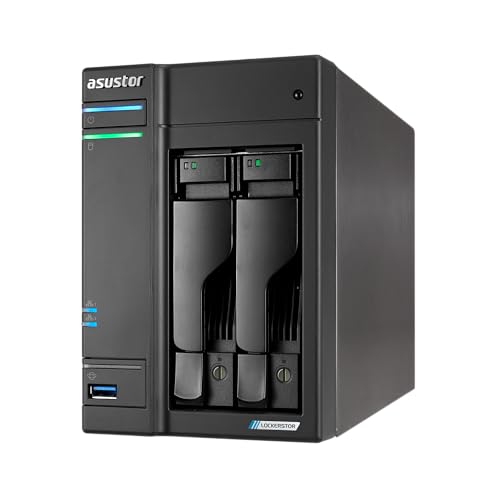
Asustor Lockerstor 2 Gen2 AS6702T
Asustor puts dual 2.5 gigabit ports and two NVMe slots into a two bay chassis, so small file operations and caching feel quicker than the bay count suggests. ADM software is clean and the hardware specification is generous. Based on specifications it is the pick for a home office moving large files regularly.
Pros
- Fast networking and NVMe caching in a small unit
- Clean, responsive ADM interface
- Good hardware specification for the class
Cons
- Smaller app ecosystem than Synology
- Only two bays for spinning drives

TerraMaster F4-424
TerraMaster consistently offers more processor, memory and networking for the outlay than the established brands. The F4-424 gives four bays, an Intel N95 processor and dual 2.5 gigabit ports. Owners report TOS has improved considerably, though it still trails DSM for polish and third party app support.
Pros
- Strongest hardware specification in this group
- Generous standard memory allocation
- Popular base for third party operating systems
Cons
- Software is less polished than DSM or QTS
- Smaller community for troubleshooting

UGREEN NASync DXP4800 Plus
UGREEN entered this market with a specification sheet aimed squarely at enthusiasts, including a Pentium Gold processor, 10 gigabit networking and multiple NVMe slots. It is well suited to running containers and virtual machines alongside storage. Based on specifications the hardware is excellent, while the software is the newest and least proven here.
Pros
- Serious processing power for containers and virtual machines
- 10 gigabit networking included
- Very high memory ceiling
Cons
- Newest software platform with the shortest track record
- More capability than a simple backup target needs
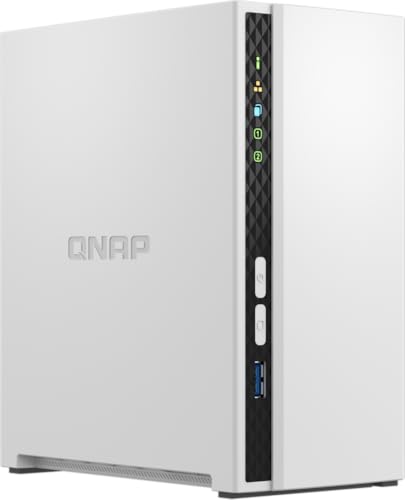
QNAP TS-233
The TS-233 is the low commitment way to get files off a single external drive and onto a redundant array. An ARM processor keeps power draw and noise down while handling file serving and basic backup duties. Owners report it is fine for backup and file access but not for transcoding a media library.
Pros
- Low power draw and quiet operation
- Enough for backups and file sharing
- Compact vertical footprint
Cons
- Not capable of media transcoding
- Memory cannot be upgraded later
Compared at a glance
| # | Model | Drive bays | Best for | Score | Price |
|---|---|---|---|---|---|
| 1 | Synology DiskStation DS224+ | 2 bays, 3.5 or 2.5 inch | Best overall | 9.4 | Check price |
| 2 | Synology DiskStation DS923+ | 4 bays plus 2 NVMe slots | Best for growing storage needs | 9.2 | Check price |
| 3 | QNAP TS-464 | 4 bays plus 2 NVMe slots | Best for media servers | 9.0 | Check price |
| 4 | Asustor Lockerstor 2 Gen2 AS6702T | 2 bays plus 2 NVMe slots | Best for fast transfers | 8.8 | Check price |
| 5 | TerraMaster F4-424 | 4 bays plus NVMe slots | Best value | 8.6 | Check price |
| 6 | UGREEN NASync DXP4800 Plus | 4 bays plus 2 NVMe slots | Best for power users | 8.3 | Check price |
| 7 | QNAP TS-233 | 2 bays | Best budget | 8.0 | Check price |
Questions worth asking
What does NAS stand for and what is it for?
Network attached storage. It is a small always-on computer holding several drives, shared across your home or office network. Typical uses are automatic device backups, a central photo and document store, and streaming a media library to phones, tablets and televisions.
How many drive bays should I buy?
Two bays with mirrored drives is the sensible minimum for data you cannot lose. Four bays gives better usable capacity from parity redundancy plus room to grow. Buying more bays than you need today is usually cheaper than replacing the whole unit in two years.
Do I need special drives for a NAS?
Drives rated for NAS use are designed for constant operation, vibration in multi-drive enclosures and appropriate error recovery timing. Desktop drives will work but tend to fail sooner in this duty cycle. Check the manufacturer’s compatibility list, since some vendors restrict which drives are supported.
Can a NAS run Plex?
Yes, and most of these can. What varies is whether it can transcode. Units with Intel integrated graphics handle transcoding for devices that cannot play a file natively. ARM based units generally only manage direct play, which is fine if your clients support the formats you store.
Is RAID the same as a backup?
No. RAID protects against a drive failing while the system keeps running. It does not protect against deletion, ransomware, corruption, theft or fire. Keep at least one separate backup copy, ideally offsite or in cloud storage.
How much power does a NAS use?
A two bay unit typically draws somewhere between 10 and 30 watts depending on activity and whether drives are spun down. Four bay units with faster processors draw more. Most models support scheduled power down and drive hibernation to reduce idle consumption.
Can I access a NAS away from home?
Yes. Every vendor here provides a remote access service and mobile apps. Enable two factor authentication, keep the firmware updated, and avoid exposing administrative ports directly to the internet. A VPN back to your home network is the safest approach.
How loud is a NAS in a living room?
The drives usually make more noise than the fan. Units with larger, slower fans and rubber drive mounts are quieter. If it will live in a room you use in the evenings, consider a two bay unit with drive hibernation enabled, or place it in a cupboard with airflow.
Our pick
The Synology DiskStation DS224+ remains the easiest recommendation for a first NAS, because DSM removes most of the administration burden while the Intel processor handles media and photo duties comfortably. Households already outgrowing two bays should go straight to the DS923+ for its expansion path, and anyone comfortable trading software polish for hardware gets considerably more from the TerraMaster F4-424.


