Video Lights That Fix Bad Home Studio Lighting
The Aputure Amaran 200x S is the most capable video light in this roundup, with enough output for softbox work and adjustable colour temperature. The Godox SL60W is the value pick for a fixed studio, and the Elgato Key Light Air suits desk streaming setups best.
The Aputure Amaran 200x S is the light most creators grow into rather than out of, the Godox SL60W is the affordable studio workhorse, and the Elgato Key Light Air is the tidiest answer for a desk. Output and modifier support matter more than any headline feature.
Video lights are tricky because output figures are quoted at different distances and colour accuracy claims are rarely comparable between brands. We compared published output, CRI and TLCI ratings, colour temperature range, mount type, power options and control apps, and weighed what owners report about fan noise and how each light behaves through a softbox.
What matters most
COB or panel changes what you can do COB lights concentrate output into a single point, which lets a softbox, grid or snoot shape it precisely. Panels emit across a wide flat surface, so the light is already soft but far harder to control or stop from spilling onto a background. If you want cinematic contrast, choose COB and add a modifier. If you want quick, even light for a talking head or a call, a panel is faster.
Colour accuracy is worth checking properly CRI and TLCI ratings above 95 mean skin tones and product colours reproduce without the green or magenta cast cheap LEDs introduce. Ratings below that are noticeable the moment you try to grade footage. Also check whether the light holds its accuracy when dimmed, since some units shift colour badly at low output, which matters if you dim rather than move the light back.
Match output to your distance and modifier A softbox eats a significant portion of the light passing through it, and doubling the distance to your subject reduces intensity dramatically. A 60 watt COB is plenty at a desk with a small softbox and inadequate lighting a room through a large one. Buy more output than you think you need if you plan to shoot in bigger spaces or use heavy diffusion.
Think about power, noise and mounting together Mains powered COB lights need an outlet and usually run a cooling fan, which a sensitive microphone will pick up in a quiet room. Battery powered panels free you from cables but limit runtime at high output. Bowens mount lights open up an enormous range of affordable modifiers, while proprietary mounts lock you into one brand’s accessories, so favour the standard where you can.
The top picks, ranked

Aputure Amaran 200x S Bi-Color LED Light
A 200 watt COB light with a Bowens mount gives you enough output to shape properly through a large softbox, which is where cheaper panels run out. Bi colour adjustment from tungsten to daylight lets it match mixed room lighting. App control over Bluetooth means you can dim it without leaving the frame.
Pros
- Enough output for large modifiers
- Wide bi colour range
- Full Bowens modifier ecosystem
Cons
- Fan noise is audible in quiet rooms
- Needs mains power for full output

Godox SL60W LED Video Light
The SL60W has been the default first COB light for years because it delivers real daylight balanced output at a modest cost. The Bowens mount opens up softboxes, snoots and grids from any brand. It is daylight only, so plan on gelling if you are mixing with warm room lights.
Pros
- Strong output for the outlay
- Works with all Bowens modifiers
- Simple reliable controls
Cons
- Fixed daylight colour temperature
- Fan runs constantly

Elgato Key Light Air
A soft edge to edge panel on a desk clamp, controlled entirely from software so nothing blocks your keyboard. Owners report it is the light they actually use because turning it on is one click in Stream Deck. Output is modest, which is fine at desk distance and limiting anywhere else.
Pros
- Clean desk mounting with no stands
- Fully software controlled
- Diffused panel needs no softbox
Cons
- Not bright enough for room lighting
- Depends on Wi-Fi and companion software
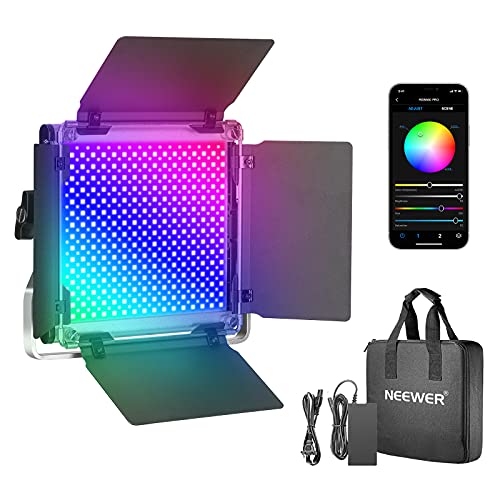
Neewer 660 PRO RGB LED Video Light
Full RGB control with a large panel makes this useful for background colour as well as key lighting. Built in effects cover police lights, lightning and TV flicker for narrative work. Panel lights spread widely, so expect softer, less controllable light than a COB through a modifier.
Pros
- Full colour and effects control
- Battery or mains power
- Large soft emitting surface
Cons
- Harder to control spill than COB lights
- Bulky to travel with

GVM 800D-RGB LED Video Light
GVM sells these in kits with stands and barn doors, which is the cheapest route to a proper two or three light setup. App control lets you sync colour across several units at once. Build is lighter than premium brands, so treat the stands as the weak point.
Pros
- Good value in multi light kits
- Syncs several lights from one app
- Includes stands and barn doors
Cons
- Stands are the weakest component
- App can be inconsistent
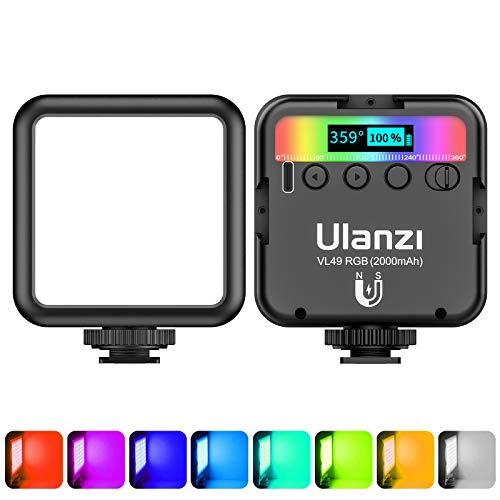
Ulanzi VL49 RGB Video Light
Pocket sized with a built in battery and magnetic back, this is the light that ends up in a camera bag permanently. It works as a fill for close up product shots or as a colour accent behind a subject. Output is small, so it is a supporting light rather than a key.
Pros
- Fits in a pocket or bag
- Built in battery, no cables
- Magnetic mounting is genuinely handy
Cons
- Far too little output for a key light
- Short runtime at full brightness

Lume Cube Panel Mini LED Light
A slim panel designed to clip to a laptop lid or sit on a small stand for video calls. Colour temperature adjusts to match window light so you do not look orange against a blue background. It is a call and vlogging tool rather than a production light.
Pros
- Very portable and light
- Adjusts to match room colour
- USB-C rechargeable
Cons
- Low output limits use to close range
- No modifier options
How they compare
| # | Model | Output | Best for | Score | Price |
|---|---|---|---|---|---|
| 1 | Aputure Amaran 200x S Bi-Color LED Light | 200 watt COB | Best overall | 9.4 | Check price |
| 2 | Godox SL60W LED Video Light | 60 watt COB | Best value | 9.2 | Check price |
| 3 | Elgato Key Light Air | 1400 lumens | Best for streaming | 9.0 | Check price |
| 4 | Neewer 660 PRO RGB LED Video Light | RGB LED panel | Best RGB panel | 8.7 | Check price |
| 5 | GVM 800D-RGB LED Video Light | RGB LED panel | Best for two point setups | 8.5 | Check price |
| 6 | Ulanzi VL49 RGB Video Light | Pocket sized cube | Best pocket light | 8.2 | Check price |
| 7 | Lume Cube Panel Mini LED Light | Slim LED panel | Best for calls | 8.0 | Check price |
Common questions
How many lights do I need to start?
One good key light placed to one side of the camera solves most home video problems. A second light for background separation is the first upgrade, and a fill only becomes necessary if your key creates shadows you dislike.
Is a softbox necessary?
For COB lights, effectively yes, because bare COB light is harsh. Panels are already diffused. A large modifier close to the subject produces the soft, flattering light most creators are aiming for.
What is CRI and does it matter?
CRI measures how accurately a light source renders colours compared with natural light. Aim for 95 or above for video, since lower values make skin tones look off in ways that are difficult to correct in editing.
Should I choose bi colour or daylight only?
Bi colour is more flexible if you shoot in rooms with mixed lighting or near windows at different times of day. Daylight only lights are usually brighter for the money, and gels can adapt them when needed.
Are RGB lights worth it?
For background accents, product work and stylised content, yes. For a straightforward talking head key light, RGB adds cost without improving the main light, so put the budget into output and colour accuracy instead.
Do video lights make noise?
High output COB lights generally use a fan, and it is audible in a quiet room. Passive cooled panels are silent. If you record audio in the same room, factor fan noise into the decision or place the light further from the microphone.
Can I use a video light for photography?
Yes. Continuous lighting works well for still photography, especially product and food shots, because you see exactly what you get. The trade is that it is far less powerful than a flash for freezing motion.
Where should I position a key light?
Roughly 45 degrees to one side of the camera and slightly above eye level is the reliable starting point. Move it closer for softer light, further away for more contrast, and adjust height until the shadow under the nose looks natural.
Our pick
The Aputure Amaran 200x S is the light worth stretching for, because its output and Bowens mount mean it stays useful as your setups get more ambitious. On a tighter budget the Godox SL60W delivers most of the practical benefit for a fixed studio corner. Desk based streamers should skip both and take the Elgato Key Light Air, which solves the specific problem of lighting a face at a computer without clutter.