Network Adapters That Keep Your Connection Fast and Stable
The TP-Link Archer TX50E is our top pick for most people because it combines Wi-Fi 6 speeds with a Bluetooth 5.0 combo at a reasonable price, but its PCIe design requires a desktop with an open slot. For laptop users or those who need plug-and-play simplicity, the ASUS USB-AX56 offers comparable performance in a USB form factor.
A sluggish Wi-Fi connection can turn streaming, gaming, and video calls into a frustrating experience. Upgrading your laptop or desktop with a quality network adapter is often the simplest fix.
We rounded up the best USB and PCIe adapters available today, balancing speed, range, and price. Whether you need an upgrade for gaming or just want to eliminate dead zones, there’s an option here for you.
Before you buy
The top picks, ranked

TP-Link Archer TX50E
The Archer TX50E is a PCIe adapter that brings Wi-Fi 6 (802.11ax) to your desktop. It features a magnetic external antenna base for flexible placement, and it also includes Bluetooth 5.0 for connecting peripherals. Owners report stable connections and impressive speeds on compatible routers.
Pros
- Excellent throughput on Wi-Fi 6 networks
- Includes Bluetooth 5.0
- Magnetic antenna base for optimal placement
Cons
- Requires PCIe slot, not for laptops
- Drivers can be tricky on older systems

ASUS USB-AX56
This dual-band USB adapter delivers Wi-Fi 6 speeds in a compact, plug-and-play design. It uses an external antenna pod to boost signal reception. Users note it runs cooler than many USB adapters, and the included USB 3.0 connection ensures full throughput.
Pros
- Plug-and-play setup
- Great range for a USB adapter
- Compact and portable
Cons
- Antenna pod can be bulky
- Not as fast as PCIe counterparts

TP-Link Archer TX3000E
The TX3000E is a PCIe adapter featuring OFDMA and MU-MIMO technology for efficient data transfer. It has a heatsink to prevent overheating during intense gaming sessions. Gamers report reduced lag and stable connections when paired with Wi-Fi 6 routers.
Pros
- Low latency for online gaming
- High throughput on 5 GHz band
- Efficient heat dissipation
Cons
- No Bluetooth included
- Pricey compared to similar adapters
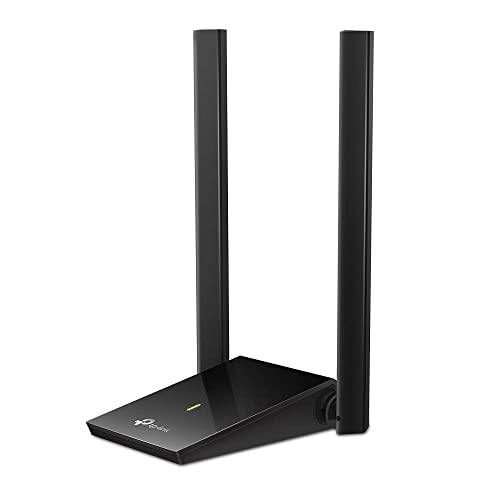
TP-Link Archer T4U
If you’re on a tight budget, the Archer T4U provides reliable AC1300 speeds over USB 3.0. Its high-gain antennas are adjustable, helping to improve signal pickup. Multiple users mention it’s a straightforward solution for older laptops that lack 5 GHz support.
Pros
- Affordable
- Good range for the price
- Simple installation
Cons
- Not future-proof for Wi-Fi 6
- USB 2.0 devices will bottleneck speed

Intel Wi-Fi 6 AX200
This is a bare M.2 module that many laptops and mini PCs use. If your device has an M.2 slot, this card can replace an older Wi-Fi card to add Wi-Fi 6 and Bluetooth 5.0. Tech enthusiasts appreciate its reliability and compatibility with many systems.
Pros
- Widely compatible with many laptops
- High performance for the price
- Includes Bluetooth 5.0
Cons
- Requires technical skill to install
- Not for desktops without M.2 slot

ASUS PCE-AC58BT
The PCE-AC58BT is a PCIe adapter that supports dual-band AC2100 speeds and includes Bluetooth 4.2. It features external antennas for better signal reception. Owners note it’s an excellent choice if your router is not Wi-Fi 6 capable, offering stable performance.
Pros
- Reliable performance on Wi-Fi 5
- Comes with Bluetooth
- External antennas for better placement
Cons
- Not future-proof for Wi-Fi 6
- Bluetooth version is older

TP-Link Archer T3U
The Archer T3U is a nano-sized USB adapter that supports AC1300 speeds. It’s so small it barely protrudes from your laptop, making it ideal for travel. While not the fastest, it offers a convenient way to add dual-band Wi-Fi to devices with limited ports.
Pros
- Ultra-portable
- Affordable
- No external antennas to break
Cons
- USB 2.0 limits speed
- Range is not as good as larger adapters
Compared at a glance
| # | Model | Interface | Best for | Score | Price |
|---|---|---|---|---|---|
| 1 | TP-Link Archer TX50E | PCIe | Best overall for desktop users who need Wi-Fi 6 and Bluetooth | 9.4 | Check price |
| 2 | ASUS USB-AX56 | USB 3.0 | Best USB adapter for laptops and desktops needing Wi-Fi 6 | 9.2 | Check price |
| 3 | TP-Link Archer TX3000E | PCIe | Best for gamers who need low latency and high speeds | 9.1 | Check price |
| 4 | TP-Link Archer T4U | USB 3.0 | Best budget adapter for basic upgrades | 8.8 | Check price |
| 5 | Intel Wi-Fi 6 AX200 | M.2 2230 | Best for DIY users who want to upgrade their laptop’s internal Wi-Fi card | 8.7 | Check price |
| 6 | ASUS PCE-AC58BT | PCIe | Best for users who need a reliable Wi-Fi 5 adapter with Bluetooth | 8.5 | Check price |
| 7 | TP-Link Archer T3U | USB 2.0 | Best for travelers or those needing a compact adapter | 8.0 | Check price |
Common questions
What is the difference between a USB and PCIe network adapter?
USB adapters plug into a USB port and are easy to install, making them ideal for laptops and quick upgrades. PCIe adapters install inside a desktop computer and often provide better performance because they connect directly to the motherboard and can have larger antennas.
Do I need a Wi-Fi 6 adapter if my router is not Wi-Fi 6?
No, a Wi-Fi 6 adapter will work with older routers, but it will operate at the router’s maximum supported speed. You won’t get the full benefits of Wi-Fi 6 unless your router supports it. Consider future-proofing if you plan to upgrade your router soon.
Can I use a network adapter with a desktop that has no PCIe slots?
Yes, you can use a USB network adapter. USB adapters work on any computer with a compatible USB port, making them a versatile choice for desktops without expansion slots or for mini PCs.
Why is my USB Wi-Fi adapter slow?
Several factors can cause slow speeds, including using a USB 2.0 port, being far from the router, or interference. Try plugging into a USB 3.0 port, repositioning the adapter, and updating drivers to improve performance.
How do I install a PCIe network adapter?
Power off your computer, open the case, and locate an available PCIe x1 or x16 slot. Remove the metal bracket, insert the adapter firmly, and secure it with a screw. Attach antennas, close the case, and boot up. Install the drivers from the included disc or manufacturer’s website.
What is MU-MIMO and do I need it?
MU-MIMO stands for Multi-User, Multiple-Input, Multiple-Output. It allows the router to communicate with multiple devices simultaneously, improving efficiency when many devices are connected. It’s beneficial for households with many users, but not essential if you have few devices.
Can I use a network adapter to improve my Wi-Fi range?
Yes, a network adapter with high-gain antennas can pick up weaker signals and improve range. USB adapters with external antennas or PCIe cards with detachable antennas often provide better reception than built-in laptop Wi-Fi.
What is the advantage of having Bluetooth on a network adapter?
Having Bluetooth built-in allows you to connect wireless mice, keyboards, headphones, and other peripherals without needing a separate Bluetooth dongle. It can free up USB ports and reduce cable clutter.
Final word
For most desktop users, the TP-Link Archer TX50E is the clear winner because it combines top-tier Wi-Fi 6 performance with Bluetooth and a flexible antenna design. If you need a USB adapter, the ASUS USB-AX56 is your best bet for similar performance in a portable package. For a budget upgrade, the TP-Link Archer T4U is a reliable choice that won’t break the bank. Choose the TX50E if you want the best overall experience and have a PCIe slot available.


