Network Tool Kits That Crimp Right the First Time
Klein Tools VDV501-829 ranks first for daily installers because its ratcheting head locks in full crimp pressure on every cycle. Fluke Networks MicroScanner2 fits certifying finished runs with length and PoE checks. NOYAFA NF-388 handles home and hobby networking without the cost of certifier grade gear.
Three kits rise above the rest here. Klein Tools VDV501-829 suits installers who terminate cable daily, since its ratcheting head releases only after reaching full crimp force. Fluke Networks MicroScanner2 goes further than a tester by certifying wiremap, length, and PoE on a finished run. NOYAFA NF-388 gives hobbyists a workable tester and crimper combo without certifier level pricing.
Symptoms of a bad crimp rarely show up right away. A ratcheting crimper applies full pressure before releasing, while squeeze types stop early once your grip tires. Testers differ just as sharply, since a continuity tester confirms wiring order only, and a certifier measures signal length and crosstalk. We compared crimp mechanisms, tester capability, bundled punch down tools, and case design, then checked owner reports of connector failures and tester accuracy against published specifications.
The top picks, ranked

Klein Tools VDV501-829 Ratcheting Data Cable Crimper/Stripper/Cutter
Full crimp pressure locks in before the ratcheting head releases, so RJ45 and RJ11 connectors seat evenly on every cycle. Built in strippers switch between round and flat cable without a tool change. Installers running daily jobs report fewer callback jacks compared with squeeze crimpers.
Pros
- Ratchet mechanism prevents undercrimped connectors
- Strips round and flat cable without swapping tools
- Forged steel jaws hold calibration over years of use
Cons
- No cable tester included
- Heavier in hand than a basic squeeze crimper

Fluke Networks MicroScanner2 Cable Verifier
MicroScanner2 reads cable length, flags wiremap faults, and detects active PoE voltage on a completed run. That pushes it past basic continuity testing into documentation installers can hand a client. Numbered remotes let one person check up to six runs without walking back to relabel.
Pros
- Measures true cable length instead of continuity alone
- Detects active PoE with no extra equipment
- Numbered remotes speed up multi run testing
Cons
- No crimper included with this kit
- More capability than a single home run needs

NOYAFA NF-388 Network Cable Tester
Wiremap order and continuity checks span Ethernet, telephone, and coax cable, which covers most home troubleshooting. A basic crimper and stripper ship in the box, so first time installers skip a second purchase. Accuracy falls short of certifier grade tools, matching the lower price.
Pros
- Covers Ethernet, phone, and coax from one tester
- Bundles a crimper and punch down tool
- Low entry cost for basic cable testing
Cons
- Cannot measure cable length
- Plastic housing feels less durable than professional gear

Cable Matters RJ45 Crimping Tool Kit
Crimper, tester, stripper, and a small set of connectors and boots arrive together, enough for a first home network project. Squeeze mechanism crimping means results depend on steady hand pressure rather than a locked ratchet. A molded case keeps every piece together between jobs.
Pros
- Bundles everything a first project needs
- Connectors and boots included with no separate order
- Compact case suits storage or a van
Cons
- Squeeze crimp less consistent than ratcheting
- Tester checks basic continuity only

Klein Tools 80020 Network Cable Termination Kit
A hard case built for jobsite use holds a ratcheting crimper, punch down tool, cable tester, stripper, and connector assortment. Punch down blades cover both 110 and Krone styles, useful when patch panels vary between buildings. Foam organization keeps tools from rattling loose during transport.
Pros
- Covers termination and punch down from one case
- Two punch down blade styles included
- Hard shell case survives daily jobsite transport
Cons
- Bulkier than a single crimper kit
- Tester lacks length measurement
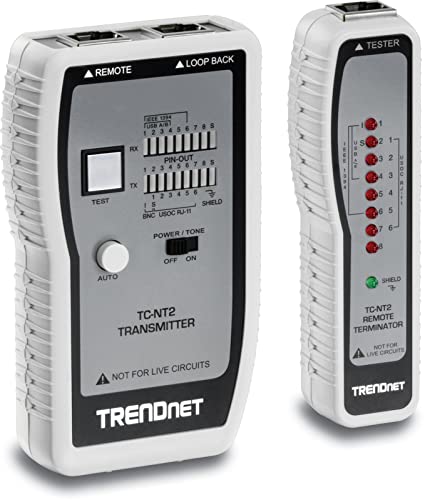
TRENDnet TC-NT2 Network Cable Tester
Cat5e and Cat6 wiremap checks plus coax continuity fit inside a compact handheld unit, suited to spot checking patch cables rather than full installs. Only a single remote plug ships in the box, so multi run capacity trails professional testers. A small screen shows battery status at a glance.
Pros
- Compact enough for a pocket or bag
- Covers coax alongside Ethernet cable
- Single button operation keeps testing simple
Cons
- One remote limits multi run testing
- No crimper or punch down tool included
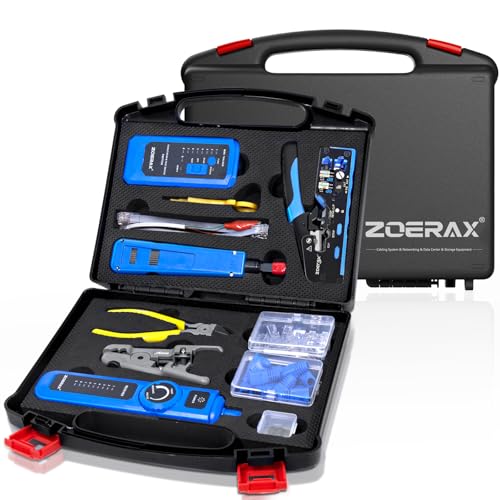
VIVO Professional Network Installation Tool Kit
Labeled pockets inside a zippered bag organize a crimper, tester, punch down tool, and wire strippers for a first home network build. Instructions printed inside the lid walk through basic RJ45 termination steps. Build quality sits below the Klein and Fluke kits at this price point.
Pros
- Labeled bag keeps beginners organized
- Printed instructions included in the case
- Combines crimping and punch down in one kit
Cons
- Squeeze crimper needs steady hand pressure
- Tester lacks PoE or length testing
What to look for
What is the difference between a home and professional network tool kit? Professional kits certify a run with length and crosstalk data, while home kits confirm wiring order only. Ratcheting crimpers show up almost exclusively in professional grade tools, since they remove hand strength as a variable. Someone installing a handful of runs a year gets by with a continuity tester and squeeze crimper. Daily installers should budget for a ratcheting crimper at minimum.
How do you pick a crimper that will not undercrimp connectors? A ratcheting mechanism will not release the handle until it reaches full crimp force, which stops the loose pins that cause intermittent connections. Squeeze crimpers depend on steady hand pressure across every connector, and fatigue late in a job raises failure rates. Check that a crimper handles round and flat cable if phone cable termination is also on the list.
What should a cable tester actually check? Continuity testers confirm the eight wires land in correct order, catching miswired jacks before they go live. Length testing matters near the 100 meter Ethernet limit, where a few extra feet causes signal loss. PoE detection helps when installing security cameras or access points, since it confirms power reaches the device without a separate injector test.
Do you need a bundled kit or separate tools for daily work? Occasional installers do fine with a bundled starter kit that pairs a basic tester, squeeze crimper, and connector assortment in one case. Daily installers should treat the crimper and punch down tool as separate purchases worth upgrading, since a ratcheting crimper and a certifier outlast several generations of bundled kits. Sticking to tools that share a connector standard avoids compatibility surprises on a jobsite.
Compared at a glance
| # | Model | Connector types | Best for | Score | Price |
|---|---|---|---|---|---|
| 1 | Klein Tools VDV501-829 Ratcheting Data Cable Crimper/Stripper/Cutter | RJ45, RJ11, RJ12 | Best overall | 9.4 | Check price |
| 2 | Fluke Networks MicroScanner2 Cable Verifier | Wiremap, length, PoE detection | Best for certifying runs | 9.2 | Check price |
| 3 | NOYAFA NF-388 Network Cable Tester | Wiremap and continuity | Best budget | 8.6 | Check price |
| 4 | Cable Matters RJ45 Crimping Tool Kit | Squeeze crimp | Best value | 8.4 | Check price |
| 5 | Klein Tools 80020 Network Cable Termination Kit | 110 and Krone blades | Best for full installs | 8.8 | Check price |
| 6 | TRENDnet TC-NT2 Network Cable Tester | Cat5e, Cat6, coax | Best for quick troubleshooting | 8.2 | Check price |
| 7 | VIVO Professional Network Installation Tool Kit | Squeeze crimp | Best for beginners | 8.0 | Check price |
Frequently asked questions
What tools come in a basic network tool kit?
A crimper for RJ45 connectors, a cable stripper, a continuity tester, and often a punch down tool for patch panels. Bundled kits add connector boots and a storage case.
Is a ratcheting crimper worth it over a squeeze crimper?
Yes, for anyone terminating cable on a regular basis. The ratchet applies full, even pressure every cycle, cutting down on loose pins that cause intermittent drops.
Can a network tool kit test Wi-Fi signal strength?
No. These kits test wired Ethernet, phone, and coax cable. Wi-Fi signal strength needs a separate wireless survey tool, not a cable tester.
What is the difference between a cable tester and a certifier?
A tester confirms wiring order and continuity only. A certifier such as the Fluke MicroScanner2 also measures cable length and can flag active PoE, giving documented proof a run meets standard.
Do you need both a 110 and Krone punch down blade?
Only when work spans buildings with different patch panel standards. Most US residential and commercial installs use 110 style blocks, so a single blade covers most jobs.
How many remotes do you need for cable testing?
One remote handles single run testing. Numbered remote sets, common on professional testers, allow multiple runs to be checked from a patch panel without relabeling each time.
Are network tool kits and electrical tool kits the same thing?
No. Network kits crimp low voltage RJ45 and RJ11 connectors and test data cable. Electrical kits handle heavier gauge wire and a different set of connectors entirely.
Which network tool kit works best for a beginner installing home Ethernet?
A bundled starter kit like the Cable Matters or VIVO kit covers a first project, since crimper, tester, and connectors arrive together with no separate purchases.
Which network tool kit fits daily professional installs?
Klein Tools kits pair a ratcheting crimper with a hard case built for jobsite use, matching the demands of daily termination and punch down work.
The verdict
Pick the Klein Tools VDV501-829 for regular cable termination, since its ratcheting crimp removes the most common cause of jack failure. Add the Fluke Networks MicroScanner2 when a client needs documented proof a run meets length and PoE requirements. For a single home project, the NOYAFA NF-388 or Cable Matters kit covers testing and termination without certifier grade accuracy that goes unused.