Portable Optical Drives That Keep Your Discs Spinning on the Go
For most travelers, the ASUS ZenDrive U2M is the top pick. It is a slim USB-A DVD burner with a stylish design and reliable performance. Its main advantage is its featherlight, ultraportable build that slips into any sleeve. The main limitation is the lack of USB-C connectivity and Blu-ray support.
Discs are not dead, especially for those who collect movies, back up data, or drive older vehicles without digital media ports. A portable optical drive lets you access and burn CDs and DVDs from any laptop or desktop, anywhere.
We compared the most popular slim models on Amazon, weighing factors like weight, cable design, interface (USB-A vs. USB-C), and whether they handle Blu-ray. Owner reports highlight which units survive the rigors of a carry-on bag and which ones feel flimsy.
What to look for
The top picks, ranked

ASUS ZenDrive U2M
The ASUS ZenDrive U2M is a sleek, ultra-slim DVD burner that weighs just over half a pound. Its brushed metal finish looks premium. It is powered solely by USB, so no extra power adapter is needed, making it perfect for a backpack.
Pros
- Very lightweight and compact
- Quiet operation
- Stylish design
Cons
- No USB-C cable included
- No Blu-ray support

LG BP60NB10
This slim external Blu-ray writer from LG is one of the few portable options that can burn and read Blu-ray discs. It connects via USB-A and includes CyberLink software for playback. Owners note it is slightly heavier than DVD-only drives but still fits in a laptop bag.
Pros
- Reads and writes Blu-ray
- Comes with software suite
- Reliable LG build
Cons
- Heavier than typical slim drives
- Requires USB-A port

Rioddas External USB 3.0 DVD Drive
This Rioddas drive offers a no-frills solution for reading and writing DVDs and CDs. It has a simple, matte black plastic body and a detachable USB-A 3.0 cable. It is widely praised for its plug-and-play simplicity and low cost, though it lacks premium materials.
Pros
- Very affordable
- Fast USB 3.0 transfer
- No external power needed
Cons
- Plastic build feels cheap
- No carrying case included
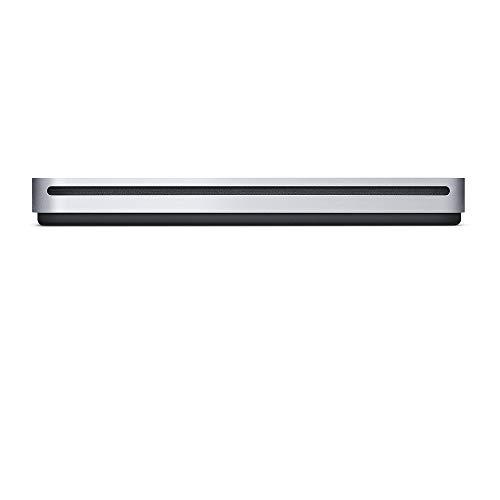
Apple USB SuperDrive
Apple’s own external DVD drive is designed for Macs, but works with Windows PCs too. It has a sleek, aluminum body that matches Apple’s aesthetic. It is slim and lightweight, but its USB-A cable is short and tethered, and it does not support burning to some DVD formats.
Pros
- Sleek and lightweight
- Works with Mac and PC
- Reliable for reading DVDs
Cons
- Short, non-removable cable
- Does not write DVD-RAM

Buffalo MediaStation USB 3.0 Ultra-Slim DVD Writer
Buffalo’s ultra-slim drive supports a wide range of formats including DVD-RAM and M-DISC, making it a favorite for archiving. It features USB-A 3.0 for fast data transfer. Some users note the included software is limited, but the hardware is solid.
Pros
- Supports M-DISC for archival
- Fast USB 3.0
- Very slim profile
Cons
- Software bundle is basic
- No USB-C adapter

TP-Link USB 3.0 DVD Writer
TP-Link, known for networking gear, offers a cleanly designed external DVD writer. It features a glossy top and a USB-A 3.0 cable that can be detached. Owners appreciate its sturdy feel and quiet operation, though it lacks advanced features like M-DISC.
Pros
- Sturdy build
- Detachable USB cable
- Quiet during playback
Cons
- Glossy surface shows fingerprints
- No Blu-ray support

LG GP65NB60
This LG model is one of the thinnest portable DVD writers available, measuring just over half an inch thick. It has a sleek, rounded design and a USB-A cable that clips into the body for easy storage. Owners report it is very reliable for burning and reading discs on the go.
Pros
- Extremely slim and light
- Cable clips into drive
- Good build quality
Cons
- USB 2.0 only
- No Blu-ray
Compared at a glance
| # | Model | Interface | Best for | Score | Price |
|---|---|---|---|---|---|
| 1 | ASUS ZenDrive U2M | USB-A 2.0 | Best overall for lightweight travel | 9.4 | Check price |
| 2 | LG BP60NB10 | USB-A 2.0 | Best for Blu-ray playback on the road | 8.9 | Check price |
| 3 | Rioddas External USB 3.0 DVD Drive | USB-A 3.0 | Best budget-priced basic burner | 8.6 | Check price |
| 4 | Apple USB SuperDrive | USB-A 2.0 (tethered) | Best for Apple users with older Macs | 8.0 | Check price |
| 5 | Buffalo MediaStation USB 3.0 Ultra-Slim DVD Writer | USB-A 3.0 | Best for writable disc versatility | 8.3 | Check price |
| 6 | TP-Link USB 3.0 DVD Writer | USB-A 3.0 | Best for simple design and durability | 8.1 | Check price |
| 7 | LG GP65NB60 | USB-A 2.0 | Best for thin laptops with USB-A only | 8.7 | Check price |
Good to know
Can I use a portable optical drive with a USB-C only laptop?
Yes, but you will need a USB-C to USB-A adapter or hub. Some newer drives come with a USB-C cable, but most budget models only have USB-A. If you want a native USB-C connection, look for a drive that explicitly lists USB-C support.
Are portable optical drives powered entirely by USB?
Yes, all slim portable drives draw power from the USB port. They do not need an external power adapter. However, some older or high-power Blu-ray drives may require two USB cables for adequate power.
What is the difference between a DVD writer and a Blu-ray writer?
A DVD writer can read and write DVDs and CDs. A Blu-ray writer can also read and write Blu-ray discs, which hold up to 25GB per layer (vs 4.7GB for DVD). Blu-ray writers are typically heavier and more expensive.
Can I watch movies from a different region on a portable drive?
Most optical drives are region-coded for DVDs and Blu-rays. You may need to change the region code on the drive, but you can only do so a limited number of times (usually 5). Some drives are region-free, but they are less common.
Do portable optical drives work with Chromebooks?
Yes, many portable drives work with Chrome OS, but you may need to install a compatible app for certain formats. Check owner reviews to see if the drive works well with your specific Chromebook model.
How fast can a portable DVD drive burn a disc?
Most slim DVD writers burn at 8x speed, which means a full 4.7GB disc takes about 8 to 10 minutes. Some models offer up to 24x for CDs, but DVD speeds are typically capped at 8x for portability and heat reasons.
Are there any risks to using a portable optical drive on the go?
The main risk is physical damage from drops or pressure in a bag. Always use a protective case or sleeve. Also, avoid using the drive on soft surfaces where it can overheat. Keep it clean from dust and debris.
What is M-DISC support and why is it useful?
M-DISC is a special type of DVD or Blu-ray disc designed for long-term archival, lasting up to 1,000 years. To burn M-DISCs, your drive must explicitly support the M-DISC format. It is useful for preserving photos and documents for decades.
Final word
For most travelers, the ASUS ZenDrive U2M is the best choice because it combines a lightweight design, reliable performance, and a premium feel at a reasonable price. If you need Blu-ray capability, the LG BP60NB10 is the only truly portable option worth considering. For budget-conscious travelers, the Rioddas drive offers great value, but be prepared for a plastic build. Avoid the Apple SuperDrive unless you are deeply invested in the Apple ecosystem and prefer its aesthetic.