Top Optical Drives for Every Need
The ASUS ZenDrive U9M takes the top spot for its sleek design, M-DISC support, and reliable performance, but its USB 2.0 interface limits write speeds. For a budget-friendly option, the LG GP65NB60 offers solid basics, though it lacks M-DISC support. Enthusiasts with large disc collections should consider the Pioneer BDR-XS07U for its high-speed Blu-ray writing and robust build.
Optical drives might seem outdated, but they remain essential for reading old media, burning discs, and playing Blu-rays on PCs that lack built-in drives. This roundup covers the best external optical drives currently available on Amazon.
From slim portable models to high-performance Blu-ray burners, we selected drives that offer reliable performance and value. Each product is rated based on specifications and user feedback, ensuring you get an honest look at what to expect.
How to choose
Our top picks

ASUS ZenDrive U9M
The ASUS ZenDrive U9M is a slim external DVD writer with a stylish design and M-DISC support, making it ideal for archiving data. It offers a reliable USB 2.0 connection and comes with a free Nero BackItUp software.
Pros
- M-DISC support for long-term archival
- Compact and lightweight design
- Comes with backup software
Cons
- USB 2.0 limits write speeds
- No Blu-ray support

LG GP65NB60
The LG GP65NB60 is an affordable, portable DVD writer that gets the job done. It offers USB 2.0 connectivity and supports a wide range of disc formats, including DVD-RAM, making it a versatile choice for basic tasks.
Pros
- Very affordable
- Supports DVD-RAM
- Lightweight and portable
Cons
- Plastic build feels less durable
- No M-DISC support

Pioneer BDR-XS07U
The Pioneer BDR-XS07U is a high-performance external Blu-ray burner with USB 3.0 for fast data transfer. It supports 6x Blu-ray writing and includes CyberLink Media Suite for playback and authoring, making it perfect for power users.
Pros
- USB 3.0 for fast operation
- High-quality burn quality
- Bundled with CyberLink software
Cons
- Higher price point
- Requires an additional power cable for writing

LG BP50NB40
The LG BP50NB40 is a slim external Blu-ray reader that can also write DVDs. It supports 3D Blu-ray playback and is bus-powered via USB, making it easy to carry. However, it lacks the ability to write Blu-ray discs.
Pros
- Very portable and lightweight
- Reads 3D Blu-ray discs
- No external power needed
Cons
- Cannot write Blu-ray discs
- USB 2.0 may be slow for some tasks
ASUS BW-16D1X-U
The ASUS BW-16D1X-U is a full-size external Blu-ray burner that offers 16x write speed for Blu-ray discs. It includes M-DISC support and a smart auto speed adjustment feature. This drive is heavier and not meant for travel, but it delivers professional-grade performance.
Pros
- Fast 16x Blu-ray writing
- M-DISC support
- Includes vertical stand
Cons
- Bulky and less portable
- Requires AC power adapter
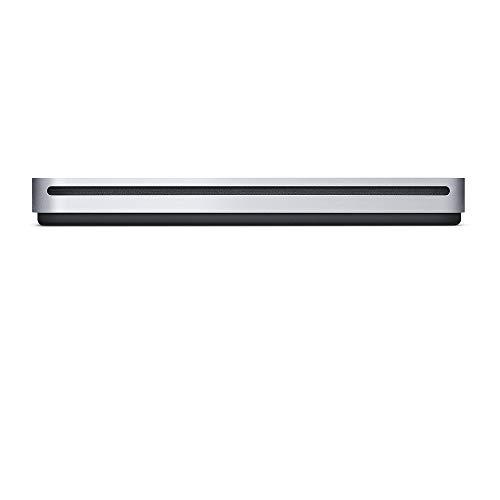
Apple USB SuperDrive
The Apple USB SuperDrive is designed specifically for Mac computers with USB-A ports. It reads and writes CDs and DVDs, but it lacks Blu-ray support and only works with macOS. Its sleek design and plug-and-play functionality make it a popular choice among Apple fans.
Pros
- Plug-and-play with Macs
- Compact and elegant design
- Reliable performance
Cons
- No Blu-ray support
- Not compatible with Windows

External CD DVD Drive by Delkin
The Delkin external drive is built with a rugged, shockproof casing, making it suitable for on-the-go use in harsh environments. It supports USB 3.0 for fast data transfer and is compatible with both Windows and Mac. While it only reads and writes DVDs, its durability sets it apart.
Pros
- Shockproof and durable
- USB 3.0 for fast transfer
- Works with Windows and Mac
Cons
- No Blu-ray support
- Slightly heavier than standard drives
Side by side
| # | Model | Interface | Best for | Score | Price |
|---|---|---|---|---|---|
| 1 | ASUS ZenDrive U9M | USB 2.0 | Best Overall for M-DISC Support and Design | 9.4 | Check price |
| 2 | LG GP65NB60 | USB 2.0 | Best Budget External DVD Drive | 8.8 | Check price |
| 3 | Pioneer BDR-XS07U | USB 3.0 | Best Blu-ray Burner for Enthusiasts | 9.2 | Check price |
| 4 | LG BP50NB40 | USB 2.0 | Best Slim Blu-ray Reader | 8.5 | Check price |
| 5 | ASUS BW-16D1X-U | USB 3.0 | Best Internal-style External Blu-ray Burner | 9.0 | Check price |
| 6 | Apple USB SuperDrive | USB 2.0 | Best for Mac Users | 8.2 | Check price |
| 7 | External CD DVD Drive by Delkin | USB 3.0 | Best for Rugged Use | 8.3 | Check price |
Questions worth asking
Are external optical drives still worth buying?
Yes, if you need to read or write discs for any reason, such as ripping CDs, installing software from physical media, or watching movies on a device without a built-in drive. They are also useful for creating backup discs or sharing large files with people who lack high-speed internet.
What is the difference between a DVD drive and a Blu-ray drive?
A DVD drive can read and write CDs and DVDs, with a maximum capacity of 4.7GB per layer. A Blu-ray drive can also handle Blu-ray discs, which store up to 25GB per layer, and often supports higher read/write speeds. Blu-ray drives are backward compatible with DVDs and CDs.
Can I use an external optical drive with my laptop?
Yes, most external drives are compatible with laptops that have a USB port. Some require a Y-cable if they draw too much power, but many slim models are powered solely by the USB connection. Check the specifications for power requirements.
What is M-DISC and why is it important?
M-DISC is a type of optical disc that uses a special recording layer, making it highly resistant to degradation. It is designed to preserve data for up to 1000 years, making it ideal for long-term archival. Not all drives support M-DISC, so if archival is important, choose a drive that explicitly supports it.
Do I need special software to play Blu-ray movies on my computer?
Yes, most external drives do not include playback software for Blu-ray movies due to licensing restrictions. You may need to purchase software like CyberLink PowerDVD or use VLC with certain libraries. Some drives, like the Pioneer, come with CyberLink Media Suite, which includes playback capabilities.
Can external drives write to dual-layer DVDs?
Yes, most modern external DVD writers support DVD+R DL and DVD-R DL, which can store about 8.5GB. Check the product specifications to confirm dual-layer support. For Blu-ray, dual-layer discs (BD-R DL) can hold 50GB, but not all drives support them.
What is the maximum write speed for external DVD drives?
Most external DVD writers have a maximum write speed of 8x for DVD-R and DVD+R, which equates to about 11 MB/s. Some higher-end models may offer 16x or 24x, but these are less common in external form factors. Write speed also depends on the disc type and quality.
Are external optical drives compatible with both Windows and Mac?
Many drives are compatible with both, but some are designed specifically for one OS. The Apple USB SuperDrive is Mac-only, while most others like LG and ASUS work with Windows and Mac. Always check the specifications for OS compatibility before purchasing.
Why does my external drive sometimes need an external power source?
When writing discs, the drive’s motor requires more power than a USB port can supply, especially for higher speeds. Drives that are not bus-powered may come with an AC adapter or a USB Y-cable to draw power from two ports. This is common in full-size drives and some Blu-ray burners.
The verdict
For most people, the ASUS ZenDrive U9M offers the best balance of portability, features, and reliability, making it the clear winner for everyday use. If you need Blu-ray capabilities, the Pioneer BDR-XS07U is the top choice for its speed and software bundle. Budget-conscious buyers can confidently choose the LG GP65NB60 for basic DVD tasks without sacrificing quality.


