Top OTG Adapters to Connect USB Devices to Phones
The Anker USB C to USB 3.0 OTG Adapter is our top pick for most Android users because it offers reliable data transfer and a sturdy build, but it lacks USB Power Delivery for charging while transferring.
OTG adapters let you plug USB flash drives, keyboards, mice, and other peripherals directly into your phone or tablet. With the right adapter, you can expand storage, transfer files quickly, or connect a game controller.
We compared seven top-selling OTG adapters to help you find the best match for your device. Whether you use USB-C, Micro USB, or Lightning, there is a reliable option here.
What we recommend

Anker USB C to USB 3.0 OTG Adapter
Anker’s adapter is a compact and sturdy choice that supports USB 3.0 speeds. It works with a wide range of USB-C phones and tablets, and its aluminum shell resists wear. Users report fast file transfers and a snug fit.
Pros
- Fast USB 3.0 data transfer
- Durable aluminum construction
- Compact and lightweight
Cons
- No USB Power Delivery support
- May block adjacent ports on some laptops
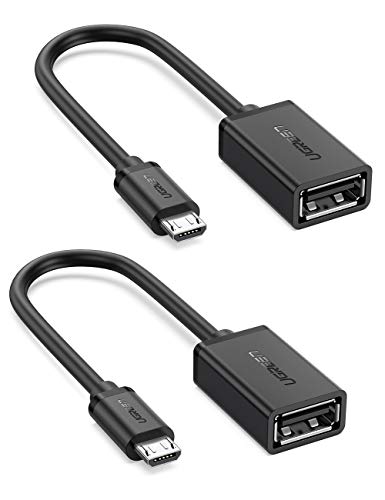
UGREEN Micro USB OTG Adapter
This adapter is designed for Micro USB devices, making it a great choice for older Android phones and tablets. It supports USB 2.0 speeds, which is sufficient for most file transfers and peripherals. The connector is reinforced for durability.
Pros
- Affordable and reliable
- Good for legacy devices
- Compact design
Cons
- Limited to USB 2.0 speeds
- Not compatible with USB-C

Apple Lightning to USB 3 Camera Adapter
Apple’s official adapter allows you to connect USB devices to your iPhone or iPad. It supports USB 3.0 speeds on iPad Pro models and also includes a Lightning port for charging. It works with cameras, flash drives, and MIDI keyboards.
Pros
- Supports charging and data simultaneously
- Official Apple product, reliable
- Works with a wide range of accessories
Cons
- Expensive compared to third-party options
- Requires iOS 9.3 or later

CableCreation USB C OTG Adapter with Power Delivery
This CableCreation adapter adds a USB-C Power Delivery port, so you can charge your phone while using USB devices. It supports USB 3.0 data transfer and is built with a braided cable for extra durability.
Pros
- Charge and transfer simultaneously
- High-quality construction
- Supports fast charging
Cons
- Slightly bulkier than simple adapters
- More expensive than basic OTG

iSyncIO USB C OTG Adapter (2 Pack)
Get two adapters for the price of one. iSyncIO offers a compact and functional USB-C to USB-A adapter that supports USB 3.0 speeds. It is universally compatible with Android devices, Windows, and Mac.
Pros
- Great value with 2-pack
- Fast USB 3.0
- Works with various operating systems
Cons
- No pass-through charging
- May be less durable than premium brands

Nonda USB C to USB 3.0 Adapter with LED Indicator
Nonda’s adapter features a sleek design with an LED indicator that shows connection status. It supports USB 3.0 speeds and is made of high-grade materials. The LED is helpful for troubleshooting.
Pros
- LED light shows active connection
- Premium look and feel
- Compact and portable
Cons
- More expensive than basic adapters
- LED may be distracting for some users

CHOETECH USB C OTG Adapter with USB 3.1
CHOETECH offers a USB 3.1 Gen 1 adapter that delivers up to 5 Gbps data transfer. It is built with a sturdy aluminum housing and is compatible with a wide range of USB-C devices, including Nintendo Switch.
Pros
- High-speed data transfer
- Durable aluminum body
- Works with Nintendo Switch
Cons
- No power delivery
- May be overkill for USB 2.0 devices
How to choose
The lineup, side by side
| # | Model | Connector | Best for | Score | Price |
|---|---|---|---|---|---|
| 1 | Anker USB C to USB 3.0 OTG Adapter | USB-C to USB-A (female) | Best overall for Android USB-C | 9.4 | Check price |
| 2 | UGREEN Micro USB OTG Adapter | Micro USB to USB-A (female) | Best for older Android devices | 8.8 | Check price |
| 3 | Apple Lightning to USB 3 Camera Adapter | Lightning to USB-A (female) + Lightning | Best for iPhone and iPad | 9.0 | Check price |
| 4 | CableCreation USB C OTG Adapter with Power Delivery | USB-C to USB-A (female) + USB-C PD | Best for charging and data | 8.9 | Check price |
| 5 | iSyncIO USB C OTG Adapter (2 Pack) | USB-C to USB-A (female) | Best value 2-pack | 8.6 | Check price |
| 6 | Nonda USB C to USB 3.0 Adapter with LED Indicator | USB-C to USB-A (female) | Best for visibility and style | 8.5 | Check price |
| 7 | CHOETECH USB C OTG Adapter with USB 3.1 | USB-C to USB-A (female) | Best for high-speed transfers | 8.8 | Check price |
Good to know
Will an OTG adapter work with my Samsung phone?
Most Samsung phones with USB-C support OTG. You can use flash drives, mice, and game controllers. However, check if your specific model supports USB 3.0 or only USB 2.0.
Can I use an OTG adapter with an iPhone?
Yes, but you need a Lightning to USB adapter. Apple’s official adapter is reliable, but some third-party options may work as well. Note that iOS may only support certain file formats and devices.
Do OTG adapters support charging while transferring data?
Standard OTG adapters do not provide charging. However, some adapters include a separate power delivery port that allows you to charge your device simultaneously. Look for adapters with PD support if you need that.
Will an OTG adapter work with a USB flash drive?
Yes, that is one of the most common uses. You can plug in a flash drive to transfer files, view photos, or play media. The adapter must support the file system format (FAT32, exFAT, etc.) that your device recognizes.
Can I connect a keyboard and mouse to my phone using an OTG adapter?
Yes, most Android devices support external keyboards and mice via OTG. For iOS, it may depend on the device and app support. You may need to enable Bluetooth or use a USB hub for multiple devices.
Do OTG adapters work with game controllers?
Many game controllers that are USB-compatible can be used via OTG. For example, Xbox and PlayStation controllers often work with Android devices. Check if your phone supports the controller and if any drivers are needed.
Are there any downsides to using an OTG adapter?
The main downside is that it uses a physical connection, which can be bulky. Also, some devices may not provide enough power to run high-power peripherals like external hard drives. Data transfer speeds may be limited by your phone’s USB version.
How do I know if my phone supports OTG?
Most modern Android phones support OTG. You can check your device specifications online or use an app like USB OTG Checker. For iPhones, any Lightning device that supports external accessories may work with the appropriate adapter.
Can I use an OTG adapter to connect a printer?
Some printers with USB support may work with OTG, but it depends on the printer and the operating system. Android has built-in support for some printers, but you may need to install manufacturer apps. iOS is more limited.
Our take
For most Android users, we recommend the Anker USB C to USB 3.0 OTG Adapter for its reliability and speed. If you need simultaneous charging, choose the CableCreation USB C OTG Adapter with Power Delivery. iPhone owners should stick with Apple’s official Lightning to USB 3 Camera Adapter to ensure compatibility.