Which Photo Printer Actually Suits Your Photos?
The Canon SELPHY CP1500 is our overall pick for fast, smudge resistant prints at postcard size. The Canon PIXMA PRO-200 is the choice for large gallery prints, and the HP Sprocket Portable Printer is the simplest pocket sized option for phone photos.
For most people wanting real photo prints at home, the Canon SELPHY CP1500 is the printer to buy, with the Canon PIXMA PRO-200 the step up for large framed work and the HP Sprocket Portable Printer the pocket option for phone snaps.
Photo printers are confusing because the specification that matters changes completely with print size. Dye sublimation wins at postcard size, multi ink inkjets win above that, and instant film printers are not really competing on quality at all. We compared print technology, ink systems, supported sizes and what owners report about fading and clogging to rank the seven below.
Our top picks

Canon SELPHY CP1500 Wireless Compact Photo Printer
A dye sublimation printer that lays down colour in passes and finishes with a protective overcoat, so prints come out dry, water resistant and free of the ink dots you see on inkjet output. It prints postcard size in well under a minute and runs from a phone over its own wireless connection. Owners report it is the most consistent small printer here because the paper and ribbon come matched in one pack.
Pros
- Prints emerge dry and water resistant
- Consumables come matched so results are predictable
- No clogging risk during long idle periods
Cons
- Limited to postcard size and smaller
- Cannot print documents or plain paper

Canon PIXMA PRO-200 Wireless Professional Inkjet Photo Printer
An eight ink dye based inkjet built for prints up to 13 inches wide, with dedicated grey inks that keep black and white work neutral instead of casting green or magenta. It handles fine art papers through a rear straight paper path. Owners report the colour gradation on glossy paper is the clear reason to choose it over a general purpose all in one.
Pros
- Grey inks keep monochrome prints neutral
- Handles thick fine art paper properly
- Wide gamut on glossy and lustre stock
Cons
- Large footprint that needs a dedicated space
- Dye inks are less light stable than pigment on some papers

Epson EcoTank Photo ET-8550 Wide-Format All-in-One Supertank Printer
A six ink supertank printer that you refill from bottles rather than replacing cartridges, which changes the economics entirely if you print regularly. It goes up to 13 inches wide and includes a scanner, so it covers document work too. Owners report the per print cost is the main draw, with photo output close to dedicated photo inkjets.
Pros
- Very low cost per print once set up
- Doubles as a scanner and document printer
- Wide format without a specialist machine
Cons
- Large and heavy on a desk
- Higher initial outlay than cartridge models

Epson Expression Photo HD XP-15000 Wide-Format Printer
A six ink wide format photo printer using red ink alongside the standard set, which noticeably improves skin tones and sunset colour compared with four ink machines. It takes paper up to 13 inches wide from a front cassette or rear feed. Owners report it is the sensible middle ground for people who want gallery sizes without professional pricing complexity.
Pros
- Red ink improves warm tones and skin
- Handles 13 inch prints from a compact body
- Front cassette keeps plain paper loaded separately
Cons
- Single function, no scanning
- Cartridges drain quickly on borderless prints
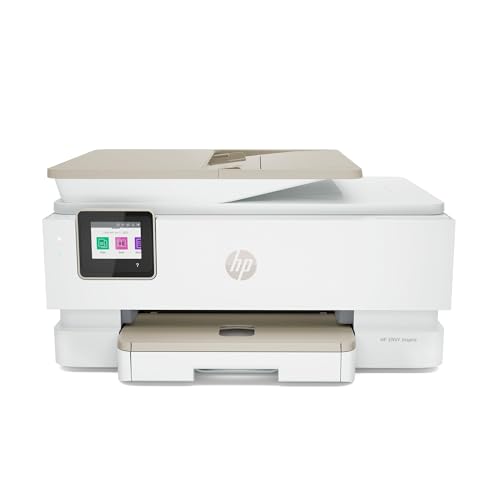
HP ENVY Inspire 7955e All-in-One Printer
An all in one designed to print school documents on Monday and 5 by 7 photos on Saturday without swapping anything. It has a dedicated photo tray so glossy paper stays loaded alongside plain paper. Owners report it is the practical choice when one printer has to serve a whole household rather than a photography hobby.
Pros
- Separate photo tray avoids constant paper swapping
- Covers documents and photos in one machine
- Compact for an all in one
Cons
- Four ink output cannot match six or eight ink photo printers
- Ink subscription prompts during setup annoy some owners

Fujifilm INSTAX Link WIDE Smartphone Printer
This prints your phone photos onto genuine INSTAX Wide instant film, which gives a physical, slightly analogue result that no inkjet reproduces. The wide format is roughly twice the area of standard INSTAX mini prints. Owners report it is the one to pick when the print itself is meant to be the keepsake rather than a faithful reproduction.
Pros
- Genuine instant film look and feel
- Wide frame suits group shots
- Runs entirely from a phone with no computer
Cons
- Film cost per shot is high over time
- Colour accuracy is characterful rather than faithful

HP Sprocket Portable 2×3 Instant Photo Printer
A pocket printer that uses inkless ZINK paper, so there are no cartridges to buy or dry out, just packs of sticky backed sheets. Prints are small at 2 by 3 inches and come out peel and stick. Owners report it is best understood as a fun sticker maker rather than a photo printer, and it is very good at that job.
Pros
- No ink or cartridges to manage
- Prints are stickers straight out of the slot
- Genuinely pocketable
Cons
- Small print size limits what it suits
- Colour and detail fall well short of a real photo printer
How to pick the right one
Decide your maximum print size first Everything else follows from this. If your prints go into albums or get handed out, a postcard sized dye sublimation printer gives better results with less fuss than any inkjet. If you frame prints on a wall, you need at least a 13 inch wide inkjet, and nothing smaller will do. Buying a small printer and hoping to enlarge later is the most common regret, because these formats are not interchangeable.
Understand the ink systems Dye sublimation uses a ribbon and paper matched in one pack, so cost per print is fixed and predictable. Cartridge inkjets have low entry cost and high ongoing cost. Supertank printers reverse that, costing more initially and far less per print. Instant film and ZINK printers have no ink at all but the highest per print cost of the group. Work out roughly how many prints per month you expect before choosing.
Clogging is the hidden inkjet issue Inkjet print heads dry out when unused, and photo inkjets with six or eight inks have more nozzles to lose. If you print in occasional bursts rather than weekly, expect to run cleaning cycles that consume ink before you get a good print. Dye sublimation and ZINK printers have no nozzles at all, which is a real practical advantage for infrequent users, and worth weighing against their smaller output size.
Paper matters as much as the printer A capable printer on cheap paper produces flat, dull output, while a mid range printer on good lustre or baryta paper looks far better than people expect. Match paper to ink type, since dye and pigment inks are formulated for different coatings. Also check the paper path, because thick fine art stock needs a straight rear feed and will jam or scuff in a printer that only curves paper from a bottom cassette.
Compared at a glance
| # | Model | Print technology | Best for | Score | Price |
|---|---|---|---|---|---|
| 1 | Canon SELPHY CP1500 Wireless Compact Photo Printer | Dye sublimation with protective overcoat | Best overall | 9.4 | Check price |
| 2 | Canon PIXMA PRO-200 Wireless Professional Inkjet Photo Printer | Eight colour dye based inkjet | Best for large prints | 9.2 | Check price |
| 3 | Epson EcoTank Photo ET-8550 Wide-Format All-in-One Supertank Printer | Six colour Claria ET Premium ink | Best for running cost | 9.0 | Check price |
| 4 | Epson Expression Photo HD XP-15000 Wide-Format Printer | Six colour Claria Photo HD ink | Best value wide format | 8.8 | Check price |
| 5 | HP ENVY Inspire 7955e All-in-One Printer | Four colour thermal inkjet | Best for households | 8.5 | Check price |
| 6 | Fujifilm INSTAX Link WIDE Smartphone Printer | INSTAX Wide instant film | Best for instant film | 8.2 | Check price |
| 7 | HP Sprocket Portable 2×3 Instant Photo Printer | Inkless ZINK thermal paper | Best budget | 8.0 | Check price |
Good to know
Is dye sublimation better than inkjet for photos?
At small sizes, generally yes. Dye sublimation lays continuous tone colour and seals it, so prints are dry, water resistant and free of visible dot patterns. The limitation is size, since consumer dye sublimation printers stop at postcard format. Above that, a multi ink inkjet is the only realistic option.
How long will home printed photos last?
That depends on ink, paper and display conditions far more than on the printer. Pigment inks on matched photo paper are rated for the longest life, dye inks somewhat less, and all prints fade faster in direct sunlight. Storing prints in an album rather than a sunny window makes the biggest single difference.
Do I need a computer to use these?
Not usually. Most current photo printers print directly from a phone app over Wi-Fi or Bluetooth, and several accept SD cards or USB drives directly. A computer still helps if you want to colour manage, crop precisely or use printer profiles for specific papers.
Why do my prints look different from my screen?
Screens emit light and paper reflects it, so a perfect match is not possible. Most of the gap comes from screen brightness being set too high and from no colour profile being applied. Turning screen brightness down and selecting the correct paper type in the print dialogue closes most of the difference.
Are supertank printers worth the higher upfront cost?
If you print regularly, yes, because the cost per page drops sharply once the initial bottles are in. If you print a handful of photos a few times a year, a cartridge printer or a dye sublimation model makes more sense, and you avoid ink sitting unused.
Can a photo printer also print documents?
All in one inkjets like the HP ENVY Inspire and the Epson EcoTank do both well. Dedicated photo printers such as the SELPHY cannot print plain paper at all. If one machine has to cover homework and holiday photos, choose an all in one with a separate photo tray.
What size photo paper should I buy?
Match it to the printer and to how you display prints. Four by six inches suits albums and dye sublimation printers, five by seven and eight by ten suit frames, and 13 inch wide stock is for wall display. Buy small packs of a few surfaces first, since glossy, lustre and matte look very different with the same file.
Do portable printers produce real photo quality?
No, and it helps to expect that. ZINK and instant film printers trade resolution and colour accuracy for convenience and a physical, tactile print. They are excellent for stickers, scrapbooks and gifts, but a dedicated photo printer is a different class of output.
The bottom line
The Canon SELPHY CP1500 is the photo printer most people should buy, because dye sublimation gives consistent, dry, water resistant prints without the clogging and cleaning cycles that plague occasional inkjet users. If you frame your work, the Canon PIXMA PRO-200 is the one worth the space and expense, and the Epson EcoTank ET-8550 is the smarter choice when volume rather than absolute quality drives the decision.