Portable Hard Drives Compared by Speed and Toughness
Samsung’s T7 Shield leads on speed and drop resistance, WD’s My Passport packs the most storage per dollar, and SanDisk’s Extreme Portable suits gamers loading titles fast. Whether raw capacity, transfer speed, or physical durability matters most decides which of these seven drives fits your setup.
Samsung’s T7 Shield reads at up to 1050MB/s and survives 3 meter drops, making it the pick for anyone who needs both speed and toughness in one drive. WD’s My Passport costs less per terabyte but caps out near 130MB/s since it spins a physical platter. Video editors and gamers should lean toward NVMe based SSDs instead of spinning disks.
Portable drives split into spinning platters, which pack more capacity per dollar, and solid state drives, which trade some capacity for speed and shock resistance. Rated transfer speeds, drop ratings, included cables, and format compatibility separate one drive from another more than brand name does. We compared those specs across seven current models to match drives to specific workflows.
What we recommend
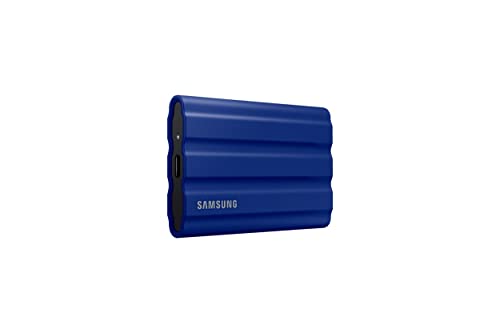
Samsung T7 Shield 2TB Portable SSD
Samsung rates this NVMe based SSD at 1050MB/s read speed with an IP65 rating against dust and water. A rubberized shell survives 3 meter drops onto concrete, per the listing. The aluminum core body weighs under 100 grams.
Pros
- No moving parts to fail from drops
- IP65 rating blocks dust and resists water
- Small enough for a jacket pocket
Cons
- Costs more per terabyte than spinning disks
- Tops out at 4TB capacity

WD My Passport 4TB
Western Digital fits a spinning platter into this drive, delivering 4TB at a lower cost per gigabyte than any SSD here. WD Backup software handles scheduled backups alongside 256-bit AES hardware encryption. Transfer speeds hover near 130MB/s, enough for photo and document backup.
Pros
- Lowest cost per terabyte in this roundup
- Hardware encryption built in
- Capacity options span 1TB to 6TB
Cons
- Spinning disk handles drops worse than SSDs
- Large file transfers lag behind SSD alternatives

SanDisk Extreme Portable SSD 2TB
SanDisk rates this drive at 1050MB/s with an IP65 rating, a common pick for storing PS5 and Xbox game libraries externally. A carabiner loop clips onto a backpack for travel. Its bundled USB-C to USB-A cable covers modern laptops and older ports alike.
Pros
- Fast enough for external game installs
- Weighs just 41 grams
- AES 128-bit password protection included
Cons
- Console read speeds get capped by the console itself
- Capacity maxes out at 2TB

Seagate Portable 5TB External Hard Drive
Seagate squeezes 5TB into a slim spinning-disk enclosure built for archiving video footage or large photo catalogs. Reformatting lets it work with both Windows and Mac. A two-year rescue data recovery plan comes included with purchase.
Pros
- High capacity suits archiving raw footage
- Data recovery plan included
- Slim profile fits a laptop bag pocket
Cons
- No hardware encryption included
- Spinning disk noise is audible in quiet rooms

Crucial X9 Pro 1TB Portable SSD
Crucial’s X9 Pro hits 1050MB/s read speeds inside an aluminum unibody rated IP55 for dust and splash resistance. It targets buyers wanting SSD speed without paying for top capacities. A pocket sized, 100 gram body travels easily alongside a laptop.
Pros
- SSD speed at a lower cost than premium brands
- Aluminum body resists dings
- Works across Mac, Windows, Android, and consoles
Cons
- IP55 resistance trails the T7 Shield’s IP65
- Only ships in 1TB and 2TB capacities

LaCie Rugged Mini 2TB
LaCie’s orange rubber bumper withstands 1.2 meter drops and 1 ton of crush pressure, per the brand’s testing claims. A spinning disk inside keeps cost down for field technicians and location photographers. USB 3.0 connectivity keeps compatibility broad across older computers.
Pros
- Distinctive rugged build suited to field use
- Reasonable cost for the durability offered
- Works with both older and newer computers
Cons
- Spinning disk trails SSD options here on speed
- Bulkier than SSD alternatives

Toshiba Canvio Advance 2TB
Toshiba’s Canvio Advance skips extra features for straightforward plug and play backup at a low price point. NTI Backup Now EZ software handles scheduled Windows backups. Its slim, light design tosses into a bag without needing a case.
Pros
- Low cost for a name brand drive
- Setup takes no learning curve
- Compact and lightweight
Cons
- No password protection or encryption software
- Formatted for Windows, needs reformatting for Mac
Before you buy
SSD vs spinning disk: what actually differs Solid state drives store data on flash memory with no moving parts, so they survive drops and transfer files faster. Spinning hard disk drives pack more capacity per dollar but run slower and more fragile. Editors and gamers tend to favor SSD speed, while archivists chase spinning disk capacity.
How much capacity your files actually need RAW photo shooters often burn through 2TB or more within a year of active work. Gamers loading current titles benefit from at least 1TB set aside just for installs. A household backing up documents and photos usually fits comfortably on 1TB to 2TB.
Why drop and water resistance matters for travel Field photographers and outdoor workers should look for an IP65 rating or better, which blocks dust entirely and resists water jets. A rubberized bumper case adds shock absorption beyond what the drive’s internal rating covers. Desk bound users can skip this feature and put that budget toward capacity instead.
Connecting a portable drive to consoles and older PCs PS5 and Xbox Series X both support USB 3.0 external drives for storing games, though titles still load fastest from internal storage. Older laptops with only USB-A ports need a drive that ships with a USB-A cable, not just USB-C. Checking the included cable beats assuming compatibility.
Side by side
| # | Model | Interface | Best for | Score | Price |
|---|---|---|---|---|---|
| 1 | Samsung T7 Shield 2TB Portable SSD | USB 3.2 Gen 2 | Best overall | 9.4 | Check price |
| 2 | WD My Passport 4TB | USB 3.0 | Best value | 9.0 | Check price |
| 3 | SanDisk Extreme Portable SSD 2TB | USB 3.2 Gen 2 | Best for gaming | 8.9 | Check price |
| 4 | Seagate Portable 5TB External Hard Drive | USB 3.0 | Best for large media libraries | 8.6 | Check price |
| 5 | Crucial X9 Pro 1TB Portable SSD | USB 3.2 Gen 2 | Best budget SSD | 8.4 | Check price |
| 6 | LaCie Rugged Mini 2TB | USB 3.0 | Best for outdoor and field work | 8.3 | Check price |
| 7 | Toshiba Canvio Advance 2TB | USB 3.2 Gen 1 | Best for simple backup | 8.0 | Check price |
Good to know
How much storage do I need on a portable hard drive?
Casual backup users are fine with 1TB to 2TB, while video editors and photographers working in RAW should look at 4TB or more.
Are portable SSDs worth the extra cost over hard disk drives?
Yes for speed and drop resistance, no if cheap bulk storage for infrequent backups is all you need.
Can I use a portable hard drive with a PS5 or Xbox?
Yes, both consoles support USB external drives for storing games, though internal SSD storage still loads games faster.
What is the difference between USB 3.0 and USB 3.2 Gen 2?
USB 3.2 Gen 2 roughly doubles the maximum transfer speed of USB 3.0, which matters most for large video files.
Do portable SSDs need to be reformatted for Mac?
Most ship formatted in exFAT or NTFS for Windows, but exFAT already works on Mac without reformatting.
How long do portable hard drives typically last?
Spinning disk drives commonly last three to five years with regular use, while SSDs often outlast them since they have no moving parts.
Is a rugged drive necessary for everyday desk use?
No, drop resistance mainly matters for travel, fieldwork, or households with kids and pets near the desk.
Can a portable drive fail without warning?
Yes, any drive can fail, so keeping a second backup of important files remains good practice regardless of drive quality.
Which portable drive works best for gaming?
SanDisk’s Extreme Portable SSD and Samsung’s T7 Shield both hit 1050MB/s, fast enough for external game installs on PS5, Xbox, or PC.
The verdict
Anyone who wants dependable everyday backup should get the WD My Passport 4TB for its low cost per terabyte. Editors, gamers, and field workers should spend more on the Samsung T7 Shield for its speed and IP65 protection. Skip the Toshiba Canvio Advance if encryption matters, since it ships without any password protection software.



