Top Portable Optical Drives for Movies, Backups, and More
The LG BP65NB46 is our top pick for most users because it combines 6x Blu-ray writing, a slim design, and reliable performance at a reasonable price. Its main limitation is that it lacks 4K UHD Blu-ray playback support. For those who only need DVD capabilities, the Pioneer DVR-XD12D is a compact and affordable choice.
A portable optical drive is a handy companion for a laptop that lacks a built-in drive, or for anyone needing to read or write CDs, DVDs, or Blu-ray discs on the go. Whether you’re ripping a music collection, burning a backup, or watching a movie, a reliable external drive can save the day.
We compared seven of the most popular models currently available on Amazon. Our analysis focuses on real-world usability, speed, and durability, helping you choose the right drive for your specific needs.
Our top picks
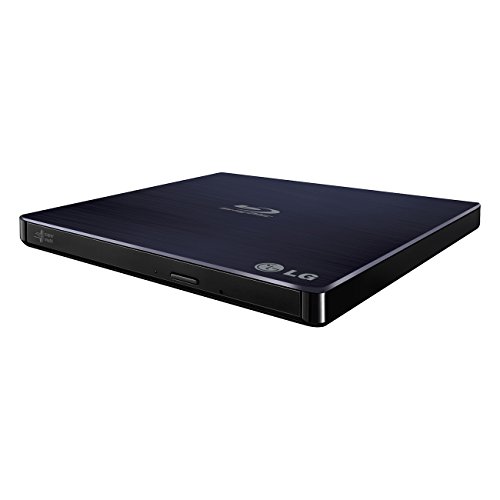
LG BP65NB46
The LG BP65NB46 is a slim, bus-powered external Blu-ray drive that writes to BD-R at 6x speed and reads 3D Blu-ray discs. It supports M-DISC for archival burning and includes CyberLink Media Suite software. Users appreciate its plug-and-play simplicity and sturdy build, though some note that it requires a Y-cable on older USB ports.
Pros
- Fast 6x Blu-ray writing
- M-DISC support for long-term archival
- Includes CyberLink software for playback and burning
Cons
- Does not support 4K UHD Blu-ray playback
- Requires Y-cable for some USB 2.0 ports
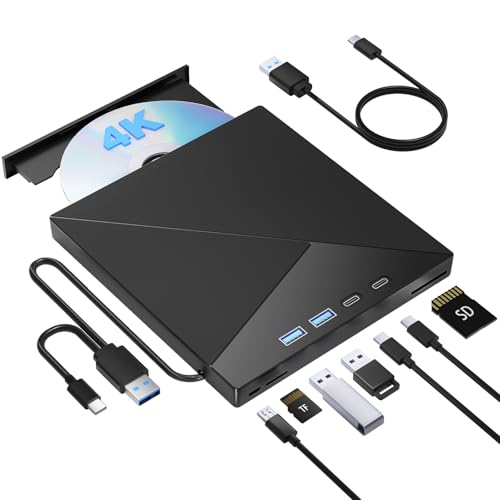
Pioneer BDR-XD07B
The Pioneer BDR-XD07B is a top-tier portable Blu-ray burner with a sleek aluminum design and USB 3.1 Gen 1 (USB-C) connectivity. It offers 6x BD-R write speed and includes Pioneer’s proprietary software for disc quality check. Owners praise its quiet operation and reliable burning, but it comes at a higher price.
Pros
- USB-C connection with included adapter
- Aluminum body for durability and heat dissipation
- Quiet operation during burning
Cons
- More expensive than similar models
- Software bundle is basic

ASUS ZenDrive U9M
The ASUS ZenDrive U9M is an ultra-slim DVD writer that is perfect for travel. It features a stylish design with a matte finish and includes Nero BackItUp software. The drive supports M-DISC and has a quick auto-standby mode to save power. Users note that it is very lightweight and works well with Mac and Windows.
Pros
- Extremely slim and lightweight
- Auto-standby saves power
- Includes Nero BackItUp for data backup
Cons
- USB 2.0, not USB 3.0
- No Blu-ray support

LG WP50NB40
The LG WP50NB40 is an affordable and reliable external DVD writer that connects via USB 2.0. It is compatible with both Windows and Mac, and supports M-DISC. This drive is a no-frills option for those who simply need to read or burn CDs and DVDs occasionally. It is compact and easy to carry.
Pros
- Very affordable
- Plug and play, no software needed for basic burning
- M-DISC support
Cons
- USB 2.0 limits speed
- Build quality feels less premium
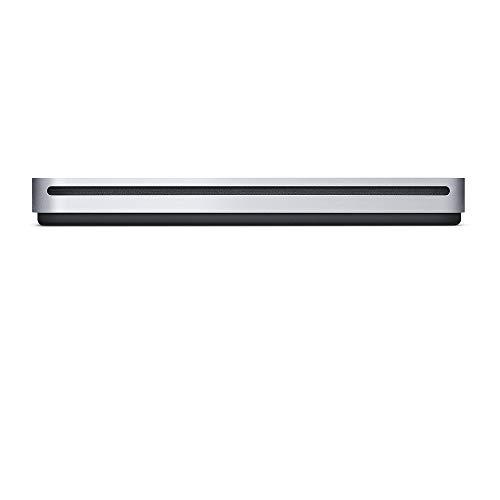
Apple USB SuperDrive
The Apple USB SuperDrive is designed specifically for Macs with USB-A ports. It is a slim DVD burner that works seamlessly with macOS and iTunes. The drive is compact and quiet, but it does not support Blu-ray and requires a separate USB-C adapter for newer Macs. Many Mac users appreciate its integration and reliability.
Pros
- Optimized for macOS
- Plug and play with Macs
- Compact and quiet design
Cons
- Requires USB-C adapter for newer Macs
- No Blu-ray support

Buffalo MediaStation BDXL
The Buffalo MediaStation BDXL is an external Blu-ray writer that supports BDXL discs up to 128GB, making it ideal for large backups. It features USB 3.0 connectivity and comes with a vertical stand. The drive is compatible with Windows and Mac (with software). Owners note that it is a bit bulky but performs well.
Pros
- Supports BDXL for high-capacity archival
- USB 3.0 for faster data transfer
- Includes vertical stand to save desk space
Cons
- Bulky design
- Software bundle may not be Mac compatible

Pioneer BDR-XS07S
The Pioneer BDR-XS07S is a portable Blu-ray drive with a built-in USB-C connector, making it super convenient for modern laptops. It offers 6x BD-R write speed and a stylish design with a soft-touch finish. It supports M-DISC and includes Power2Go software. Users appreciate its compact size and reliable performance.
Pros
- Integrated USB-C cable, no adapter needed
- Ultra-slim and lightweight
- Fast Blu-ray writing
Cons
- Cable is short
- Slightly pricey
The lineup, side by side
| # | Model | Form Factor | Best for | Score | Price |
|---|---|---|---|---|---|
| 1 | LG BP65NB46 | Slim external | Best Overall Blu-ray Writer | 9.4 | Check price |
| 2 | Pioneer BDR-XD07B | Slim external aluminum | Best Premium Portable Blu-ray Burner | 9.2 | Check price |
| 3 | ASUS ZenDrive U9M | Ultra-slim | Best Slim DVD Writer for Travel | 8.9 | Check price |
| 4 | LG WP50NB40 | Slim | Best Budget DVD Drive | 8.7 | Check price |
| 5 | Apple USB SuperDrive | Slim | Best for Mac Users | 8.5 | Check price |
| 6 | Buffalo MediaStation BDXL | Slim external with stand | Best for Archiving with BDXL Support | 8.8 | Check price |
| 7 | Pioneer BDR-XS07S | Ultra-slim | Best USB-C Convenience with Blu-ray | 8.9 | Check price |
What to look for
Good to know
Do all portable optical drives work with laptops that have no CD drive?
Yes, portable optical drives connect via USB and do not require an internal bay. They are designed to be used with any computer that has a USB port, including laptops without built-in drives.
Can I use a portable Blu-ray drive to watch 4K UHD movies?
Most portable Blu-ray drives do not support 4K UHD playback because it requires specific hardware and software (like PowerDVD with compatible drive). If you need 4K playback, you must look for a drive that explicitly states 4K UHD support, which is rare in portable models.
Is it better to get a DVD drive or a Blu-ray drive?
It depends on your needs. If you only have CDs and DVDs, a DVD drive is more affordable and sufficient. If you want to watch or burn Blu-ray discs, you need a Blu-ray drive. Blu-ray drives are backward compatible with DVDs and CDs.
How do I power a portable optical drive?
Most portable optical drives are bus-powered, meaning they draw power from the USB connection. However, some drives (especially Blu-ray burners) may require an external power adapter or a Y-cable that plugs into two USB ports to supply enough power.
Can I use a portable optical drive with a tablet or smartphone?
Generally, no. Tablets and smartphones may not have the necessary drivers or power output to support external optical drives. Some Android devices with USB-OTG might work, but it is not guaranteed. It is best to use a drive with a computer.
What is M-DISC and why is it important?
M-DISC is a type of optical disc that uses a special recording layer that is more stable and resistant to degradation. It is designed for long-term data preservation, with a lifespan of up to 1000 years. If you want to archive important files, look for a drive that supports M-DISC.
Do I need to install software to use a portable optical drive?
For basic reading of discs, most operating systems (Windows and macOS) have built-in drivers that allow plug-and-play. For writing (burning) discs, you may need software. Some drives include a software suite, or you can use free tools like Windows Disc Image Burner or macOS Disk Utility.
Are portable optical drives compatible with USB-C only laptops?
Many drives come with USB-A connectors, so you will need a USB-C to USB-A adapter or hub. Some newer drives, like the Pioneer BDR-XS07S, have integrated USB-C cables. Always check the interface before buying.
Can I rip music CDs with a portable drive?
Yes, you can rip audio CDs to MP3 or other formats using software like iTunes or Windows Media Player. The drive reads the disc and the software extracts the audio tracks.
What is the difference between read and write speeds?
Read speed is how fast the drive reads data from a disc, while write speed is how fast it burns data to a disc. Higher speeds mean less waiting time. For example, a 24x CD-R write speed is faster than 8x. Typical speeds are often listed as multiples of the original CD or DVD speed.
Our pick
For most users, the LG BP65NB46 offers the best balance of performance, features, and price. It handles Blu-ray burning, supports M-DISC, and is easy to carry. If you only need DVD functionality and want to save money, the LG WP50NB40 is an excellent choice. For Mac users, the Apple USB SuperDrive is the most seamless option, but remember it lacks Blu-ray support and may need an adapter. If you work with large archives and require BDXL capacity, the Buffalo MediaStation BDXL is the way to go, but it is bulkier. Ultimately, prioritize the disc types you need and the connectivity your computer offers.