Premium All in One PCs That Blend Power and Style
The Apple iMac 24 inch M3 is the top pick for most users because it combines a stunning 4.5K Retina display with the M3 chip’s fast performance in a slim, colorful design. Its main limitation is the limited port selection and the need for adapters for some peripherals.
Premium all in one computers have evolved far beyond basic desktops. They now pack powerful processors, stunning displays, and sleek designs that save space while boosting productivity.
Choosing the right model depends on your priorities: creative work demands color accuracy and graphics power, while general use may favor a balance of speed and price. We analyzed specifications and owner feedback to help you decide.
What to look for
The top picks, ranked

Apple iMac 24 inch M3
The iMac 24 inch with M3 chip offers a 4.5K Retina display that makes text and images crisp. Its 8 core CPU and 10 core GPU handle photo editing and light video work smoothly. The slim aluminum design comes in seven colors. Owners appreciate the quiet operation and the quality of the built in speakers and microphone.
Pros
- Stunning 4.5K display with true color
- Fast performance for everyday tasks
- Elegant, space saving design
Cons
- Limited ports (only 2 Thunderbolt on base model)
- Not user upgradable

Microsoft Surface Studio 2+
The Surface Studio 2+ features an adjustable 28 inch PixelSense display that folds into a studio mode. The dedicated NVIDIA RTX 3060 GPU accelerates rendering and 3D modeling. The zero gravity hinge allows smooth transition from desktop to canvas. It comes with the Surface Pen and dial support, making it ideal for digital artists.
Pros
- Exceptional touch and pen experience
- Powerful RTX graphics
- Unique versatile hinge
Cons
- Very expensive
- Older processor compared to competitors

Dell XPS 8950 All in One
The Dell XPS 8950 is a 27 inch all in one that packs desktop hardware. Options include Intel Core i9 processors and NVIDIA RTX graphics. It has ample storage and memory capacity, and the tool less design allows easy access for future upgrades. The 4K display supports HDR and covers 100 percent sRGB.
Pros
- Powerful and upgradeable
- Excellent 4K display
- Many configuration options
Cons
- Bulkier design
- Fans can be audible under load
HP Envy 34 All in One
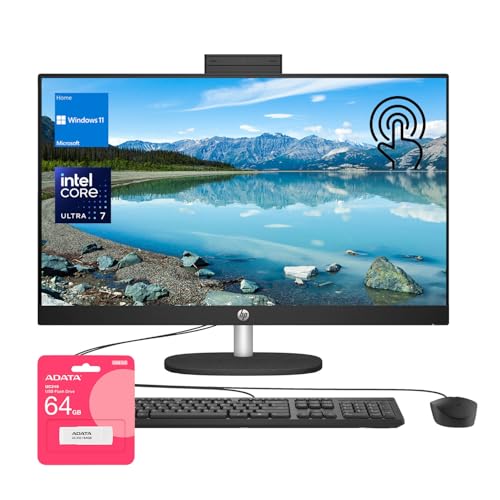
The HP Envy 34 features a 34 inch curved WUHD display with a 21:9 aspect ratio. It offers immersive space for multiple windows and creative timelines. Powered by Intel Core i7 processors and up to NVIDIA GeForce RTX 3060 graphics, it handles demanding tasks. The integrated 5MP camera includes privacy shutter and auto framing.
Pros
- Immersive ultrawide display
- Great for productivity and media
- Integrated pop up camera
Cons
- Large footprint
- Heavier than typical AIOs

ASUS ProArt PA90 All in One
The ASUS ProArt PA90 is designed for creative professionals. It features a 27 inch 4K UHD display with Pantone validation and Delta E < 2 for precise colors. The Intel Core i7 processor and NVIDIA Quadro graphics ensure reliable performance in design and engineering software. The compact design includes a handle for easy movement.
Pros
- Superb color accuracy out of the box
- Professional graphics card
- Compact and portable
Cons
- Older processor
- Limited storage capacity

Lenovo Yoga AIO 9i
The Lenovo Yoga AIO 9i has a 31.5 inch 4K touchscreen that can be rotated into portrait mode. This flexibility is great for presentations and collaborative work. Powered by Intel Core i9 and NVIDIA GeForce RTX 3050, it can handle photo and video editing. The built in wireless charging pad and hidden webcam add convenience.
Pros
- Large 4K touch display with rotation
- Powerful specs for its class
- Convenient wireless charging
Cons
- Display covers do not fully remove
- Limited upgradeability
MSI Modern AM242TP All in One
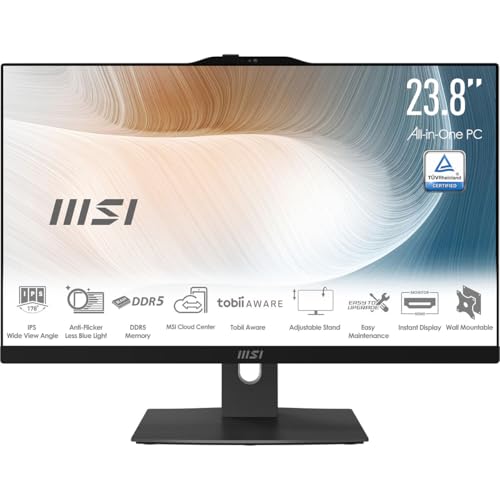
The MSI Modern AM242TP is a 23.8 inch all in one that fits well in professional settings. It offers a FHD IPS display with narrow bezels and an integrated webcam with IR for Windows Hello. The Intel Core i7 processor and 16GB RAM deliver smooth performance for office applications. The stand allows height and tilt adjustments for ergonomic comfort.
Pros
- Space saving design
- Good for office tasks
- Adjustable stand
Cons
- Lower resolution display
- Integrated graphics only
How they stack up
| # | Model | Processor | Best for | Score | Price |
|---|---|---|---|---|---|
| 1 | Apple iMac 24 inch M3 | Apple M3 chip with 8 core CPU | Everyday users who value a brilliant display and seamless performance | 9.4 | Check price |
| 2 | Microsoft Surface Studio 2+ | Intel Core i7 11370H | Creative professionals needing precise touch and pen input | 9.1 | Check price |
| 3 | Dell XPS 8950 All in One | Up to Intel Core i9 13900K | Users who want desktop level performance and upgrade options | 8.9 | Check price |
| 4 | HP Envy 34 All in One | Intel Core i7 12700 | Multitaskers who enjoy an ultrawide curved screen | 8.7 | Check price |
| 5 | ASUS ProArt PA90 All in One | Intel Core i7 9700K | Professionals who need factory calibrated color accuracy | 8.5 | Check price |
| 6 | Lenovo Yoga AIO 9i | Intel Core i9 12900H | Families and offices that need a versatile touchscreen AIO | 8.3 | Check price |
| 7 | MSI Modern AM242TP All in One | Intel Core i7 1255U | Business users who need a reliable and clean looking AIO | 8.0 | Check price |
Frequently asked questions
What is a premium all in one computer?
A premium all in one combines the computer components and monitor into one unit, but with higher quality parts and design compared to budget models. They feature faster processors, better displays, and more refined aesthetics.
Are all in one computers good for gaming?
Some premium AIOs include discrete graphics cards like NVIDIA RTX 3060, which can handle many games at high settings. However, they are not as powerful as high end gaming desktops, and upgradeability is limited.
Can I upgrade the RAM or storage in an all in one?
It depends on the model. Some Windows AIOs like the Dell XPS 8950 allow user access to RAM and storage. Others, especially Apple’s, have soldered components and are not user upgradable. Check the specifications before buying.
How do I clean and maintain my all in one?
Use a soft, dry microfiber cloth to wipe the screen and exterior. Avoid harsh chemicals. Ensure proper ventilation around the device. Periodically update software and drivers for optimal performance.
What is the lifespan of a premium all in one?
With regular use, a high quality AIO can last 5 to 7 years. The lifespan depends on the component quality and whether you keep software updated. Over time, you may want more RAM or storage, but that is not always possible.
Are all in ones good for video editing?
Yes, many premium AIOs are suitable for video editing. Look for models with powerful multi core processors, dedicated graphics, and high resolution color accurate displays. The Apple iMac and Surface Studio are popular choices among editors.
Do all in ones come with a warranty?
Yes, most come with at least a one year limited warranty. Some brands offer additional coverage options or extended warranties. Always check the warranty terms before purchase.
Can I use an all in one as a monitor for another device?
Some AIOs have video inputs (HDMI or DisplayPort) that allow them to be used as external monitors. However, this feature is not universal. Check the specifications if this is important to you.
What is the difference between a touch and non touch display?
Touch displays allow direct interaction with the screen using fingers or a stylus. This can be useful for creative work and navigation. Non touch displays are typically less expensive and may have better color accuracy for some users.
How much RAM do I need in a premium all in one?
For general use, 8GB is the minimum, but 16GB is recommended for smooth multitasking. For heavy creative workloads like video editing or 3D modeling, 32GB or more is advised.
The bottom line
For most people, the Apple iMac 24 inch M3 delivers the best combination of performance, display quality, and elegance. If you need a Windows machine with upgrade options, the Dell XPS 8950 is a solid choice. Creative professionals should invest in the Surface Studio 2+ for its unique touch and pen experience.



