Premium Electronic Learning Toys That Grow With Your Child
The LeapFrog LeapStart 3D stands out as the top premium pick for its interactive book system that adapts to your child’s level, offering a vast library of activities that grow from preschool to first grade, but it requires additional books for full content.
Premium electronic learning toys promise more than just entertainment; they deliver educational value through interactive play. But with so many options, choosing the right one for your child can feel overwhelming.
We compared the most popular premium models on the market, looking at features, durability, and what parents actually say. Our goal is to help you find a toy that engages, teaches, and lasts.
What we recommend

LeapFrog LeapStart 3D Interactive Learning System
This interactive book system uses a stylus to trigger audio and animations on each page. It covers reading, math, science, and more, with 3D effects that enhance engagement. The system includes a sampler book, but additional books are sold separately, offering a vast library for ages 2-7.
Pros
- Adaptive learning adjusts to child’s level
- Huge library of books and activities
- Durable design withstands rough handling
Cons
- Requires additional books for full experience
- Audio can be low if not pressed firmly

VTech KidiZoom Smartwatch DX2
A durable smartwatch for kids that includes a camera, voice recorder, and games. It offers educational challenges, a pedometer, and customizable watch faces. The touch screen is responsive, and it includes a USB cable for charging.
Pros
- Encourages physical activity with step counter
- Multiple games and learning apps
- Parental controls for camera and sound
Cons
- Screen is small for some kids
- Charging cable is short

Osmo Little Genius Starter Kit
This kit turns an iPad into an interactive learning tool using physical pieces. It includes four games that teach pre-reading, vocabulary, and problem solving. The child manipulates letters, shapes, and objects while the app responds in real time.
Pros
- Blends physical and digital play
- High-quality educational games
- Parents can track progress
Cons
- Requires an iPad (not included)
- Pieces can get lost easily

LeapFrog 2-in-1 LeapTop Touch
A laptop that transforms into a tablet with a touch screen. It features five learning modes that teach letters, numbers, music, and more. The keyboard is kid-friendly and the design is durable for little hands.
Pros
- Two-in-one design offers variety
- Easy to use for small fingers
- Volume control and mute option
Cons
- Sound quality is average
- Not as advanced as real tablets

VTech Touch and Learn Activity Desk Deluxe
This activity desk includes an interactive desktop, a stool, and five activity pages that can be flipped. It teaches letters, numbers, colors, and more with lights and sounds. The desk converts into an easel and chalkboard for additional creative play.
Pros
- Multiple activity pages keep it fresh
- Converts to easel for art
- Sturdy construction
Cons
- Stool may be low for taller kids
- Pages need to be attached carefully
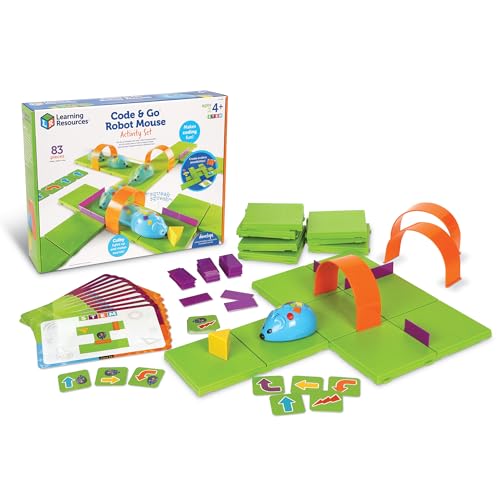
Fisher-Price Think & Learn Code-a-Pillar
This toy teaches sequencing and problem solving through coding. Kids arrange segments to make the caterpillar move, light up, and play sounds. It has over 1,000 possible combinations, encouraging experimentation.
Pros
- Introduces coding without screens
- Encourages trial and error
- Colorful and engaging
Cons
- Sounds can be repetitive
- Limited content beyond basic coding

LeapFrog Scoop & Learn Ice Cream Cart
This interactive ice cream cart lets kids take orders and serve customers while learning colors, numbers, and listening skills. It includes six scoops, two cones, and a scooper. The cart responds to actions with sounds and phrases.
Pros
- Encourages role-play and social skills
- Teaches numbers and colors through play
- Sturdy and well-made
Cons
- Cart is bulky and takes up space
- Audio might be too quiet in noisy rooms
How to pick the right one
How they compare
| # | Model | Age Range | Best for | Score | Price |
|---|---|---|---|---|---|
| 1 | LeapFrog LeapStart 3D Interactive Learning System | 2-7 years | Best for growing with your child through multiple grade levels | 9.4 | Check price |
| 2 | VTech KidiZoom Smartwatch DX2 | 4-9 years | Best for tech-savvy kids who love gadgets | 8.9 | Check price |
| 3 | Osmo Little Genius Starter Kit | 3-5 years | Best for hands-on learning with iPad | 9.1 | Check price |
| 4 | LeapFrog 2-in-1 LeapTop Touch | 2-4 years | Best for toddlers who love pretend laptops | 8.7 | Check price |
| 5 | VTech Touch and Learn Activity Desk Deluxe | 2-5 years | Best for multi-activity learning | 9.0 | Check price |
| 6 | Fisher-Price Think & Learn Code-a-Pillar | 3-6 years | Best for introducing coding basics | 8.8 | Check price |
| 7 | LeapFrog Scoop & Learn Ice Cream Cart | 2-5 years | Best for imaginative play with learning | 8.6 | Check price |
Questions worth asking
What age is appropriate for electronic learning toys?
Electronic learning toys are designed for various age groups, from infants to school-age children. Always check the manufacturer’s recommended age range. For babies, choose toys with sensory features like lights and sounds. For toddlers, interactive toys that teach basic concepts are ideal. For preschoolers, more complex toys that encourage problem solving are suitable.
Are premium electronic learning toys worth the extra cost?
Premium toys often have better build quality, more features, and a longer lifespan. They may offer a wider range of activities or grow with your child. If you value durability and educational depth, they can be worth the investment. However, some budget options are also effective, so consider your child’s interests and your budget.
How do I choose the right electronic learning toy for my child?
Consider your child’s age, interests, and developmental needs. Look for toys that align with the skills you want to encourage, such as language, math, or creativity. Read product descriptions and user reviews to gauge quality and engagement. Also, think about the toy’s longevity and whether it can adapt to your child’s growing abilities.
Can electronic learning toys replace traditional educational methods?
No, electronic toys should complement, not replace, hands-on learning and human interaction. They can be valuable tools for reinforcing concepts and engaging children, but they are not a substitute for reading together, playing outside, or other traditional learning experiences.
Are these toys safe for babies?
Many electronic learning toys are designed specifically for babies, with no small parts and safe materials. Always supervise infants during play. Check the age rating and follow safety guidelines. Avoid toys with cords or small detachable pieces that could pose a choking hazard.
How long do batteries last in these toys?
Battery life varies by toy and usage. Some toys have an auto-off feature to conserve battery, while others are power-hungry. Rechargeable options are more economical in the long run. User reviews often mention battery life, so it’s wise to check those before buying.
Can these toys be used without adult supervision?
Most electronic learning toys are designed for independent play, but younger children may need supervision to ensure safety and proper use. For older kids, they can play alone. Always follow the age recommendations and safety instructions.
What is the difference between premium and standard electronic learning toys?
Premium toys typically offer more advanced features, such as adaptive learning, higher-quality audio, and more durable construction. They may also cover a broader age range. Standard toys are usually simpler and less expensive, but they may not have the same educational depth or longevity.
Do these toys require an internet connection?
Most do not, but some, like the Osmo Starter Kit, require an iPad and internet for downloading apps. Check the product specifications to see if any connectivity is needed. Many toys are completely offline, which is great for travel and screen-free play.
How do I clean electronic learning toys?
Use a damp cloth to wipe the surfaces. Avoid submerging in water. For toys with fabric parts, remove and hand wash if possible. Always unplug or remove batteries before cleaning. Follow the manufacturer’s instructions for best results.
The bottom line
For most families, the LeapFrog LeapStart 3D is the best premium electronic learning toy because it offers the most extensive content library and adapts to your child’s progress, providing years of use. If your child is already using an iPad, the Osmo Little Genius Starter Kit is a close second for its innovative blend of physical and digital play. However, for a toddler’s first learning device, the LeapFrog 2-in-1 LeapTop Touch is a durable and engaging choice. Choose based on your child’s age and your preference for screen-based or screen-free interaction.