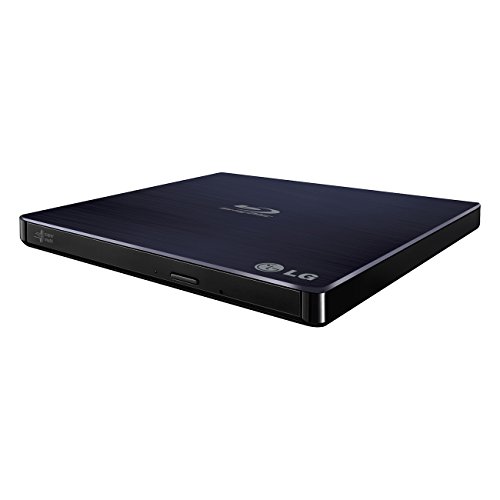
Premium External Hard Drives Worth Your Investment
For most professionals, the LaCie Rugged SSD Pro is the top choice because it combines Thunderbolt 3 speed, IP67 ruggedness, and generous capacity. Its main advantage is fast transfers in harsh conditions, but the premium price is its limitation.
When you need reliable storage for large files, creative projects, or backups, a premium external drive makes a difference. These drives offer faster speeds, better build quality, and longer warranties than budget options.
We looked at drives from LaCie, Samsung, SanDisk, G-Technology, and others. We considered real-world performance, durability ratings, and user feedback to help you choose.
How to pick the right one
What we recommend

LaCie Rugged SSD Pro
The LaCie Rugged SSD Pro is a Thunderbolt 3 SSD that delivers blazing fast transfers. It is IP67 rated, meaning it is dust tight and can survive immersion in water. Built with a rugged aluminum core, it can withstand drops from 3 meters. Owners report consistent performance even during long video editing sessions.
Pros
- Extremely fast data transfer
- Rugged and weatherproof design
- Five year limited warranty
Cons
- Premium price point
- Requires Thunderbolt 3 for full speed

Samsung T7 Shield
The Samsung T7 Shield is a portable SSD with an IP65 rating, protecting against dust and water jets. It has a rubberized exterior that absorbs shocks. It works with USB 3.2 Gen 2 and is backward compatible, making it versatile. Users appreciate its compact size and included USB-C to C and USB-C to A cables.
Pros
- Excellent shock and water resistance
- Works with PC, Mac, and mobile devices
- Slim and lightweight design
Cons
- Slower than Thunderbolt 3 drives
- Rubber coating may attract dust

SanDisk Extreme PRO Portable SSD
The SanDisk Extreme PRO offers fast NVMe performance in a pocket sized drive. It features a forged aluminum chassis and a carabiner loop for easy attachment. It is IP55 rated for dust and water resistance. The drive includes password protection with AES 256 bit hardware encryption.
Pros
- Very fast read and write speeds
- Rugged and stylish design
- Hardware encryption for security
Cons
- Can get warm during heavy use
- Requires USB 3.2 Gen 2×2 for max speed

G-Technology G-DRIVE Mobile SSD R-Series
The G-DRIVE Mobile SSD R-Series is designed with Mac users in mind, offering plug and play Time Machine support. It features a sleek aluminum enclosure that complements Apple products. It delivers sequential read speeds up to 560 MB/s via USB 3.1 Gen 2. It comes with a three year limited warranty.
Pros
- Time Machine ready out of the box
- Premium aluminum build
- Reliable performance for daily use
Cons
- Slower than NVMe based SSDs
- Limited to 2 TB capacity

LaCie d2 Professional
The LaCie d2 Professional is a desktop external hard drive designed for creative professionals. It offers massive storage capacity and a fast USB 3.1 interface. The drive features a robust aluminum enclosure with a built in stand. It is compatible with Time Machine and includes backup software.
Pros
- Large capacity options
- Tool free capacity expansion (additional drive)
- Durable metal design
Cons
- Bulky and heavy
- Requires external power supply
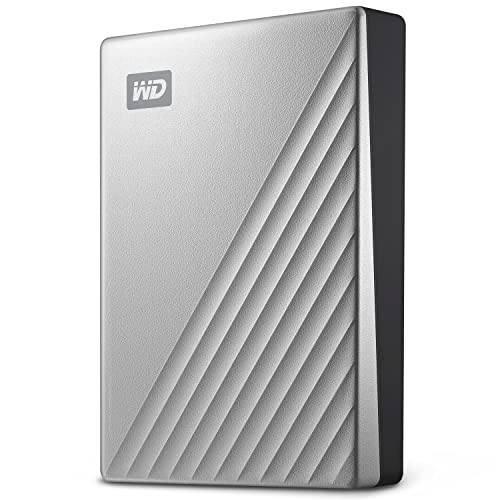
WD My Passport Ultra Metal Edition
The WD My Passport Ultra Metal Edition combines a sleek metal casing with reliable storage. It provides up to 2 TB of space and uses USB 3.0 for fast transfers. The drive includes WD Discovery software for backup and security. Its slim profile makes it easy to slip into a pocket or bag.
Pros
- Premium metal finish
- Compact and lightweight
- Hardware encryption built in
Cons
- Slower than SSD alternatives
- No USB-C cable included

SanDisk Desk Drive
The SanDisk Desk Drive is a high capacity SSD designed for desktop use. It offers up to 8 TB of storage, combining speed and capacity. With USB 3.2 Gen 2 interface, it delivers fast backup and file access. The drive has a vertical stand to save desk space.
Pros
- Huge capacity in an SSD
- Fast performance for a desktop drive
- Quiet and cool operation
Cons
- Expensive per GB
- Requires external power
How they stack up
| # | Model | Capacity | Best for | Score | Price |
|---|---|---|---|---|---|
| 1 | LaCie Rugged SSD Pro | 1 TB or 2 TB | Creative professionals needing speed and durability | 9.4 | Check price |
| 2 | Samsung T7 Shield | 1 TB, 2 TB, or 4 TB | Portable durability and broad compatibility | 9.2 | Check price |
| 3 | SanDisk Extreme PRO Portable SSD | 1 TB, 2 TB, or 4 TB | High speed in a compact form | 9.0 | Check price |
| 4 | G-Technology G-DRIVE Mobile SSD R-Series | 500 GB, 1 TB, or 2 TB | Mac users needing reliable performance | 8.8 | Check price |
| 5 | LaCie d2 Professional | 6 TB, 8 TB, 10 TB, or 12 TB | Desktop backup with high capacity | 8.6 | Check price |
| 6 | WD My Passport Ultra Metal Edition | 1 TB or 2 TB | Style and portability with hardware encryption | 8.4 | Check price |
| 7 | SanDisk Desk Drive | 4 TB or 8 TB | High capacity desktop SSD for professionals | 8.2 | Check price |
Questions worth asking
What is the difference between an SSD and an HDD?
SSDs use flash memory for storage, offering faster read and write speeds, lower power consumption, and better shock resistance. HDDs use spinning magnetic disks, which are cheaper per gigabyte and available in larger capacities, but are slower and more fragile.
Do I need Thunderbolt 3 for a premium external drive?
Only if you require the fastest possible transfer speeds, such as for 4K video editing. Thunderbolt 3 provides up to 40 Gbps, but many USB 3.2 drives offer sufficient speed for most users at a lower cost.
Are rugged external drives worth the extra cost?
If you travel frequently or work in demanding environments, yes. Rugged drives offer IP ratings, drop resistance, and often come with longer warranties. They provide peace of mind and can prevent data loss.
Can I use these drives with both Mac and Windows?
Most drives are formatted for one OS by default. To use with both, you may need to reformat to exFAT or use software. Some drives, like the LaCie d2, come with utilities for cross platform use.
How important is hardware encryption?
Hardware encryption is important if you store sensitive data. It protects your files without affecting performance. Many premium drives include AES 256 bit encryption, which is the industry standard.
What is the lifespan of an external SSD?
SSDs have no moving parts, so they are less likely to fail mechanically. Their lifespan is determined by write cycles. Most premium SSDs are rated for hundreds of terabytes written (TBW), which translates to years of typical use.
Can I run applications directly from an external drive?
Yes, you can, especially with a fast SSD. However, performance may be lower than an internal drive due to interface limitations. For best results, use a Thunderbolt or USB 3.2 Gen 2 drive.
What should I look for in a warranty?
A longer warranty indicates manufacturer confidence. Premium drives often come with three to five year limited warranties. Check what is covered, as some warranties exclude accidental damage.
Our pick
For most professionals, the LaCie Rugged SSD Pro offers the best combination of speed, durability, and capacity, making it our top pick. If you need a more affordable rugged option, the Samsung T7 Shield is excellent. For desktop use with massive storage, consider the LaCie d2 Professional. Choose based on your primary need: speed, portability, or capacity.