Top Premium Gaming PCs for Serious Gamers
For most premium buyers, the Alienware Aurora R16 stands out as the top pick. It pairs a clean, compact design with strong airflow and easy upgradeability, making it a safe choice for those who want a powerful machine without fuss. Its main advantage is the balance of performance and thermals in a smaller footprint. However, it carries a premium price for the brand name and proprietary parts, so you may pay more than for a comparable custom build.
Premium gaming PCs promise top-tier performance, but choosing one can be overwhelming. With so many configurations, you need to know which machines deliver on their promises. We compared seven leading models to help you make an informed decision.
Each pick below excels in a specific area, from raw power to silent operation. Whether you prioritize 4K gaming, content creation, or a sleek aesthetic, there is a system here for you.
The top picks, ranked

Alienware Aurora R16 Gaming Desktop
The Alienware Aurora R16 is a refined version of its predecessor, offering improved airflow and a more compact chassis. With an Intel Core i9 processor and NVIDIA GeForce RTX 4080, it handles 4K gaming and heavy multitasking with ease. Users report that the system runs cool and quiet under load, and the tool-less entry makes upgrades straightforward.
Pros
- Excellent thermal performance
- Easy to open and upgrade
- Strong 4K gaming capability
Cons
- Proprietary motherboard and PSU
- Premium price

Corsair Vengeance i7400 Gaming PC
The Corsair Vengeance i7400 offers a powerful combination of an Intel Core i7 and RTX 4070 Ti, making it ideal for smooth 1440p gaming at high frame rates. Its clean design includes tempered glass and RGB lighting. Owners note that cable management is tidy and the system runs quietly.
Pros
- Great price-to-performance ratio
- Quiet operation
- High-quality components
Cons
- Limited storage capacity
- Not as fast as RTX 4080 in 4K

MSI Aegis RS 13th Gen Gaming Desktop
Packing an Intel Core i9-13900K and liquid-cooled RTX 4090, the MSI Aegis RS is a beast for demanding games and creative work. The tool-free design allows easy component access, and the included software enables one-click overclocking. Some users report that the system can get loud under heavy load, but the performance is undeniable.
Pros
- Top-tier gaming performance
- Ample memory and storage
- Liquid cooling for CPU
Cons
- Can be noisy under load
- Very expensive

HP OMEN 45L Gaming Desktop
The HP OMEN 45L features a unique front intake design that keeps components cooler than many rivals. With an AMD Ryzen 7 and RTX 4070, it delivers solid 1440p performance. The transparent side panel shows off the interior, and the tool-less access simplifies upgrades.
Pros
- Superb cooling design
- Quiet under typical gaming
- Easy access to internals
Cons
- Bulky case
- Only 1TB storage

Lenovo Legion Tower 7i Gen 8
The Lenovo Legion Tower 7i is a well-rounded system with an Intel Core i9 and RTX 4080. It excels at gaming and streaming, thanks to its robust CPU and GPU combo. The case includes a glass side panel and ARGB lighting. Users appreciate the quiet operation and the array of USB ports.
Pros
- High memory capacity
- Powerful CPU and GPU
- Quiet fans
Cons
- Large footprint
- Premium price

Skytech Gaming Prism II Gaming Desktop
The Skytech Prism II offers an AMD Ryzen 7 and RTX 4070 Ti, making it a cost-effective way to enjoy 4K gaming with some settings adjustments. It comes with a 1TB NVMe SSD and 32GB of RAM. The case features four RGB fans and a tempered glass side. While the brand is less established, many users report great performance for the price.
Pros
- Competitive pricing
- Strong 4K performance for the price
- Attractive RGB design
Cons
- Less reputable brand
- May need additional fans for extreme loads
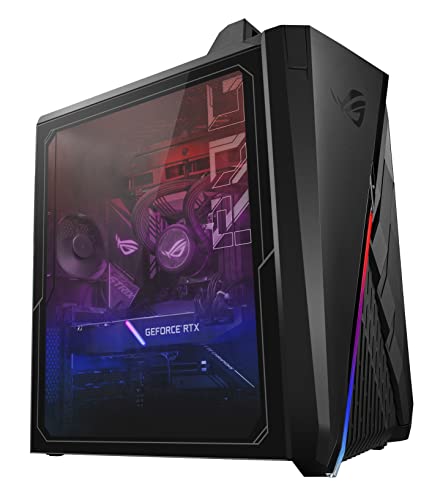
ASUS ROG Strix GA35 G35CG Gaming Desktop
The ASUS ROG Strix GA35 is built with AMD Ryzen 7 and an RTX 3070, focusing on high-refresh-rate gaming at 1080p and 1440p. It includes a 240mm liquid cooler and front panel USB Type-C. Owners report that the system is responsive and the software for overclocking is user-friendly.
Pros
- Excellent for competitive gaming
- Liquid cooling for CPU
- Compact design
Cons
- Older CPU and GPU
- Less memory for multitasking
What to look for
Compared at a glance
| # | Model | CPU | Best for | Score | Price |
|---|---|---|---|---|---|
| 1 | Alienware Aurora R16 Gaming Desktop | Intel Core i9-13900F | Best overall for balanced performance and upgradeability | 9.4 | Check price |
| 2 | Corsair Vengeance i7400 Gaming PC | Intel Core i7-13700K | Best for high-refresh-rate 1440p gaming | 9.2 | Check price |
| 3 | MSI Aegis RS 13th Gen Gaming Desktop | Intel Core i9-13900K | Best for raw performance and overclocking | 9.0 | Check price |
| 4 | HP OMEN 45L Gaming Desktop | AMD Ryzen 7 7700X | Best for airflow and cooling efficiency | 8.8 | Check price |
| 5 | Lenovo Legion Tower 7i Gen 8 | Intel Core i9-13900KF | Best for multitasking and productivity | 8.7 | Check price |
| 6 | Skytech Gaming Prism II Gaming Desktop | AMD Ryzen 7 7800X3D | Best for 4K gaming on a budget | 8.5 | Check price |
| 7 | ASUS ROG Strix GA35 G35CG Gaming Desktop | AMD Ryzen 7 5800X3D | Best for esports and high frame rates | 8.3 | Check price |
Common questions
What is the best CPU for a premium gaming PC in 2025?
The Intel Core i9-13900K and AMD Ryzen 7 7800X3D are top choices. The i9 is better for multitasking, while the Ryzen offers superior gaming performance per dollar.
How much RAM do I need for a premium gaming PC?
32GB is the sweet spot for gaming and streaming. Some systems offer 64GB, which is overkill for most but useful for heavy content creation.
Is an RTX 4070 Ti enough for 4K gaming?
Yes, but you may need to lower some settings for the most demanding titles. An RTX 4080 or 4090 provides a smoother 4K experience.
What is the difference between air cooling and liquid cooling?
Liquid cooling is more efficient at transferring heat, keeping temperatures lower. Air cooling is simpler and more reliable but may be louder under load.
Can I upgrade the GPU in a prebuilt gaming PC?
Mostly yes, but check the power supply wattage and physical space. Some proprietary systems may have limitations.
Are gaming PCs with DDR4 memory worth buying?
DDR4 is older but still capable. For a premium PC in 2025, DDR5 is recommended for future-proofing, but DDR4 won’t bottleneck current games significantly.
What is the best storage configuration?
A fast NVMe SSD of at least 1TB is essential for loading games quickly. Adding a secondary HDD or SSD for mass storage is common.
How long will a premium gaming PC last?
With a top-tier GPU and CPU, you can expect 4-5 years of high settings before needing an upgrade. The GPU is often the first component to become outdated.
Do I need a 4K monitor to take advantage of these PCs?
Not necessarily. Many gamers prefer high refresh rate 1440p monitors for competitive play. 4K is great for visual fidelity but requires a more powerful GPU.
What is the best value premium gaming PC?
The Corsair Vengeance i7400 offers excellent performance for its price, making it a top value pick for most gamers.
Our take
If you want the best all-around premium gaming PC, choose the Alienware Aurora R16. It offers balanced performance, good thermals, and upgradeability in a manageable size. For those who prioritize raw power and have a larger budget, the MSI Aegis RS with an RTX 4090 is the ultimate choice.