Top Premium Scanners for High-Volume and High-Resolution Needs
For serious document workflows, the Fujitsu fi-7160 stands out as the top premium document scanner, offering blazing speed and robust paper handling, but it is limited to letter-size paper. If you need both documents and photos, the Epson Perfection V850 Pro is a top choice for its dual-lens system and high optical resolution, though it is slower for batch work.
Premium scanners are an investment for professionals who need reliable, high-quality digitization. They offer faster speeds, better resolution, and more durable construction than budget models.
Whether you manage high volumes of documents, archive precious photos, or need to scan large blueprints, there is a premium scanner tailored to your task. Here are the top contenders.
How to choose
Our top picks
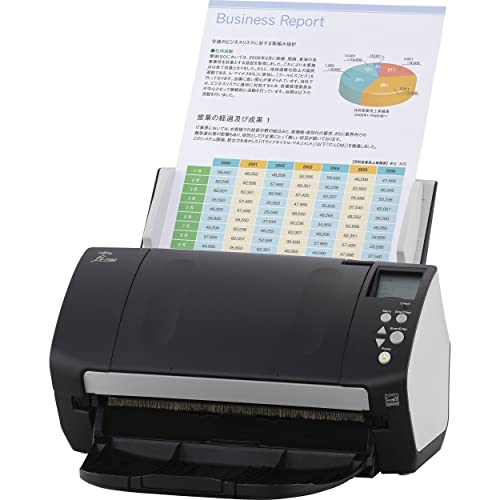
Fujitsu fi-7160
The Fujitsu fi-7160 is a workhorse document scanner built for busy offices. It scans up to 60 pages per minute and handles mixed batches with ultrasonic double-feed detection. Its reliable paper path minimizes jams, and the included software offers powerful OCR and cloud connectivity.
Pros
- Very fast scanning for large batches
- Excellent paper handling and durability
- Comprehensive software suite
Cons
- Limited to letter-size documents
- No built-in Wi-Fi on base model

Epson Perfection V850 Pro
The Epson Perfection V850 Pro is a flatbed scanner that delivers exceptional 6400 dpi optical resolution. Its dual-lens system captures fine details in photos and film, and the included holders support 35mm, 120, and 4×5 film formats. Professionals trust it for archival work.
Pros
- Crisp scans of photos and film
- Dual-lens system for sharpness
- Includes film holders and software
Cons
- Slow for document batches
- Large footprint on desk

Plustek OpticBook A300 Plus
The Plustek OpticBook A300 Plus is designed to scan books without damaging spines. Its book-edge scanner technology captures content close to the binding, and the flatbed design accommodates oversized pages up to A3. It is a favorite for libraries and digitization projects.
Pros
- Scans thick books with minimal curvature
- Large A3 scan area
- Book edge technology preserves margins
Cons
- Lower resolution than some premium models
- No automatic document feeder

Canon imageFORMULA DR-C225 II
The Canon imageFORMULA DR-C225 II is a compact document scanner that offers 25 ppm speed and a 30-sheet feeder. It includes advanced features like double-feed detection and can scan long pages up to 118 inches. Its small footprint fits on crowded desks.
Pros
- Compact and space saving
- Scans long documents
- Reliable feeding with ultrasonic detection
Cons
- Lower speed than larger models
- Smaller paper capacity

Brother ADS-3600W
The Brother ADS-3600W is a network-ready scanner with built-in Wi-Fi and Ethernet. It scans up to 50 pages per minute, has a 80-sheet ADF, and supports multiple users. Its touchscreen panel simplifies scanning to cloud services and network folders.
Pros
- Wireless connectivity for shared use
- Fast scanning speed
- Large paper capacity
Cons
- Heavier than desktop models
- Software setup can be complex

Fujitsu ScanSnap iX1400
The Fujitsu ScanSnap iX1400 is a streamlined scanner designed for one-touch scanning. It delivers 40 ppm and automatically detects document size and orientation. It includes a one-year subscription to ScanSnap Home for organizing scans, and it is ideal for users who want minimal fuss.
Pros
- Extremely easy operation with one button
- Fast enough for small offices
- Compact design
Cons
- No Wi-Fi on this model
- Limited advanced features

Epson WorkForce ES-500W
The Epson WorkForce ES-500W is a versatile scanner with a 50-sheet ADF, Wi-Fi connectivity, and a 4.3-inch touchscreen. It scans up to 35 ppm and supports cloud services like Dropbox and Google Drive. It is a solid choice for small businesses needing flexible scanning options.
Pros
- Touchscreen simplifies operation
- Wireless and cloud scanning
- High resolution for photos
Cons
- Slower than dedicated document scanners
- Feeder can struggle with thin paper
Compared at a glance
| # | Model | Scan Speed | Best for | Score | Price |
|---|---|---|---|---|---|
| 1 | Fujitsu fi-7160 | 60 ppm / 120 ipm | High-volume document scanning | 9.4 | Check price |
| 2 | Epson Perfection V850 Pro | 6400 dpi | High-resolution photo and film scanning | 9.2 | Check price |
| 3 | Plustek OpticBook A300 Plus | 600 dpi | Book and bound document scanning | 8.8 | Check price |
| 4 | Canon imageFORMULA DR-C225 II | 25 ppm / 50 ipm | Compact office document scanning | 8.6 | Check price |
| 5 | Brother ADS-3600W | 50 ppm / 100 ipm | Wireless network scanning | 8.5 | Check price |
| 6 | Fujitsu ScanSnap iX1400 | 40 ppm / 80 ipm | Simple home office use | 8.4 | Check price |
| 7 | Epson WorkForce ES-500W | 35 ppm / 70 ipm | Wireless scanning with duplex ADF | 8.3 | Check price |
Good to know
What is the difference between 600 dpi and 1200 dpi scanning?
600 dpi is sufficient for text documents and most business use. 1200 dpi captures more detail, making it better for photos and small originals. For film and high-quality prints, 2400 dpi or higher is recommended.
Do I need a flatbed scanner if I have a document scanner?
Flatbed scanners are better for scanning bound materials, photos, and fragile items. ADF scanners are faster for loose sheets but cannot handle books or thick items. Many users keep both types for different tasks.
What does ‘duplex scanning’ mean?
Duplex scanning means the scanner can capture both sides of a document in one pass. It uses two image sensors to avoid flipping the paper manually. This doubles your speed when scanning double-sided documents.
Can these scanners handle long documents like receipts or blueprints?
Some scanners, like the Canon DR-C225 II, can scan long pages up to 118 inches. Others have a maximum page length of around 14 inches. Check the specifications for ‘long page’ support if you need it.
How important is a daily duty cycle?
The daily duty cycle tells you how many scans the scanner is designed to handle per day without causing wear. If you exceed it regularly, you may experience jams or reduced lifespan. For high-volume use, choose a scanner with a high duty cycle, like the Fujitsu fi-7160.
What is OCR and should I use it?
OCR (Optical Character Recognition) converts scanned images into searchable and editable text. It is useful for archiving documents and making them searchable. Most premium scanners include OCR software; you can also use third-party apps.
Are Wi-Fi scanners slower than USB connected ones?
Wireless scanning can be slightly slower due to network latency, but for most tasks the difference is negligible. Heavy batch scanning might benefit from a direct USB connection for maximum speed and reliability.
What is the advantage of a dual-lens system in photo scanners?
A dual-lens system uses two lenses to optimize focus at different resolutions. For example, the Epson V850 Pro has a lens for high resolution (up to 6400 dpi) and another for lower resolution with higher scanning speed. This ensures sharpness at all settings.
Can these scanners scan film negatives?
Flatbed photo scanners like the Epson Perfection V850 Pro include film holders for 35mm, 120, and 4×5 formats. They have a backlight unit that illuminates film for proper scanning. Most document scanners cannot scan film because they lack the necessary backlight.
How do I clean and maintain a document scanner?
Regularly wipe the glass and rollers with a lint-free cloth and a mild cleaning solution. Use a cleaning sheet periodically to remove dust and debris from the ADF. Follow the manufacturer’s guidelines to avoid damaging sensors.
Our pick
If you need a premium scanner for high-volume office document digitization, the Fujitsu fi-7160 is the best pick due to its speed and reliability. For photographers and archivists seeking exceptional image quality, the Epson Perfection V850 Pro is the clear winner. For a versatile network scanner, the Brother ADS-3600W combines wireless convenience with fast throughput, making it a strong choice for team environments.


