Professional Printers That Keep Work Flowing
For most professional settings, the HP Color LaserJet Pro MFP M479fdw leads with fast duplex printing, robust wireless connectivity, and a low cost per page, though its toner replacement is pricey. If your priority is photo quality, the Epson SureColor P700 is the better choice, but it is slow for text documents.
Choosing a professional printer means balancing speed, quality, and cost per page. You need a machine that handles high volumes without jamming and produces crisp text and graphics.
We looked at a range of models from workhorse laser printers to wide-format photo printers. Each one excels in a specific area, so you can pick the one that matches your typical output.
The shortlist, ranked

HP Color LaserJet Pro MFP M479fdw
This HP multifunction laser delivers 28 pages per minute with automatic duplexing. It has a 50-sheet automatic document feeder, dual-band Wi-Fi, and a 4.3-inch touchscreen. Users report reliable performance and easy mobile printing, but toner costs can add up.
Pros
- Fast two-sided printing
- Solid build quality
- Intuitive touchscreen
Cons
- Toner is expensive
- No fax for some versions

Brother MFC-L8900CDW
Brother’s color laser printer prints at 33 pages per minute and supports up to 300-sheet paper capacity with optional trays. It includes a 70-sheet automatic document feeder and advanced security features. Owners appreciate the low cost per page and sturdy construction, but the initial setup can be involved.
Pros
- Very low cost per page
- Expandable paper trays
- Reliable paper handling
Cons
- Large footprint
- Complex menu system

Canon imageCLASS MF743Cdw
Canon’s all-in-one printer prints at 28 pages per minute and has a 50-sheet duplexing automatic document feeder. It offers a 5-inch color touchscreen and supports USB direct print. Users like its small footprint and clear output, but the toner cartridges are small for heavy printing.
Pros
- Space-saving design
- Beautiful color output
- Intuitive display
Cons
- Small standard paper tray
- Toner capacity is low

Epson WorkForce Pro WF-7840
This Epson printer handles paper up to 13×19 inches and prints at 25 pages per minute in black and color. It has a 4.3-inch touchscreen, automatic duplexing, and a 50-sheet automatic document feeder. It uses high-capacity ink cartridges to reduce cost per page, but ink drying time can be longer.
Pros
- Prints up to 13×19 inches
- High-capacity ink options
- Fast for an inkjet
Cons
- Large and heavy
- Ink may smear if not dried
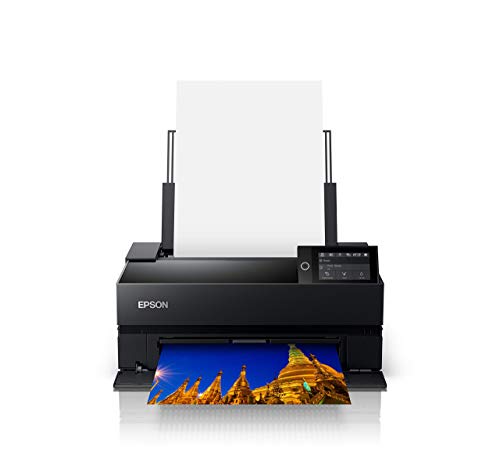
Epson SureColor P700
The SureColor P700 uses a 10-channel pigment ink system for wide color gamut and exceptional black-and-white prints. It supports up to 13×19-inch paper and includes a built-in spectrophotometer for color calibration. It prints at a modest speed, but the output is stunning.
Pros
- Superb color accuracy
- Excellent grayscale
- Built-in calibration
Cons
- Slow for text documents
- Ink cartridges are costly

Canon imagePROGRAF PRO-300
Canon’s PRO-300 is a 10-ink pigment printer designed for photo labs and fine artists. It produces vibrant colors and deep blacks, with a built-in display and Wi-Fi connectivity. It prints borderless up to 13×19 inches and handles thick media well. However, it is not designed for high-volume text printing.
Pros
- Outstanding color gamut
- Borderless printing
- Great for fine art papers
Cons
- Slow for office docs
- Large footprint

Brother HL-L8360CDW
This Brother printer is a workhorse for printing only, with speeds up to 33 pages per minute. It includes a 5-inch color touchscreen and supports automatic duplexing. It has a 300-sheet paper capacity and offers low running costs. It lacks scanning and copying, but it does those tasks well.
Pros
- Fast printing
- Low cost per page
- Expandable paper handling
Cons
- No scan or copy functions
- Touchscreen can be slow
Before you buy
Side by side
| # | Model | Print Speed | Best for | Score | Price |
|---|---|---|---|---|---|
| 1 | HP Color LaserJet Pro MFP M479fdw | 28 ppm black and color | Busy offices needing fast color printing, scanning, and faxing | 9.4 | Check price |
| 2 | Brother MFC-L8900CDW | 33 ppm black and color | High-volume printing with low running costs | 9.2 | Check price |
| 3 | Canon imageCLASS MF743Cdw | 28 ppm black and color | Small teams needing a compact yet capable color laser | 9.0 | Check price |
| 4 | Epson WorkForce Pro WF-7840 | 25 ppm black and color | Architects and engineers printing large-format documents | 8.8 | Check price |
| 5 | Epson SureColor P700 | Up to 2 minutes per 8×10 photo | Photographers and artists needing gallery-quality prints | 9.1 | Check price |
| 6 | Canon imagePROGRAF PRO-300 | Up to 2.5 minutes per 8×10 photo | Professionals who need borderless printing up to 13×19 | 8.9 | Check price |
| 7 | Brother HL-L8360CDW | 33 ppm | Teams needing a dedicated single-function printer with low cost | 8.7 | Check price |
Questions worth asking
What is the difference between laser and inkjet for professional use?
Laser printers use toner powder and a fuser to bond the image to the paper. They are faster and have lower cost per page for text. Inkjets use liquid ink and excel at photo and color reproduction. For mostly text, choose a laser; for vibrant graphics, an inkjet.
How do I calculate cost per page?
Divide the price of a toner or ink cartridge by its page yield as stated by the manufacturer. Add the cost of paper and drum if applicable. For example, a cartridge that costs current price and yields 2,000 pages gives a cost of 4 cents per page.
Do professional printers need special paper?
For high-quality prints, paper weight and coating matter. For documents, standard 20 lb paper is fine. For brochures or photos, use heavier coated paper. Many printers have paper type settings to optimize output.
Can I print wirelessly from a laptop or phone?
Yes, most professional printers have Wi-Fi and support Apple AirPrint, Google Cloud Print, or proprietary apps. Some support direct Wi-Fi for connecting without a network. Check the printer’s specifications for mobile printing features.
What is automatic duplexing?
Automatic duplexing allows the printer to automatically print on both sides of the page without manual flipping. It saves paper and is standard on many business printers. Look for automatic if you print double-sided often.
How do I maintain a professional printer?
Regularly clean the printhead or use the self-cleaning function. For lasers, replace the drum unit when prints show streaks. Keep the printer in a dust-free area and use the recommended paper type. Perform firmware updates to fix bugs.
What is the average lifespan of a professional printer?
Laser printers often last 5 to 10 years with proper maintenance. Inkjets can last 3 to 5 years. The lifespan depends on print volume and care. Replacing consumables like toner and drums extends the life.
Are refillable ink tanks better than cartridges?
Refillable ink tanks, like Epson’s EcoTank, have a higher upfront cost but lower cost per page. They are better for high-volume printing. For occasional printing, cartridges may be more practical. Consider your monthly volume.
Our pick
For most professional offices, the Brother MFC-L8900CDW is the best overall value because it combines fast speed, low cost per page, and expandable paper handling. If you need occasional photo prints, the HP M479fdw is a reliable alternative. For photographers, the Epson SureColor P700 is the clear winner for print quality.


