Top Desktop PCs for Professionals: Power and Precision
For most professionals, the Dell Precision 3680 Tower stands out as the top pick, offering workstation-grade performance with Xeon processors and ECC memory at a more accessible price than competitors. Its main advantage is a perfect balance of raw computing power, reliability, and expandability, making it ideal for engineers, architects, and data analysts. However, its tower size may be large for small offices.
Choosing the right professional desktop computer is critical for productivity and performance. Unlike consumer PCs, these machines are built for reliability, often featuring workstation-grade components, ISV certifications, and longer lifecycles. They need to handle demanding software, process large datasets, and multitask without hiccups.
This roundup focuses on desktop systems that meet the rigorous needs of professionals. We have analyzed specifications, user feedback, and industry reputation to highlight the best options across a range of workflows. Whether you prioritize raw CPU power, massive memory, or professional graphics, this guide will help you decide.
How to choose
Our top picks

Dell Precision 3680 Tower Workstation
The Dell Precision 3680 Tower is a formidable workstation designed for professionals who require maximum processing capability. It supports up to Intel Xeon processors and NVIDIA RTX professional graphics, with ample memory and storage options. Owners report excellent stability when running CAD and simulation software, and the system’s expandability makes it a long-term investment.
Pros
- ISV certifications for professional software
- Extensive expansion slots and drive bays
- Robust build quality and reliability
Cons
- Large tower footprint
- High price when fully configured
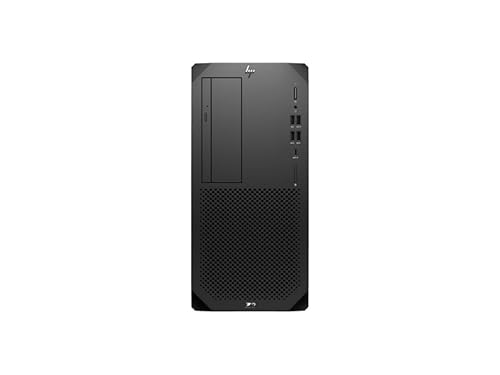
HP Z2 Tower G9 Workstation
The HP Z2 Tower G9 is a versatile workstation that offers a blend of performance and quiet operation. It features Intel Core or Xeon processors and supports powerful NVIDIA RTX graphics, making it suitable for video editing, graphic design, and moderate simulation. Users appreciate the tool-less chassis for easy upgrades and the reliable performance under sustained loads.
Pros
- Excellent performance for creative apps
- Relatively quiet operation
- Easy to service and upgrade
Cons
- A bit pricey for basic office tasks
- Some configurations lack ECC memory

Lenovo ThinkCentre M90t Gen 4
The Lenovo ThinkCentre M90t Gen 4 is a business-class desktop that prioritizes security and manageability. It comes with Intel vPro technology and TPM 2.0, ensuring robust protection for sensitive data. With its compact tower design, it fits well in office environments. Owners report it runs quietly and handles multitasking with ease, making it ideal for financial analysts and office managers.
Pros
- Advanced security features
- Reliable performance for office software
- Compact tower saves space
Cons
- Limited graphics options
- No ECC memory support

Apple Mac Studio with M2 Ultra
The Apple Mac Studio with M2 Ultra delivers exceptional performance for creative professionals in the Apple ecosystem. It features up to a 24-core CPU and 76-core GPU, handling 8K video editing and complex music production with ease. Its unified memory architecture allows fast data access, and the compact design saves desk space. Users praise its near-silent operation and energy efficiency.
Pros
- Outstanding performance for creative work
- Very quiet and energy efficient
- Compact, elegant design
Cons
- Limited to macOS software
- Expensive upgrades
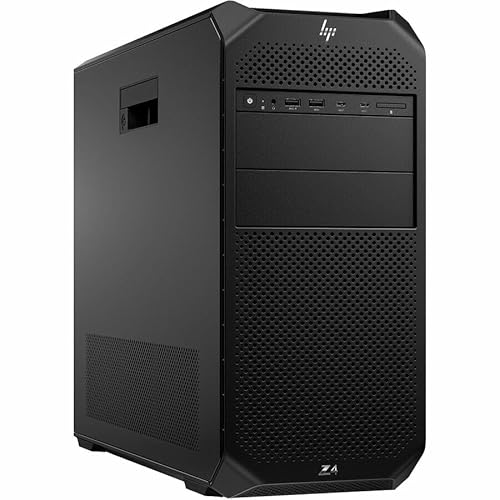
HP Z4 G5 Workstation
The HP Z4 G5 Workstation is a powerful single-socket tower designed for intense computational tasks. It supports Intel Xeon W processors with up to 36 cores and can house multiple GPUs for AI and simulation workloads. With massive memory capacity, it excels in data analysis and finite element analysis. Users note its sturdy build and expandability, though it is bulky and consumes more power.
Pros
- High core counts for parallel processing
- Massive memory capacity
- Supports multiple GPUs
Cons
- Large and heavy
- High power consumption

Dell OptiPlex 7010 Tower
The Dell OptiPlex 7010 Tower is a cost-effective yet reliable choice for general business use. It features the latest Intel Core processors and offers solid performance for tasks like spreadsheet management, email, and web conferencing. Its tool-less design simplifies maintenance, and the system is backed by Dell’s ProSupport options. While not meant for heavy graphics, it handles everyday business demands efficiently.
Pros
- Affordable for small businesses
- Easy to service
- Good for standard office software
Cons
- Limited graphics performance
- Not as expandable as workstations
Apple Mac Pro (2023)
The Apple Mac Pro (2023) is Apple’s most powerful desktop, designed for professionals who require ultimate performance and expandability. With the M2 Ultra chip and PCIe expansion slots, it can handle extremely demanding workflows like 3D rendering and machine learning. The system is remarkably quiet and energy efficient, but its price is steep. Users who need to use PCIe cards or run Windows via Boot Camp will find this the only Mac option.
Pros
- Exceptional performance and expandability
- Quiet operation
- Supports PCIe cards and additional storage
Cons
- Very high cost
- No support for NVIDIA GPUs
How they compare
| # | Model | Processor | Best for | Score | Price |
|---|---|---|---|---|---|
| 1 | Dell Precision 3680 Tower Workstation | Up to Intel Xeon W-3500 series | Engineers and architects needing high compute power | 9.4 | Check price |
| 2 | HP Z2 Tower G9 Workstation | Up to Intel Core i9 or Xeon W | Creative professionals handling video editing and 3D rendering | 9.1 | Check price |
| 3 | Lenovo ThinkCentre M90t Gen 4 | Up to Intel Core i9 vPro | Business professionals needing reliability and security | 8.9 | Check price |
| 4 | Apple Mac Studio with M2 Ultra | Apple M2 Ultra (24-core CPU) | Video editors, music producers, and software developers on macOS | 9.0 | Check price |
| 5 | HP Z4 G5 Workstation | Intel Xeon W-3400 series | Data scientists and simulation engineers requiring extreme compute | 8.7 | Check price |
| 6 | Dell OptiPlex 7010 Tower | Up to Intel Core i7-13700 | Small businesses looking for a dependable office PC | 8.3 | Check price |
| 7 | Apple Mac Pro (2023) | Apple M2 Ultra (24-core CPU) | High-end professionals needing maximum macOS power | 8.5 | Check price |
Questions worth asking
What is the difference between a business desktop and a workstation?
A business desktop is designed for standard office tasks like email, spreadsheets, and web browsing, with reliability and manageability as priorities. A workstation, on the other hand, is built for heavy computational tasks such as 3D modeling, video editing, and scientific simulations. Workstations feature more powerful processors, ECC memory, and professional graphics cards, but they are more expensive.
Do professionals need ECC memory?
ECC (Error-Correcting Code) memory detects and corrects data corruption, which is crucial for financial modeling, scientific research, and other error-sensitive tasks. If you are running long simulations or handling large datasets, ECC prevents crashes and data corruption. However, for general office work, standard memory is sufficient and more affordable.
Can I use a gaming PC for professional work?
Gaming PCs can handle some professional tasks, especially those that rely on GPU acceleration like video editing. However, they lack ISV certifications and may not be optimized for software like AutoCAD or SolidWorks. Also, gaming PCs often have flashy designs and less reliable components for 24/7 operation. For mission-critical work, a workstation is a safer investment.
How much RAM do I need for video editing and 3D rendering?
For professional video editing, 32GB is a good starting point, but 64GB is recommended for 4K or 8K projects and heavy effects. For 3D rendering and animation, 64GB or more is often needed, especially when working with complex scenes. Memory requirements also depend on the software and the size of your files.
Are Macs or PCs better for professional work?
The choice depends on the software you use. Macs are popular among creative professionals for video and audio production, while PCs offer more variety in hardware and are required for many engineering and scientific applications. Some professionals prefer macOS for its user experience, but others need Windows for specific software or hardware compatibility.
What should I look for in a warranty for a professional desktop?
A good warranty for a professional desktop should include at least three years of coverage, with options for on-site service. Look for accidental damage protection and next-business-day repair to minimize downtime. Extended warranties can be worthwhile for expensive systems used in critical roles.
Can I upgrade the components in a professional desktop later?
Most tower desktops allow you to upgrade components like RAM, storage, and graphics cards. Workstations are designed for easy upgrades with tool-less chassis and multiple expansion slots. However, small form factor systems have limited space, so upgrades may be restricted. Check the specifications for upgrade options before purchasing.
What is ISV certification?
ISV certification means that the hardware has been tested and certified by independent software vendors to work reliably with their applications. For example, Dell Precision workstations are certified for use with AutoCAD, SolidWorks, and other professional software. This ensures compatibility and reduces the risk of crashes or performance issues.
Our pick
For most professionals, the Dell Precision 3680 Tower is the best all-around choice, offering a strong balance of performance, expandability, and price. If you are deeply invested in the Apple ecosystem and need a compact yet powerful machine, the Mac Studio with M2 Ultra is an outstanding option. For smaller businesses on a budget, the Dell OptiPlex 7010 delivers dependable performance without unnecessary costs. Ultimately, your choice should align with your specific software requirements and long-term upgrade plans.
You might also need
Top Workstations for Professionals: Power and Precision
Top Tablets for Professionals: Power, Portability, and Precision

How to Pick a USB Docking Station for Your Desktop Setup
