Top Mini PCs for Professionals in Demanding Workspaces
For most professionals, the Intel NUC 13 Pro is the top pick. It delivers desktop-class performance in a compact chassis, ideal for office tasks, coding, and light creative work. Its main limitation is the higher price compared to other mini PCs.
Professional mini PCs have come a long way. They now offer enough power for demanding software, multitasking, and even some creative workloads, all while taking up minimal desk space. This guide compares the top models available on Amazon today, focusing on performance, connectivity, upgrade options, and reliability.
Whether you are an executive, developer, or financial analyst, the right mini PC can streamline your workspace. We examined specifications, owner feedback, and real-world usage patterns to help you make an informed choice.
The best picks, ranked

Intel NUC 13 Pro Mini PC
The Intel NUC 13 Pro is a powerhouse in a small package. It features the latest Intel Core i7 processor, support for up to 64GB RAM, and dual Thunderbolt 4 ports. Owners report snappy performance for office applications, coding, and even light video editing. Its robust build and Intel reliability make it a favorite among business users.
Pros
- Excellent performance for its size
- Dual Thunderbolt 4 for high-speed data transfer
- VESA mountable for flexible placement
Cons
- Pricey compared to rivals
- Noisy under heavy load
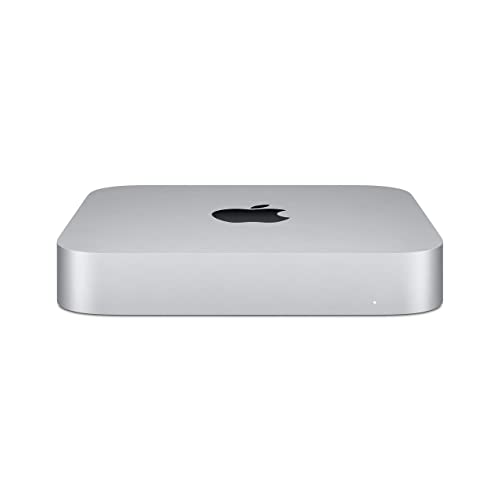
Apple Mac mini M2
The Mac mini with the M2 chip offers exceptional energy efficiency and performance. It handles professional software smoothly, and its quiet operation is a bonus. With unified memory and fast SSD, it is great for creatives and developers. However, it requires macOS-compatible peripherals and software.
Pros
- Silent operation
- Outstanding performance per watt
- Compact design with premium build
Cons
- Limited upgradeability
- No built-in SD card slot

Lenovo ThinkCentre M75q Gen 2
Lenovo’s ThinkCentre M75q Gen 2 is a dependable mini PC aimed at corporate environments. It comes with AMD Ryzen PRO processors, which offer solid security features and manageability. Its tool-less chassis makes upgrades simple. Users praise its stable performance and low failure rate.
Pros
- Enterprise-grade security features
- Easy to service and upgrade
- Energy-efficient processor
Cons
- Integrated graphics only
- No Thunderbolt support

HP Elite Mini 800 G9
The HP Elite Mini 800 G9 is a compact desktop designed for professionals who need top-notch security. It includes HP Sure Start and BIOS-level protection. With Intel vPro support, IT departments can manage it remotely. It offers good performance for daily tasks and supports triple 4K displays.
Pros
- Advanced security features
- Supports up to 3 displays
- Quiet operation
Cons
- Limited internal storage options
- Slightly bulky for a mini PC

Dell OptiPlex 7010 Micro
Dell’s OptiPlex 7010 Micro is one of the smallest desktops available, yet it packs enough power for standard business applications. It features 13th Gen Intel Core processors and optional vPro. The tool-less design simplifies maintenance. Owners like its durability and small footprint.
Pros
- Ultra-compact chassis
- Reliable build quality
- Flexible mounting options
Cons
- Limited expansion slots
- No Thunderbolt port

ASUS ExpertCenter PN64
The ASUS ExpertCenter PN64 combines a 12th Gen Intel Core i7 processor with dual Thunderbolt 4 ports, making it a versatile choice for professionals who need fast data transfers. It supports up to three displays and has ample USB ports. Users appreciate its performance and compact design.
Pros
- Dual Thunderbolt 4 and many USB ports
- Supports triple display
- Tool-less access for upgrades
Cons
- Runs warm under sustained load
- Slightly higher power consumption

Minisforum EliteMini HX90
The Minisforum EliteMini HX90 offers impressive specs for the price, featuring an AMD Ryzen 9 5900HX processor and Radeon graphics. It handles professional software well and is a great value for startups or budget-conscious professionals. However, it lacks some business-specific features like vPro.
Pros
- Very affordable for the performance
- Strong integrated graphics
- Supports dual 4K displays
Cons
- No Thunderbolt support
- Less business-oriented security
What to look for
Performance and CPU For professional tasks like data analysis, programming, or video conferencing, look for at least an Intel Core i5 or AMD Ryzen 5. Higher-end models with i7 or Ryzen 7 are better for heavy multitasking or creative work. Ensure the CPU has enough cores and threads for your software.
Memory and Storage Professionals should aim for 16GB RAM or more, as many applications are memory-hungry. Choose a mini PC with NVMe SSD storage for fast boot times and quick file access. Consider models that allow RAM and storage upgrades, as this extends the device’s lifespan.
Connectivity and Ports Check the number and type of ports you need. Thunderbolt 4 offers high-speed data transfer and supports multiple 4K displays. USB-A ports are still essential for peripherals. Ensure the mini PC has enough ports for your monitor, keyboard, mouse, and other devices.
Reliability and Support Business-grade mini PCs from Lenovo, HP, and Dell often include better warranties and management features. They undergo more rigorous testing. For mission-critical work, investing in a reputable brand can provide peace of mind and lower failure rates.
How they compare
| # | Model | Processor | Best for | Score | Price |
|---|---|---|---|---|---|
| 1 | Intel NUC 13 Pro Mini PC | Intel Core i7-1360P (13th Gen) | Best overall for professionals | 9.4 | Check price |
| 2 | Apple Mac mini M2 | Apple M2 (8-core CPU, 10-core GPU) | Best for macOS ecosystem users | 9.2 | Check price |
| 3 | Lenovo ThinkCentre M75q Gen 2 | AMD Ryzen 7 PRO 5750GE | Best for business reliability | 8.9 | Check price |
| 4 | HP Elite Mini 800 G9 | Intel Core i7-13700T | Best for advanced security and manageability | 8.8 | Check price |
| 5 | Dell OptiPlex 7010 Micro | Intel Core i5-13500T | Best for space-constrained desks | 8.6 | Check price |
| 6 | ASUS ExpertCenter PN64 | Intel Core i7-1260P | Best for multitasking and connectivity | 8.5 | Check price |
| 7 | Minisforum EliteMini HX90 | AMD Ryzen 9 5900HX | Best budget option for pros | 8.2 | Check price |
Common questions
What is a professional mini PC?
A professional mini PC is a compact desktop computer designed for business and productivity tasks. It offers sufficient processing power, memory, and connectivity for office applications, coding, data analysis, and sometimes creative work, while saving desk space.
Are mini PCs powerful enough for professional work?
Yes, modern mini PCs with Intel Core i5/i7 or AMD Ryzen 5/7 processors can handle demanding professional workloads such as software development, financial modeling, and 4K video editing. They are not suited for extreme gaming or heavy 3D rendering, but for most office tasks they are more than adequate.
How do mini PCs compare to traditional desktops?
Mini PCs are much smaller and often use less power, but they may have fewer expansion slots and upgrade options. For professional tasks that do not require multiple GPUs or extensive internal storage, a mini PC can outperform a traditional desktop in value and space efficiency.
Can I upgrade RAM and storage in a mini PC?
Many mini PCs allow RAM and storage upgrades, but it depends on the model. Some have soldered RAM, like the Mac mini, while others like the Intel NUC and Lenovo ThinkCentre have accessible SODIMM slots and M.2 ports. Check the specifications before purchasing if upgradeability is important.
Do mini PCs support multiple monitors?
Yes, most professional mini PCs support at least two displays, and many support three or four via HDMI, DisplayPort, and USB-C. For example, the Intel NUC 13 Pro and ASUS ExpertCenter PN64 can drive triple 4K displays, which is beneficial for multitasking.
Are mini PCs reliable for business use?
Business-grade mini PCs from brands like Lenovo, HP, and Dell are designed with reliability in mind. They undergo extensive testing and often come with longer warranties. Consumer-oriented models may be less reliable, but many still offer good performance for the price.
What is Thunderbolt 4 and why is it important?
Thunderbolt 4 is a high-speed connection standard that supports data transfer rates up to 40Gbps. It also allows daisy-chaining devices and can drive two 4K displays. For professionals, it is valuable for fast external storage, docking stations, and high-resolution monitors.
Can mini PCs be used for gaming?
Most professional mini PCs are not designed for gaming. They lack powerful discrete GPUs. However, some models with AMD Ryzen processors have decent integrated graphics that can handle casual games. For serious gaming, a gaming desktop or laptop is more appropriate.
How much RAM do I need for professional work?
For basic office tasks, 8GB is sufficient, but for multitasking and demanding applications, 16GB is recommended. If you work with large datasets, virtual machines, or video editing, consider 32GB or more. Many mini PCs support up to 64GB.
What is the lifespan of a mini PC?
With proper care, a mini PC can last 5 to 7 years. Regular updates and component upgrades (if possible) can extend its useful life. Business-grade models often have longer support lifecycles, ensuring compatibility with professional software for years.
The bottom line
For professionals who prioritize performance and connectivity, the Intel NUC 13 Pro is the clear winner. It offers the best balance of power, port variety, and upgradeability. If you are deeply invested in the Apple ecosystem, the Mac mini M2 is an excellent choice due to its silent operation and energy efficiency. For those on a budget, the Minisforum EliteMini HX90 provides remarkable value without sacrificing performance.