Top Presentation Remotes for Flawless Professional Talks
The Logitech Spotlight stands out as the top pick for most professionals because it offers precise cursor control, a generous 30 meter range, and a premium build, but its higher price may not suit budget-conscious presenters.
A reliable presentation remote is essential for delivering a smooth, confident talk. The right device lets you move freely, advance slides without fumbling, and keep your audience engaged.
We compared seven top-rated models to help you choose. Each one was evaluated for range, ease of use, build quality, and unique features that matter in professional settings.
Our top picks

Logitech Spotlight
The Logitech Spotlight is a premium presentation remote with a sleek aluminum body. It features a unique spotlight highlight that draws attention to specific areas on your slide. Its 30 meter range and motion control make it a favorite among executives and keynote speakers.
Pros
- Precise cursor and highlight features
- Excellent build quality
- Works even when pointing away from screen
Cons
- Expensive
- Requires app for full functionality on some systems

Logitech R800
The Logitech R800 offers an impressive 30 meter range, making it ideal for large conference rooms and auditoriums. It features a bright green laser and a large slide button layout that is easy to use in the dark. The red laser is replaced by green for better visibility on any screen.
Pros
- Exceptional range
- Bright green laser visible on any surface
- Comfortable grip
Cons
- No cursor control
- Bulky compared to newer models
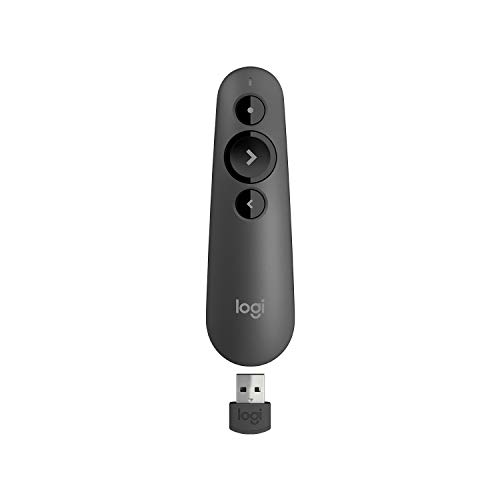
Logitech R500
The Logitech R500 is a less expensive alternative that still offers a 20 meter range and a red laser. It works with both USB receiver and Bluetooth, making it versatile for different laptops. Owners report it as a dependable workhorse for everyday presentations.
Pros
- Affordable
- Dual connectivity (USB and Bluetooth)
- Simple, intuitive button layout
Cons
- Red laser less visible on bright screens
- No rechargeable battery
SMK-Link VP4700
The SMK-Link VP4700 is a versatile presenter that functions as an air mouse, allowing you to control the cursor by moving the remote in the air. It also includes a slide advancer, laser pointer, and full keyboard shortcuts. This is a great choice for those who need to navigate between apps or web pages during a presentation.
Pros
- Air mouse eliminates need to touch laptop
- Rechargeable battery
- Works with many operating systems
Cons
- Steeper learning curve for gestures
- Build feels less premium

Canon WS-1200
The Canon WS-1200 is a straightforward presentation remote that features a bright green laser, which is three times more visible than red. It has a simple button layout with slide controls and a mute button. It connects via USB receiver and is plug-and-play on most systems.
Pros
- Green laser is highly visible
- Simple and reliable
- Affordable price point
Cons
- Shorter range than competitors
- No cursor control

Amazon Basics Presentation Remote
The Amazon Basics remote is an entry-level option that covers the essentials: slide control and a red laser. It has a compact design that fits in a pocket. While it lacks advanced features, it gets the job done for casual or infrequent presenters.
Pros
- Very affordable
- Compact and lightweight
- Plug and play setup
Cons
- Basic feature set
- Red laser may be hard to see

Kensington Wireless Presenter with Laser
The Kensington Wireless Presenter is a classic clicker that has been a staple in boardrooms for years. It features a comfortable ergonomic shape, a red laser, and straightforward slide navigation. Its USB receiver stores inside the device when not in use.
Pros
- Ergonomic design
- Receiver storage prevents loss
- Trusted brand with reliable performance
Cons
- No cursor control or advanced features
- Red laser less visible
Compared at a glance
| # | Model | Range | Best for | Score | Price |
|---|---|---|---|---|---|
| 1 | Logitech Spotlight | 30 meters | Professionals needing precise cursor control | 9.4 | Check price |
| 2 | Logitech R800 | 30 meters | Large venues and long-range presentations | 9.0 | Check price |
| 3 | Logitech R500 | 20 meters | Budget-friendly reliability | 8.6 | Check price |
| 4 | SMK-Link VP4700 | 20 meters | Air mouse and gesture control | 8.4 | Check price |
| 5 | Canon WS-1200 | 15 meters | Presenters who need a green laser | 8.2 | Check price |
| 6 | Amazon Basics Presentation Remote | 15 meters | Minimalist presenters on a tight budget | 8.0 | Check price |
| 7 | Kensington Wireless Presenter with Laser | 15 meters | Those who prefer a traditional clicker | 8.1 | Check price |
Before you buy
Common questions
What is the best presentation remote for large conferences?
The Logitech Spotlight or Logitech R800 are excellent choices for large venues due to their 30 meter range. The Spotlight offers advanced cursor control, while the R800 has a bright green laser.
Do presentation remotes require software installation?
Most basic remotes are plug and play and work without additional software. However, some advanced models like the Logitech Spotlight may require an app for features like cursor control and highlighting.
Can I use a presentation remote with a Mac?
Yes, most presentation remotes are compatible with macOS. Some may require a specific receiver or Bluetooth pairing. Check the product specifications to ensure compatibility.
What is the difference between a red and green laser?
Green lasers are up to three times brighter than red lasers, making them easier to see on bright screens or in well-lit rooms. They are often preferred for professional presentations.
How long do presentation remote batteries last?
Battery life varies by model. Many use AAA batteries that last up to a year with regular use. Rechargeable models, like the Logitech Spotlight, can last for months on a single charge.
Can I control the cursor with a presentation remote?
Yes, some models like the Logitech Spotlight and SMK-Link VP4700 offer cursor control. The Spotlight uses motion control, while the VP4700 has an air mouse feature.
Are presentation remotes compatible with PowerPoint and Google Slides?
Yes, presentation remotes work with major presentation software like PowerPoint, Google Slides, Keynote, and PDF viewers. They simulate keyboard presses for next and previous slides.
What is the range of a typical presentation remote?
Typical ranges are between 15 and 30 meters. For most conference rooms, 15 meters is sufficient, but for auditoriums, longer range is better.
Do I need a USB receiver for a presentation remote?
Many remotes use a USB receiver, but some also support Bluetooth. If your laptop lacks USB ports, consider a Bluetooth model or one with a USB-C receiver that can be adapted.
How do I choose between a laser pointer and cursor control?
A laser pointer is useful for pointing at specific items on a slide from a distance. Cursor control is better for interacting with content, such as clicking links or navigating within a web page. Some remotes offer both.
Final word
For most professionals, the Logitech Spotlight is the best choice because it offers the most advanced features and build quality, despite its higher price. If you present in very large venues and need a long range, the Logitech R800 is a solid alternative. Budget-conscious presenters will find the Logitech R500 to be a reliable and affordable option that still offers dual connectivity.



