Smart Displays Built for Serious Work
The Amazon Echo Show 15 is our top pick for most professionals because its large 15.6 inch screen, built in Fire TV, and widget based interface turn your wall or desk into a command center. Its main advantage is the customizable visual dashboard that keeps calendars, notes, and tasks visible at a glance. The main limitation is that it lacks a built in camera, so video calls require an external webcam.
Smart displays have moved beyond simple kitchen timers and photo frames. Professionals now use them to manage schedules, join video conferences, control smart office gear, and even mirror presentations. The right model can replace a pile of sticky notes and a second monitor.
This roundup focuses on displays that earn their keep in a work environment. We looked at models with sharp screens, quality cameras, and strong privacy controls. We also considered how well they integrate with calendars, email, and other productivity tools.
What to look for
The top picks, ranked

Amazon Echo Show 15
The Echo Show 15 is a 15.6 inch smart display that can be mounted on a wall or propped on a desk. It runs on Alexa and features a widget based home screen that you can populate with calendars, to do lists, weather, and more. It also includes Fire TV built in, so you can stream video or mirror your computer screen. The lack of a camera is a downside for video calls, but you can connect an external webcam via USB.
Pros
- Large, customizable visual dashboard
- Fire TV built in for streaming and mirroring
- Wall mountable to save desk space
Cons
- No built in camera for video calls
- Some widgets require extra setup

Google Nest Hub (2nd Gen)
The Google Nest Hub (2nd Gen) features a 7 inch touchscreen and uses the Google Assistant. Its standout feature is Motion Sense, which lets you pause and play media with a wave of your hand. It also includes Soli radar for sleep sensing when placed on a nightstand, which can track sleep patterns and provide insights. For professionals, it works well as a bedside companion or a small desk display for quick Google Calendar and reminders.
Pros
- Gestures control media without touching
- Sleep sensing with Soli radar
- Compact size fits small spaces
Cons
- Small screen not ideal for heavy visual tasks
- No camera for video calls
Lenovo Smart Display 7
The Lenovo Smart Display 7 is a 7 inch display that runs Google Assistant. It has a fabric covered speaker that delivers decent audio for music and podcasts. It includes a camera with a physical shutter for privacy. Owners appreciate its compact footprint and clear sound for the price. While the screen is smaller, it handles Google Calendar, YouTube, and smart home controls well.
Pros
- Affordable price point
- Physical camera shutter for privacy
- Good audio quality for size
Cons
- Small screen may be limiting
- No smart home hub built in

Amazon Echo Show 8 (2nd Gen, 2021)
The Echo Show 8 (2nd Gen) has an 8 inch HD display and a 13 MP camera with auto framing that keeps you centered during video calls. It supports Alexa and has a built in Zigbee hub for smart home control. The display can show calendars, news, and weather, and it integrates with Amazon’s Alexa routines. It also includes a physical camera shutter and a mic off button for privacy.
Pros
- High quality camera for video conferencing
- Auto framing keeps you in frame
- Built in Zigbee hub
Cons
- No Google Assistant support
- Screen smaller than other options
Google Nest Hub Max
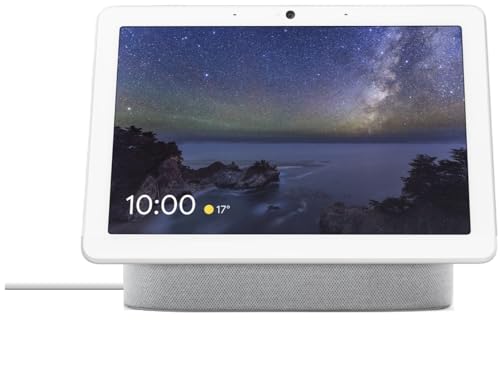
The Google Nest Hub Max features a 10 inch HD display and a 6.5 MP camera with Nest Cam functionality. It runs Google Assistant and includes a built in smart home hub with Thread support. The camera can be used for video calls and also as a security camera when you are away. Its stereo speakers deliver room filling sound. Owners note that the display is sharp and the camera quality is good for video calls.
Pros
- Large screen for Google ecosystem
- Camera doubles as security cam
- Strong audio output
Cons
- More expensive than smaller models
- No physical camera shutter (but has mic/cam off switch)

Facebook Portal+ (10 inch, 2nd Gen)
The Facebook Portal+ (10 inch, 2nd Gen) is designed for video calling, especially with WhatsApp and Messenger. It has a 12 MP camera with AI that automatically pans and zooms to keep everyone in frame during group calls. The display is a 10 inch touchscreen with a resolution of 2000 x 1200. It runs on the Portal OS and supports Alexa. It also includes a physical camera cover and a mic off switch.
Pros
- AI camera follows movement in group calls
- Works with WhatsApp and Messenger
- High resolution screen
Cons
- Facebook integration may be a privacy concern
- Lacks Google Assistant

Echo Show 5 (3rd Gen, 2023)
The Echo Show 5 (3rd Gen, 2023) has a 5.5 inch display and is the smallest in Amazon’s lineup. It includes a 2 MP camera with a physical shutter and a built in Zigbee smart home hub. It is ideal for a small desk or nightstand, offering quick access to Alexa, calendars, and smart home controls. The sound is surprisingly full for its size. Owners appreciate its low profile and easy setup.
Pros
- Compact size fits small spaces
- Physical camera shutter
- Built in Zigbee hub
Cons
- Small screen limits productivity
- Lower resolution display
Side by side
| # | Model | Display | Best for | Score | Price |
|---|---|---|---|---|---|
| 1 | Amazon Echo Show 15 | 15.6 inch 1080p | Best overall for a visual command center | 9.4 | Check price |
| 2 | Google Nest Hub (2nd Gen) | 7 inch touchscreen | Best for gesture control and sleep sensing | 9.0 | Check price |
| 3 | Lenovo Smart Display 7 | 7 inch touchscreen | Best for Google Assistant users on a budget | 8.4 | Check price |
| 4 | Amazon Echo Show 8 (2nd Gen, 2021) | 8 inch HD touchscreen | Best for video calls with auto framing | 9.1 | Check price |
| 5 | Google Nest Hub Max | 10 inch HD touchscreen | Best for larger Google Assistant display | 9.0 | Check price |
| 6 | Facebook Portal+ (10 inch, 2nd Gen) | 10 inch 2000×1200 | Best for group video calls and AI camera | 8.7 | Check price |
| 7 | Echo Show 5 (3rd Gen, 2023) | 5.5 inch touchscreen | Best for compact desk or nightstand | 8.0 | Check price |
Good to know
Can smart displays be used for video conferencing?
Yes, many smart displays have built in cameras and support video calling apps. For example, Echo Show devices support Alexa Calling and Zoom, while Google Nest Hub Max supports Google Meet and Duo. The Facebook Portal+ supports WhatsApp and Messenger. Some models like the Echo Show 15 lack a camera but allow you to connect an external webcam.
Do smart displays work with Microsoft Teams?
Some do. The Echo Show series has supported Microsoft Teams for business, but it may require an enterprise account. Google Nest Hub Max does not support Teams natively, but you can use it with Google Meet. For Teams, you might need to use a dedicated device or a computer.
Can I use a smart display as a second monitor?
In a limited way. The Echo Show 15 can mirror your Fire TV or use Alexa for Business to show content. The Google Nest Hub Max can cast Chrome tabs. However, they are not true monitors with full desktop support. They work best for quick glances and dashboards rather than extended work sessions.
Are smart displays always listening?
Smart displays listen for a wake word like ‘Alexa’ or ‘Hey Google’ by default. You can mute the microphone with a physical button. Some models have a camera shutter as well. When muted, they do not process audio. Review privacy settings to control data collection.
Can I make phone calls with a smart display?
Yes, most smart displays allow voice calls. Echo Show devices support Alexa Calling, which works with other Echo devices and the Alexa app. Google Nest Hub Max supports Google Voice calls and Duo. Facebook Portal+ is designed for calling. These features require a phone number or account.
Do smart displays require a subscription?
No, basic features like voice assistant, calendar, and smart home control are free. Some advanced features may require subscriptions, such as Amazon Music for music streaming or Nest Aware for enhanced security camera recording. The display itself does not have a mandatory subscription.
Can I use a smart display without a smartphone?
Yes, you can set up most smart displays using a web browser or directly on the device, but the process is easier with a smartphone. Some features like phone calls may require a smartphone for verification. However, basic use is possible without one.
What is the difference between a smart display and a tablet?
A smart display is designed for hands free interaction with a voice assistant, always connected to the internet, and typically has a fixed user interface. A tablet is a general purpose device with a full operating system that can run many apps. Smart displays excel at quick information and smart home control, while tablets are more versatile for productivity.
How secure are smart displays?
Security depends on the manufacturer and your usage. Smart displays receive regular software updates to patch vulnerabilities. Use strong passwords, enable two factor authentication where possible, and review app permissions. Physical controls like camera shutters add an extra layer of privacy.
Which smart display has the best sound quality?
The Google Nest Hub Max and Amazon Echo Show 8 are often praised for their audio output. The Echo Show 15 has decent sound but is not as powerful. The Nest Hub Max has a larger speaker driver and fuller sound, making it suitable for music and podcasts.
Our pick
If you want a central hub for your workday, get the Amazon Echo Show 15. Its large display and widget system are unmatched for keeping your schedule and tasks in view. For professionals who spend a lot of time on video calls, the Echo Show 8 with its auto framing camera is the better choice. If you prefer Google’s ecosystem, the Nest Hub Max offers the best balance of screen size, camera, and smart home features.