Receipt Printers for Small Shops and Busy Counters
The Epson TM-T20III is the best all round receipt printer, combining fast thermal printing with driver support for almost every point of sale system. The Star TSP143IIIU is the easier tablet based choice, and the MUNBYN ITPP047 is the value pick for lower volume counters.
For most counters the Epson TM-T20III is the receipt printer to buy, with the Star TSP143IIIU the better fit for tablet based systems and the MUNBYN ITPP047 the sensible option when volume is low and outlay matters.
The hard part is compatibility rather than hardware, because a printer that works flawlessly with one point of sale app may be invisible to another. We compared current models on published specifications, interface options and driver coverage, alongside what owners report about paper jams, cutter reliability and how they behave when a connection drops mid transaction.
What we recommend

Epson TM-T20III Thermal Receipt Printer
The TM-T20III is the safe recommendation for almost any counter, printing quickly and quietly with the broadest driver support in the category. Drop in paper loading means a roll change takes seconds rather than a fiddle with spindles. Owners report the auto cutter is among the most reliable in daily retail use, which is where cheaper printers tend to fail first.
Pros
- Excellent driver and POS compatibility
- Reliable auto cutter under daily load
- Drop in paper loading
Cons
- No built in Bluetooth on the base model
- Interface must be chosen at purchase

Star Micronics TSP143IIIU USB Receipt Printer
Star’s TSP143III family is what many tablet based point of sale systems are built around, and the USB variant can power a tablet while printing. Setup on those platforms is usually plug in and go rather than a driver hunt. Based on specifications it matches the Epson on speed while adding the convenience of charging the device it prints from.
Pros
- Widely supported by tablet POS apps
- Charges the connected tablet
- Fast and quiet in operation
Cons
- USB only on this variant
- Larger footprint than compact rivals

Epson TM-m30II Bluetooth Receipt Printer
The m30II is built for counters that are not tied to a fixed till, offering Bluetooth and network options in a compact square footprint. Top or front paper exit lets you mount it where space allows. Owners report it pairs reliably with tablet based systems and recovers cleanly when a device sleeps and reconnects.
Pros
- Flexible wireless connectivity
- Compact square footprint
- Top or front exit for tight mounting
Cons
- Higher outlay than wired models
- Bluetooth pairing quirks on some tablets

Bixolon SRP-350plusIII Thermal Receipt Printer
Bixolon aims this at counters that print continuously through a shift, and the mechanism and cutter are rated for that kind of duty. It supports several emulations, which helps when replacing an older printer without rewriting integrations. Based on specifications it is one of the faster units here, useful when queues form at peak trading.
Pros
- Built for continuous high volume printing
- Emulation support eases printer replacement
- Fast print speed for busy queues
Cons
- Less common in consumer POS documentation
- Bulkier than compact models

Citizen CT-S310II Thermal Receipt Printer
Citizen’s reputation in this category rests on mechanisms that keep working in hospitality environments where dust, heat and spills are routine. The CT-S310II takes both paper widths and offers a splash resistant design. Owners report it is the printer that outlasts the point of sale system it was bought for, which is exactly the point.
Pros
- Robust in hospitality environments
- Handles both common paper widths
- Long mechanism service life
Cons
- Slower than the fastest rivals
- Plain styling for customer facing counters
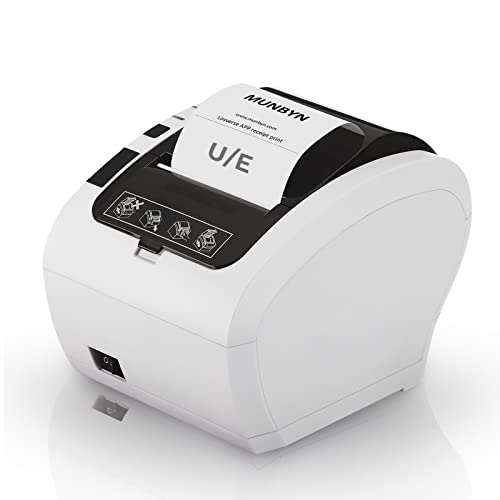
MUNBYN ITPP047 Thermal Receipt Printer
MUNBYN has become the default for small online and market sellers who need a working thermal printer without a commercial support contract. The ITPP047 covers USB and network connection and includes a cash drawer port. Owners report setup takes some driver work on less common systems, but that it prints reliably once configured.
Pros
- Strong specification for the outlay
- Multiple interfaces included
- Popular with small independent sellers
Cons
- Driver setup can take trial and error
- Support is email based rather than local
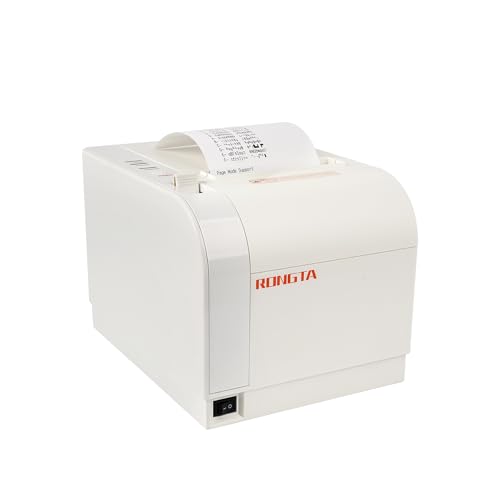
Rongta RP80 Thermal Receipt Printer
Rongta covers the entry level, offering the standard eighty millimetre thermal format with an auto cutter and cash drawer port. It suits a market stall, a pop up or a second till that runs occasionally rather than all day. Based on specifications the mechanism duty rating is lower than commercial units, so treat it as a light duty printer.
Pros
- Lowest cost route into thermal printing
- Includes cutter and drawer port
- Standard paper size is easy to source
Cons
- Lower duty rating than commercial models
- Documentation is minimal
How to pick the right one
Thermal or impact Thermal printers dominate retail because they are fast, quiet and have no ribbons to replace, printing by heating chemically coated paper. Impact printers survive heat and grease better and can print on multi part paper, which is why kitchens still use them. If your printer sits over a grill or in a warm pass, impact is the durable answer. Everywhere else, thermal is the right default.
Compatibility is the real buying decision Before comparing print speeds, confirm your point of sale software explicitly supports the model. Tablet based systems often list a handful of approved printers and behave unpredictably with anything else. Desktop systems are more flexible but still need a driver for your operating system. A slightly slower printer that your software recognises immediately beats a faster one you spend a weekend configuring.
Interfaces, cash drawers and the wider setup USB is simplest for a single fixed till, Ethernet suits multiple stations sharing one printer, and Bluetooth suits mobile or pop up setups. Most receipt printers also drive a cash drawer through a modular port, which is how the drawer opens automatically at the end of a sale. If you need that, check the port is present rather than assuming.
Paper, cutters and running costs Eighty millimetre paper is the retail standard and the easiest to source, while fifty eight millimetre suits compact mobile printers. Thermal rolls are inexpensive but receipts fade over time, which matters for warranty records. The auto cutter is usually the first component to fail under heavy use, so for a busy counter it is worth prioritising a model with a well regarded cutter over one with a higher headline speed.
How they stack up
| # | Model | Print speed | Best for | Score | Price |
|---|---|---|---|---|---|
| 1 | Epson TM-T20III Thermal Receipt Printer | Up to 250 mm per second | Best overall | 9.4 | Check price |
| 2 | Star Micronics TSP143IIIU USB Receipt Printer | Up to 250 mm per second | Best for tablet POS | 9.2 | Check price |
| 3 | Epson TM-m30II Bluetooth Receipt Printer | Up to 250 mm per second | Best for mobile setups | 9.0 | Check price |
| 4 | Bixolon SRP-350plusIII Thermal Receipt Printer | Up to 300 mm per second | Best for high volume | 8.7 | Check price |
| 5 | Citizen CT-S310II Thermal Receipt Printer | Up to 160 mm per second | Best for durability | 8.5 | Check price |
| 6 | MUNBYN ITPP047 Thermal Receipt Printer | Up to 300 mm per second | Best value | 8.2 | Check price |
| 7 | Rongta RP80 Thermal Receipt Printer | Up to 300 mm per second | Best budget | 8.0 | Check price |
Questions worth asking
Do I need special paper for a thermal receipt printer?
Yes, thermal printers require heat sensitive thermal paper rather than plain rolls. It is inexpensive and widely available in eighty and fifty eight millimetre widths, but ordinary paper simply will not produce an image.
Will any receipt printer work with my POS app?
No. Compatibility varies significantly, especially with tablet based systems that support only a specific approved list. Check the software vendor’s supported hardware page before buying, since that single step prevents most setup problems.
What paper width should I choose?
Eighty millimetre is the retail and hospitality standard, giving a readable receipt and the widest choice of rolls. Fifty eight millimetre suits mobile and compact printers where space is tight but produces a narrower receipt.
How does a receipt printer open a cash drawer?
Most models have a modular cash drawer port that sends a pulse to the drawer at the end of a transaction. The drawer connects to the printer rather than to the computer, so confirm the port exists on the model you choose.
Why do my printed receipts fade?
Thermal prints fade with exposure to heat, light and some plastics over months or years. For records you need to keep, either store a digital copy or use an impact printer with ribbon and plain paper.
Are impact printers still worth buying?
In kitchens, yes. Heat and grease damage thermal paper quickly, and impact printers handle both while also printing multi part slips. For a front of house counter they are noisier and slower with no real benefit.
How fast does a receipt printer need to be?
Anything from around one hundred and fifty millimetres per second feels instant for a typical short receipt. Higher speeds matter mainly at very busy counters or when receipts include long itemised lists and promotional footers.
What usually fails first on a receipt printer?
The auto cutter, followed by the print head after heavy use. Keeping the paper path clean, using quality rolls and clearing jams carefully rather than yanking paper extends the life of both considerably.
Our pick
The Epson TM-T20III remains the printer to buy if you want something that works with almost any point of sale system and keeps cutting cleanly under daily use. Choose the Star TSP143IIIU when your till is a tablet, or the Epson TM-m30II if the counter moves. The MUNBYN ITPP047 is the pragmatic pick for lower volume setups where a little driver work is acceptable.


