Which RGB Desk Mat Actually Matches Your Setup’s Lighting
Razer Goliathus Chroma leads this group for balanced RGB lighting and cloth surface mouse tracking. SteelSeries QcK Prism Cloth XL suits anyone wanting full desk coverage under one lighting zone. Corsair MM800 RGB Polaris fits players who prefer a hard, low friction surface for fast flicks.
Razer Goliathus Chroma stands out among RGB desk mats for pairing cloth surface control with Chroma lighting that syncs to other Razer gear. Gamers already invested in Razer peripherals get the most value from that sync. Its main limitation is a fixed micro-USB cable with no passthrough ports.
We compared surface material, lighting zones, connector type, and software ecosystem across seven current Amazon listings. Owner feedback on glide feel and lighting reliability shaped which picks made this list.
Our top picks
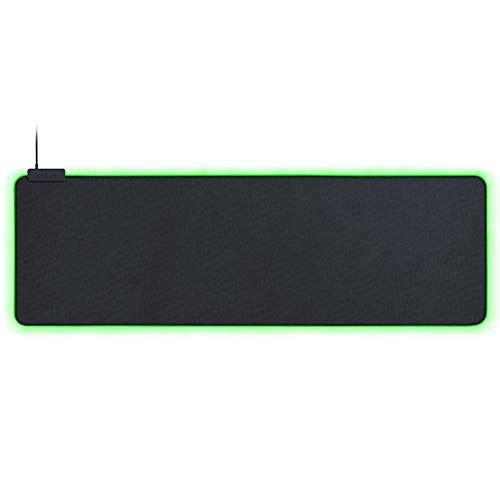
Razer Goliathus Chroma
Razer Goliathus Chroma pairs a micro-textured cloth surface with single-zone Chroma RGB edge lighting. Razer Synapse 3 syncs its glow with other Razer keyboards and mice for a matched setup. Daily desk movement rarely frays the braided micro-USB cable.
Pros
- Smooth glide for both low and high DPI mice
- Chroma RGB syncs across Razer peripherals
- Non-slip rubber base stays put on most desks
Cons
- Cloth surface wears faster than hard mats
- Fixed cable length with no passthrough

HyperX Pulsefire Mat
HyperX Pulsefire Mat uses a hard, low-friction top layer for consistent mouse glide. A single-zone RGB strip runs along the front edge, controlled through HyperX NGENUITY software. It plugs straight into a rear USB port, since the mat itself skips a passthrough.
Pros
- Lower cost than most RGB hard mats
- Consistent glide for FPS flick shots
- Anti-slip rubber base
Cons
- Only one size ships with RGB lighting
- No USB passthrough ports

Razer Firefly V2
Razer Firefly V2 trims the price while keeping Chroma RGB lighting and a hard micro-textured surface. Its smaller footprint suits compact desks better than extended mats. Razer Synapse 3 controls its single lighting zone the same way it does on pricier Razer mats.
Pros
- Lowest price point in the Razer RGB lineup
- Hard surface tracks well at high sensitivity
- Compact size fits small desks
Cons
- No cloth surface option
- Smaller than most extended mats
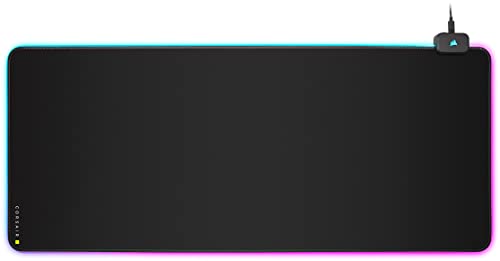
Corsair MM800 RGB Polaris
Corsair MM800 RGB Polaris runs 15 individually addressable RGB LEDs around a hard, low-friction surface. Corsair iCUE software links its lighting to other Corsair gear. A built-in two-port USB passthrough keeps a headset or flash drive within reach.
Pros
- USB passthrough adds two extra ports
- Hard surface favors fast, precise swipes
- iCUE lighting syncs with Corsair keyboards and cases
Cons
- Rigid edges feel harder on the wrist than cloth
- Full lighting control needs iCUE running
Corsair MM700 RGB
Corsair MM700 RGB extends to 930 mm long, covering keyboard, mouse, and desk accessories under one cloth surface. RGB lighting wraps the front edge and syncs through Corsair iCUE. A two-port USB passthrough sits at the top corner for easy reach.
Pros
- Covers an entire keyboard and mouse area
- Two-port USB passthrough for peripherals
- Anti-fray stitched edges
Cons
- Takes up most of a standard desk depth
- Cloth surface needs more frequent cleaning

SteelSeries QcK Prism Cloth XL
SteelSeries QcK Prism Cloth XL stretches 900 mm across the desk with RGB lighting built into the entire perimeter, not just one edge. SteelSeries GG software controls brightness and color patterns. The cloth top keeps the classic QcK glide that longtime SteelSeries users expect.
Pros
- RGB lights the full perimeter, not just the front
- Classic QcK cloth glide many players already know
- SteelSeries GG software also manages other peripherals
Cons
- Thin 2mm profile can bunch on carpeted desks
- Cloth surface is not treated for spill resistance

ASUS ROG Balteus Qi
ASUS ROG Balteus Qi adds a Qi wireless charging pad into the corner of a dual-sided mouse surface. Aura Sync RGB lighting rings the edge and matches other ROG components. Flipping the mat swaps between a hard and a soft surface for different games.
Pros
- Built-in Qi pad charges a phone during play
- Dual-sided surface offers two feels in one mat
- Aura Sync ties into other ROG RGB gear
Cons
- Smaller footprint than extended cloth mats
- Qi pad only fits phones without thick cases
How to choose
What actually matters in an RGB desk mat Surface material decides how a mouse glides across the mat. Cloth surfaces like Razer Goliathus Chroma favor control at lower sensitivity. Hard surfaces such as Corsair MM800 RGB Polaris favor speed at higher sensitivity. Lighting zones range from a single edge strip to full perimeter RGB. Software ecosystem matters too, since Corsair iCUE, Razer Synapse 3, SteelSeries GG, and ASUS Aura Sync do not cross-sync with each other.
Best surface for fast FPS tracking Hard, low-friction coatings let a mouse skim with less resistance. Corsair MM800 RGB Polaris and HyperX Pulsefire Mat both use this coating for quick flick shots. Cloth mats trade some top speed for finer stopping control. Competitive shooter players often prefer the hard surface for consistent stops during aim.
Matching lighting software to gear you already own Razer Synapse 3 links Goliathus Chroma and Firefly V2 to other Razer peripherals automatically. Corsair iCUE does the same for MM700 RGB and MM800 RGB Polaris. SteelSeries GG covers the QcK Prism Cloth XL alongside SteelSeries keyboards and headsets. Mixing brands means running two lighting apps side by side, since none of these ecosystems talk to each other yet.
When an extended mat or a charging pad earns its keep Extended cloth mats like Corsair MM700 RGB make sense once a keyboard, mouse, and wrist rest all need to share one surface. Smaller desks rarely need that much coverage. ASUS ROG Balteus Qi’s built-in charging pad helps anyone who keeps a phone next to the keyboard during long sessions. Skip it if a phone stand or dock already handles charging elsewhere on the desk.
How they compare
| # | Model | Dimensions | Best for | Score | Price |
|---|---|---|---|---|---|
| 1 | Razer Goliathus Chroma | 354 x 254 x 3 mm | Best overall | 9.4 | Check price |
| 2 | HyperX Pulsefire Mat | 350 x 270 x 4 mm (Medium) | Best value | 9.2 | Check price |
| 3 | Razer Firefly V2 | 355 x 255 x 4 mm | Best budget | 9.0 | Check price |
| 4 | Corsair MM800 RGB Polaris | 350 x 262 x 5 mm | Best for fast, low-friction FPS tracking | 8.8 | Check price |
| 5 | Corsair MM700 RGB | 930 x 300 x 3 mm | Best for full-desk coverage | 8.6 | Check price |
| 6 | SteelSeries QcK Prism Cloth XL | 900 x 300 x 2 mm | Best for even, whole-desk lighting | 8.3 | Check price |
| 7 | ASUS ROG Balteus Qi | 320 x 240 x 4 mm | Best for wireless phone charging at the desk | 8.0 | Check price |
Questions worth asking
What is an RGB desk mat used for?
It combines a mousepad-sized surface with edge or perimeter lighting that syncs to a PC’s RGB ecosystem. Most also improve mouse glide over a bare desk.
How do RGB desk mats connect to a computer?
Nearly all of them plug into a USB-A or micro-USB port for both power and lighting data. Corsair MM700 RGB and MM800 RGB Polaris add extra USB ports through a built-in passthrough.
Which RGB desk mat covers the most desk space?
Corsair MM700 RGB stretches 930 mm long, enough for a full keyboard, mouse, and wrist rest. SteelSeries QcK Prism Cloth XL comes close at 900 mm.
Can an RGB desk mat work without installing software?
Lighting defaults to a preset pattern out of the box. Custom colors, zones, and syncing to other peripherals require Razer Synapse 3, Corsair iCUE, SteelSeries GG, or ASUS Aura Sync depending on the brand.
Is a hard or cloth surface better for gaming?
Hard surfaces like Corsair MM800 RGB Polaris suit fast, low sensitivity flicks. Cloth surfaces like Razer Goliathus Chroma suit precise stops and lower speeds.
Corsair MM800 RGB Polaris vs Razer Firefly V2, which suits FPS players?
Both use a hard, low-friction surface. MM800 RGB Polaris adds a USB passthrough and 15 addressable LEDs, while Firefly V2 costs less and fits smaller desks.
Do RGB desk mats slow down everyday typing or scrolling?
No. Lighting sits at the mat’s edge or perimeter, so it does not affect the surface texture where a keyboard or mouse actually rests.
How much desk depth does an extended RGB mat need?
Corsair MM700 RGB needs roughly 930 mm of desk width to lay flat. Standard-size mats like Razer Goliathus Chroma need under 360 mm.
Is a wireless charging desk mat worth buying?
ASUS ROG Balteus Qi is worth it for anyone who keeps a phone beside the keyboard during long sessions. Its Qi pad only fits phones without thick cases, so check compatibility first.
Our pick
Razer Goliathus Chroma earns the overall pick by balancing cloth surface control with reliable Chroma lighting sync. Anyone chasing maximum desk coverage should choose Corsair MM700 RGB instead, and FPS focused players are better served by the hard, low friction surface on Corsair MM800 RGB Polaris. Buyers on a tighter budget still get RGB lighting from Razer Firefly V2 without paying for extra size.