Smart Picks for Robot Building Kits
For most families, the LEGO Mindstorms Robot Inventor stands out as the top choice because it combines versatile building with intuitive coding, but it comes with a higher price tag and requires a tablet or phone for full functionality.
Robot building kits are more than just toys. They teach problem solving, engineering, and coding. With so many options, finding the right one can be challenging.
We compared popular models to help you decide. Whether you are buying for a curious child or a budding engineer, there is a kit on this list for you.
What matters most
The top picks, ranked

LEGO Mindstorms Robot Inventor
This 949 piece kit lets you build 5 different robots. It uses a programmable hub with sensors and motors. The companion app offers drag and drop coding as well as Python for more advanced users.
Pros
- Build 5 different models from one set
- Supports both block based and Python coding
- High quality LEGO bricks
Cons
- Expensive compared to other kits
- Requires a smart device for programming

Makeblock mBot Robot Kit
The mBot is a two wheeled robot that you assemble in about 15 minutes. It comes with a screwdriver and can be controlled via an app. It teaches basic electronics and programming through Scratch blocks.
Pros
- Quick and easy to assemble
- Affordable price point
- Great for teaching coding basics
Cons
- Only one robot design
- No additional building pieces

Sphero BOLT Power Pack
This pack includes 15 Sphero BOLT robots, charging cases, and accessories. Each BOLT is a programmable robot ball with a bright LED matrix. It can be coded using Scratch blocks or JavaScript text programming.
Pros
- Comes with everything for a class
- Durable and waterproof design
- Advanced sensors and programmable LED screen
Cons
- Very expensive for individual use
- Not a traditional building kit
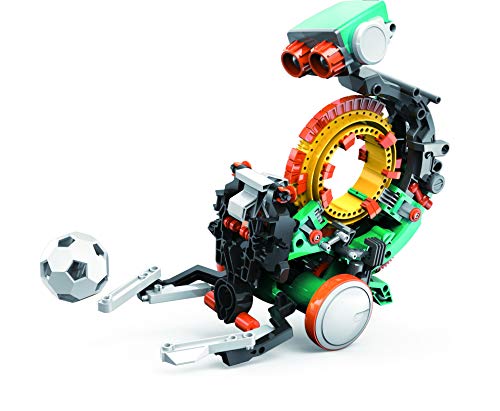
Snap Circuits Teach Tech Mech 5
This mechanical coding robot is built from over 100 parts. It introduces coding without a computer. Kids place coding buttons to make the robot move and avoid obstacles.
Pros
- No screen needed
- Teaches coding logic in a hands on way
- Sturdy construction
Cons
- Limited to pre programmed actions
- Not expandable

UBTECH JIMU Robot Builderbots Kit
This kit includes 410 snap together parts. The app shows 3D step by step instructions for building three different robots. You can code them using a simple block based interface.
Pros
- 3D instructions are very clear
- Snap together parts require no tools
- Can build three different robots
Cons
- Some users report connectivity issues
- Plastic feels less durable

Thames & Kosmos Robotics Workshop
This comprehensive kit comes with a 256 page manual. It covers the physics and technology behind robots. You build 10 different robotic models using motors, sensors, and a control unit.
Pros
- Excellent educational manual
- Teaches real engineering concepts
- Build 10 different robots
Cons
- Requires careful reading and patience
- No programming, just mechanical

ELECFREAKS micro:bit Smart Robot Car
This kit is based on the BBC micro:bit. It includes a car chassis and various sensors. You can program it using Microsoft MakeCode or Python. It is a great way to learn real coding.
Pros
- Teaches real text based coding
- Modular and expandable
- Works with micro:bit ecosystem
Cons
- Assembly requires more effort
- Micro:bit may need separate purchase if lost
The lineup, side by side
| # | Model | Piece Count | Best for | Score | Price |
|---|---|---|---|---|---|
| 1 | LEGO Mindstorms Robot Inventor | 949 | Advanced builders who want a versatile, programmable robot | 9.4 | Check price |
| 2 | Makeblock mBot Robot Kit | 15 minutes | Beginners and classrooms | 9.2 | Check price |
| 3 | Sphero BOLT Power Pack | 15 | Classrooms and group learning | 9.0 | Check price |
| 4 | Snap Circuits Teach Tech Mech 5 | 100+ | Younger kids who want a simple introduction | 8.7 | Check price |
| 5 | UBTECH JIMU Robot Builderbots Kit | 410 | Kids who enjoy building with app guidance | 8.5 | Check price |
| 6 | Thames & Kosmos Robotics Workshop | 10 | In depth learning of robotics principles | 8.3 | Check price |
| 7 | ELECFREAKS micro:bit Smart Robot Car | Included | Kids who want to learn coding with micro:bit | 8.0 | Check price |
Common questions
What is the best robot building kit for a 8 year old?
For an 8 year old, the Makeblock mBot Robot Kit is a great choice. It is easy to assemble, safe, and offers a visual programming interface that is perfect for beginners.
Do I need any tools to build a robot kit?
Most kits come with all necessary tools. For example, the mBot includes a screwdriver. Some kits, like UBTECH JIMU, use snap together pieces that require no tools at all.
Can I program the robot with Python?
Yes, some kits support Python. The LEGO Mindstorms Robot Inventor and the ELECFREAKS micro:bit Smart Robot Car both offer Python programming options.
Are robot building kits safe for young children?
Most kits are designed for ages 8 and up due to small parts. Always check the age recommendation. For younger children, look for kits with larger pieces and no small magnets or batteries that can be swallowed.
Do robot kits require batteries?
Many robot kits require batteries, either AA or rechargeable. Some kits, like Sphero BOLT, have built in rechargeable batteries. Check the product description for battery requirements.
Can these kits be used in classrooms?
Yes, many kits are used in educational settings. The Sphero BOLT Power Pack is designed specifically for classrooms. The Makeblock mBot is also popular in schools due to its affordability and ease of use.
What is the difference between a robot building kit and a robot toy?
A robot building kit requires assembly and often programming. A robot toy is ready to use out of the box. Building kits offer educational benefits and a sense of accomplishment.
How long does it take to build a robot kit?
Assembly time varies. Simple kits like the mBot can be built in 15 minutes. More complex kits like LEGO Mindstorms may take several hours. The UBTECH JIMU kit also takes about 1 to 2 hours per model.
Are there robot kits that don’t require a smartphone or tablet?
Yes, the Snap Circuits Teach Tech Mech 5 and the Thames & Kosmos Robotics Workshop do not require any smart devices. They use mechanical buttons or are purely mechanical.
What if my child loses the instructions?
Many brands offer PDF manuals online. For kits with apps, instructions are often built into the app. LEGO provides free instructions on their website. You can usually find replacements easily.
Our take
If you want the best overall robot building kit that grows with your child, choose the LEGO Mindstorms Robot Inventor. It offers the most flexibility and advanced coding features. For a budget friendly option that still teaches coding, the Makeblock mBot is an excellent value. For younger kids, the Snap Circuits Teach Tech Mech 5 provides a screen free introduction to robotics.


