Which SD Card Keeps Up With Your Camera’s Burst Mode?
The SanDisk Extreme PRO SDXC UHS-I is the safest all round card for stills and 4K, the Sony TOUGH-G Series UHS-II is the one to trust in bad weather and heavy burst work, and the Samsung PRO Plus covers everyday shooting for far less.
The SanDisk Extreme PRO SDXC UHS-I suits most cameras and most photographers, the Sony TOUGH-G Series UHS-II is the card for professional burst shooting and rough conditions, and the Samsung PRO Plus handles everyday 4K without the premium.
Card buying is confusing because the biggest number on the packaging is the read speed, which affects offloading and nothing else. What matters while shooting is sustained write speed and the video speed class, and a UHS-II card gains nothing in a camera with a single row of pins. We compared published specifications and reported real world behavior in burst and video work.
The best picks, ranked

SanDisk Extreme PRO SDXC UHS-I
This is the card most cameras are effectively designed around, offering V30 sustained write performance and a long track record for reliability. It clears burst buffers quickly on UHS-I bodies and handles 4K video without dropped frames. Recovery software is bundled, which is a genuine safety net.
Pros
- Strong sustained write for UHS-I
- Excellent long term reliability record
- File recovery software included
Cons
- Cannot exceed UHS-I bus limits
- Counterfeits circulate, so buy from trusted sellers

Sony TOUGH-G Series SDXC UHS-II
Sony moulds this card as a single piece with no write protect switch and no ribs, removing the two parts that usually break. Combined with UHS-II write speeds it is the card for long bursts on high resolution bodies. It is expensive, and the durability is the reason people accept that.
Pros
- V90 sustained write clears deep buffers
- Physically the toughest card here
- Water and dust resistant rating
Cons
- Among the most expensive per gigabyte
- Full speed needs a UHS-II camera and reader

Lexar Professional 2000x SDXC UHS-II
V90 rated write performance at a lower cost than the flagship alternatives, usually bundled with a UHS-II card reader that would otherwise be a separate purchase. It suits sports and wildlife shooters filling buffers regularly. Build is conventional, so treat it more carefully than a moulded card.
Pros
- V90 performance at a lower cost
- Reader included in most packs
- Good for long raw bursts
Cons
- Standard construction, less rugged
- Runs warm during extended video capture

ProGrade Digital SDXC UHS-II V60
V60 is the sweet spot for most 4K and many 6K codecs, and ProGrade builds these with consistent sustained write rather than headline peaks. Each card is serialized and individually tested, which matters to people shooting paid work. It costs less than V90 while comfortably exceeding video needs.
Pros
- Very consistent sustained write
- Sensible price for video work
- Refresh utility available from the maker
Cons
- V60 is not enough for the deepest raw bursts
- Limited retail availability compared to big brands

Samsung PRO Plus SDXC UHS-I
A V30 UHS-I card that handles 4K recording and moderate stills bursts without the price of professional cards. Samsung rates it against water, temperature, magnets and X rays, which covers most travel worries. For a mirrorless body used at weekends this is plenty.
Pros
- Strong value per gigabyte
- Reliable 4K video recording
- Broad environmental protection claims
Cons
- Buffer clears slower than UHS-II cards
- Not suited to high bitrate raw video

Kingston Canvas React Plus SDXC UHS-II
Kingston aims this squarely at photographers shooting long raw sequences, with V90 write speeds that keep a buffer moving. Bundles sometimes include a reader and a hard case. It is a straightforward performance card without the ruggedized construction of the Sony.
Pros
- V90 write keeps buffers clearing
- Bundle options include reader and case
- Good sustained performance in video
Cons
- Fewer capacity choices than rivals
- Ordinary physical construction
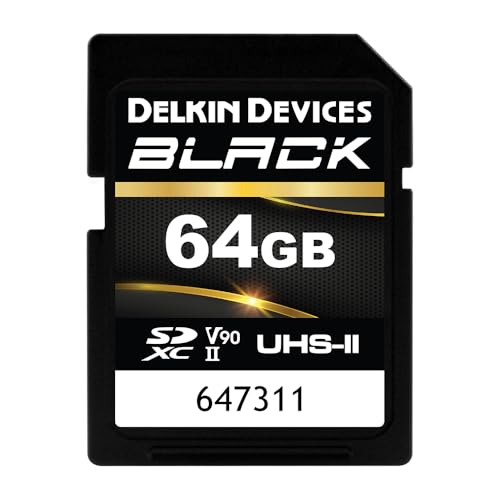
Delkin Devices Black SDXC UHS-II V90
Delkin builds the Black line for working professionals and backs it with a lifetime warranty that includes replacement, which is unusual in this category. Performance is V90 with a focus on consistency under sustained load. It is a card bought for peace of mind rather than headline numbers.
Pros
- Exceptional warranty terms
- Consistent under sustained write
- Built for demanding professional use
Cons
- Expensive per gigabyte
- Less widely stocked than SanDisk or Lexar
How they compare
| # | Model | Bus | Best for | Score | Price |
|---|---|---|---|---|---|
| 1 | SanDisk Extreme PRO SDXC UHS-I | UHS-I | Best overall | 9.4 | Check price |
| 2 | Sony TOUGH-G Series SDXC UHS-II | UHS-II | Best for professional use | 9.2 | Check price |
| 3 | Lexar Professional 2000x SDXC UHS-II | UHS-II | Best value UHS-II | 9.0 | Check price |
| 4 | ProGrade Digital SDXC UHS-II V60 | UHS-II | Best for video | 8.8 | Check price |
| 5 | Samsung PRO Plus SDXC UHS-I | UHS-I | Best value | 8.6 | Check price |
| 6 | Kingston Canvas React Plus SDXC UHS-II | UHS-II | Best for burst shooting | 8.3 | Check price |
| 7 | Delkin Devices Black SDXC UHS-II V90 | UHS-II | Best for reliability | 8.0 | Check price |
How to choose
Read speed sells cards, write speed shoots them The large number on the front of most packaging is the maximum read speed, which only affects how quickly files copy to a computer. What determines whether your camera stalls mid burst is minimum sustained write speed, expressed as U3, V30, V60 or V90. A card advertising 200 MB per second read can still be a V30, and that is the number that matters at the moment you need it.
UHS-II only helps if your camera supports it UHS-II cards have a second row of contacts that carries the faster bus. Put one in a UHS-I camera and it works perfectly, just at UHS-I speeds, so you have paid for headroom you cannot use. Check your camera’s specification first; if it is UHS-I only, a good V30 card is the right ceiling and the money is better spent elsewhere.
Match the video speed class to your codec V30 covers most 4K recording at typical consumer bitrates. V60 gives comfortable headroom for higher bitrate 4K and many 6K modes. V90 is for raw and high frame rate capture, and for photographers emptying deep buffers. Buying above your codec’s needs is harmless; buying below it produces dropped clips, which is the one failure you cannot fix afterward.
Buy several smaller cards and format them in camera One large card means one point of failure for a whole shoot, so most working photographers carry multiple mid capacity cards instead. Always format in the camera rather than on a computer, since that writes the file structure the body expects. Delete images by reformatting rather than one at a time, and replace any card that starts producing errors instead of trying to nurse it along.
Questions worth asking
What SD card speed do I need for 4K video?
V30 is the practical minimum for standard 4K recording, and V60 gives useful headroom for higher bitrate modes. Check your camera manual, since some bodies specify a minimum class for particular recording modes.
Is UHS-II worth it?
Only if your camera has the second row of contacts. In a compatible body it clears burst buffers considerably faster and speeds up offloading with a UHS-II reader. In a UHS-I camera it delivers no shooting benefit.
How big should my SD card be?
For stills, 64GB or 128GB cards used in rotation is a common approach because it limits how much a single failure costs. Video shooters generally need 128GB or more per card given file sizes.
What does V30, V60 and V90 mean?
They are video speed classes guaranteeing minimum sustained write speeds of 30, 60 and 90 MB per second respectively. Those minimums are what stops a recording halting partway through.
Should I format the card in the camera or the computer?
Always in the camera. It creates the directory structure and file system the body expects, and it avoids the subtle incompatibilities that computer formatting can introduce.
How do I avoid counterfeit SD cards?
Buy from the manufacturer’s own storefront or a well known retailer, be suspicious of unusually low prices on high capacity cards, and verify capacity with a card testing utility when a new card arrives.
How long do SD cards last?
They wear out through write cycles rather than age, and a card used regularly for several years is a candidate for replacement. Any card that produces a write error or a corrupted file should be retired immediately.
Can I use a microSD with an adapter in my camera?
It will physically fit and often work, but the adapter adds a connection point that can fail and most microSD cards have lower sustained write performance. For camera use a full size card is the more dependable choice.
Final word
The SanDisk Extreme PRO SDXC UHS-I is the card to buy if you want one answer that fits nearly every camera, with the sustained write and track record to match. Step up to the Sony TOUGH-G Series if you shoot professionally in rough conditions, or take the Samsung PRO Plus for everyday 4K.
