Which SD Card Reader Keeps Up With Your Camera?
The SanDisk ImageMate PRO Multi-Card Reader is our top pick for mixed card formats and steady UHS-II speeds. The ProGrade Digital Dual-Slot SDXC UHS-II Reader suits photographers offloading two cards at once, while the Anker USB-C 2-in-1 SD Card Reader covers everyday laptop and tablet use for less.
The SanDisk ImageMate PRO Multi-Card Reader is the best all-round SD card reader for most people, with the ProGrade Digital Dual-Slot UHS-II model ahead for serious photo work and the Anker USB-C 2-in-1 covering simple laptop offloads.
Card readers look interchangeable on a listing page, yet a UHS-I only reader will cap a fast V90 card at roughly a third of its rated speed no matter which card you buy. We compared published interface specs, slot layouts, cable design and owner reports of overheating and connection drops to separate readers that actually deliver their card’s speed from ones that quietly throttle it.
Our top picks

SanDisk ImageMate PRO Multi-Card Reader
SanDisk’s ImageMate PRO handles SD, microSD and CompactFlash from one housing, which matters if you shoot on more than one body. It supports UHS-II on the SD slot, so V60 and V90 cards run near their rated read speeds instead of being pinned at UHS-I ceilings. Owners report it stays cool through long card dumps, which is where cheaper readers tend to stall.
Pros
- Covers three card formats in one unit
- True UHS-II speeds on the SD slot
- Stable through long transfers per owner reports
Cons
- Type-A plug needs an adapter on USB-C only laptops
- Bulkier than pocket dongle readers
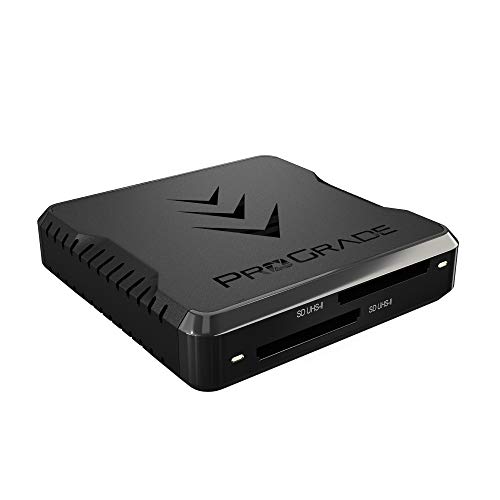
ProGrade Digital Dual-Slot SDXC UHS-II Card Reader
ProGrade builds this reader around two full UHS-II SD slots that can be read at the same time, which roughly halves the wait on a two card shoot. The aluminium shell doubles as a heatsink and the magnetic base keeps it from sliding around a desk. It is aimed squarely at people who offload cards daily rather than a few times a year.
Pros
- Simultaneous dual card offloads
- Metal body sheds heat well
- Detachable cable is easy to replace
Cons
- SD only, no microSD or CFexpress slot
- Costs more than single slot readers

Anker USB-C 2-in-1 SD Card Reader
This is the reader most people should keep in a laptop bag. It plugs straight into a USB-C port, reads SD and microSD, and needs no drivers on modern laptops, tablets or phones. Speeds are UHS-I class rather than UHS-II, so it is best matched with everyday V30 cards rather than high bitrate video media.
Pros
- Tiny and cable free
- Works with phones and tablets as well as laptops
- Reads both card sizes
Cons
- UHS-I ceiling limits fast V90 cards
- Short body can be tight next to thick cases

Lexar Professional Multi-Card 3-in-1 USB 3.2 Reader
Lexar’s three slot reader takes SD, microSD and CompactFlash and lets you move files between two cards without a computer drive in the middle. The SD and microSD slots run at UHS-II, which keeps modern cards from being throttled. It is a sensible pick if you have inherited cards from several generations of cameras.
Pros
- UHS-II on two of the three slots
- Card to card copying without a host drive
- Handles legacy CompactFlash media
Cons
- Plastic shell warms up on long dumps
- Cable is captive on some versions

UGREEN USB 3.0 4-in-1 Card Reader
UGREEN’s four slot reader is the low cost option that still uses a proper USB 3.0 controller rather than an ageing USB 2.0 chip. It reads SD, microSD, CompactFlash and Memory Stick, so it doubles as a way to rescue files from very old cards. Do not expect UHS-II speed, but for backups and casual photo transfers it is more than adequate.
Pros
- Four slots including legacy formats
- Genuine USB 3.0 controller
- Light enough to leave permanently plugged in
Cons
- No UHS-II support
- All slots share one bus, so parallel reads slow down

Kingston MobileLite Plus SD Reader
Kingston keeps this one deliberately simple: a single UHS-II SD slot in a small ribbed housing with a short captive USB-A plug. There is nothing to lose and nothing to snap off in a camera bag. Owners report consistent transfer speeds across long sessions, which is the main thing you want from a travel reader.
Pros
- UHS-II speed in a very small body
- No cable to pack or lose
- Sturdy textured housing
Cons
- One slot only
- Type-A plug can block a neighbouring port
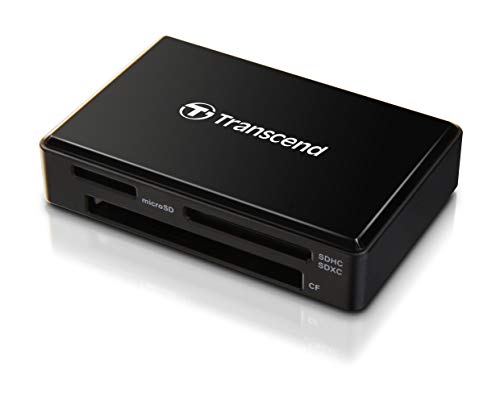
Transcend RDF9 UHS-II Card Reader
The Transcend RDF9 is a no frills UHS-II reader for people who shoot on one card format and want the transfer over quickly. It uses a standard USB-A connection and a short attached cable, and it is widely reported as a dependable long term desk fixture. The trade off is a single slot and no microSD provision.
Pros
- Reliable UHS-II throughput
- Clear activity light
- Straightforward plug and play setup
Cons
- No microSD slot
- Type-A only, needs a hub on newer laptops
Before you buy
UHS-I and UHS-II are not interchangeable A UHS-II card has a second row of contacts and a much faster bus, but only a UHS-II reader can use it. Put a V90 card in a UHS-I reader and it will still work, just at roughly UHS-I speed. If you have spent money on fast cards for high bitrate video, matching the reader is the single change that gives back the most time.
Match the port to the machine you actually use USB-A readers are still the most common, but a lot of current laptops only have USB-C. A USB-C reader avoids adapters and usually works with tablets and USB-C phones too. If you use both older and newer machines, a reader with a detachable cable lets you swap the cable rather than the whole unit.
Heat is the usual cause of stalled transfers Long card dumps push a reader’s controller hard, and cheap plastic bodies trap that heat. Owners commonly report transfers slowing or dropping partway through on unbranded readers. Aluminium housings and larger bodies shed heat better, which is why the ProGrade and SanDisk units hold their speed on big offloads.
Extra slots are useful only if you use them Multi-format readers look like better value, but slots usually share one USB bus, so reading two cards at once splits the bandwidth. Dedicated dual-slot readers are built to avoid that. Decide first whether you need parallel reads or just occasional access to a second card format, because the two needs point at different products.
Compared at a glance
| # | Model | Card slots | Best for | Score | Price |
|---|---|---|---|---|---|
| 1 | SanDisk ImageMate PRO Multi-Card Reader | SD, microSD, CompactFlash | Best overall | 9.4 | Check price |
| 2 | ProGrade Digital Dual-Slot SDXC UHS-II Card Reader | Two SDXC UHS-II | Best for photographers | 9.2 | Check price |
| 3 | Anker USB-C 2-in-1 SD Card Reader | SD and microSD | Best value | 9.0 | Check price |
| 4 | Lexar Professional Multi-Card 3-in-1 USB 3.2 Reader | SD, microSD, CompactFlash | Best for mixed card collections | 8.8 | Check price |
| 5 | UGREEN USB 3.0 4-in-1 Card Reader | SD, microSD, CF, Memory Stick | Best budget | 8.6 | Check price |
| 6 | Kingston MobileLite Plus SD Reader | Single SD | Best for travel | 8.3 | Check price |
| 7 | Transcend RDF9 UHS-II Card Reader | Single SDXC | Best for fast single card offloads | 8.0 | Check price |
Questions worth asking
Will a UHS-II reader make my old UHS-I card faster?
No. The card itself sets the ceiling. A UHS-II reader stays backward compatible and will read a UHS-I card normally, but you only see the higher speeds when both the card and the reader support UHS-II.
Do I need to install drivers for an SD card reader?
Almost never on Windows, macOS, ChromeOS or modern Linux. These readers use standard mass storage drivers built into the operating system. Any product that asks you to install software from a bundled disc is worth avoiding.
Can I use these readers with an iPad or Android phone?
USB-C readers such as the Anker generally work with USB-C tablets and phones that support USB host mode. USB-A readers need an adapter, and some very compact phones may not supply enough power for multi-slot readers.
Why does my transfer start fast and then slow down?
That is usually the card’s own write cache filling or the reader’s controller heating up. Bigger metal bodied readers hold their speed longer. It can also happen when copying thousands of small files rather than a few large video clips.
Is a dual-slot reader worth it over two cheap readers?
If you routinely offload two cards after every shoot, yes, because a proper dual-slot reader is designed for simultaneous reads rather than sharing one narrow bus. For occasional use, two inexpensive single readers do the same job.
Do card readers wear out?
The slot contacts are the usual failure point after thousands of insertions, and captive cables can fray where they meet the body. Readers with detachable cables and metal housings tend to last longer according to owner reports.
Can a card reader corrupt my files?
Removing a card mid transfer is the common cause of corruption, not the reader itself. Always eject the card in the operating system first. A loose or worn slot can also drop the connection, which is another reason to replace a reader that has started disconnecting.
Do I need CFexpress support?
Only if your camera uses CFexpress cards, which is mostly recent professional mirrorless and cinema bodies. None of the readers here cover CFexpress Type B, so check your camera’s card format before buying rather than assuming a multi-format reader covers everything.
Our take
For most people the SanDisk ImageMate PRO Multi-Card Reader is the sensible choice, since it handles three formats and delivers real UHS-II speed on the SD slot. Photographers clearing two cards after every session will get more back from the ProGrade Digital dual-slot reader, and anyone who just needs an occasional laptop offload can stop at the Anker USB-C 2-in-1.


