Smart Displays That Mean Business
The Amazon Echo Show 15 is our top pick for professionals because it offers a large 15.6 inch screen that can display calendars, sticky notes, and video feeds, making it a central hub for team coordination. Its main limitation is that it uses Alexa, which may not integrate with all corporate systems.
Smart displays have evolved from kitchen gadgets to serious productivity tools. For professionals, they offer a way to manage schedules, join video calls, and control smart office devices without a computer.
This roundup focuses on models that can handle business tasks. We evaluated each based on display quality, ecosystem compatibility, and features like calendar sync and video conferencing.
The shortlist, ranked

Amazon Echo Show 15
The Echo Show 15 is a 15.6 inch smart display designed to be wall mounted like a digital photo frame. It offers widgets for calendars, to do lists, and sticky notes, making it a central hub for a home office or small team. Owners report that the screen is sharp and bright, and Alexa responds quickly to voice commands.
Pros
- Large screen shows multiple widgets at once
- Can be wall mounted to save desk space
- Built in Zigbee hub for smart devices
Cons
- No built in camera for video calls
- Alexa integration may not fit corporate environments
Google Nest Hub Max
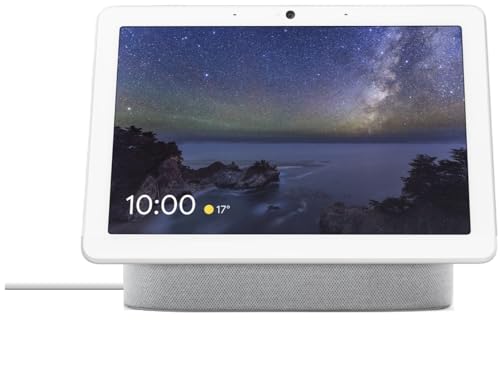
The Nest Hub Max is a 10 inch smart display with a built in camera that supports Google Meet and Duo. It integrates deeply with Google Calendar and can show your schedule at a glance. The sound quality is surprisingly good for music and calls. Users note that the camera has a physical privacy switch, which is a plus for sensitive conversations.
Pros
- Seamless Google Workspace integration
- Camera with privacy shutter
- Excellent speaker for its size
Cons
- Smaller screen than some competitors
- No built in Zigbee hub (uses Thread and Matter)

Lenovo Smart Display 10
The Lenovo Smart Display 10 offers a 10.1 inch Full HD screen and a fabric design that looks professional. It runs Google Assistant and can handle video calls through Google Duo. The display is crisp and the ambient mode can show photos or news. Some users have reported that the software is no longer updated, but it still works reliably for basic tasks.
Pros
- Sharp Full HD screen
- Physical camera cover for privacy
- Good sound quality
Cons
- Discontinued, may miss future updates
- Limited video calling options

Echo Show 8 (2nd Gen)
The Echo Show 8 (2nd Gen) is a versatile 8 inch smart display that fits on a desk without taking much space. It has a built in camera for video calls and supports Alexa communication. It also works as a smart home hub with Zigbee and Matter support. Owners appreciate its sharp screen and responsive touch.
Pros
- Compact but powerful
- Great camera for video calls
- Built in smart home hub
Cons
- Small screen for multitasking
- Audio lacks bass

Google Nest Hub (2nd Gen)
Although primarily marketed as a bedside assistant, the Nest Hub (2nd Gen) has features that appeal to professionals. It uses Soli radar for sleep sensing, which can help you monitor your sleep patterns. It also integrates with Google Calendar and can control compatible smart devices. The 7 inch screen is smaller but bright and clear.
Pros
- Sleep tracking without a camera
- Compact design
- Good for quick calendar checks
Cons
- No camera for video calls
- Small screen may not suit all tasks

Facebook Portal Go
The Facebook Portal Go is a portable smart display with a 10 inch screen and a built in battery. It is designed for video calling through WhatsApp, Messenger, and Zoom. The camera pans and zooms automatically to keep you in frame. Professionals who move between rooms will find the portability useful, but it lacks deep smart home integration.
Pros
- Portable with battery
- Excellent auto tracking camera
- Supports major video calling apps
Cons
- Limited smart home control
- Privacy concerns with Facebook ecosystem

JBL Link View
The JBL Link View is a smart display with an 8 inch screen and JBL speakers that deliver rich, room filling sound. It runs Google Assistant and supports Google Duo video calls. The audio quality is a standout, making it great for hands free conference calls. However, it lacks a camera shutter, and the design feels a bit dated.
Pros
- Exceptional sound quality
- Good for music and calls
- Google Assistant integration
Cons
- No privacy shutter
- Older model, limited availability
How they stack up
| # | Model | Display | Best for | Score | Price |
|---|---|---|---|---|---|
| 1 | Amazon Echo Show 15 | 15.6 inch 1080p | Team coordination and visual scheduling | 9.4 | Check price |
| 2 | Google Nest Hub Max | 10 inch 1280×800 | Video conferencing with Google Meet | 9.2 | Check price |
| 3 | Lenovo Smart Display 10 | 10.1 inch 1920×1200 | Business users who prefer Google Assistant | 8.8 | Check price |
| 4 | Echo Show 8 (2nd Gen) | 8 inch 1280×800 | Compact desks and small offices | 8.7 | Check price |
| 5 | Google Nest Hub (2nd Gen) | 7 inch 1024×600 | Sleep tracking and bedside use | 8.5 | Check price |
| 6 | Facebook Portal Go | 10 inch 1280×800 | Mobile video calling | 8.3 | Check price |
| 7 | JBL Link View | 8 inch 1280×800 | Audio quality for conference calls | 8.0 | Check price |
What matters most
Good to know
Which smart display is best for a small business?
For a small business, the Amazon Echo Show 15 is a great choice because you can place it in a common area to display schedules and announcements. Its large screen is visible from across the room.
Can smart displays replace a computer for scheduling?
Smart displays are excellent for viewing and managing calendars, but they are not full computers. You cannot type long emails or edit documents. They are best for quick tasks and voice commands.
Are smart displays secure for confidential calls?
Security depends on the model and how you use it. Some have physical camera covers or privacy switches. Always check the privacy settings and be cautious when discussing sensitive information near any connected device.
Do smart displays work with Zoom?
Some smart displays support Zoom, but not all. For example, the Facebook Portal Go supports Zoom, while Google Nest devices support Google Meet and Duo. Check the app compatibility before buying.
Can I use a smart display as a digital signage?
Yes, some smart displays allow you to display custom content. The Echo Show 15 has a feature for sticky notes and calendars, but for full digital signage, you may need specialized software.
What is the difference between a smart display and a smart speaker?
A smart display adds a screen to the voice assistant, allowing you to see visual information like maps, calendars, and video calls. Smart speakers only provide audio feedback.
Are there smart displays with Microsoft Teams integration?
As of now, no major smart display natively supports Microsoft Teams. However, you can sometimes mirror your computer screen or use a workaround, but it is not seamless.
How do I set up a smart display for a conference room?
Place the display on a table or mount it on a wall. Connect it to your Wi Fi network and sign in with your work accounts. Then, configure your calendar and video apps. Ensure the camera has a clear view of the meeting space.
What is the best budget smart display for a home office?
The Echo Show 8 offers a good balance of features and price. It has a camera, smart home hub, and a clear display, making it a reliable choice without being too expensive.
Can smart displays be used as baby monitors?
Yes, some models like the Echo Show can be used as baby monitors if you have the right app. However, there are dedicated baby monitor devices that offer better features like movement and sound alerts.
Our take
For most professionals, the Amazon Echo Show 15 is the best overall because of its large screen and organizational widgets. If you are heavily invested in Google Workspace, the Nest Hub Max is a strong alternative with its camera and integration. Choose the Echo Show 8 for a compact, cost effective option that still offers great functionality.
You might also need
Universal Smart Remotes That Actually Control Everything

Can a Smart Garage Door Controller Replace Your Old Remote?

Smart Shipping Label Printers Compared for Home Offices