Universal Smart Remotes That Actually Control Everything
The Logitech Harmony Companion takes the top spot for most homes. It combines a physical remote with a companion app and works with 270,000+ devices. Its main limitation is the hub requirement, which adds cost.
Universal smart remotes have come a long way from the clunky clickers of the past. Today’s models can control your TV, soundbar, streaming box, and smart home devices all from one place. But with so many options, picking the right one can be tricky.
We compared the top contenders on the market to help you find the best fit for your living room. Whether you’re a cord-cutter with a streaming stick or a home theater enthusiast with a stack of components, there’s a remote here for you.
How to pick the right one
The best picks, ranked
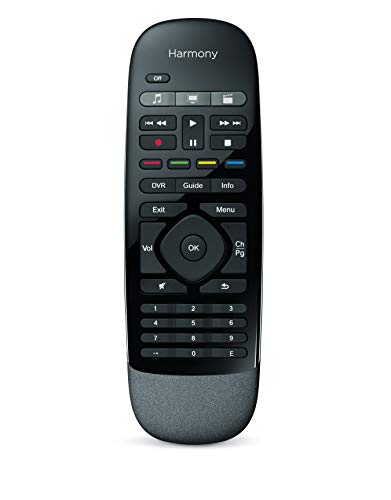
Logitech Harmony Companion
The Harmony Companion is a hub-based remote that controls over 270,000 devices. It works with Alexa, Google Assistant, and Apple HomeKit, and the included hub adds smart home control. Owners report excellent reliability and a well-designed app for setup.
Pros
- Excellent app and setup wizard
- Controls smart home devices
- Hub ensures RF devices work
Cons
- Requires hub (adds cost)
- Design feels dated

SofaBaton U1
The SofaBaton U1 is a budget-friendly remote that still packs a punch. It supports IR and Bluetooth, and can control up to 15 devices. Users like the ergonomic design and the fact that it has a backlight. Setup is straightforward with the mobile app.
Pros
- Very affordable
- Ergonomic and backlit
- Simple app setup
Cons
- No Wi-Fi control
- Limited to 15 devices
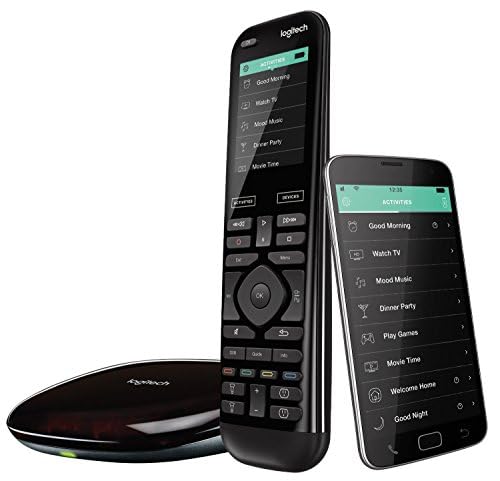
Logitech Harmony Elite
The Harmony Elite is the premium choice for power users. It features a touchscreen, a robust hub, and controls up to 15 devices. It supports IR, Bluetooth, and RF, and works with Alexa and Google Assistant. Owners appreciate the customizable activities and the long battery life.
Pros
- Touchscreen and full QWERTY keyboard
- Controls RF devices with hub
- Excellent app and automation
Cons
- Expensive
- Setup can be complex

SofaBaton X1
The SofaBaton X1 is a newer competitor that offers a hub, a smartphone app, and a remote with a small display. It works with IR, Bluetooth, and Wi-Fi, and supports Alexa and Google Assistant. It can control up to 60 devices and is highly customizable.
Pros
- Large device capacity
- Hub adds smart home control
- Companion app is intuitive
Cons
- Some users report setup hiccups
- Remote feels plastic
Caavo Control Center
The Caavo Control Center is designed for streaming enthusiasts. It connects multiple HDMI devices and lets you control them with voice and a simple remote. It works with Alexa and Google Assistant, and it automatically switches inputs for you. Owners love the universal search feature.
Pros
- Voice control and universal search
- Auto input switching
- Works with many streaming services
Cons
- 4K HDR support is limited
- Some users had HDMI handshake issues

Broadlink RM4 Pro
The Broadlink RM4 Pro is a smart IR/RF blaster that works with your smartphone. It has no physical remote, but the app is powerful. It can control air conditioners, TVs, and more, and it supports Alexa and Google Assistant. Users appreciate the learning function and scheduling.
Pros
- No remote to lose
- Learns commands from existing remotes
- Supports both IR and RF
Cons
- No physical remote
- App required for all functions

Logitech Harmony 665
The Harmony 665 is a classic IR-only remote that offers great value. It can control up to 10 devices with basic activities. It lacks smart home integration but is praised for its ergonomic design and reliable performance. It’s a good choice for those who just need to replace multiple remotes.
Pros
- Affordable
- Comfortable to hold
- Simple activity-based control
Cons
- No Bluetooth or Wi-Fi
- No smart home integration
Compared at a glance
| # | Model | Device Compatibility | Best for | Score | Price |
|---|---|---|---|---|---|
| 1 | Logitech Harmony Companion | 270,000+ devices | Best overall for smart home integration | 9.4 | Check price |
| 2 | SofaBaton U1 | Up to 15 devices | Best budget pick | 8.8 | Check price |
| 3 | Logitech Harmony Elite | Up to 15 devices | Best for large home theater setups | 9.2 | Check price |
| 4 | SofaBaton X1 | Up to 60 devices | Best for smart home enthusiasts | 9.0 | Check price |
| 5 | Caavo Control Center | 8 HDMI devices | Best for streaming device control | 8.6 | Check price |
| 6 | Broadlink RM4 Pro | Unlimited (via app) | Best for app-based control | 8.4 | Check price |
| 7 | Logitech Harmony 665 | Up to 10 devices | Best for simple IR control | 8.3 | Check price |
Questions worth asking
Can a universal smart remote control any device?
Most universal remotes support thousands of devices, but not all. Check the manufacturer’s compatibility list to see if your specific TV, soundbar, or streaming box is included. Some devices may require Bluetooth or Wi-Fi, which not all remotes support.
Do I need a hub for a universal remote?
Not always. Hub-based remotes like the Harmony Companion offer more features, such as controlling devices that are not in line of sight and integrating with smart home systems. If you only need IR control, a standalone remote like the Harmony 665 will work fine.
Can I use a universal remote with my smart TV?
Yes, most smart TVs are IR-controlled, so any universal remote can handle basic functions. For advanced features like streaming apps, you may need Bluetooth or Wi-Fi support, which some remotes offer.
How many devices can a universal remote control?
The number varies. Entry-level remotes control 4 to 8 devices, while high-end models like the SofaBaton X1 can handle up to 60. Consider how many devices you have and whether you might add more in the future.
Will a universal remote work with my Roku, Apple TV, or Fire TV?
Many remotes support these streaming devices via IR, Bluetooth, or Wi-Fi. For example, the Logitech Harmony Companion works with Roku and Apple TV. Check the specs to ensure compatibility with your streaming player.
Can I use voice commands with a universal remote?
Some remotes have built-in microphones or work with Alexa and Google Assistant. For example, the Caavo Control Center supports voice commands. However, not all remotes offer this feature, so if voice control is important to you, look for that capability.
How do I set up a universal remote?
Most modern remotes use a mobile app for setup. You enter your device brands and models, and the app programs the remote. Some remotes also have a learning function where you point the original remote at the universal remote to copy commands.
What is the difference between IR and RF remotes?
IR (infrared) remotes require line of sight to the device. RF (radio frequency) remotes can control devices without line of sight, often using a hub. Hub-based remotes use RF to communicate with the hub, which then sends IR or Bluetooth signals to your devices.
Our take
For most people, the Logitech Harmony Companion is the best choice because it balances price, features, and ease of use. If you are on a tight budget and only need IR control, the SofaBaton U1 is a great value. For a large home theater with many devices and a desire for a touchscreen, the Harmony Elite is worth the investment. Choose the one that fits your specific setup and budget.



