Smart Power Strips: Per Outlet Control Explained
The Kasa Smart Wi-Fi Power Strip HS300 leads because all six outlets switch independently and each reports its own energy use. The Kasa KP303 is the compact three outlet version, and the Meross MSS425F adds Apple Home support for mixed households.
The Kasa HS300 is the smart power strip we would buy first, with the smaller Kasa KP303 for tight spaces and the Meross MSS425F for households that need Apple Home compatibility.
The trap in this category is that some strips marketed as smart only switch the whole bar at once, which makes them an expensive smart plug rather than a strip, and surge protection ratings vary from serious to decorative. We compared these seven on whether each outlet switches independently, whether energy monitoring is per outlet or aggregate, USB port count and output, published joule ratings and which voice assistants are supported, using manufacturer specifications and the behaviours owners report.
How to choose
Check whether outlets switch individually This is the difference between a smart power strip and a power strip on a smart plug. Independently controlled outlets let you turn off a lamp while the router beside it stays up, which is the entire point. Some cheaper products control all outlets as one group, and the listing will often bury that. Look for a specific claim that each outlet is separately controlled, and count how many, since USB ports are frequently on one shared switch.
Surge protection ratings vary enormously The joule rating tells you roughly how much energy the strip can absorb before its protection is used up, and figures across the category run from a few hundred to a few thousand. If the strip is protecting a television, a computer or network gear, look for a higher rating and a warranty on connected equipment. Also remember that surge protection degrades with each event and is not visible, so old strips should be replaced periodically.
Decide what you want energy monitoring for Per outlet monitoring is genuinely useful for finding what draws power overnight and for confirming a device actually switched off. Aggregate monitoring across the whole strip tells you far less. If you are trying to track down standby draw or measure the cost of a specific appliance, this feature is worth paying for, and if you just want scheduled control it is not.
Never plug high draw appliances into a smart strip Space heaters, air conditioners, kettles and other heating appliances draw close to a circuit’s limit and are widely advised against on any power strip, smart or not. Smart strips have relays and electronics inside that make this more of a concern rather than less. Check the strip’s total wattage rating, add up what you intend to plug in, and keep heating appliances on their own wall outlet.
Our top picks

Kasa Smart Wi-Fi Power Strip HS300
The HS300 is the strip that set the standard, with six outlets that each switch on their own schedule plus three USB ports on a shared bus. Energy monitoring is per outlet, so you can see which device on a desk is the one drawing power overnight. The Kasa app handles scheduling, away mode and grouping without a subscription.
Pros
- Every outlet switches independently
- Per outlet energy reporting is genuinely useful
- Mature app with no subscription
Cons
- Physically long, needs space behind furniture
- No Apple Home support
Kasa Smart Wi-Fi Power Strip KP303
Most people do not need six controlled outlets, and the KP303 delivers the same app and independent switching in a much smaller body with three outlets and two USB ports. It fits behind a TV or under a desk where the HS300 would not. The omission is energy monitoring, which this model drops entirely.
Pros
- Small enough to hide behind a TV
- Same reliable Kasa app and scheduling
- Independent control on all three outlets
Cons
- No energy monitoring at all
- Only three controlled outlets

Meross Smart Wi-Fi Surge Protector MSS425F
Meross is the accessible way to get a smart strip that works with Apple Home alongside Alexa and Google, which matters in households where phones are split between platforms. Four independently controlled outlets and four USB ports cover a typical desk. Build quality is plainer than the Kasa units and the app is functional rather than elegant.
Pros
- Apple Home support at a reasonable outlay
- Four USB ports for charging duty
- Independent control on every outlet
Cons
- App design lags behind Kasa
- No energy monitoring
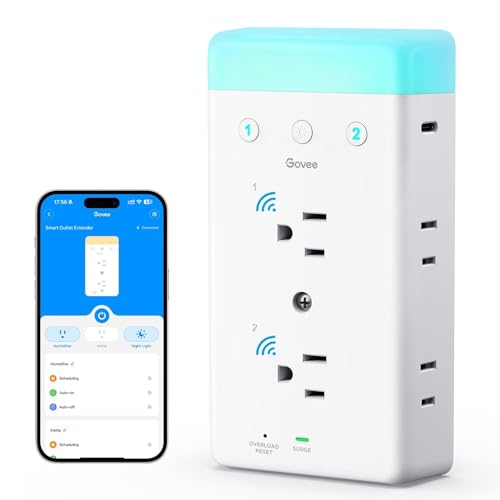
Govee Smart Power Strip
If you already run Govee lighting, keeping the strip in the same app means one place for scenes and schedules rather than juggling two. Three controlled outlets and three USB ports suit a media unit or bedside setup, and setup takes a couple of minutes. Outside the Govee ecosystem there is less reason to choose it over the Kasa options.
Pros
- Shares scenes with Govee lighting products
- Quick pairing process
- Compact enough for a bedside table
Cons
- Little advantage outside the Govee app
- Only three controlled outlets

TESSAN Smart Power Strip with USB Ports
TESSAN leans towards charging duty, pairing app controlled AC outlets with a bank of USB ports and a long cord that reaches an awkward socket. It works well as the single hub for a family’s phones and tablets with a bedtime schedule that cuts charging overnight. The USB ports are not individually switched, which is worth knowing before you plan around it.
Pros
- Good AC and USB balance for charging stations
- Longer cord than most rivals
- Schedules make overnight charging cutoffs easy
Cons
- USB ports switch together, not individually
- Surge rating is modest
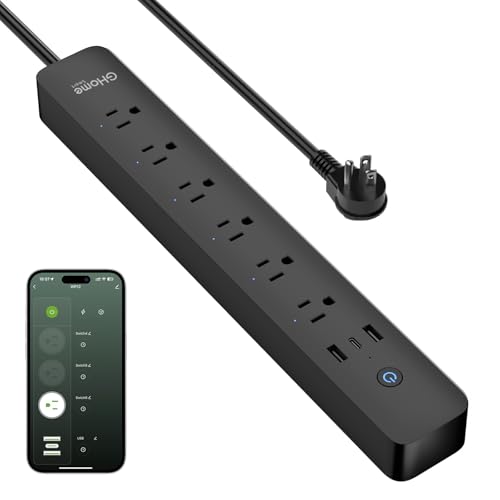
GHome Smart WiFi Power Strip
GHome is the cheapest route to independently controlled outlets, with a small body, four AC outlets and four USB ports. The app covers scheduling, countdown timers and group control, which is all most people use. Expect plainer materials and a shorter cord than the mainstream brands, and check the surge rating against your needs.
Pros
- Cheapest independent outlet control here
- Four AC outlets plus four USB ports
- Countdown timers and grouping supported
Cons
- Plastics feel cheaper than premium brands
- Short cord limits placement
Refoss Smart Power Strip
Refoss covers the same ground as Meross with independently switched outlets and broad assistant support, and it is a reasonable alternative when stock or colour options push you away from the bigger names. Setup runs through a straightforward app with schedules and timers. There is no energy monitoring, so treat it as a control device rather than a measurement one.
Pros
- Wide assistant support including Apple Home
- Independent control across four outlets
- Simple app setup
Cons
- Smaller support community than major brands
- No energy monitoring
The lineup, side by side
| # | Model | Outlets | Best for | Score | Price |
|---|---|---|---|---|---|
| 1 | Kasa Smart Wi-Fi Power Strip HS300 | Six individually controlled | Best overall | 9.4 | Check price |
| 2 | Kasa Smart Wi-Fi Power Strip KP303 | Three individually controlled | Best compact | 9.2 | Check price |
| 3 | Meross Smart Wi-Fi Surge Protector MSS425F | Four individually controlled | Best for Apple Home | 9.0 | Check price |
| 4 | Govee Smart Power Strip | Three individually controlled | Best for scenes | 8.8 | Check price |
| 5 | TESSAN Smart Power Strip with USB Ports | Three individually controlled | Best for charging | 8.6 | Check price |
| 6 | GHome Smart WiFi Power Strip | Four individually controlled | Best budget | 8.3 | Check price |
| 7 | Refoss Smart Power Strip | Four individually controlled | Best for mixed setups | 8.0 | Check price |
Frequently asked questions
What makes a power strip smart?
It connects to your home network so you can switch outlets from an app or a voice assistant, set schedules and often see energy use. The best ones control each outlet independently, so one device can be off while its neighbours stay powered.
Do smart power strips control each outlet separately?
The good ones do, but not all. Every strip on this list controls its AC outlets individually. USB ports are usually a single shared group even on premium models, so plan around that if you wanted timed charging on one port only.
Do smart strips work without Wi-Fi?
The outlets keep supplying power and any physical buttons still work, but app control, voice control and cloud schedules stop until the connection returns. Devices already switched on stay on, which is why people avoid putting anything critical on a scheduled outlet.
Can a smart power strip save electricity?
It can reduce standby draw by fully cutting power to devices that would otherwise idle, and per outlet monitoring helps you find the worst offenders. The savings on modern low standby electronics are small, so treat it as a convenience feature with a side benefit.
Is it safe to plug a space heater into a smart power strip?
No. High draw heating appliances should go straight into a wall outlet. This applies to any power strip, and manufacturers state it explicitly. The same caution covers air conditioners, kettles and anything else that converts a lot of electricity into heat.
What surge protection rating do I need?
For general lamps and chargers a modest rating is fine. For computers, televisions and network equipment, look for a higher joule rating and ideally a connected equipment warranty. Bear in mind that protection wears out over time and after surges, so old strips need replacing.
Do smart power strips work with Apple Home?
Some do. Meross and Refoss models on this list support it, while the Kasa and Govee strips focus on Alexa and Google Assistant. Check the specific model rather than the brand, because support varies between products in the same range.
Can I use several smart strips together?
Yes, and apps let you group them so a single command switches a whole room. Do not daisy chain one strip into another, though, which is a safety issue regardless of whether the strips are smart. Each strip should have its own wall outlet.
Our pick
The Kasa HS300 remains the smart power strip to beat, because six independently switched outlets with per outlet energy reporting cover both the control and the measurement side in one device. If space is tight, the Kasa KP303 gives you the same app and independent control in a much smaller body, and the Meross MSS425F is the pick when Apple Home support is a requirement.
You might also need
Filing Cabinet vs Digital Storage: Do You Still Need Paper Files?

Smart Speakers Compared on Sound, Skills, and Price

Smart Displays That Actually Earn Counter Space