Smart Displays That Actually Earn Counter Space
The Amazon Echo Show 8 (3rd Gen) is our top overall pick thanks to its centred camera and stronger sound. The Google Nest Hub (2nd Gen) is the better value for anyone inside the Google ecosystem, and the Amazon Echo Show 5 (3rd Gen) remains the easiest bedside upgrade.
If you want one smart display that suits most rooms, the Amazon Echo Show 8 (3rd Gen) is the safest choice, with the Google Nest Hub (2nd Gen) close behind for Google households and the Amazon Echo Show 5 (3rd Gen) covering bedside duty.
Smart displays are tricky because the spec sheet rarely tells you how a panel behaves in a bright kitchen or how thin the speakers sound across a room. We compared published display resolutions, speaker layouts, camera and shutter details, and built in smart home radios, then weighed what owners report about glare, microphone pickup and long term software support.
The top picks, ranked

Amazon Echo Show 8 (3rd Gen)
The 8 inch panel hits the sweet spot between readable from across a kitchen and small enough to sit on a nightstand. Amazon moved the camera to the centre of the bezel and added spatial audio processing, which is why owners report noticeably fuller sound than earlier Echo Show models. A built in Zigbee and Matter hub means it can control compatible devices without a separate bridge.
Pros
- Centred camera makes video calls look natural
- Built in hub removes the need for extra bridges
- Adaptive content scales as you walk toward it
Cons
- Alexa still surfaces promotional cards on the home screen
- Glossy panel picks up glare in bright kitchens

Google Nest Hub (2nd Gen)
The Nest Hub keeps things simple with a fabric wrapped 7 inch display and no camera at all, which suits bedrooms where a lens feels intrusive. Soli radar handles sleep sensing and simple air gestures, and the ambient light sensor dims the panel convincingly at night. It is the natural pick if your photos, calendars and video doorbells already live in Google services.
Pros
- No camera means no privacy worries in bedrooms
- Ambient EQ dimming is genuinely good for overnight use
- Google Photos slideshows look excellent on the panel
Cons
- Cannot make video calls
- Single speaker is thin for music

Amazon Echo Show 5 (3rd Gen)
This is the compact option that fits a crowded nightstand without dominating it. The 5.5 inch screen is best read from arm’s length rather than across a room, but the tap to snooze alarm and sunrise style wake routines are the reason most owners keep it. Sound improved over the previous generation, though it is still a small speaker in a small box.
Pros
- Small footprint suits nightstands and desks
- Tap anywhere on top to snooze alarms
- Physical camera shutter is standard
Cons
- Low resolution camera for video calls
- Screen is too small for recipes at a distance

Amazon Echo Show 15
At 15.6 inches this behaves more like a family noticeboard than a speaker with a screen. It mounts flat to a wall in portrait or landscape and runs widgets for shared calendars, sticky notes and shopping lists that everyone in the house can see. Visual ID recognises faces and swaps in the right person’s reminders, which is the feature owners mention most.
Pros
- Widget board works well as a family hub
- Large readable screen for recipes and video
- Visual ID personalises what appears
Cons
- Stand is sold separately
- Speakers are modest for the screen size
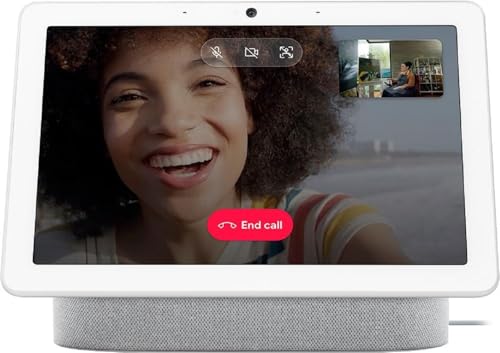
Google Nest Hub Max
The Nest Hub Max pairs a 10 inch display with a 6.5MP wide angle camera that pans and crops to keep you framed while you move around the kitchen. It doubles as an indoor Nest camera when you leave the house, which is unusual at this size. Sound is the strongest of the Google displays thanks to a rear woofer.
Pros
- Auto framing keeps you centred on calls
- Best speaker output of the Google displays
- Face Match tailors the screen per person
Cons
- Camera shutter is electronic rather than physical
- Bulky footprint on a shallow counter

Amazon Echo Show 10 (3rd Gen)
The motorised base rotates the 10 inch screen to follow you, which sounds gimmicky until you are cooking and the video keeps facing you. The premium speaker array is the loudest in this roundup and handles music better than any other display here. It needs clear space to swivel, so a corner of the counter will not do.
Pros
- Screen follows you around the room
- Best sound quality of the Echo Show line
- Turns into a pan capable home monitoring camera
Cons
- Needs a large clear area to rotate safely
- Motor noise is audible in a quiet room

Amazon Echo Hub
The Echo Hub is a wall panel first and a smart display second, built to sit by a door and show every light, lock and camera on one dashboard. It is powered over ethernet or by a wall adapter and wakes as you approach. Media playback is limited compared with an Echo Show, so treat it as a control surface rather than a kitchen TV.
Pros
- Dashboard view of every connected device
- Sits flush on a wall like a thermostat
- Wide radio support covers older accessories
Cons
- No camera and weak built in speakers
- Needs a nearby power or ethernet run
How they compare
| # | Model | Display | Best for | Score | Price |
|---|---|---|---|---|---|
| 1 | Amazon Echo Show 8 (3rd Gen) | 8 inch touchscreen, 1280 x 800 | Best overall | 9.4 | Check price |
| 2 | Google Nest Hub (2nd Gen) | 7 inch touchscreen, 1024 x 600 | Best value | 9.2 | Check price |
| 3 | Amazon Echo Show 5 (3rd Gen) | 5.5 inch touchscreen, 960 x 480 | Best budget | 9.0 | Check price |
| 4 | Amazon Echo Show 15 | 15.6 inch Full HD, 1920 x 1080 | Best for kitchens | 8.8 | Check price |
| 5 | Google Nest Hub Max | 10 inch touchscreen, 1280 x 800 | Best for video calls | 8.6 | Check price |
| 6 | Amazon Echo Show 10 (3rd Gen) | 10.1 inch HD, 1280 x 800 | Best for moving around | 8.3 | Check price |
| 7 | Amazon Echo Hub | 8 inch touchscreen, 1280 x 800 | Best for whole home control | 8.0 | Check price |
How to choose
Match the screen size to the room, not the spec sheet A 5 inch panel is fine at arm’s length on a nightstand and frustrating at the far end of a kitchen counter. An 8 inch display is the practical middle ground for most homes because recipes and video calls stay readable from a few steps away. Go to 10 inches or larger only when the display has a dedicated spot, since bigger units need more depth and a clear line of sight to be worth the space.
Decide how you feel about the camera before you buy Cameras enable video calls, auto framing and home monitoring, but they also point a lens into your living space. Physical shutters are the meaningful difference here, since an electronic off switch relies on software behaving. If a display is going in a bedroom, a camera free model removes the question entirely, and owners report that is the single most common reason they choose one.
Check which smart home radios are actually built in A display with a built in Zigbee, Thread or Matter radio can talk to sensors and bulbs directly instead of routing everything through a separate bridge. Based on specifications, this is where the price gaps in the range are usually justified. If you already own a hub, you can safely pick a display without one and spend the difference on screen or speaker quality instead.
Stay inside one ecosystem where you can Assistants cannot see each other’s routines, so a household split between two platforms ends up with duplicated automations and confused voice commands. Look at where your photos, calendars, doorbells and thermostats already live and let that decide the brand. Matter has narrowed the gap for basic device control, but reminders, calendars and shopping lists remain firmly tied to whichever assistant you choose.
Common questions
What size smart display is best for a kitchen?
An 8 inch display is the most practical for a working kitchen because it stays readable from a couple of steps back without taking over the counter. If you have wall space and mostly want shared calendars and lists, a 15 inch panel mounted flat is easier to read and frees up the counter entirely.
Can smart displays be used without a camera?
Yes. The Google Nest Hub (2nd Gen) and Amazon Echo Hub ship without any camera, and every Echo Show model here includes a physical shutter that blocks the lens mechanically. Owners commonly pick a camera free unit for bedrooms and a camera equipped one for the kitchen or living room.
Do smart displays work as security cameras?
Some do. The Google Nest Hub Max doubles as an indoor Nest camera, and the Amazon Echo Show 10 (3rd Gen) can pan around a room for home monitoring. They are useful for checking in rather than replacing a dedicated camera, since they need mains power and sit at counter height.
Do I need a separate smart home hub?
Not if the display has the radios built in. Models such as the Amazon Echo Show 8 (3rd Gen) and Amazon Echo Hub include Zigbee, Thread or Matter support, so compatible sensors and bulbs pair straight to them. Wi Fi only accessories work with any display on this list.
Can a smart display replace a bedroom alarm clock?
It can, and that is one of the most common uses owners report. Look for automatic screen dimming at night, a tap to snooze surface and sunrise style wake routines. The Amazon Echo Show 5 (3rd Gen) and Google Nest Hub (2nd Gen) are the two designed most directly for that job.
How good is the sound for music?
It varies more than any other spec. Small 5 inch displays have a single modest driver and are fine for podcasts, while the Amazon Echo Show 10 (3rd Gen) and Google Nest Hub Max include a dedicated woofer and can carry a room. If music matters, treat speaker configuration as the deciding factor.
Will a smart display keep getting software updates?
Both Amazon and Google have shipped feature updates to displays several years after launch, and support periods are generally longer than for phones. Buying the current generation rather than a clearance older model is the simplest way to maximise how long yours keeps receiving new features.
Can two people share the same smart display?
Yes. Face and voice recognition, such as Visual ID on Echo Show or Face Match on Nest, swaps in the right calendar, reminders and photos for whoever is in front of the screen. Each person needs to enrol their profile once during setup.
The verdict
For most households the Amazon Echo Show 8 (3rd Gen) is the display to buy, because the centred camera, stronger speakers and built in hub cover kitchen, desk and video call duty in one unit. Google households get more out of the Google Nest Hub (2nd Gen), which trades the camera for a cleaner bedside experience at a lower outlay. Pick the Amazon Echo Show 15 only if you have wall space and want a shared family board rather than a speaker with a screen.


