Soundbars That Finally Make TV Dialogue Clear
The Sonos Beam (Gen 2) is our top pick for most living rooms, balancing clear speech with real height cues in a compact body. The Samsung HW-Q990D suits full home cinema setups, while the Bose Smart Soundbar 600 is the easiest music and TV all rounder.
If you want one soundbar that fixes muddy TV dialogue without filling the room with boxes, the Sonos Beam (Gen 2) is the pick we keep coming back to. For a full surround setup the Samsung HW-Q990D ships with a wireless subwoofer and rear speakers, and the Bose Smart Soundbar 600 is the smoothest choice if you listen to as much music as television.
Soundbars are tricky because the spec sheet rarely tells you how a bar handles speech, which is the one thing most buyers actually care about. We compared listings on channel count, HDMI eARC versus optical connection, whether height channels are real drivers or virtual processing, cabinet width against common TV sizes, and what owners report about dialogue modes and app setup.
Before you buy
Start with your connection, not the channel count If your TV has an HDMI port labelled ARC or eARC, use it. That single cable carries sound from every input on the TV and lets the TV remote control volume. Optical still works but caps the audio formats you can receive, so Dolby Atmos will not pass through. Check the back of your television before you compare anything else, because a bar with height channels is wasted on an optical only connection.
Decide whether dialogue or bass is the real problem These are different faults with different fixes. If voices vanish under music and effects, look for a bar with a dedicated centre channel and an adjustable dialogue mode, such as the Polk Signa S4 or the Sonos Beam. If the issue is thin, tinny sound overall, a package with a wireless subwoofer will do more for you. Buying a large surround system to fix a speech problem usually makes the speech worse.
Match the cabinet width to your TV and stand A bar wider than your TV looks odd and a bar taller than the gap under the screen will clip the bottom of the picture or block the infrared receiver. Measure the space under your television and the width of your media unit before ordering. Most 55 inch sets pair well with a bar around 25 to 40 inches, and slim bars around two and a half inches tall clear the majority of stands.
Think about whether you will expand later Some systems let you add a subwoofer and rear speakers over time, which spreads the outlay and lets you start small. Others are closed packages that cannot grow. If you rent or expect to move, a single bar that improves TV sound immediately is the safer buy. If you own the room and want cinema sound eventually, choose an ecosystem that supports extra components from the same brand.
The top picks, ranked

Sonos Beam (Gen 2)
The Beam (Gen 2) packs five drivers into a cabinet short enough to sit under a 55 inch TV without blocking the screen. Its speech enhancement mode is the reason it stays on this list, and the HDMI eARC connection carries Dolby Atmos from most streaming apps. Owners report that setup through the Sonos app takes only a few minutes.
Pros
- Speech enhancement genuinely lifts dialogue
- Short enough for most TV stands
- Expandable later with sub and rears
Cons
- No dedicated subwoofer in the box
- Height effects are processed, not physical drivers

Samsung HW-Q990D
This is the closest a soundbar package gets to a proper surround system, arriving with a wireless subwoofer and two wireless rear speakers that carry their own up firing drivers. The 11.1.4 layout means overhead effects come from real drivers rather than bounced processing. Owners report it needs a decent sized room to avoid overwhelming the space.
Pros
- Real height and rear channels
- Passes 4K video through to the TV
- Strong bass without a separate amp
Cons
- Takes up a lot of room
- Rear speakers still need mains power

Bose Smart Soundbar 600
Bose tunes this bar warmer than most rivals, which makes it the easier pick if the same speaker handles films at night and playlists during the day. It supports Dolby Atmos over eARC and includes up firing drivers for a sense of height. Owners report the dialogue mode is subtle rather than aggressive.
Pros
- Warm, easy listening tuning
- Up firing drivers for height
- Simple app with room calibration
Cons
- Bass is limited without the optional sub
- Fewer manual EQ controls than rivals

LG S90QY
The S90QY brings a 5.1.3 layout with a centre up firing driver, which is unusual at this level and helps anchor voices to the screen. It pairs neatly with LG televisions for a shared remote and picture linked sound modes. Owners report the wireless subwoofer connects reliably once positioned within a few metres.
Pros
- Centre up firing driver aids dialogue
- Wireless sub included
- Gaming friendly passthrough
Cons
- Menus are cluttered
- Best features favour LG TV owners
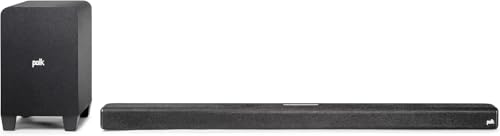
Polk Audio Signa S4
Polk built its reputation on the Voice Adjust feature, which raises the centre channel independently of the rest of the mix. That makes the Signa S4 a sensible pick for households where someone always reaches for the subtitles. It includes a wireless subwoofer and supports Dolby Atmos through eARC.
Pros
- Adjustable dialogue level in three steps
- Subwoofer included
- Slim profile under most screens
Cons
- Height effects are modest
- No Wi-Fi streaming

Yamaha SR-B20A
A single cabinet bar with built in subwoofers, so there is no second box to hide behind the sofa. Yamaha includes a Clear Voice mode and its Bass Extension circuit adds weight without a separate driver. Owners report it works well in flats and smaller rooms where a subwoofer would annoy neighbours.
Pros
- One box, no separate sub
- Clear Voice mode is effective
- Wall mountable out of the box
Cons
- No Dolby Atmos support
- Limited low bass

VIZIO V-Series V51x-J6
The V-Series covers the basics well, adding a wireless subwoofer and two satellite speakers for genuine 5.1 sound at the bottom of the market. It supports DTS Virtual:X for a wider soundstage and connects over HDMI ARC or optical. Owners report the satellites need speaker wire runs, so plan cable routing first.
Pros
- True surround channels at entry level
- Subwoofer included
- Straightforward remote
Cons
- Satellites are wired to the subwoofer
- No Dolby Atmos
How they compare
| # | Model | Channels | Best for | Score | Price |
|---|---|---|---|---|---|
| 1 | Sonos Beam (Gen 2) | 5.0 with virtual height | Best overall | 9.4 | Check price |
| 2 | Samsung HW-Q990D | 11.1.4 | Best for home cinema | 9.2 | Check price |
| 3 | Bose Smart Soundbar 600 | 5.0.2 | Best for music | 9.0 | Check price |
| 4 | LG S90QY | 5.1.3 | Best value | 8.8 | Check price |
| 5 | Polk Audio Signa S4 | 3.1.2 | Best for dialogue clarity | 8.6 | Check price |
| 6 | Yamaha SR-B20A | 2.1 with built in subwoofers | Best for simple setup | 8.3 | Check price |
| 7 | VIZIO V-Series V51x-J6 | 5.1 | Best budget | 8.0 | Check price |
Common questions
Do I need a soundbar if my TV already has speakers?
Modern televisions are too thin to fit speakers that face the viewer, so most fire sound downwards or backwards. A soundbar puts drivers at the front, pointed at you, which is why dialogue clarity improves so noticeably even with a modest model.
What is the difference between HDMI ARC and eARC?
ARC sends compressed audio back from the TV to the soundbar. eARC has more bandwidth and can carry uncompressed and object based formats such as Dolby Atmos and DTS:X. If you want the full surround formats, both the TV and the bar need eARC.
Is a separate subwoofer worth it?
For films and games, yes. A subwoofer handles the low frequencies a slim bar physically cannot produce, and it lets the main bar concentrate on midrange and voices. For news, sport and daytime viewing, a single bar with bass extension is often enough.
Can I wall mount any of these?
Most soundbars include keyhole slots on the rear and many ship with a bracket or template. Check whether your model needs a separate mount kit, and keep the bar centred under the screen rather than off to one side.
Will a soundbar work with my streaming stick?
Yes. Plug the stick into the TV as normal and let the TV pass the audio to the bar over ARC or eARC. Some bars also have their own HDMI inputs, which lets you connect a console or player directly and pass video through to the screen.
Do soundbars help with hearing difficulties?
Owners often report that a dedicated dialogue or voice mode makes a real difference, because it raises the centre channel where speech lives rather than raising overall volume. Look for bars that list an adjustable speech setting rather than a single on or off switch.
How many channels do I actually need?
For a bedroom or a small lounge, 2.1 or 3.1 is plenty. For a dedicated film room, look at 5.1 or higher with height channels. Adding channels in a small room can smear the sound rather than improve it, so match the layout to the space.
Can I use a soundbar with an older TV?
If the TV has an optical output you can connect almost any bar. You will lose Atmos and may need to control volume with two remotes, but the core improvement in clarity still applies.
The bottom line
For most homes the Sonos Beam (Gen 2) is the sensible choice, because it fixes the dialogue problem people actually complain about while staying small enough to disappear under the screen. If you have the space and want genuine surround, the Samsung HW-Q990D arrives with everything included. On a tighter outlay, the VIZIO V-Series still delivers real rear channels.

