Elgato vs Loupedeck: Which Stream Deck Fits Your Setup
Elgato Stream Deck MK.2 leads with 15 customizable LCD keys and the deepest OBS plugin library. Elgato Stream Deck+ adds four physical dials for streamers who mix audio live. Loupedeck Live pairs six dials with 15 touch buttons at a lower cost than Elgato’s dial-equipped tier.
Elgato Stream Deck MK.2 suits most streamers who want 15 customizable LCD keys and deep OBS Studio integration. Scene switches, soundboard clips, and overlay triggers all fit on one panel. Its fixed keys offer less precise audio control than dial-based decks, so mixing-heavy shows may want a different pick.
Key count, dial controls, and software ecosystem all shift workflow speed in different directions across these seven decks. We compared official specs, published dimensions, and owner feedback on scene switching, audio mixing, and video editing to rank them.
Our top picks

Elgato Stream Deck MK.2
Fifteen customizable LCD keys sit inside this compact USB-C unit with an adjustable stand. Elgato’s Stream Deck software links directly to OBS Studio, Twitch, and YouTube scene triggers. Streamers who switch scenes, launch overlays, and fire soundboards from one panel get the most use from this layout.
Pros
- Wide plugin library covers OBS, Twitch, and Discord
- Adjustable stand keeps keys visible on a crowded desk
- Each LCD icon is individually customizable
Cons
- No physical dials for audio mixing
- Plastic housing feels less premium than metal decks

Elgato Stream Deck XL
Thirty-two LCD keys across eight columns double the standard Stream Deck layout. Profiles and folders carry over directly, since it runs the same software and plugin ecosystem as the MK.2. Streamers running multi-scene productions with many hotkeys get the most from the larger footprint.
Pros
- Fits full macro sets without folder-switching
- Shares the same plugin library as smaller Stream Deck models
- Eight columns make room for labeled folder groups
Cons
- Takes up significant desk space
- Costs more than mid-size decks

Elgato Stream Deck Mini
Six LCD keys fit inside a footprint under 3.5 inches wide on this trimmed-down deck. Fewer simultaneous shortcuts come with the same Stream Deck software used on larger models. New streamers testing scene control before committing to a bigger deck fit this size well.
Pros
- Costs less than full-size Stream Deck models
- Small enough to sit beside a keyboard
- Shares the same setup software as larger Stream Deck models
Cons
- Six keys limit how many actions fit without folders
- No dials for audio adjustment

Elgato Stream Deck+
Eight LCD keys pair with four turnable dials and a touch strip on this model. Dials map to volume levels, scene transitions, or app-specific sliders in supported software. Tactile audio mixing alongside standard hotkeys suits streamers running live sound adjustments.
Pros
- Dials give tactile control over volume and sliders
- Touch strip adds a second gesture input
- Compact footprint keeps eight keys plus four dials on one small panel
Cons
- Fewer flat keys than the MK.2 for macros
- Dial functions depend on third-party plugin support
Loupedeck Live
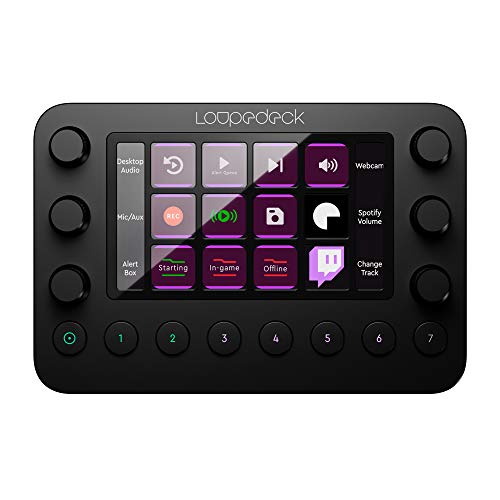
Six turnable dials combine with 15 customizable touch buttons in this hybrid panel. Loupedeck’s software supports OBS, Twitch, and Discord alongside creative apps like Premiere Pro. Dial-based mixing costs less here than on Elgato’s dial-equipped models.
Pros
- Dials included at a lower price than Stream Deck+
- Software covers both streaming and editing apps
- Fifteen touch buttons match the key count of Elgato’s MK.2
Cons
- Smaller third-party plugin library than Elgato
- Touch buttons feel less tactile than physical keys
Loupedeck CT
A center touch wheel and eight dials join 15 customizable buttons on an aluminum frame. Deep profiles for Premiere Pro, Photoshop, and OBS target creators who edit video and stream. Anyone who also color-grades or edits footage gets the most from this layout.
Pros
- Touch wheel suits timeline scrubbing and fine audio adjustment
- Aluminum build feels sturdier than plastic decks
- Eight dials cover more simultaneous parameters than the Stream Deck+
Cons
- Highest price in this roundup
- Overkill for streamers who only need scene switching
Loupedeck Live S
A smaller frame with fewer dials shrinks the standard Live layout while keeping USB-C and the Loupedeck app. Laptop-based streamers with limited desk space fit this size best. Profiles sync with the same software used on larger Loupedeck decks.
Pros
- Compact size fits laptop-based streaming setups
- Shares software and profiles with larger Loupedeck decks
- USB-C connection needs no separate power adapter
Cons
- Fewer controls than the standard Live model
- Limited desk presence for complex macro sets
The lineup, side by side
| # | Model | Keys | Best for | Score | Price |
|---|---|---|---|---|---|
| 1 | Elgato Stream Deck MK.2 | 15 LCD buttons | Best overall | 9.4 | Check price |
| 2 | Elgato Stream Deck XL | 32 LCD buttons | Best for large macro libraries | 9.1 | Check price |
| 3 | Elgato Stream Deck Mini | 6 LCD buttons | Best budget | 8.8 | Check price |
| 4 | Elgato Stream Deck+ | 8 LCD buttons plus 4 dials | Best for audio mixing | 8.5 | Check price |
| 5 | Loupedeck Live | 6 dials, 15 touch buttons | Best value | 8.3 | Check price |
| 6 | Loupedeck CT | 8 dials, touch wheel, 15 buttons | Best for professional video editing | 8.1 | Check price |
| 7 | Loupedeck Live S | Dials plus touch buttons, reduced count | Best for portability | 8.0 | Check price |
Before you buy
How many keys does a streamer actually need Ten to fifteen shortcuts cover a typical broadcast: scene switches, a mute toggle, alert triggers, and a couple of soundboard clips. A 6-key deck like the Stream Deck Mini handles basics but forces folder-switching once overlays get added. Fifteen-key decks such as the MK.2 or Loupedeck Live cover most single-monitor setups without constant menu diving. Multi-game or multi-scene channels often grow into a 32-key deck like the Stream Deck XL.
LCD keys vs turnable dials One-touch actions like switching scenes or launching a clip suit LCD keys best. Continuous adjustments, such as sliding a microphone level or scrubbing a timeline, favor dials instead. Stream Deck+ and both Loupedeck models blend the two, pairing physical dials with flat keys. Scene-only streamers rarely miss the dials, but audio-heavy shows benefit from them.
OBS integration and software ecosystem Elgato’s Stream Deck software carries the largest third-party plugin library, covering OBS, Twitch, Discord, and dozens of niche tools. Loupedeck’s app supports OBS too, plus creative software like Premiere Pro and Photoshop for streamers who also edit video. Checking for a listed plugin before buying matters, since a missing integration means manual hotkeys instead of one-touch actions.
Portability, desk space, and price tier Lower cost and minimal desk space come from budget decks like the Stream Deck Mini or Loupedeck Live S, at the expense of key count. Price and control options balance out on mid-tier decks such as the MK.2, Stream Deck+, and Loupedeck Live for most home studios. Loupedeck CT and Stream Deck XL sit at the top of the price range, aimed at full production setups or professional editing alongside streaming.
Questions worth asking
What is a stream control deck used for?
It is a dedicated keypad that triggers scene changes, hotkeys, soundboard clips, and app shortcuts during a live broadcast. Manual keyboard combos become unnecessary once it is set up.
How do stream control decks integrate with OBS?
A plugin installs inside OBS Studio, letting each key or dial trigger a scene switch, source toggle, or audio mute directly from the panel.
Which stream control deck is best for beginners?
Elgato Stream Deck MK.2 suits beginners well. Its 15-key layout covers common actions, and Elgato’s software ships with extensive setup guides and plugin support.
Can you use a stream control deck without OBS?
Yes. These decks also work with Streamlabs, Discord, media players, and general desktop shortcuts, so OBS is not required.
How many keys do most streamers actually need?
Ten to fifteen shortcuts cover most sessions, which fits comfortably on a 15-key deck without frequent folder-switching.
Is the Stream Deck Mini enough for a full streaming setup?
It works for a short list of core actions, but six keys fill up fast once overlays, alerts, and soundboards get added.
What is the difference between Stream Deck and Loupedeck decks?
Stream Deck models focus on flat LCD keys and a large streaming-specific plugin library. Loupedeck decks add dials and support creative apps like Premiere Pro alongside OBS.
Can a stream control deck handle audio mixing?
Yes, on models with physical dials. The Stream Deck+ or Loupedeck Live let you adjust individual volume levels in real time instead of using on-screen sliders.
Is a stream deck worth it for a single-scene setup?
A simpler deck may cover it. The Stream Deck Mini or Loupedeck Live S fit single-scene setups without paying for keys or dials that go unused.
Our take
Elgato Stream Deck MK.2 remains the strongest all-around pick, pairing 15 customizable LCD keys with the widest OBS plugin support for single-monitor setups. Streamers who mix audio live should choose the Stream Deck+ or Loupedeck Live for their physical dials instead. Anyone short on desk space or budget will get more practical value from the Stream Deck Mini or Loupedeck Live S.