Television and Video Devices Worth Your Attention
The Sony Bravia XR A80L tops our list for OLED lovers who want cinematic contrast and smart Google TV features, but its brightness may not suit very bright rooms. For a more budget-friendly option, the TCL Q6 Series offers excellent value with QLED color and gaming features.
Upgrading your home entertainment starts with choosing the right display or streaming companion. The market is packed with options, from high-end OLED TVs to compact projectors and streaming devices.
We compared seven real products based on their specifications, user feedback, and feature sets to help you find the best fit for your space and viewing habits. No fluff, just the facts you need to decide.
How to choose
The best picks, ranked

Sony Bravia XR A80L 55 Inch OLED TV
The Sony A80L is a stellar OLED TV with perfect blacks and wide viewing angles. Its XR Cognitive Processor enhances color and contrast, making it ideal for movies and shows. Owners report vibrant HDR performance and smooth motion handling. The Google TV interface is intuitive, though some find the remote basic.
Pros
- Perfect black levels
- Excellent color accuracy
- Great for gaming with HDMI 2.1
Cons
- Brightness lower than QLED rivals
- Premium price

Samsung QN90C 55 Inch Neo QLED TV
Samsung’s QN90C uses Mini LED backlighting to deliver high brightness and deep blacks. It’s a top choice for bright living rooms where OLED might struggle. Owners report excellent reflection handling and punchy HDR. The Tizen smart platform offers all major apps, and the design is sleek.
Pros
- Very high brightness
- Anti-glare screen
- Great for sports and gaming
Cons
- Blacks not as deep as OLED
- No Dolby Vision support
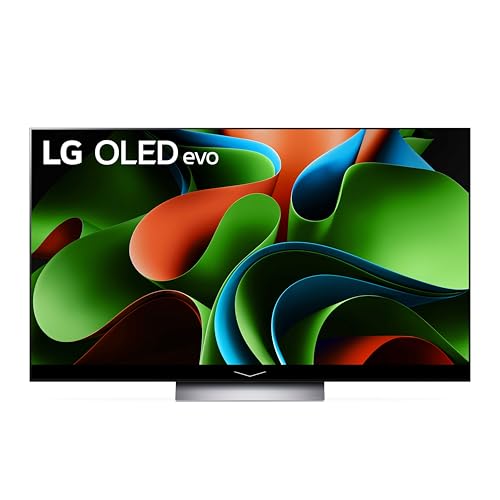
LG C3 55 Inch OLED evo TV
The LG C3 is a gaming powerhouse with four HDMI 2.1 ports, 4K 120Hz support, and low input lag. Its OLED evo panel offers brighter highlights than older models. Owners appreciate the webOS interface and the Game Optimizer menu. It is a balanced choice for movies and gaming.
Pros
- Superb gaming features
- Excellent motion handling
- Great for dark rooms
Cons
- Risk of burn-in (manageable)
- No DTS audio support

TCL Q6 55 Inch QLED 4K TV
The TCL Q6 Series delivers impressive picture quality for the price. Its QLED panel offers good color and brightness, and the Fire TV interface is user-friendly. Owners report that it handles reflections well and supports Dolby Vision. It lacks advanced gaming features like VRR, but for most viewers it’s a steal.
Pros
- Affordable price
- Good HDR performance
- Simple smart interface
Cons
- No 120Hz panel
- Limited gaming features

Hisense U8K 55 Inch Mini LED TV
The Hisense U8K offers mini LED technology at a more accessible price. It gets extremely bright, making it suitable for well-lit rooms. Owners praise its Dolby Vision IQ and wide color gamut. The built-in Google TV is smooth. Some report inconsistent viewing angles, but overall it’s a strong performer.
Pros
- Very bright panel
- 144Hz refresh rate
- Dolby Vision IQ support
Cons
- Viewing angles could be better
- Upscaling not as strong as competitors

Fire TV Stick 4K Max (2023)
The Fire TV Stick 4K Max is a compact streaming device that supports Wi-Fi 6 and offers fast performance. It provides access to all major apps and works with Alexa. Owners find the interface snappy and the remote convenient. It lacks the processing power of dedicated streamers, but for most it’s perfect.
Pros
- Affordable and portable
- Great for everyday streaming
- Hands-free Alexa available
Cons
- Interface is ad-supported
- No Ethernet port
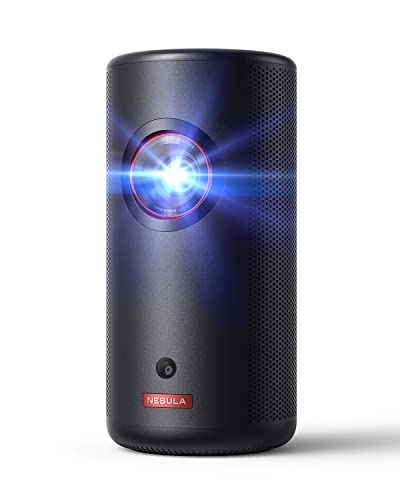
Anker Nebula Capsule 3 Laser Projector
The Anker Nebula Capsule 3 is a small laser projector that fits in your hand. It projects a 1080p image up to 120 inches and runs on Android TV. Owners love its portability and built-in speakers. It is not for bright rooms, but for camping or bedroom use, it is a fun option.
Pros
- Compact and portable
- Laser light source (long life)
- Built-in 360 degree speaker
Cons
- Low brightness for daylight
- Needs external power
How they stack up
| # | Model | Display | Best for | Score | Price |
|---|---|---|---|---|---|
| 1 | Sony Bravia XR A80L 55 Inch OLED TV | 55 inch OLED | Cinematic picture quality | 9.4 | Check price |
| 2 | Samsung QN90C 55 Inch Neo QLED TV | 55 inch Mini LED QLED | Bright rooms and HDR pop | 9.2 | Check price |
| 3 | LG C3 55 Inch OLED evo TV | 55 inch OLED evo | Gaming with OLED | 9.1 | Check price |
| 4 | TCL Q6 55 Inch QLED 4K TV | 55 inch QLED | Budget-conscious shoppers | 8.7 | Check price |
| 5 | Hisense U8K 55 Inch Mini LED TV | 55 inch Mini LED | High brightness and value | 8.9 | Check price |
| 6 | Fire TV Stick 4K Max (2023) | 4K Ultra HD with Dolby Vision | Streaming on a budget | 8.4 | Check price |
| 7 | Anker Nebula Capsule 3 Laser Projector | Laser Projection 1080p | Portable movie nights | 8.2 | Check price |
Frequently asked questions
What is the difference between OLED and QLED?
OLED uses self-lit pixels, offering perfect blacks and wide viewing angles. QLED uses a backlight with quantum dots, delivering higher brightness and better color volume. OLED is better for dark rooms, QLED for bright rooms.
Do I need a 120Hz TV for gaming?
For next-gen consoles like PS5 or Xbox Series X, a 120Hz panel allows games to run at 120 frames per second for smoother motion. If you play on standard consoles or casual games, 60Hz is adequate.
Can I use a Fire TV Stick with any television?
Yes, the Fire TV Stick connects to any TV with an HDMI port. It adds smart capabilities to non-smart TVs and offers a consistent interface.
What is Dolby Vision and why is it important?
Dolby Vision is an HDR format that includes dynamic metadata, allowing the TV to adjust brightness and color scene by scene. It provides a more vibrant and detailed picture compared to standard HDR10.
Is a projector better than a TV?
Projectors offer huge images (over 100 inches) and are portable, but they require a dark room and have lower brightness. TVs are better for everyday viewing and bright rooms.
How important is the refresh rate for watching movies?
For movies, a 60Hz refresh rate is fine because films are typically shot at 24 frames per second. Higher refresh rates mainly benefit sports and gaming.
What is input lag and why does it matter?
Input lag is the delay between your action and the screen’s response. For gaming, lower input lag is crucial. Look for TVs with a game mode to reduce it.
Can I control my TV with voice assistants?
Many smart TVs and streaming devices support Alexa or Google Assistant. For example, Fire TV Stick works with Alexa, while Google TV supports Google Assistant.
Do I need a soundbar with a new TV?
TV speakers are often thin and lack bass. A soundbar improves audio significantly. If you value sound quality, consider adding one.
What is the ideal viewing distance for a 55 inch TV?
For 4K TVs, a common recommendation is 1.5 times the screen’s diagonal distance. That’s around 6.5 feet for a 55 inch TV. For 1080p, sit farther away.
The verdict
If you want the best overall picture for movies and TV shows, the Sony A80L is your pick, especially if you watch in a dim or dark room. For bright spaces or heavy HDR content, the Samsung QN90C with its high brightness is a better choice. Gamers should lean toward the LG C3 for its gaming features, while on a budget, the TCL Q6 offers surprising value. For streaming, the Fire TV Stick 4K Max is a no-brainer. And for portability, the Anker Nebula Capsule 3 is perfect for occasional outdoor viewing. Choose based on your room lighting and primary use, but any of these will elevate your viewing experience.