USB Switches for Sharing One Keyboard or Printer
The UGREEN USB 3.0 Switch Selector is our top pick for its 5Gbps ports and reliable button switching. The Sabrent USB-SW20 is the value choice for two computers sharing peripherals, and the ABLEWE selector is the simplest option for a printer or scanner shared between desks.
If you need two computers to share the same keyboard, printer or drive, the UGREEN USB 3.0 Switch Selector is the most dependable pick, the Sabrent USB-SW20 offers the best value, and the ABLEWE selector covers simple single-device sharing.
USB switches look interchangeable in listings, but the differences show up in the details: whether the switch runs at USB 2.0 or 3.0 speeds, how many devices it can host per computer, whether it needs external power to run a bus-powered drive, and how cleanly devices reconnect after switching. We compared published bandwidth figures, port layouts, switching methods and power options, then ranked on reconnection reliability, because a switch that drops devices creates more work than it saves.
What to look for
Know the difference between a USB switch and a KVM A USB switch moves peripherals between computers while each computer keeps its own display. A KVM switch moves the keyboard, video and mouse together, so one monitor serves both machines. If you have two monitors, or two laptops with their own screens, a USB switch is the cheaper and simpler answer. If you want a single monitor shared between two towers, you need a KVM instead.
Bandwidth matters only for some devices USB 2.0 is perfectly adequate for keyboards, mice, printers, scanners and audio interfaces. USB 3.0 at 5Gbps matters when an external drive or a high-resolution webcam is on the shared side, because a 2.0 switch will throttle it severely. Check what you actually plan to share. Paying for 3.0 to switch a printer buys nothing, while running a backup drive through a 2.0 switch is genuinely painful.
External power solves most mystery failures Bus-powered switches draw everything from the connected computer, which is fine for low-draw peripherals but marginal once a portable hard drive or a powered hub is attached. Devices that connect intermittently, disconnect under load or fail to spin up are usually power problems rather than data problems. If you plan to share drives, choose a switch with an external power input and use it.
Switching method changes daily convenience more than specs do A button on the unit is fine if the unit sits on your desk, but many people hide switches behind monitors and then cannot reach them. A wired remote solves that. Some switches also respond to a keyboard shortcut, though that depends on the connected keyboard being on the switch itself, which creates a chicken and egg problem when a switch fails to hand over cleanly. Physical buttons remain the most reliable approach.
What we recommend
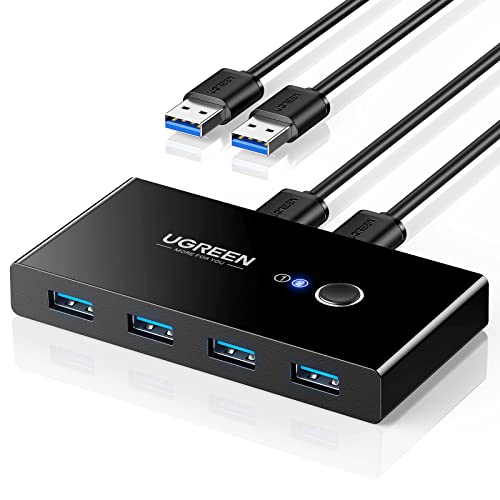
UGREEN USB 3.0 Switch Selector
This switch handles two computers sharing four USB devices at full 5Gbps speeds, which matters if an external drive is one of those devices. Switching is a single button press with a clear indicator. Owners report clean reconnection with keyboards and mice, which is the failure point on cheaper switches.
Pros
- Full USB 3.0 speed on all ports
- Reliable device reconnection after switching
- Solid build with clear indicators
Cons
- Host cables sold in fixed lengths
- External power needed for hungry drives
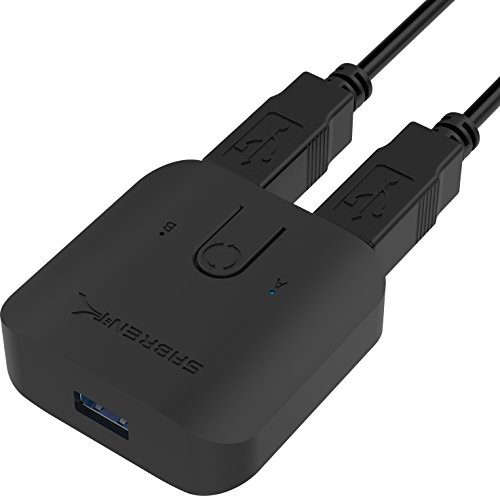
Sabrent USB-SW20 USB 3.0 Sharing Switch
Sabrent covers the common two computer scenario at a lower price without dropping to USB 2.0 speeds. The compact housing sits neatly between two machines and the switching button is easy to find by feel. It ships with the host cables you need, which saves a second order.
Pros
- Host cables included
- Good speed for the price
- Compact desktop footprint
Cons
- Plastic case feels light
- No remote switching option

ABLEWE USB 3.0 Switch Selector
The straightforward answer for two computers sharing a printer or scanner, with a single press to move the connection. It is not trying to be a docking solution, and that focus keeps it cheap and predictable. Bus power is enough for printers and flash drives but not for larger external hard drives.
Pros
- Very low cost
- One-press operation anyone can use
- Ideal for shared printers
Cons
- Bus power limits drive support
- Indicator lights are dim

Cable Matters USB 3.0 Sharing Switch
Cable Matters publishes clearer compatibility notes than most in this category, which helps when a switch has to work alongside managed office hardware. The build is plain but sturdy, and the switching behaviour is consistent across Windows and macOS. It is the safe choice when the switch has to just work without troubleshooting.
Pros
- Consistent behaviour across operating systems
- Good pre-purchase documentation
- Sturdy housing
Cons
- Unremarkable design
- No included long host cables

IOGEAR GUS404 4×4 USB 3.0 Sharing Switch
Where most switches stop at two computers, the GUS404 handles four hosts sharing four devices, which suits test benches and multi-machine desks. It includes external power, so bus-powered drives are not a problem. The trade-off is size and price, both higher than the two-host units.
Pros
- Supports four separate computers
- External power handles demanding devices
- Robust metal-feel construction
Cons
- Larger desktop footprint
- Costs considerably more than two-host switches

Rybozen USB 3.0 Switch Selector
The wired remote button is the reason to consider this one, since it lets the switch itself live behind a monitor while the control sits within reach. That solves the common annoyance of hiding a switch and then not being able to press it. Speeds are standard USB 3.0 and the device count matches its rivals.
Pros
- Remote button allows hidden placement
- Standard USB 3.0 speeds
- Clear switch state indication
Cons
- Remote adds another cable to route
- Casing is plain plastic

ATEN US224 2-Port USB Peripheral Sharing Device
ATEN builds for commercial installations, and this unit reflects that in its conservative design and long-term availability. It is USB 2.0 rather than 3.0, so it is not the choice for external drives, but for keyboards, printers and scanners it is close to set and forget. Buy it when uptime matters more than throughput.
Pros
- Very stable long-term operation
- Trusted in professional environments
- Simple predictable behaviour
Cons
- USB 2.0 speeds only
- Fewer shared ports than rivals
Side by side
| # | Model | Standard | Best for | Score | Price |
|---|---|---|---|---|---|
| 1 | UGREEN USB 3.0 Switch Selector | USB 3.0 at up to 5Gbps | Best overall | 9.4 | Check price |
| 2 | Sabrent USB-SW20 USB 3.0 Sharing Switch | USB 3.0 at up to 5Gbps | Best value | 9.2 | Check price |
| 3 | ABLEWE USB 3.0 Switch Selector | USB 3.0 | Best budget | 9.0 | Check price |
| 4 | Cable Matters USB 3.0 Sharing Switch | USB 3.0 at up to 5Gbps | Best for office setups | 8.8 | Check price |
| 5 | IOGEAR GUS404 4×4 USB 3.0 Sharing Switch | USB 3.0 | Best for four computers | 8.6 | Check price |
| 6 | Rybozen USB 3.0 Switch Selector | USB 3.0 | Best for desk cable tidiness | 8.3 | Check price |
| 7 | ATEN US224 2-Port USB Peripheral Sharing Device | USB 2.0 | Best for reliability | 8.0 | Check price |
Good to know
What is the difference between a USB switch and a USB hub?
A hub expands one computer’s ports into many. A switch lets multiple computers take turns using the same set of devices. They solve completely different problems, though some products combine both functions.
Will a USB switch work with my keyboard and mouse?
Almost always, though wireless receivers and gaming peripherals with high polling rates occasionally reconnect slowly after switching. Wired keyboards and mice are the most reliable through a switch.
Do I need USB 3.0 or is 2.0 enough?
USB 2.0 handles keyboards, mice, printers and scanners with room to spare. Choose 3.0 if you are sharing an external drive, a fast card reader or a high-resolution webcam, since 2.0 will bottleneck those badly.
Can I share a printer between two computers with a switch?
Yes, and it is one of the most common uses. Both computers need the printer driver installed. Only the computer currently selected can print, so switch before sending a job.
Why do my devices take a moment to reconnect after switching?
Switching physically re-enumerates the USB devices on the newly selected computer, which takes a second or two just as unplugging and replugging would. Longer delays usually point to a power shortfall or a driver that reloads slowly.
Do USB switches work with Mac and Linux?
Yes. These are passive or near-passive devices that require no drivers, so operating system support is rarely an issue. Any quirks tend to come from the connected peripherals rather than the switch.
Can I connect an external hard drive to a USB switch?
You can, but use a switch with external power and a USB 3.0 rating. Always eject the drive properly before switching, since cutting the connection mid-write risks data corruption.
How many computers can share one switch?
Most consumer switches handle two. Four-host models exist, such as the IOGEAR unit here, and are worth the extra cost for test benches or multi-machine desks.
The verdict
The UGREEN USB 3.0 Switch Selector is the switch most desks should have, because full 5Gbps speeds and clean reconnection cover both peripheral sharing and drive access. Sabrent’s USB-SW20 does the same job for less if your needs are modest, and the ATEN US224 is the pick when long-term stability outranks speed. Decide first whether you actually need a KVM instead, since a shared monitor changes the answer entirely.


