Top Thermal Pastes for CPU Cooling in 2025
The Thermal Grizzly Kryonaut is our top pick for extreme performance, offering the lowest thermal resistance for overclockers, but it is not electrically conductive, making it safe for most users. Its main limitation is that it is not ideal for beginners due to its thick consistency.
Thermal paste is essential for efficient heat transfer between your CPU or GPU and its cooler. A good paste can lower temperatures by several degrees, improving performance and longevity.
With countless options on the market, choosing the right one can be overwhelming. We’ve narrowed down the best thermal pastes for different needs and budgets.
The shortlist, ranked

Thermal Grizzly Kryonaut
Thermal Grizzly Kryonaut is a high-end thermal paste known for its outstanding thermal conductivity. It is designed for extreme overclocking and delivers some of the lowest temperatures in independent tests. Its viscous consistency can be a bit challenging to spread, but the performance is worth it for enthusiasts.
Pros
- Top-tier thermal performance
- Non-electrically conductive
- Long-lasting stability
Cons
- Higher price point
- Difficult to spread for beginners
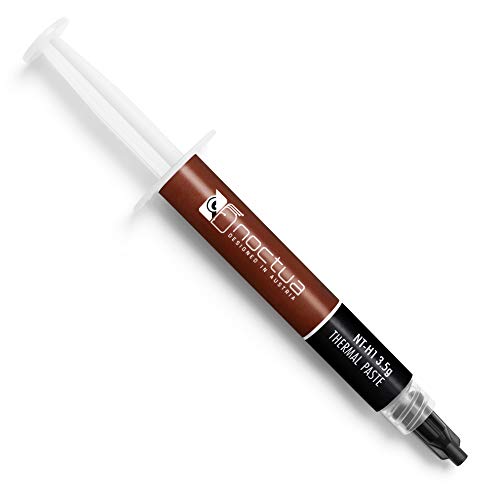
Noctua NT-H1
Noctua NT-H1 is a well-known thermal paste that offers excellent thermal performance and ease of use. It comes with a spatula for spreading and a comprehensive guide. It is a safe choice for most builds, providing consistent results without being overly expensive.
Pros
- Easy to apply
- Excellent performance for the price
- Non-conductive and safe
Cons
- Not the absolute best for extreme overclocking
- Comes in smaller syringe

Arctic MX-6
Arctic MX-6 is the successor to the popular MX-4, offering improved thermal performance at an affordable price. It is non-conductive and has a good consistency for easy application. Many users report it performs nearly as well as premium pastes at a fraction of the cost.
Pros
- Great value for money
- Non-conductive
- Includes spatula for spreading
Cons
- Slightly lower performance than Kryonaut
- Not ideal for sub-zero cooling

Cooler Master MasterGel Maker
Cooler Master MasterGel Maker is a high-performance thermal paste that comes with a unique applicator tip for precise application. It offers excellent thermal conductivity and is designed to last. This is a great option for those who want convenience without compromising on performance.
Pros
- Comes with applicator tip
- High thermal conductivity
- Non-conductive
Cons
- Small amount included
- Thicker paste may be harder to spread

Arctic Silver 5
Arctic Silver 5 has been a favorite among PC builders for years. It contains 99.9% pure micronized silver for high thermal conductivity. It requires a break-in period of about 200 hours to reach its full potential, but after that, it offers reliable performance.
Pros
- Proven track record
- Good performance
- Non-conductive
Cons
- Break-in period required
- Capacitive, so avoid spilling on circuits

Thermalright TF8
Thermalright TF8 is a premium thermal paste that offers performance comparable to Kryonaut but at a more accessible price. It has a high thermal conductivity and is easy to apply. Many users report excellent temperature reductions.
Pros
- Excellent thermal performance
- Non-conductive
- Great value
Cons
- Small syringe size
- May need to reapply after a few years

Corsair XTM50
Corsair XTM50 is a user-friendly thermal paste that comes with a multi-purpose spreader tool. It has a low viscosity, making it easy to apply evenly. While not the top performer, it is reliable and perfect for first-time builders.
Pros
- Easy to apply
- Includes spreader
- Non-conductive
Cons
- Lower thermal conductivity
- May need more frequent replacement
The lineup, side by side
| # | Model | Thermal Conductivity | Best for | Score | Price |
|---|---|---|---|---|---|
| 1 | Thermal Grizzly Kryonaut | 12.5 W/mK | Extreme overclocking and maximum performance | 9.6 | Check price |
| 2 | Noctua NT-H1 | 8.5 W/mK | Reliable all-round performance with easy application | 9.3 | Check price |
| 3 | Arctic MX-6 | 9.5 W/mK | Budget-conscious users who want solid performance | 9.0 | Check price |
| 4 | Cooler Master MasterGel Maker | 11 W/mK | High performance with an included applicator | 9.1 | Check price |
| 5 | Arctic Silver 5 | 8.9 W/mK | Proven classic with excellent performance | 8.9 | Check price |
| 6 | Thermalright TF8 | 13.8 W/mK | High performance at a lower price than Kryonaut | 9.2 | Check price |
| 7 | Corsair XTM50 | 5.4 W/mK | Easy application with a spreader included | 8.8 | Check price |
What matters most
Common questions
How often should I replace thermal paste?
Typically every 2 to 3 years, or whenever you remove the cooler from the CPU/GPU. Some high-quality pastes can last longer, but it is good practice to replace it during maintenance.
Is more thermal paste better?
No, using too much can actually insulate and reduce heat transfer. A small pea-sized amount is usually sufficient for a CPU. Too little can leave air gaps, so aim for even coverage.
Can thermal paste be reused?
No, once applied and hardened, thermal paste loses its effectiveness. Always clean off old paste and apply a fresh layer when reinstalling a cooler.
Does thermal paste expire?
Yes, most thermal pastes have a shelf life of 2-3 years if unopened. Once opened, it can dry out over time. Check the consistency before use.
Is liquid metal better than regular thermal paste?
Liquid metal offers superior thermal conductivity but is electrically conductive and can damage components if it spills. It is risky for beginners. Traditional pastes are safer for most users.
How do I remove old thermal paste?
Use isopropyl alcohol (90% or higher) and a lint-free cloth or coffee filter. Gently wipe the surface until clean. Avoid cotton swabs that can leave fibers.
What is the best application method?
The pea method (a small dot in the center) is widely recommended for CPUs. For GPUs, spreading a thin layer may be better. The key is even coverage without excess.
Does thermal paste brand matter?
Yes, higher-quality pastes generally have better thermal conductivity and longevity. However, the difference between mid-range and high-end pastes is often only a few degrees, which may not affect typical users.
Can I use thermal paste on a laptop?
Yes, but laptops are more challenging to disassemble. If you are experienced, replacing thermal paste can improve temperatures. Otherwise, consider professional service.
What does thermal conductivity mean?
It is a measure of how well the paste conducts heat. Higher values (W/mK) indicate better performance. However, real-world performance depends on many factors.
The verdict
For most users, the Noctua NT-H1 offers the best balance of performance, ease of use, and price. If you are an overclocker seeking the absolute lowest temperatures, choose the Thermal Grizzly Kryonaut. For budget builds, the Arctic MX-6 is a reliable choice. Ultimately, any of these pastes will work well; pick based on your specific needs and skill level.


