Turntables with USB C: Our Top Picks for Modern Vinyl Rigs
The Audio-Technica AT-LP60XUSB is our top pick for most people, offering reliable automatic operation and USB C output for easy digital conversion at an affordable price. Its main limitation is the lack of adjustable tracking force, which might deter audiophiles seeking finer control.
Vinyl is back, and so is the need to digitize your record collection. Turntables with USB C output make it simple to connect to modern laptops and computers, ensuring high-quality audio transfer without needing old-school USB A ports.
We have sifted through the current market to find the best turntables that feature USB C connectivity. From fully automatic models ideal for beginners to manual turntables that please purists, our list covers a variety of needs and budgets.
What we recommend

Audio-Technica AT-LP60XUSB
The AT-LP60XUSB is a fully automatic belt-drive turntable that simplifies vinyl playback and digitization. It includes a USB C output for direct connection to computers, and its built-in phono preamp lets you connect to speakers without an external receiver. Owners appreciate its ease of use and reliable performance.
Pros
- Automatic operation prevents record damage
- Switchable preamp offers flexibility
- USB C output is easy to connect to modern computers
Cons
- Non-adjustable tracking force
- Plastic build may not satisfy audiophiles
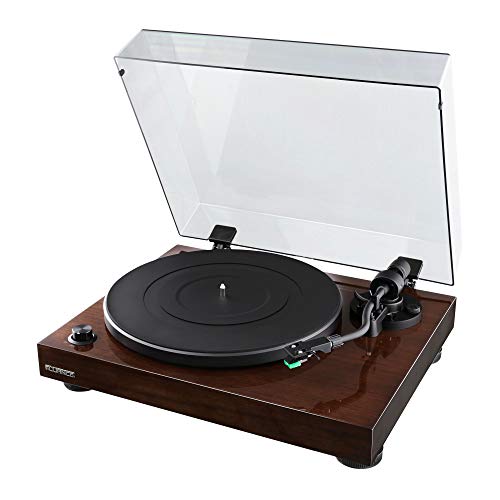
Fluance RT81 Elite High Fidelity Vinyl Turntable
The Fluance RT81 combines classic wood veneer aesthetics with solid engineering. It features a belt-drive system, an Audio-Technica AT95E cartridge, and a built-in preamp. Its USB output allows direct conversion to digital, and the included acrylic platter reduces resonance. Owners report excellent sound quality for the price.
Pros
- Excellent sound quality with detailed highs
- Beautiful solid wood construction
- Adjustable counterweight and anti-skate
Cons
- Manual operation requires attention
- Some users prefer an external preamp

Pro-Ject Debut Carbon EVO
The Pro-Ject Debut Carbon EVO is a high-performance manual turntable that has earned a strong reputation among vinyl enthusiasts. It features a carbon fiber tonearm, a pre-mounted Sumiko Rainier cartridge, and a heavy platter for stable rotation. The USB C output is available in the version with the built-in phono box, simplifying digital conversion without compromising audio fidelity.
Pros
- Superb detail retrieval and soundstage
- Carbon fiber tonearm reduces resonance
- Adjustable speed control
Cons
- Requires careful setup and adjustments
- Price is higher than entry-level models

Sony PS-LX310BT
The Sony PS-LX310BT offers both USB C and Bluetooth connectivity, making it versatile for modern setups. It features one-step auto start and stop, a built-in phono preamp, and a lightweight tonearm. While its primary focus is wireless streaming, the USB C port allows for direct digital recording to a computer.
Pros
- Bluetooth output for wireless speakers and headphones
- Auto start and stop is user-friendly
- Compact design fits small spaces
Cons
- Sound quality is good but not exceptional
- Plastic build feels less premium
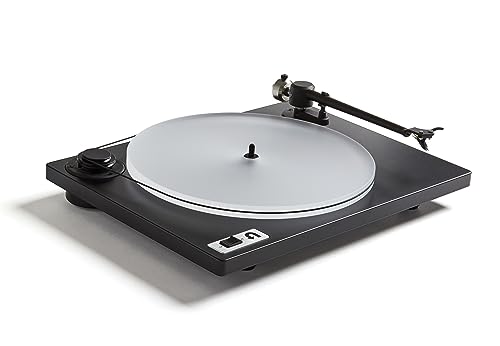
U-Turn Orbit Plus
The U-Turn Orbit Plus stands out for its minimalist design and high level of customization. Buyers can choose cartridge, platter, and preamp options. The base model includes an Ortofon OM5E cartridge and a felt platter, but we recommend upgrading to the acrylic platter for improved sound. A USB C output is available when you select the built-in preamp with USB.
Pros
- Highly customizable to fit your preferences
- Simple, elegant design with a small footprint
- Great upgrade path for future tweaks
Cons
- No automatic stop or start
- Built-in preamp option adds to the cost

Crosley C100A-BK
The Crosley C100A-BK offers a low-cost entry into vinyl with a USB C port for digitizing records. It features a belt-drive system, an Audio-Technica cartridge, and a built-in preamp. While it lacks some refinements, it provides a solid foundation for beginners who want to convert their collection without spending a lot.
Pros
- Very affordable price point
- Includes necessary features for USB ripping
- Suitable for casual listening
Cons
- May require additional vibration damping
- Limited upgrade options

House of Marley Stir It Up
The House of Marley Stir It Up turntable combines sustainability with functionality. It is crafted from bamboo and recycled materials, and it offers a USB C output for digital recording. The turntable includes a built-in preamp and Bluetooth output, making it a versatile choice for eco-conscious music lovers.
Pros
- Eco-friendly materials and design
- Bluetooth allows wireless streaming
- USB C for easy computer connection
Cons
- Sound quality is decent but not reference grade
- Some users find the controls unconventional
What matters most
Side by side
| # | Model | Drive Method | Best for | Score | Price |
|---|---|---|---|---|---|
| 1 | Audio-Technica AT-LP60XUSB | Belt-drive, manual or automatic | Best overall for beginners | 9.4 | Check price |
| 2 | Fluance RT81 Elite High Fidelity Vinyl Turntable | Belt-drive, manual | Best for audiophiles on a budget | 9.0 | Check price |
| 3 | Pro-Ject Debut Carbon EVO | Belt-drive, manual | Best high-end manual turntable | 8.8 | Check price |
| 4 | Sony PS-LX310BT | Belt-drive, automatic | Best for wireless convenience | 8.6 | Check price |
| 5 | U-Turn Orbit Plus | Belt-drive, manual | Best for customization | 8.4 | Check price |
| 6 | Crosley C100A-BK | Belt-drive, manual | Best budget pick with USB | 8.0 | Check price |
| 7 | House of Marley Stir It Up | Belt-drive, manual | Best eco-friendly design | 8.2 | Check price |
Common questions
Why should I choose a turntable with USB C instead of USB A?
USB C is the modern standard for data transfer and charging. It offers faster transfer speeds, reversible connectors, and is increasingly the only port on newer laptops. Choosing a turntable with USB C ensures compatibility with current and future computers without needing adapters. Additionally, some turntables with USB C support higher-resolution audio transfer.
Can I connect a USB C turntable to a USB A port?
Yes, you can use a USB C to USB A adapter or cable. However, the turntable will operate at the speed of the USB A port, which is fine for audio recording. Just make sure the adapter supports data transfer, not just charging.
Do all turntables with USB C have a built-in phono preamp?
Not all. Some turntables with USB C require an external phono preamp if you want to connect to a receiver or speakers that don’t have a phono input. However, most models in our list include a built-in preamp that can be switched on or off, giving you flexibility.
What is the difference between a magnetic cartridge and a moving coil cartridge?
Moving magnet (MM) cartridges are more common and typically produce a higher output voltage, so they work well with built-in preamps. Moving coil (MC) cartridges require a more sensitive preamp and are often found in high-end turntables. For USB C turntables, MM cartridges are standard, and they offer good performance for digitizing records.
How do I connect my USB C turntable to a computer?
Simply connect the turntable to your computer using a USB C cable. The turntable will be recognized as an audio input device. Then, open your recording software, select the turntable as the input source, adjust the volume, and start recording. Some turntables may require driver installation, but most are plug-and-play.
What software do I need to record vinyl to my computer?
Many turntables come with free software like Audacity or a limited version of a commercial program. Audacity is a popular free, open-source option that works on Windows, Mac, and Linux. You can also use GarageBand on Mac or Windows’ built-in Voice Recorder, though you’ll have less control over quality settings.
Can I use a USB C turntable with a smartphone or tablet?
Some smartphones and tablets support USB audio input, but not all. If your device supports USB audio class, you can connect the turntable and use a recording app. However, powering the turntable may be an issue, as most require AC power. Check the specifications of your device before attempting.
Is there a difference in sound quality between USB C and USB A turntables?
No, the USB version does not affect audio quality. The sound quality is determined by the turntable’s components, such as the cartridge, preamp, and analog-to-digital converter (ADC) inside the turntable. USB C just offers a more modern and convenient connection.
How do I clean my records before digitizing?
Use a carbon fiber brush to remove dust and static before each play. For deeper cleaning, consider a record cleaning machine or a manual solution with a microfiber cloth. Always handle records by the edges to avoid fingerprints. Clean records will produce better digital transfers with fewer pops and clicks.
What is the best format to save my digitized records?
For archiving, lossless formats like FLAC or WAV are recommended because they preserve all the audio data. If you want smaller files for portable use, MP3 at 320 kbps is acceptable. Many recording software tools allow you to choose the format and bitrate. For best quality, record at 24-bit/96kHz and convert to FLAC for storage.
Our take
For most people, the Audio-Technica AT-LP60XUSB is the best turntable with USB C because it combines user-friendly automation, reliable performance, and an affordable price. If you are willing to invest more for superior audio quality and don’t mind manual operation, the Fluance RT81 is an excellent choice that offers great value for its sound. For those who prioritize wireless connectivity, the Sony PS-LX310BT adds Bluetooth without sacrificing USB C. Ultimately, choose based on your budget and how much you value sound quality versus convenience.


