Full Motion vs Tilting TV Wall Mounts: What to Buy
Mounting Dream MD2380 is the top pick overall, combining full motion and a 132 pound capacity. Echogear EGLF2 leads for premium articulation on TVs up to 90 inches, and VideoSecu ML531BE covers small to mid-size screens as the strongest budget full-motion option.
Mounting Dream MD2380 tops this list for balancing full motion with a high weight rating, while Echogear EGLF2 and VideoSecu ML531BE lead the premium and budget categories.
TV mounts fall into fixed, tilting and full motion designs, so screen size, VESA spacing and wall studs all limit which one fits. We compared published capacity ratings, VESA ranges and owner feedback to match each mount with a realistic room setup.
The top picks, ranked

Mounting Dream MD2380 Full Motion TV Mount
This full motion mount tilts, swivels and extends to reach most seating positions in a living room. Dual arms support screens from 42 to 75 inches with a 132 pound weight limit. A built-in level adjustment lets you square up the TV after it goes on the wall.
Pros
- Full tilt, swivel and extension range
- Rated for up to 132 pounds
- Post-install leveling adjustment
Cons
- Full rated strength needs two wall studs
- Assembly involves several steps
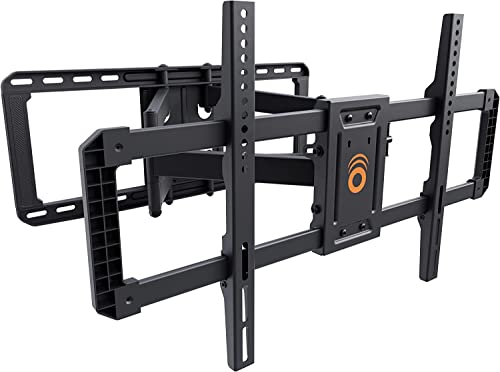
Echogear EGLF2 Full Motion TV Mount
Echogear built this articulating arm for smooth extension and easy access to the cables behind it. VESA support reaches 800 by 400 millimeters, covering TVs from 42 to 90 inches. Included hardware and a printed guide simplify the install for larger screens.
Pros
- Smooth, controlled arm extension
- Cable channel built into the arm
- Supports screens up to 90 inches
Cons
- Costs more than basic full motion mounts
- Folded profile sits deeper off the wall

Kanto PDX650 Full Motion TV Mount
Kanto pairs a refined metal finish with smooth articulation on this dual-stud mount. It covers TVs from 37 to 80 inches and VESA patterns up to 600 by 400 millimeters. Integrated cable clips keep wiring tidy along the arm.
Pros
- Refined finish and smooth movement
- Sturdy dual-stud mounting plate
- Built-in cable clips
Cons
- Higher price than similar full motion mounts
- Hardware is heavier to maneuver during install

Sanus VMPL50A Tilting TV Mount
Sanus keeps this tilting mount close to the wall while still angling the screen down to cut glare. It rates up to 150 pounds, the highest capacity in this lineup, and covers TVs from 42 to 90 inches. Lateral shift lets you center the TV after mounting into studs.
Pros
- Sits close to the wall
- 150 pound weight rating
- Lateral shift for centering
Cons
- No swivel or arm extension
- Not needed for screens under 42 inches

Perlesmith PSLFK1 Full Motion TV Mount
Perlesmith targets screens from 50 to 90 inches with a dual-arm design rated to 132 pounds. The arm extends far off the wall and swivels for corner placement. It suits large living-room TVs that need to angle toward seating across the room.
Pros
- Built for large 50 to 90 inch TVs
- Long extension for corner rooms
- Wide swivel range
Cons
- Arm assembly adds bulk when folded
- Full strength requires stud mounting

VideoSecu ML531BE Full Motion TV Mount
VideoSecu keeps this full motion mount priced like a basic tilting bracket while adding swivel and extension. It fits TVs from 26 to 55 inches and VESA patterns up to 400 by 400 millimeters. Weight capacity tops out at 88 pounds, enough for most mid-size sets.
Pros
- Full motion at an entry price point
- Good reach for a compact mount
- Covers common VESA patterns for mid-size TVs
Cons
- 88 pound limit rules out larger screens
- Instructions are minimal

Pipishell PISF1 Tilting TV Mount
Pipishell offers a slim tilting mount that installs quickly and sits close to the wall. Tilt range cuts glare when the TV sits above eye level. It covers 37 to 75 inch TVs with a 132 pound rating and no swivel hardware to configure.
Pros
- Fast, straightforward installation
- Slim, low-profile fit
- 132 pound rating at a low cost
Cons
- No swivel or extension
- Cable routing options are limited
What matters most
What size and VESA pattern do you need? Two numbers decide compatibility: your TV’s diagonal size and its VESA hole spacing in millimeters. Manufacturers print both specs on the mount’s listing and inside the TV manual. A mount has to cover both ranges, or the bracket simply will not attach. Check these figures before comparing price or features.
Fixed, tilting or full motion, which do you need? Fixed mounts hold the TV flattest against the wall and suit eye-level seating. Tilting mounts add downward angle to cut glare from higher placement, such as above a fireplace. Full motion arms extend and swivel toward different seats, which helps in open floor plans. Each added motion increases cost and folded depth, so pick the simplest option that solves your viewing angle.
How much weight can a wall mount hold? Weight capacity should exceed your TV’s actual weight, not just match it. Most mounts only reach their full rating when bolted into wooden wall studs. A stud finder locates them before you drill. Drywall anchors alone are risky for anything heavier than a light, fixed mount, and masonry walls need separate hardware.
Where should you mount the TV and route the cables? Height planning matters as much as hardware choice. Center the screen near eye level for your usual seat, then add tilt if it sits above a fireplace. Route power and HDMI cables along the arm or behind the wall plate so nothing hangs loose. Doing this before drilling avoids a second round of holes.
The lineup, side by side
| # | Model | Motion | Best for | Score | Price |
|---|---|---|---|---|---|
| 1 | Mounting Dream MD2380 Full Motion TV Mount | Full motion (tilt, swivel, extend) | Best overall | 9.4 | Check price |
| 2 | Echogear EGLF2 Full Motion TV Mount | Full motion articulating | Best premium | 9.2 | Check price |
| 3 | Kanto PDX650 Full Motion TV Mount | Full motion | Best build quality | 9.0 | Check price |
| 4 | Sanus VMPL50A Tilting TV Mount | Tilt only | Best low-profile mount | 8.8 | Check price |
| 5 | Perlesmith PSLFK1 Full Motion TV Mount | Full motion | Best for large TVs | 8.6 | Check price |
| 6 | VideoSecu ML531BE Full Motion TV Mount | Full motion | Best budget | 8.3 | Check price |
| 7 | Pipishell PISF1 Tilting TV Mount | Tilt only | Best for simple installation | 8.0 | Check price |
Frequently asked questions
How do I know which TV wall mount fits my TV?
Match two numbers: your TV’s diagonal size and its VESA hole spacing in millimeters. Both appear in the TV manual or on the box, and the mount you pick must support each one.
What is a VESA pattern on a TV?
VESA is the spacing between the four mounting holes on the back of a TV, listed as width by height in millimeters, such as 400 by 400. A mount’s supported VESA range must include your TV’s exact figure.
Do TV mounts need to go into wall studs?
Most full motion and heavy tilting mounts only reach their rated capacity when bolted into wooden studs. A stud finder locates them before drilling. Drywall anchors alone suit only small, light screens.
Which is better, tilting or full motion mount?
Tilting mounts stay closer to the wall and only angle up or down, which suits a single seating position. Full motion mounts extend and swivel toward multiple seats but cost more and sit deeper when folded.
Can you mount a TV on drywall without studs?
It works only for very light TVs with specialized anchors rated for the load. For anything mid-size or larger, studs or masonry hardware give a safer hold.
How high should a TV wall mount be placed?
Center the screen near eye level for your usual seat. Above a fireplace, the TV sits higher, so a tilting or full motion mount lets you angle it back down.
Will a TV wall mount work if I upgrade to a bigger screen later?
Only if the new TV’s size, VESA pattern and weight all fall inside the mount’s rated range. Buying a mount with some headroom on all three numbers avoids replacing it later.
How do you hide cables on a wall mounted TV?
Route power and HDMI cables along the mount arm using the included clips. For a cleaner look, an in-wall cable kit rated for the job runs them behind the drywall.
Is a full motion mount worth it over a fixed mount?
It depends on your seating layout. A full motion arm helps when you watch from more than one spot or need to angle around glare, while a fixed or tilting mount is enough for a single, centered seat.
Our take
Mounting Dream MD2380 remains the strongest all-round choice, pairing full motion with a 132 pound capacity at a reasonable cost. Buyers who want smoother articulation on larger screens should look at Echogear EGLF2 or Kanto PDX650, while VideoSecu ML531BE covers small to mid-size TVs on a tighter budget. Whichever mount you pick, confirm size, VESA pattern and weight rating, then bolt into studs.


