Top USB Cables That Actually Survive Daily Use
For most people, the Anker PowerLine II 3-in-1 Cable is the best pick because it offers three connectors in one rugged package, but its 4-foot length may be short for some.
USB cables are easy to overlook until they fray or stop working. A good cable should last years, not months, and deliver consistent power and data transfer. We compared 7 top-selling models to find the ones that hold up best.
Each cable below has been chosen for its build quality, performance, and user feedback. Whether you need a short cable for power banks or a long one for your desk, this list covers the options.
What we recommend

Anker PowerLine II 3-in-1 Cable
This cable has a braided nylon exterior and a built-in USB-C, Lightning, and Micro USB tips. It supports fast charging for all three types and is backed by a 5-year warranty. Owners report that it flexes well without breaking.
Pros
- Built-in tips are hard to lose
- Durable braided nylon jacket
- Fast charging supported
Cons
- Only 4 feet long
- Bulky connector head

Belkin Boost Charge Braided USB-C to USB-C Cable
A 6.6-foot cable that supports up to 60W charging and USB 2.0 data speed. The braided design is tangle-free and the connectors are reinforced. It passes 15,000 bend tests, making it a reliable choice for laptops and phones.
Pros
- Long length for desk use
- Reinforced stress points
- Supports power delivery
Cons
- USB 2.0 data speed
- Price is higher than generic cables

UGREEN USB C to USB C Cable 100W
This cable supports up to 100W for laptops and tablets. It uses E-marker chip for safe fast charging and has a tough nylon braid. Users like the 10-foot option for reach. It is USB-IF certified.
Pros
- High 100W power support
- Fast data transfer up to 10 Gbps
- Available in extra long lengths
Cons
- Stiffer cable bends
- No Lightning option

Amazon Basics USB 2.0 A to Micro B Cable
A simple, reliable cable for Micro USB devices. It supports charging and data transfer at USB 2.0 speeds. The PVC jacket is not as durable as braided, but it is very affordable and available in multiple lengths.
Pros
- Very low cost
- Reliable basic performance
- Multiple lengths available
Cons
- PVC jacket can wear out
- No fast charging support
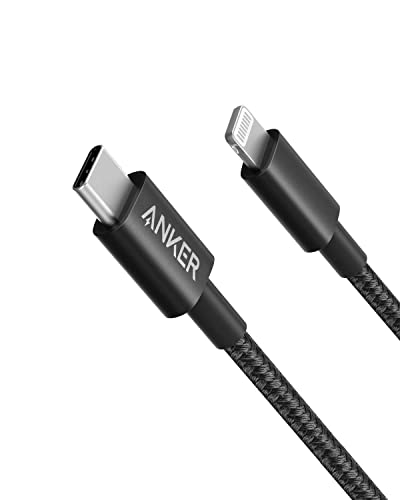
Anker New Nylon USB-C to Lightning Cable
Made for Apple devices, this cable supports fast charging for iPhones and iPads. It has a double braided nylon exterior and is MFi certified. The 6-foot length is convenient for bedside charging.
Pros
- MFi certified for safety
- Long length for flexibility
- Durable construction
Cons
- Limited to Apple devices
- No USB-A compatibility

Cable Matters Braided USB C to HDMI Cable
This cable connects USB-C devices to HDMI displays, supporting 4K at 60Hz. It is not for charging, but for video. The braided exterior is durable and the connectors are gold plated.
Pros
- Supports 4K video
- Durable braided cable
- Plug and play
Cons
- Does not charge devices
- Requires USB-C port with DisplayPort Alt Mode

Native Union Stow USB-C to USB-C Cable
This cable features a leather strap and a magnetic clip for neat storage. It supports 60W charging and has a braided nylon exterior. It is a favorite among frequent travelers for its tangle-free design.
Pros
- Built in cable management
- 8 foot length is versatile
- Premium look and feel
Cons
- Higher price
- Data transfer is limited to USB 2.0
Compared at a glance
| # | Model | Length | Best for | Score | Price |
|---|---|---|---|---|---|
| 1 | Anker PowerLine II 3-in-1 Cable | 4 feet | Multi-device users | 9.4 | Check price |
| 2 | Belkin Boost Charge Braided USB-C to USB-C Cable | 6.6 feet | USB-C only setups | 9.2 | Check price |
| 3 | UGREEN USB C to USB C Cable 100W | 6.6 feet (also 10 feet) | High power charging | 9.1 | Check price |
| 4 | Amazon Basics USB 2.0 A to Micro B Cable | 6 feet | Budget and legacy devices | 8.5 | Check price |
| 5 | Anker New Nylon USB-C to Lightning Cable | 6 feet | iPhone users | 9.0 | Check price |
| 6 | Cable Matters Braided USB C to HDMI Cable | 6 feet | Video output | 8.8 | Check price |
| 7 | Native Union Stow USB-C to USB-C Cable | 8 feet | Travel | 8.7 | Check price |
Before you buy
Good to know
What is the difference between USB-A and USB-C?
USB-A is the rectangular connector found on older devices. USB-C is oval and reversible. USB-C supports faster charging and higher data speeds. Many new devices only have USB-C ports.
Can I use any USB cable to fast charge my phone?
No. Your phone, cable, and charger must all support the same fast charging standard. For example, USB Power Delivery for USB-C and Qualcomm Quick Charge for some Android phones. Check your phone’s specifications.
How long do USB cables typically last?
It depends on the quality. Cheap cables may last a few months, while quality braided cables can last years. The most common failure point is near the connector. Reinforced cables last longer.
Are braided cables better than plastic cables?
Braided cables are usually more durable and tangle resistant. They resist cuts and abrasions better. Plastic cables are cheaper but more prone to fraying. However, not all braided cables are equally durable; the quality of the braid matters.
What does MFi certified mean?
MFi stands for ‘Made for iPhone/iPad’. It means the accessory has been certified by Apple to work with their devices. Using non-certified cables may cause issues like charging errors or reduced compatibility.
Can I use a USB-C to Lightning cable with an older iPad?
If the iPad has a Lightning port and supports USB-C fast charging, yes. However, older iPads may not support fast charging even with a compatible cable. Check your device’s specifications.
Is it safe to use a 100W cable with a 20W charger?
Yes. The cable’s power rating is the maximum it can handle. Using a higher rated cable with a lower wattage charger is safe. The charger determines the output, not the cable.
Why is my USB cable not charging my device?
Possible reasons include a faulty cable, a dirty port, or an incompatible charger. Try a different cable or charger to isolate the issue. Also, check for debris in the charging port of your device.
What is the maximum length for a USB cable?
For USB 2.0, the maximum recommended length is 5 meters (16 feet). For USB 3.0, it is 3 meters (10 feet). Longer cables can cause signal degradation and power loss. Active cables can extend this range.
Can I use a USB-C to HDMI cable to connect my phone to a TV?
Only if your phone supports video output over USB-C. Many phones do not. Check your phone’s manual or specifications. Even if it does, it may require a specific adapter or cable.
The verdict
For a durable all-rounder, get the Anker PowerLine II 3-in-1 Cable. If you need high power for laptops, choose the UGREEN 100W cable. iPhone users should stick with the Anker Nylon USB-C to Lightning. Travelers will appreciate the Native Union Stow for its cable management. Buy based on your primary device and usage pattern, not just price.


