How to Choose the Right USB Wi-Fi Adapter for Your PC
TP-Link’s Archer T4U Plus AC1300 suits most desktop users with dual-band speed and a compact footprint. Panda Wireless PAU09 leads on long-range antenna reach, while Alfa’s AWUS036ACS keeps gaming latency low. ASUS USB-AC68 tops the group on raw throughput, and the Edimax EW-7811Un covers budget setups.
A USB Wi-Fi adapter turns a desktop or older laptop into a wireless-ready device without opening the case. Chipsets, antenna designs and USB port versions differ enough that the wrong pick bottlenecks a fast router. Seven current Amazon listings below cover distinct needs, from budget upgrades to long-range outdoor pickup.
Published chipset specs, band support and antenna configuration formed the basis for these picks, checked against owner feedback on stability. Reddit threads and Amazon Q&A sections were reviewed for recurring complaints about dropped connections or driver conflicts. Each entry below fills a different real-world gap instead of repeating the same use case.
The top picks, ranked
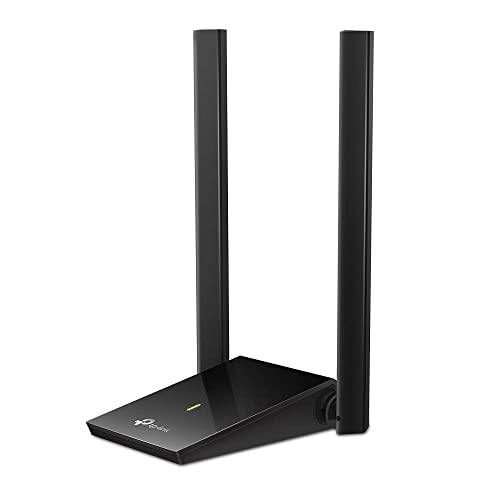
TP-Link Archer T4U Plus AC1300
A Realtek RTL8812BU chipset pairs with a foldable antenna to bring dual-band speed to any desktop. Combined throughput reaches up to 1300 Mbps across 2.4GHz and 5GHz. Owners report stable connections through drywall at typical home distances.
Pros
- Dual-band speed handles 4K streaming
- Foldable antenna protects itself during storage
- Beamforming improves signal stability
Cons
- Needs a driver install on first use
- Bulkier than nano-style adapters

ASUS USB-AC68
ASUS packs dual antennas into a dock-style base, letting this AC1900-class adapter reach 1900 Mbps combined. That base angles antennas away from cable clutter behind a tower. Owners running gigabit routers report throughput close to the rated ceiling at close range.
Pros
- Highest combined throughput in this comparison
- Included dock improves antenna placement
- MU-MIMO support suits multi-device homes
Cons
- Larger footprint than stick-style adapters
- Costs more than most dual-band picks

Panda Wireless PAU09 N600
Two external 5dBi antennas give this adapter reach across multiple floors. A Ralink RT5572 chipset supports simultaneous dual-band operation at up to 600 Mbps combined. Basements and detached garages often see the biggest improvement over a built-in Wi-Fi card.
Pros
- External antennas rotate for aim
- Holds a signal through multiple walls
- Linux driver support included out of the box
Cons
- USB 2.0 port caps real-world throughput
- Antennas add desk footprint

Alfa AWUS036ACS
Alfa built this adapter around an RTL8811CU chipset tuned for consistent ping over 5GHz. A single high-gain antenna keeps the housing slim for tight desk setups. Competitive gamers cite fewer packet spikes than laptop-integrated cards.
Pros
- Low latency on 5GHz for online play
- Compact single-antenna housing
- Wide OS driver compatibility
Cons
- Max speed trails dual-stream models
- No simultaneous 2.4GHz mode

TP-Link Archer T2U Nano AC600
Barely over an inch long, this nano adapter stays in a laptop bag without adding bulk. It still supports both bands at AC600 speeds, unlike most nano competitors. Frequent travelers use it as a backup when hotel Wi-Fi cards underperform.
Pros
- Nano size fits a laptop bag pocket
- Dual-band support despite the small housing
- Low profile avoids snagging during transit
Cons
- Small size limits raw range
- No external antenna option

Edimax EW-7811Un
This nano adapter draws minimal power and barely extends past the USB port. Running 2.4GHz only, it suits basic browsing and email rather than heavy streaming. Raspberry Pi hobbyists frequently list it as their default wireless add-on.
Pros
- Nearly invisible nano form factor
- Works reliably with Raspberry Pi OS
- Lowest price point in this comparison
Cons
- No 5GHz band limits top speed
- Not suited for HD streaming

D-Link DWA-131
Desktops still running Windows 7 or older motherboards without built-in Wi-Fi are the target here. A standard USB-A connector and driver CD ease setup on legacy hardware. IT technicians often keep one on hand for refurbished office machines.
Pros
- Broad legacy OS driver support
- Simple plug-and-play setup
- Affordable replacement for a dead onboard card
Cons
- 2.4GHz only caps modern speeds
- No 5GHz band to dodge interference
How they stack up
| # | Model | Chipset | Best for | Score | Price |
|---|---|---|---|---|---|
| 1 | TP-Link Archer T4U Plus AC1300 | Realtek RTL8812BU | Best overall for desktop PCs | 9.4 | Check price |
| 2 | ASUS USB-AC68 | Broadcom BCM4360 | Best for high-speed AC1900 performance | 9.2 | Check price |
| 3 | Panda Wireless PAU09 N600 | Ralink RT5572 | Best for long-range antenna reach | 9.0 | Check price |
| 4 | Alfa AWUS036ACS | Realtek RTL8811CU | Best for gaming and low latency | 8.8 | Check price |
| 5 | TP-Link Archer T2U Nano AC600 | Realtek RTL8811AU | Best for laptop travel | 8.5 | Check price |
| 6 | Edimax EW-7811Un | Realtek RTL8188CUS | Best budget pick | 8.2 | Check price |
| 7 | D-Link DWA-131 | Realtek RTL8192EU | Best for older PCs and USB-A ports | 8.0 | Check price |
How to choose
What to Look for in a USB Wi-Fi Adapter Chipset determines real-world speed more than the number printed on the box. Realtek and Broadcom chipsets dominate current listings and generally carry solid driver support. USB port version matters too, since a USB 2.0 port caps throughput regardless of the antenna. Dual-band models add a 5GHz option for less interference in crowded apartments.
Which Antenna Type Fits Your Space External antennas outperform nano designs in homes with multiple floors or thick walls. A rotating antenna lets you aim the signal toward the router for a stronger connection. Nano adapters trade range for portability, which suits laptops more than stationary desktops. Two external antennas, as on the Panda Wireless PAU09, support MIMO for steadier throughput.
Best USB Wi-Fi Adapters for Gaming and Streaming Low latency matters more than peak speed for competitive gaming over Wi-Fi. Dedicated 5GHz chipsets, like the one in the Alfa AWUS036ACS, cut interference from neighboring 2.4GHz networks. Streaming 4K video benefits from higher-throughput models such as the ASUS USB-AC68. Even so, a wired connection still beats any USB adapter for the lowest possible ping.
Best Options for Older Hardware or Travel Desktops running Windows 7 or early motherboards often lack modern wireless drivers entirely. A basic USB-A adapter like the D-Link DWA-131 restores connectivity without a card upgrade. Travelers should prioritize nano adapters built to survive being dropped into a bag daily. Battery-conscious laptop users benefit from lower-power 2.4GHz-only models when range is not a concern.
Questions worth asking
Are USB Wi-Fi Adapters as Fast as Built-in Cards?
Modern USB 3.0 adapters with AC or AX chipsets match many built-in cards on paper speed. Actual throughput depends on router distance, wall material and USB port version. A USB 2.0 port limits any adapter to roughly 300 Mbps regardless of the rated speed.
Do USB Wi-Fi Adapters Work With Mac and Linux?
Chipset support varies by operating system, so check the listing before buying. Realtek chipsets like the RTL8811AU generally carry built-in Linux kernel support. macOS often needs a manual driver download from the manufacturer’s site instead.
Nano vs External Antenna Adapters, What Is the Difference?
Nano adapters sit flush against the USB port and prioritize portability over range. External antenna models extend several inches and pick up signal from farther away. Choose nano for laptops on the move and external antennas for stationary desktops.
Can a USB Wi-Fi Adapter Replace a Router Upgrade?
No, the adapter only affects the receiving device, not the network’s overall speed or coverage. A weak router still limits every connected device regardless of adapter quality. Pairing a strong adapter with mesh Wi-Fi delivers the biggest coverage gain.
Is USB 3.0 Necessary for a Wi-Fi Adapter?
USB 3.0 matters for AC1200 and faster adapters that can exceed USB 2.0’s bandwidth ceiling. Budget 2.4GHz-only models rarely need it, since their max speed stays well under that limit. Check your PC’s available ports before buying a USB 3.0-only adapter.
How Far Can a USB Wi-Fi Adapter Reach From the Router?
External antenna models like the Panda Wireless PAU09 can hold a connection through two or three walls. Nano adapters typically lose reliable signal beyond one room without a clear line of sight. Physical obstructions like brick or metal ductwork cut range more than distance alone.
Do USB Wi-Fi Adapters Need a Driver Install?
Most current models install a driver automatically on Windows 10 and 11 through Plug and Play. Older operating systems or Linux distributions may need a manual download from the manufacturer. Check the listing for driver CD inclusion when working with legacy hardware.
USB Wi-Fi Adapter vs PCIe Card, Which Is Better for a Desktop?
PCIe cards typically offer higher sustained speeds and better antenna options for a permanent desktop install. USB adapters win on convenience, since they need no case opening and move easily between machines. Choose USB for flexibility and PCIe for a dedicated gaming or workstation build.
What Is the Best USB Wi-Fi Adapter for a Small Apartment?
A dual-band model with a compact external antenna, like the Panda Wireless PAU09, usually covers a small apartment without dead zones. Switching to 5GHz also helps dodge interference from neighboring routers packed into nearby units.
Our take
Match the adapter to your actual bottleneck rather than the highest advertised speed. TP-Link’s Archer T4U Plus covers most desktop needs, while the Panda Wireless PAU09 solves range problems in larger homes. Travelers and legacy PC owners have dedicated options above that fit those narrower use cases better than a general pick.


