USB WiFi Adapters for Faster, Steadier Connections
The TP-Link Archer TX20U Plus is the best all round USB WiFi adapter thanks to WiFi 6 support and high gain antennas. The NETGEAR Nighthawk A8000 is the pick for maximum throughput, and the TP-Link Archer T3U Plus is the value option for everyday use.
The TP-Link Archer TX20U Plus is the adapter most people should buy, the NETGEAR Nighthawk A8000 is the one for squeezing maximum throughput from a WiFi 6E network, and the TP-Link Archer T3U Plus is the sensible value pick.
Choosing a USB WiFi adapter is harder than it looks because the advertised speed assumes a USB 3.0 port, an ideal signal and a matching router, and a nano adapter plugged into USB 2.0 is capped at roughly 480 megabits before WiFi overhead is even counted. We ranked these on standard support, interface generation, antenna design, band coverage and what owners report about driver stability on Windows, macOS and Linux.
The best picks, ranked

TP-Link Archer TX20U Plus
This pairs WiFi 6 support with two adjustable high gain antennas and a USB 3.0 interface, which is the combination that actually delivers a stable connection at distance rather than just a high number on the box. The antennas can be aimed, and it comes with a cradle so it does not have to sit flush against a metal case. It is far too large to leave permanently in a laptop.
Pros
- High gain antennas hold signal at distance
- WiFi 6 improves performance on busy networks
- Cradle lets you position it away from interference
Cons
- Too bulky to leave in a laptop permanently
- Windows driver installation needed before first use

NETGEAR Nighthawk A8000 AXE3000 WiFi 6E Adapter
The A8000 adds the 6 GHz band, which is the real advantage in a crowded apartment block because almost nothing else is using it yet. On a WiFi 6E router with a clear line of sight it is the fastest adapter here by a wide margin. It only makes sense if you actually own a 6E capable router, and it runs warm.
Pros
- 6 GHz band avoids neighbourhood congestion
- Highest throughput ceiling on this list
- Magnetic cradle for flexible placement
Cons
- Needs a WiFi 6E router to justify itself
- Gets noticeably warm under sustained load

TP-Link Archer T3U Plus
A dual band AC1300 adapter with a single high gain external antenna, which is what separates it from the nano dongles that struggle two rooms from the router. USB 3.0 support means the 5 GHz band is not artificially throttled. WiFi 5 rather than WiFi 6 is the compromise, and it matters less than the antenna does for most homes.
Pros
- External antenna makes a real difference at range
- USB 3.0 avoids interface bottleneck
- Very reasonable price for the performance
Cons
- WiFi 5 rather than WiFi 6
- Antenna sticks out awkwardly on a laptop

ASUS USB-AX56 Dual Band WiFi 6 Adapter
ASUS supplies this with a substantial cradle and two external antennas, which suits a desktop tower sitting under a desk where the WiFi signal is worst. WiFi 6 support and MU-MIMO help when several devices compete for the same access point. The setup is decidedly not portable.
Pros
- Cradle lifts the adapter away from a metal tower
- WiFi 6 with MU-MIMO for busy networks
- Solid ASUS driver support on Windows
Cons
- Not portable in any meaningful sense
- Limited official macOS support

Alfa AWUS036ACH Dual Band USB Adapter
Alfa’s long standing favourite among people who need to reach a distant access point, with two detachable high gain antennas that can be swapped for larger or directional ones. Linux driver support is well documented, which is why it is a staple in networking and security testing circles. It is large, obvious, and overkill for sitting next to a router.
Pros
- Antennas can be upgraded or replaced
- Excellent documented Linux driver support
- Reaches access points other adapters cannot see
Cons
- Large and conspicuous on a desk
- WiFi 5 only, no WiFi 6 support
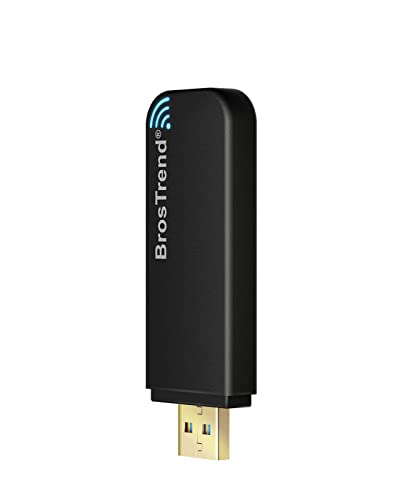
BrosTrend AC1200 Linux WiFi Adapter
BrosTrend markets specifically at Linux users and supplies an install script covering common distributions, which sidesteps the usual hunt for an out of tree driver. Dual high gain antennas give respectable range for a mid priced adapter. On Windows it works fine but has no particular advantage over TP-Link.
Pros
- Genuinely straightforward Linux installation
- Two high gain antennas for range
- Clear documentation for distribution support
Cons
- Driver still needs recompiling after some kernel updates
- No WiFi 6 support

TP-Link Archer T2U Nano
This one is small enough to leave permanently in a laptop port, which is the entire point of it. It is a dual band AC600 class adapter, so speeds are modest and the 5 GHz band is limited, but it is a substantial upgrade over a broken internal card. Range is the obvious weakness given there is no external antenna.
Pros
- Small enough to leave plugged in
- Dual band despite the tiny size
- Cheapest way to restore WiFi on an old laptop
Cons
- USB 2.0 interface caps throughput
- Weak range without an external antenna
Compared at a glance
| # | Model | Standard | Best for | Score | Price |
|---|---|---|---|---|---|
| 1 | TP-Link Archer TX20U Plus | WiFi 6, AX1800 class | Best overall | 9.4 | Check price |
| 2 | NETGEAR Nighthawk A8000 AXE3000 WiFi 6E Adapter | WiFi 6E, AXE3000 class | Best for maximum speed | 9.2 | Check price |
| 3 | TP-Link Archer T3U Plus | WiFi 5, AC1300 class | Best value | 9.0 | Check price |
| 4 | ASUS USB-AX56 Dual Band WiFi 6 Adapter | WiFi 6, AX1800 class | Best for desktops | 8.8 | Check price |
| 5 | Alfa AWUS036ACH Dual Band USB Adapter | WiFi 5, AC1200 class | Best for long range | 8.6 | Check price |
| 6 | BrosTrend AC1200 Linux WiFi Adapter | WiFi 5, AC1200 class | Best for Linux | 8.3 | Check price |
| 7 | TP-Link Archer T2U Nano | WiFi 5, AC600 class | Best compact option | 8.0 | Check price |
What matters most
The USB port generation is a hard ceiling USB 2.0 tops out around 480 megabits per second in theory, and considerably less in practice once protocol overhead is counted. That means any adapter rated above roughly AC600 must be plugged into a USB 3.0 port to reach its numbers, and a nano adapter designed for USB 2.0 will never deliver gigabit class WiFi regardless of what the router supports. Check both the adapter’s interface and the port you intend to use, since a blue USB 3.0 port on the machine does not help if the adapter itself is USB 2.0.
Antennas beat specifications at any real distance Two rooms and a wall away from the router, an AC1300 adapter with a high gain external antenna will consistently outperform an AX1800 nano dongle. Signal strength governs the negotiated link rate, and no amount of protocol improvement compensates for a weak signal. If your problem is range rather than raw speed near the router, prioritise an external antenna and a USB extension cable that lets you position the adapter away from a metal case or under a desk.
WiFi 6 and 6E help in crowded environments The headline benefit of WiFi 6 is not peak speed for one device, it is efficiency when many devices share an access point, through features like OFDMA and improved scheduling. WiFi 6E adds the 6 GHz band, which is currently almost empty in most neighbourhoods and therefore delivers a dramatic real world improvement in dense apartment blocks. Both require a matching router, so there is no benefit to buying a 6E adapter for a WiFi 5 network.
Check driver support for your operating system first Windows support is near universal, though many adapters need a driver installed from the supplied media or the manufacturer’s site before they work at all. macOS support is patchier, particularly on Apple silicon, and several popular adapters simply have no current macOS driver. Linux varies enormously: some chipsets are supported in the mainline kernel and work instantly, while others need an out of tree driver that must be rebuilt after kernel updates. Search the specific chipset rather than the product name before buying.
Good to know
Will a USB WiFi adapter be faster than my laptop’s built in card?
Often yes, if the internal card is older or the adapter supports a newer standard with better antennas. If the internal card is already WiFi 6 with well placed antennas in the screen bezel, an external adapter may be no better.
Do I need WiFi 6 or is WiFi 5 enough?
WiFi 5 is fine for most home internet speeds. WiFi 6 helps most when many devices share the network, and WiFi 6E helps most in dense apartment buildings where the 5 GHz band is congested.
Why is my adapter slower than advertised?
The most common causes are a USB 2.0 port, distance and walls reducing signal strength, a router that only supports an older standard, or connecting to the 2.4 GHz band instead of 5 GHz.
Should I use 2.4 GHz or 5 GHz?
5 GHz for speed when you are reasonably close to the router, 2.4 GHz for range and wall penetration. Dual band adapters let you pick, and most connect automatically to the stronger option.
Do USB WiFi adapters work on macOS?
Support is inconsistent. Check the manufacturer’s current driver page for your exact macOS version and processor architecture before buying, since several popular adapters have no working driver on recent releases.
Can I use a USB extension cable?
Yes, and it usually helps. Moving the adapter away from a metal case or out from under a desk often improves signal strength more than upgrading to a more expensive adapter.
Is a nano adapter good enough?
For a device sitting close to the router and doing light browsing, yes. For streaming, gaming or any distance from the access point, an adapter with an external antenna is a meaningful upgrade.
Do these work with a Raspberry Pi or older PC?
Many do, but chipset driver support is the deciding factor rather than the brand. Look up the exact chipset against your operating system’s supported device list before buying.
Our take
The TP-Link Archer TX20U Plus is the adapter to pick for most situations, since WiFi 6 support plus adjustable high gain antennas covers both speed and range. Choose the NETGEAR Nighthawk A8000 only if you already run a WiFi 6E router and want the empty 6 GHz band, and take the TP-Link Archer T3U Plus when the goal is simply a solid, cheap upgrade over a failing internal card.