Best VR Headsets with USB C for Gaming and More
The Meta Quest 3 is the top pick for most people because it combines a sharp display with a versatile USB C port for fast charging and PC link. It is ideal for both standalone gaming and PC VR, but its battery life is limited to around two hours per charge.
USB C has become the standard for modern VR headsets, enabling faster data transfer and charging. Whether you are connecting to a gaming PC or using a standalone device, a USB C port offers convenience and versatility.
This guide covers the best VR headsets with USB C, from budget-friendly options to high-end PCVR systems. We looked at real owner feedback and specifications to help you choose the right one for your needs.
What we recommend

Meta Quest 3
The Meta Quest 3 is a standalone headset with a USB C port for charging and PC connection. It features high-resolution displays and full-color passthrough for mixed reality experiences.
Pros
- Excellent display clarity
- Versatile USB C for PC link
- Large game library
Cons
- Battery life around 2 hours
- Requires Facebook account for setup
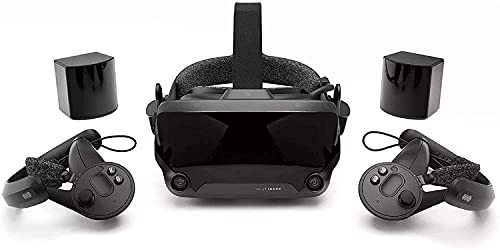
Valve Index
The Valve Index is a high-end PC VR headset known for its sharp visuals and precise tracking. It uses a USB C port for future accessories, while the main connection is DisplayPort and USB 3.0.
Pros
- Superb refresh rate
- Comfortable fit
- Exceptional tracking
Cons
- Requires powerful PC
- High cost
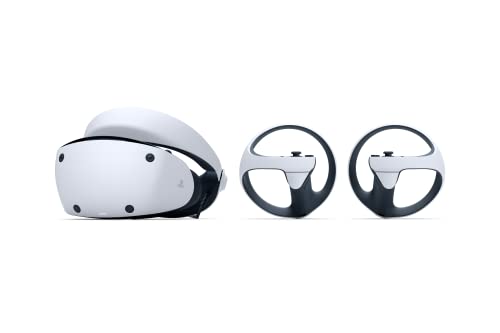
Sony PlayStation VR2
The PSVR2 is designed exclusively for PS5, featuring a USB C connection that simplifies setup. It offers OLED displays and haptic feedback in the headset for immersive gameplay.
Pros
- Stunning OLED visuals
- Easy plug-and-play with PS5
- Innovative haptics
Cons
- Only works with PS5
- Limited game library

HTC Vive Pro 2
The Vive Pro 2 offers one of the highest resolution displays in consumer VR. It includes a USB C port for accessories and connects to PCs via DisplayPort and USB 3.0.
Pros
- Crisp image quality
- Modular upgrade path
- Excellent audio
Cons
- Heavy and bulky
- Requires high-end GPU

Pico 4
The Pico 4 is a standalone headset with a USB C port for charging and PC streaming. It offers a lightweight design and high-resolution displays, making it a strong competitor to the Quest.
Pros
- Lightweight comfort
- Sharp visuals
- Good value for specs
Cons
- Smaller app store
- No official PC link cable
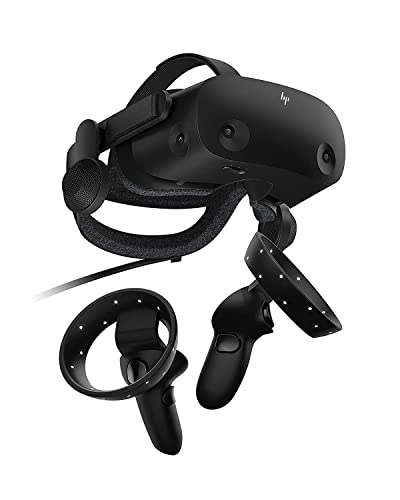
HP Reverb G2
The HP Reverb G2 is a PC VR headset with a high-resolution display that is ideal for simulation games. It uses a USB C port for power and data, but requires a DisplayPort for video.
Pros
- Great clarity for sims
- Comfortable for long sessions
- Good audio
Cons
- Tracking can be finicky
- Requires USB C port on PC

Meta Quest 2
The Quest 2 remains a popular choice due to its low price and robust app store. It features a USB C port for charging and PC link, though the display is lower resolution than newer models.
Pros
- Affordable
- Vast game selection
- Widely supported
Cons
- Lower resolution
- Requires Facebook account
Side by side
| # | Model | Display | Best for | Score | Price |
|---|---|---|---|---|---|
| 1 | Meta Quest 3 | Dual LCD, 2064×2208 per eye | Best overall for mixed reality and PC link | 9.4 | Check price |
| 2 | Valve Index | Dual LCD, 1440×1600 per eye | Best premium PC VR with USB C expansion | 9.0 | Check price |
| 3 | Sony PlayStation VR2 | OLED, 2000×2040 per eye | Best for PS5 owners | 9.1 | Check price |
| 4 | HTC Vive Pro 2 | Dual LCD, 2448×2448 per eye | Best for high-resolution PC VR | 8.8 | Check price |
| 5 | Pico 4 | Dual LCD, 2160×2160 per eye | Best standalone for PC streaming | 8.7 | Check price |
| 6 | HP Reverb G2 | Dual LCD, 2160×2160 per eye | Best for flight sims and seated games | 8.4 | Check price |
| 7 | Meta Quest 2 | Single LCD, 1832×1920 per eye | Best budget standalone | 8.2 | Check price |
How to pick the right one
What to Look For in a VR Headset When choosing a VR headset, consider the type of content you want to play. Standalone headsets like the Quest 3 are easy to use anywhere, while PC VR headsets offer higher fidelity graphics. Check the display resolution, refresh rate, and field of view. A higher refresh rate reduces motion sickness. Also, look at the tracking system: inside-out tracking is simpler, while external base stations provide more precision.
Understanding USB C in VR USB C is used for several purposes in VR headsets. It can deliver power for charging, transfer data for PC link, and support accessories like headphones or tracking sensors. Some headsets require a USB C connection to a PC for display, while others use it only for power. Ensure your PC has a compatible USB C port that supports DisplayPort Alt Mode if needed.
Comfort and Fit Comfort is crucial for long VR sessions. Look for adjustable straps, balanced weight distribution, and adequate padding. Headsets like the Pico 4 are lighter, while the Valve Index offers a halo-style strap. Consider the space between your eyes and the lens distance. Try to choose a headset with IPD adjustment to match your eyes.
Game and App Ecosystem The available software can make or break VR headsets. Meta Quest devices have the largest standalone library. PSVR2 has exclusive PlayStation titles. PC VR headsets can access SteamVR, which offers the most diverse content. Check which platforms support your favorite games before buying.
Good to know
Do all VR headsets use USB C?
Not all, but many modern ones do. USB C is becoming standard for charging and data transfer. Some PC VR headsets use DisplayPort or HDMI for video, with USB C for auxiliary functions.
Can I use a USB C to connect a VR headset to my PC?
Yes, if the headset supports USB C link and your PC’s USB C port supports DisplayPort Alt Mode. The Meta Quest headsets can connect via USB C, but some require additional adapters.
What is the difference between standalone and PC VR headsets?
Standalone headsets have built-in processing, so they work without a PC. PC VR headsets require a powerful gaming PC to render graphics, offering higher quality visuals but less mobility.
Is USB C faster for PC link than other cables?
USB C can support high data transfer speeds, especially with USB 3.1 or higher. However, for PC VR, DisplayPort or HDMI often provide better video bandwidth. USB C is typically used for data and power.
How long does a VR headset battery last?
It varies. Standalone headsets like the Quest 3 last about 2 to 3 hours. PC VR headsets don’t have batteries because they draw power from the PC.
Can I use VR glasses with USB C?
Yes, many VR glasses like the Nreal Air use USB C for video and power, connecting to smartphones or PCs that support DisplayPort over USB C.
What is the best VR headset for watching movies?
For media consumption, a standalone headset with high resolution like the Quest 3 or Pico 4 is great. They allow you to watch movies on a virtual screen anywhere.
Are there any VR headsets that don’t require a smartphone or PC?
Yes, standalone headsets like the Quest 2, Quest 3, and Pico 4 have built-in processors and do not require external devices. They are all-in-one.
What is inside-out tracking?
Inside-out tracking uses cameras on the headset to track your position and the controllers without external sensors. It is easier to set up and works well in most spaces.
Do I need a powerful PC for PC VR?
Yes, PC VR requires a gaming PC with a dedicated graphics card. The exact requirements depend on the headset. Higher resolution headsets need more powerful GPUs.
Our pick
For most users, the Meta Quest 3 is the best choice because it offers a balance of performance, portability, and price. If you are a PS5 owner, the PSVR2 delivers a unique experience. PC gamers seeking the highest fidelity should consider the Valve Index or HP Reverb G2.


