Which Webcam Should You Buy for Streaming?
Logitech Brio 4K is the overall pick for its sharp sensor, HDR and adjustable field of view. Elgato Facecam wins on pure streaming quality with an uncompressed feed and full manual controls. Anker PowerConf C200 offers strong 1080p value for creators on a budget.
Logitech Brio 4K leads this list for its detailed sensor and adjustable framing. Elgato Facecam follows for its clean uncompressed image, and Anker PowerConf C200 rounds it out on value. Seven real models are ranked below so you can match one to your setup and lighting.
Real low-light behavior, frame rate at full resolution and autofocus hunting rarely show up clearly on the box, which makes a streaming webcam trickier to shop for than it looks. Published specifications, sensor and lens details, and software features all factored into this ranking, weighed against how owners report each camera holds up on camera every day.
What we recommend

Logitech Brio 4K
HDR pairs with a 4K sensor and three field-of-view settings, and owners report it stays sharp and well balanced across mixed lighting. Streaming runs at 1080p 60fps for smooth motion. Adjustable framing makes it easy to tune how much of the room shows in shot.
Pros
- Sharp 4K sensor with HDR for mixed lighting
- Adjustable field of view for tight or wide shots
- 1080p 60fps option keeps motion smooth
Cons
- Autofocus can hunt in very low light
- 4K output needs a capable computer to process

Elgato Facecam
An uncompressed 1080p 60fps feed comes from a fixed prime lens rather than autofocus, and owners report the result looks consistent and artifact-free. Camera Hub software exposes full manual controls over exposure, white balance and ISO. Streamers who want to lock in one clean image get rewarded here.
Pros
- Uncompressed 1080p 60fps feed for clean video
- Full manual exposure and white balance control
- Fixed lens avoids distracting autofocus hunting
Cons
- No built-in microphone
- Fixed focus means you sit within a set range
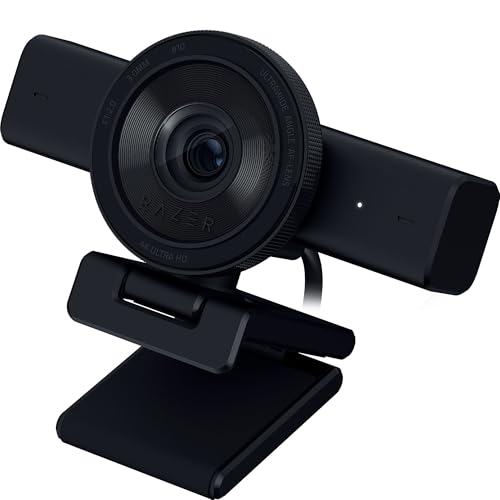
Razer Kiyo Pro
A large adaptive light sensor plus optional HDR handles dim rooms better than most rivals, which owners report as this camera’s standout strength. Streaming tops out at 1080p 60fps. Wide, medium and narrow field-of-view options make it a strong choice when lighting is not ideal.
Pros
- Strong low-light performance from a large sensor
- Optional HDR and adjustable field of view
- Smooth 1080p 60fps for motion
Cons
- No 4K capture option
- HDR mode caps the frame rate lower

Insta360 Link
A motorized gimbal pans and tilts to keep you centered, and owners report the AI tracking stays smooth for standing or moving streams. Capture runs at 4K with gesture control support. Whiteboard and overhead modes suit creators who present rather than sit still.
Pros
- Motorized gimbal tracks you as you move
- 4K sensor with gesture controls
- Useful whiteboard and overhead modes
Cons
- Tracking can overcorrect with fast movement
- More features add setup and learning time

Logitech StreamCam
Rotating hardware lets this camera shoot true vertical 1080p, and owners report it as genuinely handy for creators posting to short-form platforms alongside a stream. Smart auto exposure runs at 1080p 60fps. A USB-C connection makes it a flexible pick for multi-format content.
Pros
- Rotates for true vertical video
- 1080p 60fps with smart auto exposure
- USB-C connection with a versatile mount
Cons
- No 4K capture
- Autofocus can drift in low light

Anker PowerConf C200
Streaming basics come covered affordably here, with 2K capture, adjustable field of view and dual noise-reducing microphones. Owners report it as a dependable everyday camera. Low-light polish trails pricier models, but the 1080p 60fps stream stays clean for the money.
Pros
- 2K sensor and 1080p 60fps for the price
- Adjustable field of view and framing
- Dual microphones with noise reduction
Cons
- Low-light image is softer than premium picks
- No HDR support

Logitech C920
Reliable 1080p 30fps and dual stereo microphones keep this a widely recommended entry point at a very accessible price. Owners report it as a proven, plug-and-play choice. An older sensor and 30fps cap put it a step behind cameras built specifically for high-frame-rate streaming.
Pros
- Reliable, well-supported 1080p image
- Dual stereo microphones built in
- Plug-and-play across most platforms
Cons
- Capped at 1080p 30fps
- Older sensor struggles more in low light
How they stack up
| # | Model | Max resolution | Best for | Score | Price |
|---|---|---|---|---|---|
| 1 | Logitech Brio 4K | 4K at 30fps | Best overall | 9.4 | Check price |
| 2 | Elgato Facecam | 1080p at 60fps | Best for pure streaming quality | 9.2 | Check price |
| 3 | Razer Kiyo Pro | 1080p at 60fps | Best for low light | 9.0 | Check price |
| 4 | Insta360 Link | 4K at 30fps | Best for AI tracking | 8.8 | Check price |
| 5 | Logitech StreamCam | 1080p at 60fps | Best for vertical content | 8.6 | Check price |
| 6 | Anker PowerConf C200 | 2K at 30fps | Best value | 8.4 | Check price |
| 7 | Logitech C920 | 1080p at 30fps | Best budget classic | 8.1 | Check price |
How to choose
Resolution vs frame rate for streaming Most platforms display at 1080p, so a smooth 1080p 60fps feed usually matters more than raw 4K. Brio 4K and Insta360 Link capture 4K for cropping and future flexibility, but both output at 30fps at full resolution. Motion smoothness as the priority points toward 1080p 60fps, which the Facecam, Kiyo Pro, StreamCam and PowerConf C200 all support.
How much low-light performance matters Room lighting affects image quality more than any spec on the box. A larger sensor gathers more light, which is why Razer Kiyo Pro handles dim rooms better than most, while budget cameras like the C920 get grainy without good lighting. A simple key light or soft window light in front of you improves the picture more than higher resolution alone, regardless of which camera you choose.
Autofocus vs fixed focus, which fits your setup Moving around stays sharp with autofocus, though it can hunt and pulse in low light, which distracts on a live stream. Elgato Facecam avoids that entirely by locking to a set distance, giving a consistent image as long as you stay within range. Match the focus type to your habits: frequent movement favors autofocus, a steady spot favors fixed focus.
Microphone and connection details worth checking Most webcams include a microphone, but built-in audio on cameras like the PowerConf C200 and C920 works best as a backup, since a dedicated USB or XLR mic sounds far better for streaming. The Facecam ships with no microphone at all. USB-C models like the StreamCam connect conveniently, and a 4K camera benefits from a modern computer to process the feed without dropped frames.
Frequently asked questions
What is the best streaming webcam overall?
Logitech Brio 4K is the overall pick based on specifications and owner feedback. It combines a sharp 4K sensor with HDR and adjustable field-of-view settings, and it streams at 1080p 60fps for smooth, detailed video.
Do I need a 4K webcam for streaming?
Not necessarily. Most streaming platforms display at 1080p, so a clean 1080p 60fps feed often looks better in motion than 4K at 30fps. A 4K sensor mainly helps if you want to crop the image or keep future flexibility.
Which webcam is best in low light?
Razer Kiyo Pro uses a large adaptive light sensor that handles dim and uneven lighting better than most cameras on this list. Adding a simple key light in front of you still improves any webcam more than resolution alone.
Is 60fps important for streaming?
A 60fps feed makes movement look smoother, which is noticeable if you gesture, move, or play fast-paced games on camera. Facecam, Kiyo Pro, StreamCam and PowerConf C200 all support 1080p 60fps, while the older C920 caps out at 30fps.
Are built-in webcam microphones good enough for streaming?
Built-in microphones like those on the PowerConf C200 and C920 work as a backup, but a dedicated USB or XLR microphone sounds noticeably better. Elgato Facecam has no microphone at all, so plan on separate audio with it.
Autofocus vs fixed focus webcam, what is the difference?
Autofocus keeps you sharp as you move but can hunt distractingly in low light. Fixed focus, as on the Elgato Facecam, locks to a set distance for a consistent image as long as you stay within range. Pick based on how much you move on camera.
Which webcam is best for vertical short-form content?
Logitech StreamCam rotates to shoot true vertical 1080p, which makes it convenient for creators who post short-form clips alongside a horizontal stream. It also supports 1080p 60fps and connects over USB-C.
Can a webcam track me while I move around?
Insta360 Link mounts on a motorized gimbal with AI tracking that pans and tilts to keep you centered, which suits standing or presenting streams. Very fast movement can cause overcorrection, so it works best with steady, deliberate motion.
Is the Logitech C920 still worth buying in 2026?
The C920 remains a dependable, affordable starter webcam with reliable 1080p and plug-and-play support. A 30fps cap and older sensor put it behind cameras built for high-frame-rate streaming, so it suits beginners or tight budgets best.
Do I need a powerful computer for a 4K webcam?
A 4K camera like the Brio 4K or Insta360 Link benefits from a modern computer to process the feed without dropped frames, especially while streaming software runs alongside it. A strong 1080p 60fps camera is often the smoother choice on an older computer.
Final word
Logitech Brio 4K is the webcam to buy for most streamers, thanks to its detailed sensor, HDR and flexible framing. Choose Elgato Facecam for the cleanest uncompressed image with full manual control, or Anker PowerConf C200 for a solid, budget-friendly stream without sacrificing 1080p 60fps.

