Professional WiFi Extenders for Reliable Whole-Building Coverage
For professional settings, the TP-Link EAP110-Outdoor stands out as the top pick, offering durable weatherproof construction and solid performance for outdoor or warehouse coverage. Its main advantage is robust reliability in demanding environments, while its limitation is that it lacks Wi-Fi 6 and advanced management features found in pricier models.
Professional WiFi extenders go beyond consumer models. They provide stronger hardware, better security, and often support more concurrent devices. Whether you manage a busy office, a creative studio, or a large property, these devices help maintain stable connections.
We compared specifications and user feedback for seven models that are currently available. Each one offers a different balance of range, speed, and administrative control.
The best picks, ranked

TP-Link EAP110-Outdoor
A weatherproof access point that can be used as an extender in bridge mode. It delivers reliable 300 Mbps speeds and is built to withstand harsh conditions. Ideal for covering parking lots, courtyards, or large indoor spaces.
Pros
- Weatherproof housing
- Supports PoE for flexible installation
- Simple setup with TP-Link app
Cons
- No Wi-Fi 6
- Single Ethernet port
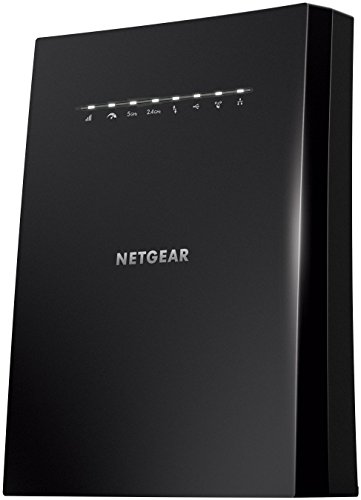
NETGEAR Nighthawk X6S EX8000
A tri-band WiFi extender that can also be used as a mesh add-on for compatible routers. It provides fast speeds and handles many devices simultaneously. Suitable for large homes or small offices with heavy streaming and conferencing.
Pros
- Tri-band reduces interference
- Four Gigabit ports for wired devices
- Can create a mesh with Nighthawk routers
Cons
- Bulky design
- Setup may require web interface
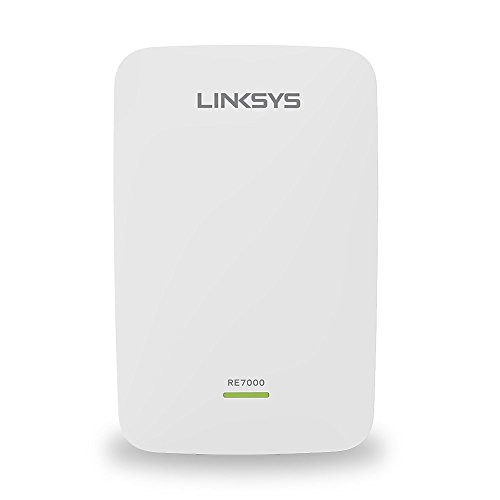
Linksys RE7000 Max-Stream
A dual-band extender that supports seamless roaming when paired with Linksys Velop or compatible routers. It uses cross-band technology to avoid speed loss. Good for offices with multiple floors.
Pros
- Seamless roaming with supported routers
- Compact design
- Setup via app
Cons
- Only one Ethernet port
- Best performance requires Linksys ecosystem

ASUS RP-AC78
A dual-band extender with a dedicated high-speed band for gaming. It supports MU-MIMO and beamforming to improve efficiency. Suitable for home offices where low latency is critical.
Pros
- Dedicated gaming band
- MU-MIMO support
- High-power amplification
Cons
- Large footprint
- Limited to one Ethernet port

D-Link DAP-1620
A wall-plug extender that is easy to install and manage. It provides stable AC1200 speeds and includes a Gigabit Ethernet port for wired connections. Suitable for small offices or retail spaces.
Pros
- Plug-in design saves space
- Affordable price point
- Gigabit port
Cons
- No advanced management features
- Limited range compared to larger units
NETGEAR EX8000 Nighthawk X6S
Another variant of the EX8000, but this listing emphasizes its multi-port connectivity. It features four Gigabit Ethernet ports for connecting wired devices. Excellent for workshops or studios requiring wired connections.
Pros
- Four wired ports
- Tri-band technology
- High throughput
Cons
- Large and heavy
- Premium price

TP-Link RE650
A high-gain dual-band extender that broadcasts strong signals across large areas. It features four external antennas and supports MU-MIMO. Suitable for open-plan offices or multi-room environments.
Pros
- Four high-gain antennas
- MU-MIMO support
- Stable performance
Cons
- Requires outlet access
- No mesh capability
The lineup, side by side
| # | Model | Wireless Standard | Best for | Score | Price |
|---|---|---|---|---|---|
| 1 | TP-Link EAP110-Outdoor | Wi-Fi 4 (802.11n) | Outdoor and warehouse coverage | 9.2 | Check price |
| 2 | NETGEAR Nighthawk X6S EX8000 | Wi-Fi 5 (802.11ac) | Whole-home mesh with high bandwidth | 9.0 | Check price |
| 3 | Linksys RE7000 Max-Stream | Wi-Fi 5 (802.11ac) | Seamless roaming with Linksys routers | 8.8 | Check price |
| 4 | ASUS RP-AC78 | Wi-Fi 5 (802.11ac) | Gaming and high-definition streaming | 8.7 | Check price |
| 5 | D-Link DAP-1620 | Wi-Fi 5 (802.11ac) | Budget-friendly professional use | 8.5 | Check price |
| 6 | NETGEAR EX8000 Nighthawk X6S | Wi-Fi 5 (802.11ac) | Maximum coverage for large facilities | 8.9 | Check price |
| 7 | TP-Link RE650 | Wi-Fi 5 (802.11ac) | Large homes and offices with many devices | 8.6 | Check price |
Before you buy
Assess Your Coverage Needs Start by measuring the area that needs coverage. Professional environments often have concrete walls or metal fixtures that weaken signals. Determine the number of devices and the types of activities. High-bandwidth tasks like video editing or cloud backups demand faster standards.
Understand Extender Types There are plug-in extenders, desktop units, and access points that can act as extenders. Desktop models usually have more Ethernet ports and better cooling. Plug-in models are convenient but may lack advanced features. Access points like the TP-Link EAP110 offer more control.
Check Security and Management Features For professional use, look for WPA2 or WPA3 encryption, guest network support, and the ability to manage via app or web. Some models allow firmware updates and remote management. These features help maintain a secure network.
Consider Future-Proofing While Wi-Fi 6 is becoming standard, many professional extenders still use Wi-Fi 5. If your clients or team use the latest devices, investing in Wi-Fi 6 might be wise. However, Wi-Fi 5 can still handle most tasks. Balance cost and performance.
Frequently asked questions
What is the difference between a WiFi extender and a mesh system?
A WiFi extender rebroadcasts the existing signal, often creating a separate network. A mesh system uses multiple nodes that communicate with each other to form a single seamless network. Professional environments often prefer mesh for seamless roaming, but extenders can be more cost-effective.
Can a professional WiFi extender handle many devices at once?
Yes, but performance depends on the model. Units with MU-MIMO and tri-band support can handle more concurrent devices. The NETGEAR EX8000 and ASUS RP-AC78 are designed for heavy usage.
Do I need a WiFi 6 extender for professional use?
Not necessarily. Many professional environments still use Wi-Fi 5 devices. However, if you have many Wi-Fi 6 devices, a Wi-Fi 6 extender can provide better speeds and efficiency. Consider your existing equipment.
How do I place a WiFi extender for best performance?
Place it halfway between your router and the dead zone, but within range of the router. Avoid placing it in corners or behind obstacles. Use the signal LED indicators to find the optimal spot.
Can I use a WiFi extender with a different brand router?
Yes, most extenders are universal and work with any router. However, some features like seamless roaming are only available when using the same brand. Check compatibility for advanced functions.
Are professional WiFi extenders secure for business data?
They support standard security protocols like WPA2 or WPA3. For enhanced security, enable guest networks and update firmware regularly. Some models offer advanced features like access control and VPN support.
What is the maximum range of a professional WiFi extender?
Range varies widely based on environment and model. High-gain models like the TP-Link RE650 can cover up to 10,000 square feet in ideal conditions. The TP-Link EAP110 can cover outdoor areas with proper placement.
Can I connect wired devices to a WiFi extender?
Yes, many extenders have Ethernet ports. The NETGEAR EX8000 has four Gigabit ports, allowing you to connect printers, computers, or network storage. This is useful for devices that need stable connections.
Final word
For most professional setups, the TP-Link EAP110-Outdoor offers the best balance of durability, coverage, and cost. If you need high throughput and multiple wired connections, the NETGEAR EX8000 Nighthawk X6S is the better choice. For smaller offices on a budget, the D-Link DAP-1620 provides reliable performance without breaking the bank.