Top Wireless Adapters for Lag Free Gaming and Streaming
For most users, the TP-Link Archer TX20U Plus is the best overall wireless adapter, offering fast Wi Fi 6 speeds, a magnetic base, and easy setup. Its main limitation is that it’s USB, so it may not achieve the absolute lowest latency of a PCIe card.
A weak Wi Fi signal can ruin gaming sessions and video calls. A quality wireless adapter can breathe new life into an older PC or fix a dead spot. We compared popular USB and PCIe models to help you choose.
Whether you need a simple plug and play stick or a high performance card with external antennas, there is an adapter for your setup and budget. Our picks are based on real user reports and technical specs.
What matters most
What we recommend

TP-Link Archer TX20U Plus
This USB adapter brings Wi Fi 6 to any desktop or laptop. It features a magnetic base and a 4 dBi high gain antenna for improved reception. Users report stable connections for streaming and gaming.
Pros
- Easy plug and play setup
- Magnetic base for flexible placement
- Supports MU MIMO and OFDMA
Cons
- USB form factor may run warm
- Requires USB 3.0 port for full speed
ASUS USB AX56
A pocket sized adapter that delivers Wi Fi 6 speeds up to 1800 Mbps. It is ideal for laptops and mini PCs where space is limited. Users appreciate its simple design and consistent performance.
Pros
- Extremely portable
- No external antenna to break
- Backward compatible with older routers
Cons
- No detachable antenna for range extension
- May be slower at long range

TP-Link Archer TX3000E
This PCIe card provides low latency and high throughput for online gaming. It includes Bluetooth 5.0 and a heatsink for thermal performance. Gamers report stable connections with minimal lag.
Pros
- Superior latency for competitive gaming
- Includes Bluetooth 5.0
- Heatsink prevents overheating
Cons
- Requires opening your PC case
- External antennas need desk space

Netgear Nighthawk A8000
A USB adapter that supports Wi Fi 6 and can handle gigabit internet speeds. It features a foldable antenna and a USB 3.0 connection. Users with fast connections see near wired performance.
Pros
- Very high throughput
- Foldable antenna for travel
- Works with Windows and Mac
Cons
- Bulky design
- Driver installation can be finicky on some systems

TP-Link Archer T4U Pro
An affordable dual band adapter that still delivers solid performance on Wi Fi 5 networks. It has a high gain antenna and USB 3.0 for fast data transfer. Great for older computers without built in Wi Fi.
Pros
- Very affordable
- Plug and play on most systems
- Stable connection for streaming
Cons
- No Wi Fi 6 support
- Limited range compared to newer models
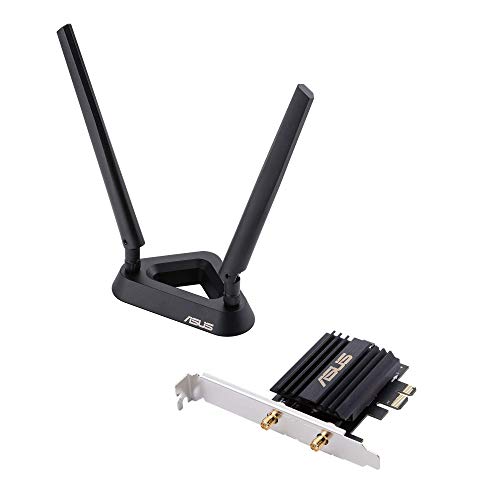
ASUS PCE AX58BT
This PCIe card offers Wi Fi 6 and Bluetooth 5.0 in one package. It features external antennas and a magnetic base for optimal signal. Users enjoy the convenience of both wireless technologies.
Pros
- Includes Bluetooth 5.0
- High speed on 5 GHz band
- Good cooling design
Cons
- More expensive than some USB adapters
- Installation requires technical skill

D-Link DWA 185
A small and simple USB adapter for basic internet browsing and streaming. It supports dual band Wi Fi 5 and is very easy to set up. Ideal for users who need a quick fix for a dead Wi Fi zone.
Pros
- Very inexpensive
- No external antenna to adjust
- Works with Windows and Mac
Cons
- USB 2.0 limits speed
- Range is limited
Compared at a glance
| # | Model | Interface | Best for | Score | Price |
|---|---|---|---|---|---|
| 1 | TP-Link Archer TX20U Plus | USB 3.0 | Best overall USB Wi Fi 6 adapter | 9.4 | Check price |
| 2 | ASUS USB AX56 | USB 3.2 Gen 1 | Best compact USB Wi Fi 6 adapter | 9.1 | Check price |
| 3 | TP-Link Archer TX3000E | PCIe | Best PCIe adapter for gamers | 9.3 | Check price |
| 4 | Netgear Nighthawk A8000 | USB 3.0 | Best for high speed internet plans | 9.0 | Check price |
| 5 | TP-Link Archer T4U Pro | USB 3.0 | Best budget Wi Fi 5 adapter | 8.5 | Check price |
| 6 | ASUS PCE AX58BT | PCIe | Best PCIe with Bluetooth combo | 9.2 | Check price |
| 7 | D-Link DWA 185 | USB 2.0 | Best compact budget USB adapter | 8.0 | Check price |
Questions worth asking
What is the difference between a wireless adapter and a router?
A router connects to your modem and broadcasts the Wi Fi signal. A wireless adapter is a device that lets your computer receive that signal. If your computer has built in Wi Fi, you may not need an adapter unless you want better performance.
Can a wireless adapter improve my internet speed?
Yes, if your current adapter is outdated or has a weak antenna, a new adapter with a newer Wi Fi standard can provide faster speeds and a more stable connection. However, your overall internet speed is limited by your internet service provider and router.
Do I need a Wi Fi 6 adapter if my router is Wi Fi 5?
No, a Wi Fi 6 adapter will work with a Wi Fi 5 router, but you will only get Wi Fi 5 speeds. If you plan to upgrade your router soon, a Wi Fi 6 adapter can be a good investment. Otherwise, a good Wi Fi 5 adapter is sufficient.
How do I install a PCIe wireless adapter?
First, shut down your computer and unplug it. Open the case, find an empty PCIe slot, and gently insert the adapter. Secure it with a screw, then replace the case cover. After booting up, install the drivers from the included disc or download them from the manufacturer’s website.
Can I use a wireless adapter on a desktop that doesn’t have Wi Fi?
Yes, that is exactly what wireless adapters are for. You can use a USB adapter that plugs into a USB port, or a PCIe card that goes inside the computer. Both will give your desktop Wi Fi capability.
What does dual band mean?
Dual band means the adapter can operate on two frequency bands: 2.4 GHz and 5 GHz. The 2.4 GHz band offers longer range but slower speeds, while the 5 GHz band provides faster speeds but shorter range. You can choose the best band for your situation.
How do I know if a wireless adapter is compatible with my computer?
Check the interface: USB adapters work with any computer that has a USB port. PCIe adapters require an available PCIe slot inside your desktop. Also, ensure the adapter supports your operating system, such as Windows, macOS, or Linux.
Is it better to use an Ethernet cable or a wireless adapter?
Ethernet cables provide the fastest and most reliable connection with no wireless interference. However, running cables may be impractical. A high quality wireless adapter can offer near Ethernet performance for most tasks.
Can a wireless adapter be used with a smart TV or game console?
Some adapters are designed for specific devices, but most are meant for computers. For smart TVs and consoles, you may need a dedicated adapter or a bridge. Check your device’s manual for compatibility.
What is MU MIMO and why is it important?
MU MIMO stands for Multi User, Multiple Input, Multiple Output. It allows the router to communicate with multiple devices at the same time, improving efficiency and speed when many devices are connected. Adapters that support MU MIMO can take advantage of this feature.
The verdict
If you want the best overall wireless adapter, choose the TP Link Archer TX20U Plus for its easy USB setup and Wi Fi 6 performance. For gamers and power users who want the lowest latency and are comfortable opening their PC, the TP Link Archer TX3000E is the top pick. If you are on a strict budget, the TP Link Archer T4U Pro offers reliable Wi Fi 5 speeds at a low cost.