Wireless Smart Locks That Make Life Simpler
The August Wi-Fi Smart Lock is the top pick for most households because it installs in minutes over your existing deadbolt and keeps your original keys. Its main advantage is the retrofit design that works with your current hardware. The main limitation is that it requires a separate Connect bridge for remote access if you don’t have the Wi-Fi version.
Smart locks have become a popular upgrade for homeowners seeking convenience and security. Wireless models let you lock and unlock via smartphone, keypad, or voice commands without complex wiring. But with many options on the market, choosing the right one can be overwhelming.
We compared top-rated wireless smart locks to help you decide. From retrofit designs to full replacements, we considered ease of installation, connectivity, battery life, and security features. Here is our breakdown of the best options available.
The shortlist, ranked

August Wi-Fi Smart Lock
The August Wi-Fi Smart Lock installs inside your door, replacing only the thumb turn. It works with your existing key and deadbolt, so you can keep your current keys. It offers auto-lock and unlock via geofencing, plus voice control with Alexa, Google Assistant, and Apple HomeKit. The included Wi-Fi module enables remote access without extra hubs.
Pros
- Keeps existing keys and deadbolt
- Easy DIY installation
- Works with major voice assistants
Cons
- No built-in keypad (requires phone or separate keypad)
- Bulky interior design

Schlage Encode Plus Smart WiFi Deadbolt
The Schlage Encode Plus is a full replacement deadbolt with an integrated keypad and Wi-Fi. It works with Apple HomeKit for easy unlocking via iPhone or Apple Watch, and also supports Alexa and Google Assistant. You can create up to 100 access codes, and it includes built-in alarm features. Its sleek design and reliable performance make it a top choice.
Pros
- Built-in Wi-Fi no hub needed
- Keypad for code entry
- High security features
Cons
- Higher price point
- Large exterior design

Yale Assure Lock 2 with Wi-Fi and Keypad
The Yale Assure Lock 2 offers a sleek touchscreen keypad and works with Wi-Fi, Bluetooth, or Z-Wave modules. It supports Apple HomeKit, Alexa, Google, and Samsung SmartThings. You can lock and unlock with your voice or through the Yale Access app. It fits most standard doors and comes in multiple finishes.
Pros
- Sleek touchscreen keypad
- Modular connectivity options
- Works with many smart home systems
Cons
- No physical key backup if not keyed
- Some features need subscription

Level Lock+ with HomeKit
Level Lock+ is a smart lock that fits entirely inside your door, looking like a traditional deadbolt from both sides. It supports Apple HomeKit, so you can use Siri and the Home app. It includes a built-in keypad option, but you can use your existing keys as well. Its minimalist design may appeal to those who want a smart lock that doesn’t look high-tech.
Pros
- Invisible from outside
- Works with existing keys
- HomeKit integration
Cons
- Requires Apple ecosystem for full features
- Battery life shorter than some

Kwikset Halo Wi-Fi Smart Lock
Kwikset Halo offers built-in Wi-Fi and a keypad at a lower price. It works with Alexa and Google Assistant. You can lock and unlock from anywhere using the Kwikset app. It uses a standard deadbolt and comes with a traditional key override. Installation is straightforward, and it provides a reliable way to secure your home without breaking the bank.
Pros
- Budget-friendly
- Built-in Wi-Fi
- Key override
Cons
- No Apple HomeKit support
- App interface could be improved
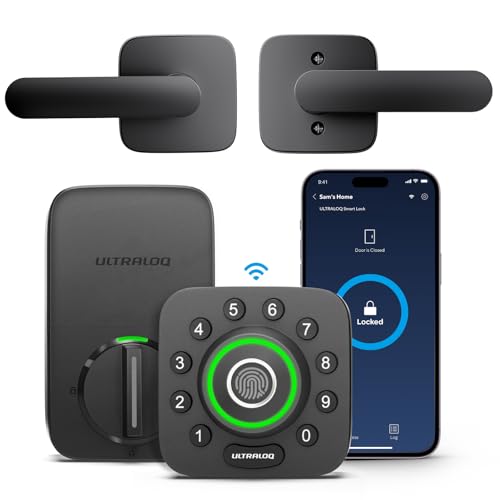
Ultraloq U-Bolt Pro with Wi-Fi Bridge
The Ultraloq U-Bolt Pro offers five ways to unlock: fingerprint, keypad, app, key, and shake to open. It includes a Wi-Fi bridge for remote access and works with Alexa and Google Assistant. It also has a built-in alarm and auto-lock. This lock is packed with features, making it great for tech enthusiasts.
Pros
- Fingerprint reader
- Many unlock methods
- Built-in alarm
Cons
- Fingerprint reader may be finicky
- Bulky design

Eufy Security Smart Lock Touch & Wi-Fi
Eufy Security Smart Lock Touch & Wi-Fi integrates a fingerprint reader and a built-in doorbell camera. It allows you to see and talk to visitors from your phone. The lock connects via Wi-Fi and works with Alexa and Google. You can create up to 100 fingerprints and access codes. It also has a tamper alarm and auto-lock.
Pros
- Built-in camera
- Fingerprint and keypad access
- Two-way audio
Cons
- Requires doorbell wiring
- Camera quality not as high as dedicated doorbells
The lineup, side by side
| # | Model | Connectivity | Best for | Score | Price |
|---|---|---|---|---|---|
| 1 | August Wi-Fi Smart Lock | Wi-Fi, Bluetooth | Easy retrofit over existing deadbolt | 9.4 | Check price |
| 2 | Schlage Encode Plus Smart WiFi Deadbolt | Built-in Wi-Fi, Bluetooth | Built-in Wi-Fi and keypad | 9.2 | Check price |
| 3 | Yale Assure Lock 2 with Wi-Fi and Keypad | Wi-Fi, Bluetooth (module included) | Modern design and versatility | 9.0 | Check price |
| 4 | Level Lock+ with HomeKit | Bluetooth, HomeKit | Invisible design with HomeKit | 8.8 | Check price |
| 5 | Kwikset Halo Wi-Fi Smart Lock | Built-in Wi-Fi | Affordable Wi-Fi with keypad | 8.5 | Check price |
| 6 | Ultraloq U-Bolt Pro with Wi-Fi Bridge | Wi-Fi (bridge included), Bluetooth | Multiple entry methods | 8.3 | Check price |
| 7 | Eufy Security Smart Lock Touch & Wi-Fi | Wi-Fi, Bluetooth | Fingerprint and video doorbell combo | 8.0 | Check price |
How to pick the right one
Common questions
Can wireless smart locks be hacked?
Wireless smart locks are generally secure, but as with any connected device, there is a risk. Choose locks with strong encryption and two-factor authentication. Keep the firmware updated. Physical security features like a key override also add protection.
Do wireless smart locks work without Wi-Fi?
Most wireless smart locks use Bluetooth for local control within range. Wi-Fi is typically needed for remote access from anywhere. Some locks have a bridge or hub that connects to your home Wi-Fi, while others have built-in Wi-Fi. Without Wi-Fi, you can still use the lock with your phone when nearby.
What happens if the battery dies in a smart lock?
If the battery dies, many smart locks have a physical key override or a 9V battery terminal on the outside to temporarily power the lock. Always keep the physical key in a safe place. Some locks also send low battery alerts before they go dead.
Can I use my existing deadbolt with a smart lock?
Retrofit smart locks like the August Wi-Fi Smart Lock are designed to work with your existing deadbolt. You only replace the interior thumb turn. Full replacement locks replace the entire deadbolt, so you need to install the new one.
Are smart locks compatible with Alexa or Google Assistant?
Many smart locks work with Alexa and Google Assistant, allowing voice control. For example, you can say ‘Alexa, lock the front door.’ But check compatibility for each model. Some locks also support Apple HomeKit, especially the Level Lock+ and Schlage Encode Plus.
Do smart locks require a subscription?
Basic lock and unlock features are usually free. However, some brands offer subscription services for advanced features like activity history, remote access, or integration with other smart home devices. For instance, Yale offers a premium plan for additional features.
How secure are smart locks compared to traditional locks?
Smart locks are as secure as traditional locks, and they add convenience. They use encryption and often have tamper alarms. However, they introduce digital risks. Choose locks with robust security features and physical key backup.
Can I install a smart lock myself?
Yes, most smart locks are designed for DIY installation. You typically need a screwdriver and maybe a drill for some models. The process usually takes 15-30 minutes. If you are not comfortable, you can hire a professional locksmith.
Do smart locks fit all doors?
Smart locks are designed to fit standard doors, but you should check the specifications for door thickness and backset. Most locks adjust to fit doors between 1.375 to 2.0 inches thick. If you have a non-standard door, check with the manufacturer.
What is the best smart lock for Airbnb rentals?
For short-term rentals, a lock with keypad access and remote code management is ideal. The Schlage Encode Plus and Kwikset Halo allow you to create temporary codes. Some locks like the Yale Assure Lock 2 offer integration with Airbnb, but you may need a smart home hub.
Our pick
For most people, the August Wi-Fi Smart Lock is the best choice because it provides an easy retrofit and works with existing keys. If you prefer a built-in keypad and Wi-Fi, the Schlage Encode Plus is a robust alternative. Budget-conscious buyers can rely on the Kwikset Halo for reliable performance without extra cost.